 CYNDRA
Your SDRs are working a decent list. The CRM is full enough to be dangerous. Reps are clicking into records, dialing by hand, leaving voicemails, forgetting to log dispositions, and calling people who already replied on email three hours earlier. Everyone says the problem is speed.
It usually isn't.
When teams try to automate outbound calls, they often start with dialing volume and only later discover the harder problem: consent, suppression, pacing, routing, and proof. That's where good outbound programs live or die. If your workflow can't prove who should be called, when they should be called, what was said, and what happened next, a faster dialer just helps you make mistakes at scale.
Outbound automation is worth doing. It's also easy to do badly. The teams that get value from it treat calling as an orchestrated operating system, not a shortcut.
Table of Contents
- Why Automate Outbound Calls Now and What It Really Changes
- Choosing How to Automate From IVR to AI Voice Agents
- Connecting Your CRM Sequences and Telephony Stack
- Scripts Templates and Compliance Guardrails That Scale
- Testing Monitoring and Tuning Performance Without Violating Rules
- Measuring ROI and Knowing When Not to Automate
Why Automate Outbound Calls Now and What It Really Changes
At 4:17 p.m., an SDR tries to catch up on callbacks from earlier in the day. One prospect already replied by email. Another asked not to be called again last week, but that opt-out never made it into the dialer. A third gets a voicemail from one rep and a follow-up email from another because ownership changed in the CRM and nobody reconciled the sequence.
That is the reason teams automate outbound calls.
The first break point is not dialing speed. It is operational control. Manual calling falls apart when follow-up timing, consent status, suppression rules, and call outcomes live across rep memory, CRM notes, and a telephony tool that is only loosely connected to the rest of the workflow.
Teams that do this well treat outbound automation as a callable-record system first. The dialer is one component. The harder job is deciding who can be called, when they can be called, what disclosure must be delivered, what happens if no agent is available, and how every attempt writes back to the record.
What automation actually changes
Used well, automation changes the shape of the work.
- Follow-up becomes enforceable. Call tasks fire on schedule instead of slipping behind meetings and inbox work.
- Callability becomes explicit. Consent, time-window rules, suppressions, and ownership checks can run before a number is dialed.
- Records stay usable. Dispositions, recordings, opt-outs, and next steps can post back to the CRM in a consistent format.
- Pacing becomes an ops setting. You are no longer asking reps to self-manage attempt timing, abandonment exposure, and retry logic by hand.
That last point matters more than teams expect. Once automation is live, the main risk is no longer missed activity. It is bad activity at scale. A sloppy manual process wastes rep time. A sloppy automated process creates complaints, duplicate touches, and compliance exposure fast.
Practical rule: If your team cannot reliably answer "Should this record be called right now?" with system evidence, fix that before you increase dialing volume.
Where automation pays off first
The best early use cases are structured and easy to verify in the CRM.
- Warm follow-up after an inbound action
- Scheduled callbacks after a no-show or partial meeting
- Sequence-based prospecting where phone is one touch in a coordinated cadence
- Reminder or re-engagement programs with clear dispositions and clear stop rules
These programs work because the data model is usually cleaner. There is a known trigger, a known owner, and a smaller range of acceptable outcomes.
High-context outreach is different. Strategic accounts, messy buying groups, and skeptical prospects still need human judgment early in the conversation. Automation can tee up the work, enforce timing, and log the result, but it should not pretend every call is interchangeable.
Industry coverage on AI calling reflects that split. Adoption is rising, but the stronger fit is still permission-based follow-up and narrow workflows rather than broad cold outreach at maximum pace (AI calling adoption and compliance view).
What really changes after rollout
After automation goes live, reps spend less energy on the mechanics of calling. Operations takes on more responsibility for system behavior.
That means setting abandonment thresholds conservatively enough for your staffing reality. It means making disclosure logic and opt-out handling testable. It means deciding whether the CRM, the sequencing tool, or the dialer is the source of truth for ownership and suppression. It also means being able to trace any complaint back to the exact number called, the sequence step that triggered it, the consent state on the record, and the outcome written after the attempt.
In other words, outbound automation changes the management problem. You are no longer just helping reps place more calls. You are engineering a controlled calling operation that can prove why each call happened and what the system did next.
Choosing How to Automate From IVR to AI Voice Agents
There isn't one category of outbound automation. There are several, and people mix them up all the time.
Some tools just deliver a message. Some keep a human in the loop. Some push volume aggressively and require tight pacing control. Some try to hold the conversation themselves. If you choose the wrong mode for your list quality, agent coverage, or compliance posture, the tool won't save you.
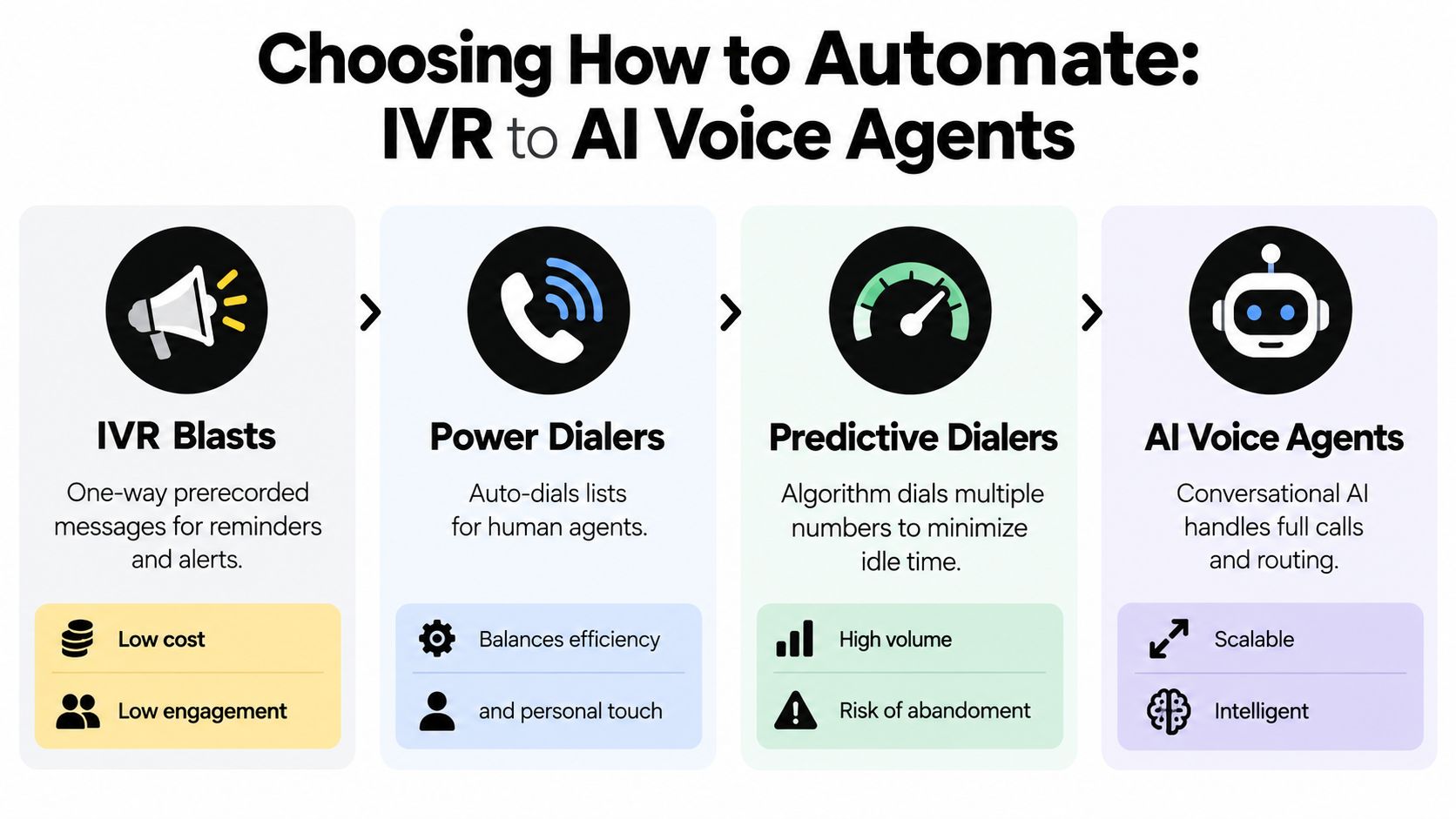
The four paths that matter
Here's the short version.
| Outbound Automation Options Compared | ||
|---|---|---|
| Automation Type | Best For | Scale and Risk |
| IVR blasts | Reminders, alerts, one-way notifications | High scale, low interaction quality, requires careful message and consent handling |
| Power dialers | SDR and AE teams that want faster calling with a human agent on every call | Moderate scale, lower abandonment risk, stronger quality control |
| Predictive dialers | Large teams optimizing agent occupancy across bigger campaigns | High scale, higher compliance risk if pacing and staffing drift |
| AI voice agents | Structured conversations, routing, qualification, and narrow workflow automation | Scalable and flexible, but disclosure, consent, and escalation design matter a lot |
What each option is really buying you
IVR blasts are the most limited. They work when your goal is delivering a message, not holding a conversation. That can fit reminders and notifications. It's a poor fit for nuanced sales outreach.
Power dialers are where many revenue teams should start. The system moves the rep through a list, reduces click friction, and logs outcomes cleanly. You still get human judgment on the actual call.
Predictive dialers are about throughput. They dial ahead of agent availability and try to minimize rep idle time. That can work well, but only when staffing, answer classification, and pacing are under control.
AI voice agents handle more of the interaction itself. In the right environment, that means structured qualification, routing, collecting a response, or handing off to a person. In the wrong environment, it creates trust problems fast.
For a related look at when pre-recorded and automated voice workflows make sense, Cyndra's guide to automated voice messages is useful.
A quick walkthrough helps if you're weighing the categories visually:

The hidden cost isn't software
The hidden cost is operational maturity.
A benchmark summary reported that automated systems can make about four times more calls per hour than manual calling, with connection rates more than double and average handle time reduced by a factor of five, but it also makes the key point operators learn quickly: those gains depend on CRM integration, real-time pacing, and strict ratio control, not just bulk dialing (outbound automation benchmark summary).
Predictive and AI systems reward discipline. If your contact data is stale or your staffing swings during the day, the same tool that boosts capacity can also create avoidable compliance exposure.
How I'd choose in practice
If you have a small sales team and inconsistent call volume, start with a power dialer.
If you have a larger outbound floor, stable scheduling, and enough ops muscle to monitor pacing daily, a predictive dialer can make sense.
If your use case is narrow, permissioned, and repeatable, such as confirming interest, collecting a simple answer, or routing to the right person, an AI voice agent is viable.
If your use case is broad cold outreach with messy data, unresolved consent handling, and no escalation path, don't start with AI. Don't start with predictive, either. Start by fixing your records and your rules.
Connecting Your CRM Sequences and Telephony Stack
Most outbound automation failures don't come from the call engine. They come from bad plumbing.
The dialer works. The CRM works. The sequence tool works. But the fields don't match, ownership lags, opt-outs sit in the wrong object, and dispositions never make it back to reporting. Sales thinks calls happened. Ops can't prove what happened. Compliance has no single audit trail.
That's why the first build should focus on the record flow.
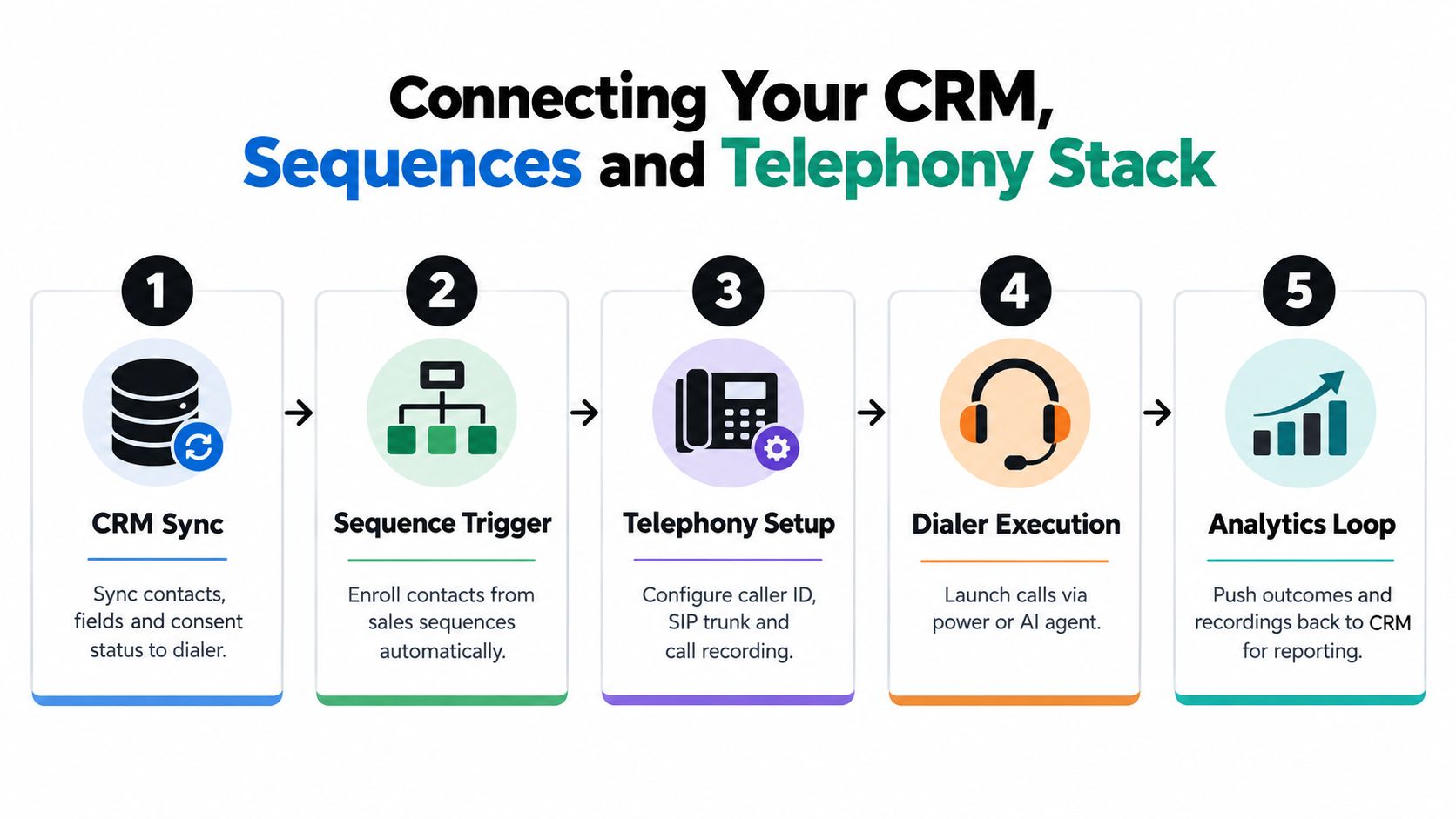
The minimum architecture that works
A clean outbound stack usually needs these layers:
CRM as source of truth
Keep contact identity, owner, lifecycle stage, consent status, suppression status, and recent activity in one place.Sequence or workflow layer
This decides when a call attempt should fire, which branch a contact enters, and what should happen after each disposition.Telephony layer
This places the call, controls caller ID behavior, records outcomes, and returns call metadata.Event layer
Use webhooks or native workflow actions to push dispositions, recordings, notes, and opt-outs back to the CRM quickly.Reporting layer
Build dashboards from CRM fields and telephony events, not from rep memory.
What to map before launch
These fields matter more than people expect:
- Callable status so the dialer never guesses.
- Consent source and date so ops can verify why a number entered a campaign.
- DNC and opt-out fields at both contact and account level when needed.
- Sequence state so a completed call can pause or branch email and SMS steps.
- Last attempted channel to prevent collisions between reps and automations.
- Disposition codes that are usable for follow-up.
If your team is also coordinating voice with messaging, it helps to study how others structure automation flows with YipSMS Inc., especially around CRM-triggered sequencing and cross-channel status sync.
The integration test most teams skip
Before launch, run a record through the full path and inspect every event.
Use a small test cohort and verify:
- Enrollment logic only pulls callable records.
- Suppression logic blocks records with opt-outs, DNC flags, or missing consent markers.
- Call outcomes write back correctly, including no answer, voicemail, connected, transfer, and opt-out.
- Sequence branching reacts to those outcomes.
- Ownership rules stay intact when a contact changes status.
- Record visibility lets sales, ops, and compliance see the same history.
Build standard: If a rep, a sales ops manager, and a compliance lead can't all reconstruct a call from the CRM timeline alone, the integration isn't finished.
For teams designing these handoffs inside broader revops systems, this primer on CRM workflow automation covers the same discipline from the process side.
What works in the real world
What works is boring. Tight field mapping. Simple disposition sets. Sequence branches with clear rules. Fast writeback. A single suppression model.
What doesn't work is trying to make five systems infer context from each other. The telephony tool should not invent consent status. The CRM should not wait on a nightly sync to learn a contact opted out. And no rep should have to copy notes manually just to keep the record usable.
That's how you get to reliable automation. Not with more features. With fewer ambiguities.
Scripts Templates and Compliance Guardrails That Scale
A team can have clean CRM sync, callable records, and working dispositions, then still create risk the moment a prospect answers.
That usually happens because outbound automation gets treated as a dialing problem. At scale, it is a consent and operations problem first. The script has to match the contact's consent status, the disclosure rules for the call type, and the exact action the system will take if the person says no, asks for a human, or hangs up after hearing an AI voice.
Teams that skip this discipline end up with three common failures. The opener sounds polished but omits a disclosure. The opt-out language exists but never writes back fast enough to stop the next attempt. Or the AI agent asks one question too many before handing off, which creates a bad customer experience and a messy audit trail.

What your script has to do besides convert
A script that scales does four jobs at once:
- Identify the caller clearly
- Disclose the AI nature of the call at the start when AI is used
- Offer an immediate opt-out path
- Support transfer to a human when the workflow requires it
The trade-off is straightforward. Every extra line can improve qualification, but it also increases the chance that disclosure gets buried, opt-out gets delayed, or the callee drops before the handoff. Keep first-contact scripts short. Put required language early. Ask only for information the next workflow step will use.
Template patterns that hold up in practice
Use a small set of script patterns tied to call intent and consent state. One universal script usually breaks under edge cases.
Warm follow-up pattern
Best for demo requests, content downloads, event follow-up, or active leads. Start with identity, reason for contact, and what action triggered the outreach. If AI is involved, disclose it before moving into qualification. Then give a clear yes or no next step and an easy opt-out.
Re-engagement pattern
Best for older pipeline, stalled conversations, or renewal outreach. The job here is to confirm whether the person wants to continue, not force a full discovery call. Short scripts perform better because they respect context and reduce compliance drift.
Transfer-first service pattern
Best when automation is doing intake or routing. Acknowledge the request, collect the minimum detail needed for the handoff, and transfer quickly. If the handoff queue is unstable, shorten the script even more. Long pre-transfer flows create abandonment, duplicate notes, and frustrated prospects.
For teams refining wording by use case, this guide to outbound call scripts for sales and follow-up workflows is a useful reference.
A good outbound script sounds like a clean handoff, not a campaign reading from a page.
The proof layer matters as much as the words
A compliant script is only half the system. The other half is evidence.
Store:
- Consent records tied to the contact
- Source context showing how the number entered your system
- Suppression history including opt-out events
- Call logs and dispositions
- Transfer records when a human takeover happens
- Caller ID consistency so the call can be traced operationally
Ops teams get exposed. Legal asks whether consent existed for that number and call type. Sales asks why a contact got called after opting out. Support asks who spoke with the customer before the transfer. If those answers live in separate tools, the script did not scale. It only ran.
The integration test to run before launch
Before releasing any script template, run a live-fire test on the exact edge cases that create compliance and operational failures.
Check that:
- AI disclosure plays or is spoken at the correct point in the call
- Opt-out phrases immediately stop the workflow and write suppression back to the system of record
- Human transfer routes to a staffed destination, not a generic queue or dead end
- Voicemail logic avoids dropping the wrong message for the wrong campaign
- Agent notes and AI summaries do not overwrite required disposition fields
- Callback tasks go to the right owner after transfer failures or partial conversations
Congress passed the TCPA in 1991 to restrict automatic dialing systems and artificial or prerecorded voice messages, and the FCC later added rules around consent, do-not-call enforcement, and blocking invalid or spoofed numbers (TCPA and FCC milestone summary). Those rules are why mature outbound programs design consent handling, disclosure placement, and suppression writeback before they try to increase dial volume.
Testing Monitoring and Tuning Performance Without Violating Rules
A lot of teams launch outbound automation and watch the wrong dashboard first.
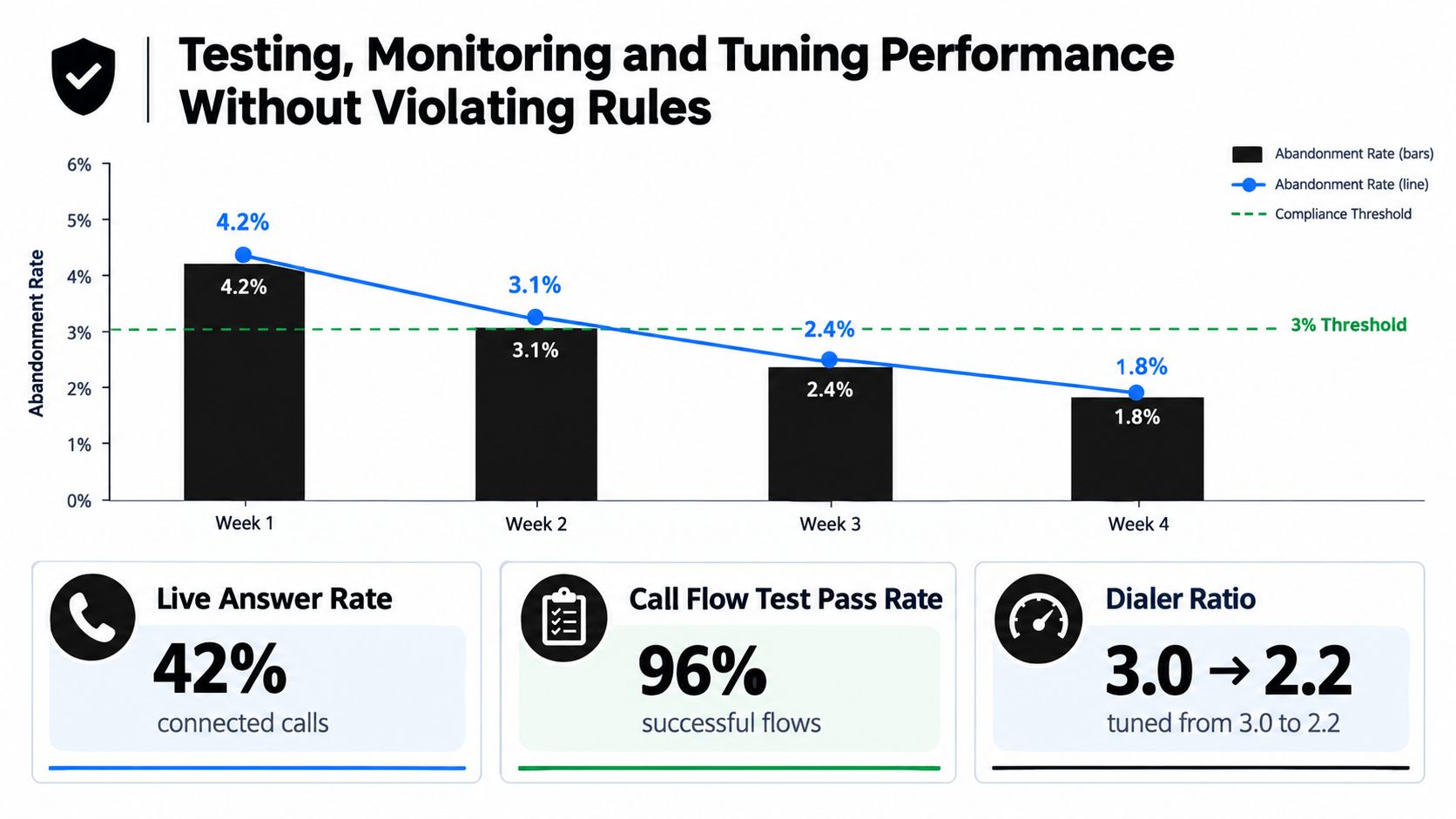
They look at total dials, agent occupancy, and maybe talk time. Those metrics matter, but if you're using predictive logic, the operating metric that keeps the system honest is abandonment rate per campaign over a rolling 30-day window.
For predictive-dialer workflows, the FTC and FCC abandoned-call rule is the key guardrail. The campaign-level abandonment rate is calculated as (abandoned calls / live answered calls) × 100, measured separately for each campaign over a rolling 30-day window, and it must stay at or below 3% of calls answered by a live person. Once a live person answers, the system must connect them to an agent within two seconds of the greeting or the call is treated as abandoned (predictive dialer abandoned-call rule summary).
What to test before real volume
Don't test only whether a call connects. Test whether the workflow behaves under pressure.
Run controlled scenarios for:
- Live answers with available agents
- Live answers with no available agents
- Voicemail detection
- Wrong-party handling
- Immediate opt-out requests
- Transfers to a human
- Sequence suppression after a negative outcome
You're looking for timing failures and state failures. Did the dialer release too many calls at once? Did the record suppress fast enough after an opt-out? Did a contact stay in an email branch even after a bad call outcome?
What to monitor every week
I'd keep a simple weekly review around a small set of indicators:
| Review Area | What to inspect | Why it matters |
|---|---|---|
| Abandonment trend | Campaign-level movement across the rolling window | Shows whether pacing is safe |
| Live answer routing | Time from greeting to agent or next step | Exposes hidden abandonment risk |
| Answer classification quality | Human, voicemail, IVR, wrong-party outcomes | Bad classification distorts both performance and compliance |
| Suppression integrity | Opt-outs and DNC flags after each campaign run | Prevents repeat mistakes |
| List freshness | Invalid, stale, or poorly owned records | Bad data makes every downstream metric less reliable |
Operating habit: Tune pacing slower than you think you need at launch. You can always add speed. Cleaning up a compliance problem is harder than giving agents a little more idle time.
What usually breaks
Over-dialing is the obvious one. The less obvious issue is weak denominator quality. If your answer classification is sloppy, your abandonment picture can look healthier than it is. If stale records stay in rotation, your pacing model learns from garbage.
Another common miss is separating compliance reviews from operations reviews. They should be the same meeting for outbound automation. The people who manage agent coverage, sequence timing, and list quality are also managing legal exposure, whether they realize it or not.
If you automate outbound calls at any serious scale, tuning isn't a one-time launch step. It's an operating rhythm.
Measuring ROI and Knowing When Not to Automate
A team launches an automated outbound program, call volume jumps, and the dashboard looks great for two weeks. Then the bill shows up. More opt-outs. More wrong-party contacts. Reps working duplicate accounts because the call outcomes did not write back cleanly. The problem was never dialing speed alone. It was weak control of consent, routing, and follow-up.
ROI for outbound automation starts there.
More attempts matter only if they produce qualified conversations without creating cleanup work or compliance exposure. If the system saves rep time but creates suppression mistakes, disclosure failures, or account confusion in the CRM, the economics are worse than they look. Ops leaders should measure the full operating cost, not just the top-line activity gain.
What I'd measure
Use a scorecard that ties revenue, labor, and risk together:
- Qualified conversation rate by campaign type, not just answer rate
- Meetings or next-step conversion for sales motions where the call is meant to advance pipeline
- Cost per qualified conversation and cost per booked meeting
- Rep hours recovered for research, objection handling, and live follow-up
- Opt-out rate, complaint rate, and suppression accuracy after each campaign run
- CRM writeback accuracy so ownership, disposition, and next action stay in sync
- Abandonment and disclosure exceptions because margin disappears fast when compliance issues create rework
I also separate capacity gain from capacity distortion. If automation lets reps spend more time on live selling, that is useful. If it floods the team with low-intent connects, bad records, or manual exception handling, the system is just moving labor from one queue to another.
Industry reporting from Salesforce points to a familiar pattern. Sales teams spend a limited share of their week actively selling, with large blocks of time pulled into admin and follow-up work (Salesforce State of Sales). That is the ROI case for outbound automation. Reduce repetitive call handling and logging work while keeping consent controls and account history intact.
When not to automate
Some call moments should stay human-led from the start.
Pull back or narrow the use case when:
- Consent status is incomplete or disputed
- The opening of the call requires judgment, negotiation, or context the system cannot reliably hold
- Dispositions fail to sync cleanly into the CRM
- Sales reps, BDRs, and automations are touching the same accounts without clear ownership rules
- Complaint review shows trust damage that comes from the channel itself, not just from the script
In those cases, reduce scope first. Use automation for appointment reminders, inbound callback queues, warm follow-up after form fills, or simple qualification paths with clear disclosure. Keep strategic prospecting and sensitive account work with people.
The better question is not whether to automate outbound calls. It is which parts of the motion can run under tight consent, disclosure, and CRM controls, and which parts still need a rep to think in real time.
If you want to build outbound automation as an operating system instead of a loose collection of tools, Cyndra can help design and deploy AI employees that connect with your CRM, log outcomes, support sales workflows, and fit real compliance constraints. Visit Cyndra to see how that kind of workflow-first automation gets implemented in practice.