 CYNDRA
McKinsey's 2025 benchmark is the stat that should reset the conversation. AI-assisted sales teams generate 50% more leads, reduce costs by 60%, and shorten call times by up to 70% compared to manual processes, according to Cirrus Insight's summary of McKinsey and Gartner findings. This isn't a “nice to have” productivity layer anymore. It's a change in operating model.
For a COO, the practical question isn't whether AI belongs in prospecting. It's whether your team will use it as a scattered collection of drafting tools or as a managed system that researches accounts, prioritizes timing, prepares outreach, and feeds learnings back into the pipeline. That distinction matters. One creates more content. The other creates more qualified conversations.
The teams getting real value aren't buying random AI apps and hoping reps figure it out. They're building what is effectively an AI prospecting agent inside the existing revenue process. It works like a junior research and workflow employee. It pulls data from your stack, applies your ICP logic, drafts first-pass outreach, and hands the rep a tight next action instead of a blank screen.
That model is already showing up outside classic SaaS outbound. If you want a sector-specific example of how operators are applying AI to prospecting workflows, ListingBooster's guide to AI strategies for real estate agents is useful because it shows how the same principles apply when speed, local context, and lead qualification all matter.
Table of Contents
- From Manual Grind to Intelligent Growth
- Assess Your Readiness for an AI Prospecting Engine
- Designing Your Custom AI Prospecting Agent
- Automating Research and Human-Refined Outreach
- Integrating AI with Your CRM and Sales Stack
- Measuring Success with an AI-Powered KPI Dashboard
- Rollout Governance and Driving Team Adoption
From Manual Grind to Intelligent Growth
Teams that rely on manual prospecting lose hours before the first message goes out. Reps pull context from CRM records, LinkedIn profiles, company sites, call notes, intent tools, and old list exports, then try to turn that mess into a relevant outreach sequence. The work is real. It is also expensive, inconsistent, and hard to scale.
AI changes the operating model by taking on the repeatable prep work first. A well-built prospecting agent can gather account context, flag buying signals, rank accounts, and produce a draft that a rep can refine quickly. That matters because the goal is not more automation for its own sake. The goal is to shift rep time toward judgment, personalization, and live selling.
I have seen the same mistake in company after company. Leaders buy an AI writing tool, connect one data source, and expect pipeline lift. What they get is faster output with weak context. The result is generic outreach, low trust from reps, and no clear link to revenue.
A better approach treats AI prospecting as a workflow design problem. Define what the agent should research, what it should score, what it can draft, and where a human must step in before anything reaches a prospect. That human-in-the-loop review is what keeps the system useful. It catches bad assumptions, removes generic language, and protects your brand from sounding automated.
This matters in vertical markets too. Teams selling into property and brokerage segments, for example, need workflows shaped around local inventory, agent activity, and market timing, which is why these AI strategies for real estate agents are a useful example of adapting the engine to a specific sales motion.
The companies that get results start with operating discipline, not prompts. They map the inputs, set rules for handoffs, and define success in business terms such as research time saved per account, meetings booked per rep, reply quality, and pipeline contribution. If your team has not done that work yet, start with an AI readiness assessment for sales operations before you start wiring tools together.
One practical rule guides the whole build. Do not treat AI for sales prospecting like a bundle of software seats. Treat it like a new SDR role with clear inputs, tasks, limits, and accountability.
When that structure is missing, two failure modes show up fast. The first is low adoption because reps do not trust the output. The second is over-automation, where teams send polished but empty messages at higher volume and mistake activity for progress. Neither improves pipeline.
Assess Your Readiness for an AI Prospecting Engine

An AI prospecting engine behaves a lot like a newly hired SDR. If you give that SDR messy data, unclear targets, and no manager, you won't get consistent output. The same is true here.
Readiness starts with three pillars
The first pillar is data hygiene. Audit what your AI agent will read. That usually means CRM account records, contact records, lifecycle stages, past activity, won and lost opportunities, email engagement, and whatever intent or enrichment data you already license. Check for duplicates, missing firmographic fields, inactive owners, and notes that never got standardized.
The second pillar is goal clarity. Tie the system to an operating problem. Maybe reps are doing too much manual list building. Maybe outbound quality is inconsistent. Maybe account prioritization is weak and enterprise reps chase the wrong segments. A useful target is one your team can evaluate in a weekly review, not a slogan.
The third pillar is team capability. You don't need an in-house ML team to get this working. You do need someone who owns process quality, someone who understands the sales motion well enough to define buying signals, and someone who can monitor results inside the CRM.
Think like you are hiring an SDR
A good way to pressure-test readiness is to ask five hiring-style questions.
What will this agent read first Will it start from CRM data, intent signals, website behavior, or rep-entered account lists?
What counts as a qualified account You need a clear definition of fit and timing. Otherwise the logic engine will reward noise.
What output should it produce Enriched lists, ranked accounts, draft emails, suggested call tasks, follow-up timing, or all of the above.
Who approves the work If nobody reviews what the system produces, low-quality output spreads fast.
How will you know it is improving The system needs a baseline and a feedback loop.
A short readiness workshop usually surfaces the actual blockers faster than any vendor demo. Cyndra's own AI readiness assessment guide is useful for this stage because it frames AI adoption as an operating readiness question, not a tooling question.
Clean data doesn't guarantee a strong AI prospecting engine. Dirty data almost guarantees a weak one.
Designing Your Custom AI Prospecting Agent
The right design question isn't “Which AI prospecting tool should we buy?” It's “What job should this agent perform inside our motion?”

Write the job description first
Treat the build like a role design exercise. A custom AI prospecting agent needs a scope.
A simple job description might look like this:
| Component | What it does | What good looks like |
|---|---|---|
| Inputs | Pulls CRM records, market data, and buyer signals | Context is current and relevant |
| Logic | Scores fit and urgency based on your ICP and triggers | High-priority accounts move to the top |
| Outputs | Produces enriched records, ranked queues, and outreach drafts | Reps get a next action, not raw data |
| Handoff | Routes recommendations to reps and writes outcomes back | The system learns from results |
That framing keeps leaders focused on workflow design instead of getting distracted by model names.
Why full automation underperforms
The common fantasy is fully automated outbound. In practice, that's usually where performance drops.
Signal-based AI prospecting can deliver 5% to 25% reply rates versus roughly 3% average for non-AI cold outreach, according to Autobound's 2026 industry report. But the same body of guidance also points to the necessary condition: AI has to work from real buying signals, and outreach still needs rep-reviewed voice.
The human-in-the-loop model is not a compromise. It's the control layer that keeps personalization from turning into pattern repetition.
Later in the workflow, that human edit is what adds the sentence AI usually misses. A contrarian angle. A reference to a rollout challenge. A sharper point of view on why the trigger matters now.
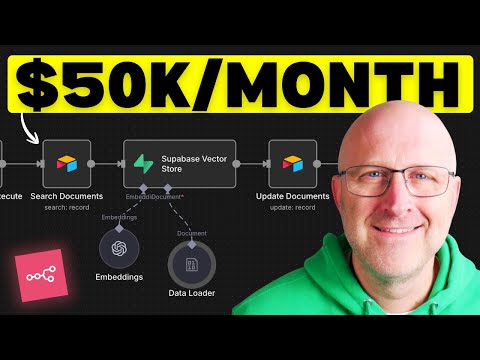
To make the architecture more concrete, it helps to see the flow in motion:
The core architecture in plain English
Most workable systems have four layers.
Data layer Internal CRM history, external market data, contact enrichment, and intent sources feed the agent.
Processing engine The processing engine interprets account context, detects signals, applies your qualification rules, and drafts recommended actions.
Decision and action layer The agent decides which accounts deserve attention, what message angle fits, and what should happen next.
Integration layer The outputs need to land in the tools reps already use. Otherwise adoption stalls.
One practical option in this category is Cyndra, which installs AI agents that research prospects, qualify leads, draft outreach, and work inside existing sales workflows. That's one path. A company with stronger internal RevOps and engineering support might assemble the same pattern from separate tools and custom orchestration.
The best AI prospecting agent doesn't feel like another dashboard. It feels like a prepared queue.
Automating Research and Human-Refined Outreach
The best use of AI in outbound isn't “write me an email.” It's “assemble the case for why this account deserves a message right now.”
What the workflow should look like
A solid outreach workflow moves in five passes:
Research pass The AI collects firmographics, role context, buying signals, recent company events, and relevant CRM history.
Reason-to-reach pass It converts that research into a simple answer to three questions: who is this, why now, and what likely matters to them.
Draft pass It produces a first-touch draft, subject line options, and often a suggested follow-up angle.
Human review pass The rep adjusts tone, removes generic phrasing, adds a pattern-breaking hook, and cuts anything that sounds machine-generated.
Execution and feedback pass The final message sends through the normal outbound system, and results flow back into the CRM.
That fourth step is where many teams try to save time and end up losing response quality. LinkedIn's guidance on AI-enabled prospecting puts it clearly: AI can synthesize the “who, why, what” picture, but reply rate depends on a human adding the unique hook that prevents the outreach from reading like spam, as described in this LinkedIn sales prospecting resource.
If you're trying to operationalize that flow, Cyndra's outbound prospecting autopilot approach is a useful reference because it shows the handoff between automated research and rep review.
A better prompt produces a better draft
Most bad AI outreach starts with weak instructions. Reps ask for an email. The model fills the gap with generic sales language.
A stronger prompt gives the system constraints:
Target role Define who the buyer is and what they typically care about.
Reason for outreach Specify the trigger, shift, or problem the message should reference.
Tone Set the style. Direct, concise, no hype, no vague personalization.
Output format Ask for a short email, a call opener, or a LinkedIn note separately. Don't bundle everything into one messy request.
A practical prompt structure looks like this:
Review this account using CRM notes, recent company activity, and available buyer signals. Summarize who the buyer is, why now may matter, and one credible angle for outreach. Draft a short first email in plain language. Avoid generic compliments. Reference only concrete context. Leave room for a human rep to add a custom hook.
Before and after the human edit
Here's the difference in practice.
AI draft
- Congratulations on your recent growth.
- I noticed your team is expanding and thought our solution could help streamline your workflow.
- Would you be open to a quick chat?
Human-refined version
- Your team is hiring into revenue operations while launching a new segment motion.
- That combination usually creates reporting gaps between top-of-funnel activity and actual pipeline quality.
- We've been helping teams tighten prospect qualification before more volume hits the reps.
- Worth a short conversation if that issue is already showing up.
The second version still uses AI research. But it doesn't sound like every other email in the inbox.
The point isn't to make every rep a copywriter. It's to stop the machine from flattening every message into the same cadence.
Integrating AI with Your CRM and Sales Stack
Sales teams lose adoption fast when AI prospecting lives outside the systems reps already use. If a rep has to jump between the CRM, an enrichment tool, a sequencing platform, and a spreadsheet just to act on one account, throughput drops and data quality follows.

The fix is architectural, not cosmetic. Build the AI prospecting agent into the flow of record, decision, and action.
In practice, that means three things happen in one loop. The agent reads from your CRM, enrichment tools, product data, and buying-signal sources. It applies your ICP rules, territory logic, suppression rules, and outreach policies. Then it writes back ranked accounts, refreshed fields, recommended next steps, and draft assets for rep review.
That last part matters. Write-back is what turns AI from an interesting assistant into an operating system your team can manage. If the output stays trapped inside a prompt tool or browser tab, managers cannot inspect it, reps stop trusting it, and the feedback loop never closes.
Start with the CRM schema before you connect tools
A lot of integration projects start with APIs. I would start with field design.
Define which fields the agent can read, which fields it can update, and which fields always require human approval. For example:
- Read only: opportunity history, call notes, contact roles, closed-lost reasons
- AI write-back: account score, trigger summary, recommended persona, draft task
- Human approval required: contact owner changes, lifecycle stage changes, sequence enrollment
This protects system integrity and keeps your reps from fighting automation later. It also forces a useful management discussion early. What decisions should the machine support, and what decisions should stay with the rep or manager?
Use a stack map, not a pile of tools
The strongest setup is boring in the right way. Each tool has a job. Each handoff is clear. Each system sends data back to the CRM.
A practical operating model looks like this:
| Layer | Typical tools | Purpose |
|---|---|---|
| System of record | CRM | Store account status, ownership, activity, and outcomes |
| Prospect discovery | Sales Navigator, Apollo | Find target accounts and contacts |
| Enrichment and workflow logic | Clay or similar workflow tooling | Normalize data, fill gaps, trigger research steps |
| Buying signals | Intent providers, web activity, product usage data | Surface timing and prioritization clues |
| Execution | Email and dialing platforms | Deliver approved outreach and capture engagement |
| Reporting layer | CRM reporting or BI tool | Measure quality, speed, conversion, and ROI |
The trade-off is straightforward. More tools can improve coverage and signal quality, but every added system increases mapping work, failure points, and governance overhead. For many teams, a smaller stack with clean write-back beats a broader stack with weak data discipline.
Build for human review at the point of action
This section is where many AI prospecting guides stay shallow. Integration is not only about syncing records. It is about inserting the Human-in-the-Loop step where it affects quality.
The best place for that review is inside the rep workflow. A rep should open an account in the CRM and see:
- why the account was prioritized
- which signals triggered the recommendation
- what the agent believes the likely pain point is
- a draft next action
- a clear place to approve, edit, or reject it
That setup does two jobs at once. It speeds execution, and it captures judgment. Rejections and edits become training data for your rules, prompts, and scoring logic.
Connect integration choices to ROI
COOs usually ask the right question here. Why invest in custom integration instead of letting reps use AI ad hoc?
Because ad hoc usage rarely produces measurable efficiency gains at the team level. Integrated usage does. It reduces research time, keeps account context in one place, improves follow-up consistency, and gives leadership a clean record of what the agent recommended versus what reps did.
That is also why the reporting layer should be planned during integration, not after it. If you need a reference point for structuring the reporting side, this guide to an AI KPI dashboard for sales and operations teams covers the measurement model. The important point here is operational. Every field you want on the dashboard later must be captured in the workflow now.
Done well, integration gives you a custom AI Prospecting Agent that works inside the sales motion your team already runs. It does the machine work quickly, leaves judgment with the rep where it matters, and creates the data trail you need to improve performance instead of guessing.
Measuring Success with an AI-Powered KPI Dashboard
Autobound's 2026 research found that signal-based AI prospecting can produce reply rates of 5% to 25%, compared with roughly 3% for cold outreach, and that stronger teams often target $150 to $500 cost per qualified meeting and 5x to 10x pipeline sourced per dollar spent in this AI sales prospecting report. Those numbers are useful only if your dashboard can show whether your own engine is producing comparable outcomes.

The common failure mode is easy to spot. Teams celebrate higher output from the agent, more accounts scored, more drafts generated, more tasks completed. The COO still cannot answer the only question that matters: did the system create qualified pipeline at a lower cost, without hurting conversion quality?
Start with a pilot dashboard before you build the executive version. Use one rep pod, one segment, and one outbound motion so the comparison is clean. A broad rollout muddies the baseline. A narrow pilot gives you signal fast.
The dashboard should measure three things at once: whether the agent is being used, whether reps trust its output, and whether the workflow improves revenue outcomes.
1. Operational throughput
These metrics confirm the engine is running as designed.
- Accounts researched
- Contacts enriched
- Drafts generated
- Tasks created
- Time from signal detection to rep action
2. Human-in-the-loop quality
These metrics show whether the agent is producing work a rep can use.
- AI-ranked accounts accepted by reps
- Drafts approved without heavy rewrite
- Drafts edited before send
- Suggested next actions rejected
- Reply rate
- Meeting booked rate
- Show rate
This middle layer is where many AI prospecting programs break. If reps rewrite every message, the model may be technically active but commercially weak. If reps reject large portions of the queue, your scoring logic is off, your signal thresholds are too loose, or your ICP definition is too broad.
3. Commercial performance
These metrics decide whether the system earns more budget.
- SQL-to-opportunity progression
- Cost per qualified meeting
- Pipeline sourced per dollar spent
- Pipeline contribution by signal type
- Win rate for AI-assisted opportunities
I recommend one additional cut that many dashboards miss. Break performance out by signal type, segment, and rep team. An AI Prospecting Agent rarely performs evenly across all motions. Hiring signals may work well for one segment and poorly for another. Funding-event outreach may drive replies but stall before pipeline. Without that view, teams keep feeding volume into tactics that look productive but do not convert.
A useful executive dashboard usually has four panels:
Top-of-funnel creation
Accounts surfaced, accepted, contacted, and replied.Conversion quality
Meetings booked, meetings held, and opportunities created.Efficiency
Research time saved, rep touches per account, and cost per qualified meeting.Commercial output
Pipeline sourced, pipeline per dollar, and assisted wins.
For the reporting model itself, Cyndra's guide to building a KPI dashboard for sales and operations teams is a practical reference because it treats dashboards as operating tools, not vanity reporting.
One test keeps the dashboard honest. A sales leader should be able to look at it and answer three questions without asking RevOps for a custom report: which signals create meetings, which segments stall after first reply, and where rep review is adding or removing value. If the dashboard cannot answer those questions, it is tracking activity, not managing performance.
Rollout Governance and Driving Team Adoption
Rollout usually fails for a simple reason. Teams treat the AI Prospecting Agent like software to install, not a sales process to govern.
The build can be sound and the dashboard can be accurate, yet adoption still slips if nobody owns queue quality, rep review standards, or model change control. Reps go back to manual prospecting when the agent creates extra work, produces weak drafts, or sends them leads they do not trust. That is an operating problem, not a model problem.
Clear ownership fixes a large share of this.
- Sales leadership decides the first use case, the target segment, and the commercial threshold for success.
- RevOps owns data definitions, CRM field discipline, routing rules, and auditability.
- Frontline managers inspect queue quality, message quality, and rep compliance with the review process.
- Reps add account context, edit messaging, and make the final send or hold decision.
I advise teams to document these decisions before launch, not after the first miss. Who can change prompts. Who can add or remove data sources. Who approves a new segment. Who reviews outreach that the model rates highly but managers reject. Without those rules, every issue becomes a debate about AI, when the underlying failure sits in workflow design.
Governance also needs to protect revenue.
Compliance matters, but pipeline risk shows up earlier. A prospecting model can over-select familiar company profiles, under-rank certain regions, or keep favoring signals that generate replies without producing qualified meetings. HubSpot has written about this bias problem in AI prospecting, and the practical takeaway is straightforward. If the ranked queue consistently excludes segments that later convert through other channels, the agent is suppressing demand you should be pursuing.
That is why shadow testing should stay in place after the pilot. Compare the AI-prioritized queue against actual outcomes by industry, geography, company size, and buyer role. Review what the model recommended, what reps accepted, what got sent, and what produced meetings or pipeline. If one segment closes well but almost never appears in the queue, the ranking logic needs adjustment.
A disciplined pilot cadence keeps this manageable. Weekly queue reviews. Biweekly draft audits. Monthly CRM hygiene checks. Small prompt updates and rule changes, with each change logged against results. Teams that skip this step often make two mistakes at once. They change too much after a bad week, or they let poor output run for a quarter because nobody owns tuning.
Training should focus on judgment, not tool fluency. Reps do not need to become prompt engineers. They need to know how to verify account context, tighten a draft, spot hallucinated details, and reject recommendations that look active but are commercially weak. The human-in-the-loop workflow is what keeps outreach specific enough to earn replies and selective enough to protect brand reputation.
Strong rollout discipline usually includes five habits:
Start with one narrow motion
One segment, one offer, one team. Expand after the agent proves it can create qualified meetings there.Train reps to edit and approve
The agent prepares research and drafts. Reps add nuance, context, and judgment.Review losses and rejects
Missed meetings, ignored drafts, and rejected leads often reveal more than accepted outputs.Feed outcomes back into the system
Closed-loop feedback improves ranking, message controls, and suppression rules.Set a clear escalation path
Reps should know when to flag a bad lead, a weak draft, or a pattern that points to model drift.
As noted earlier, human handoffs matter more than full automation in sales prospecting. AI should handle research, scoring, and draft preparation. Salespeople should decide where outreach goes live, how messaging changes by account, and when a prospect is ready for direct engagement. That division of labor is what turns an AI Prospecting Agent into a revenue tool instead of a volume machine.
The companies that get results from AI for sales prospecting run rollout like an operating system. They define control points, measure rep adoption, inspect output quality, and tune the process in public. If your team wants to turn AI prospecting from scattered experiments into a managed operating system, Cyndra helps install, train, and manage AI agents that work inside real workflows. That helps when you need more than drafting support and want an agent tied to your CRM, sales process, and KPI reporting from day one.