 CYNDRA
The popular advice on how to deploy AI agents starts in the wrong place. Teams compare models, tune prompts, and assemble impressive demos, then discover that the agent can't reliably update a CRM, survive a failing API, respect a permission boundary, or prove that its intended action took place.
Production deployment is an operations problem with an AI component. A major 2026 benchmark reports that 54% of organizations are actively deploying AI agents, up from 33% in mid-2024 and 12% in 2024, but only 21% have mature agent governance, while about half of production agents operate without security monitoring (benchmark on AI agent deployment). Adoption has moved quickly. Control systems haven't kept pace.
The practical path is therefore less glamorous than model selection. Scope the workflow, design safe integrations, establish ownership, test environment state, ship changes through controlled releases, and monitor every meaningful action. The agent is only one part of the production system.
Table of Contents
- Planning Architecture and Integration Patterns
- Connecting Tools and Building Data Pipelines
- Establishing Security and Agent Governance
- Testing Validation and Environment Evaluation
- Orchestrating CI/CD and Continuous Observability
- The Production Playbook and Cost Controls
Planning Architecture and Integration Patterns
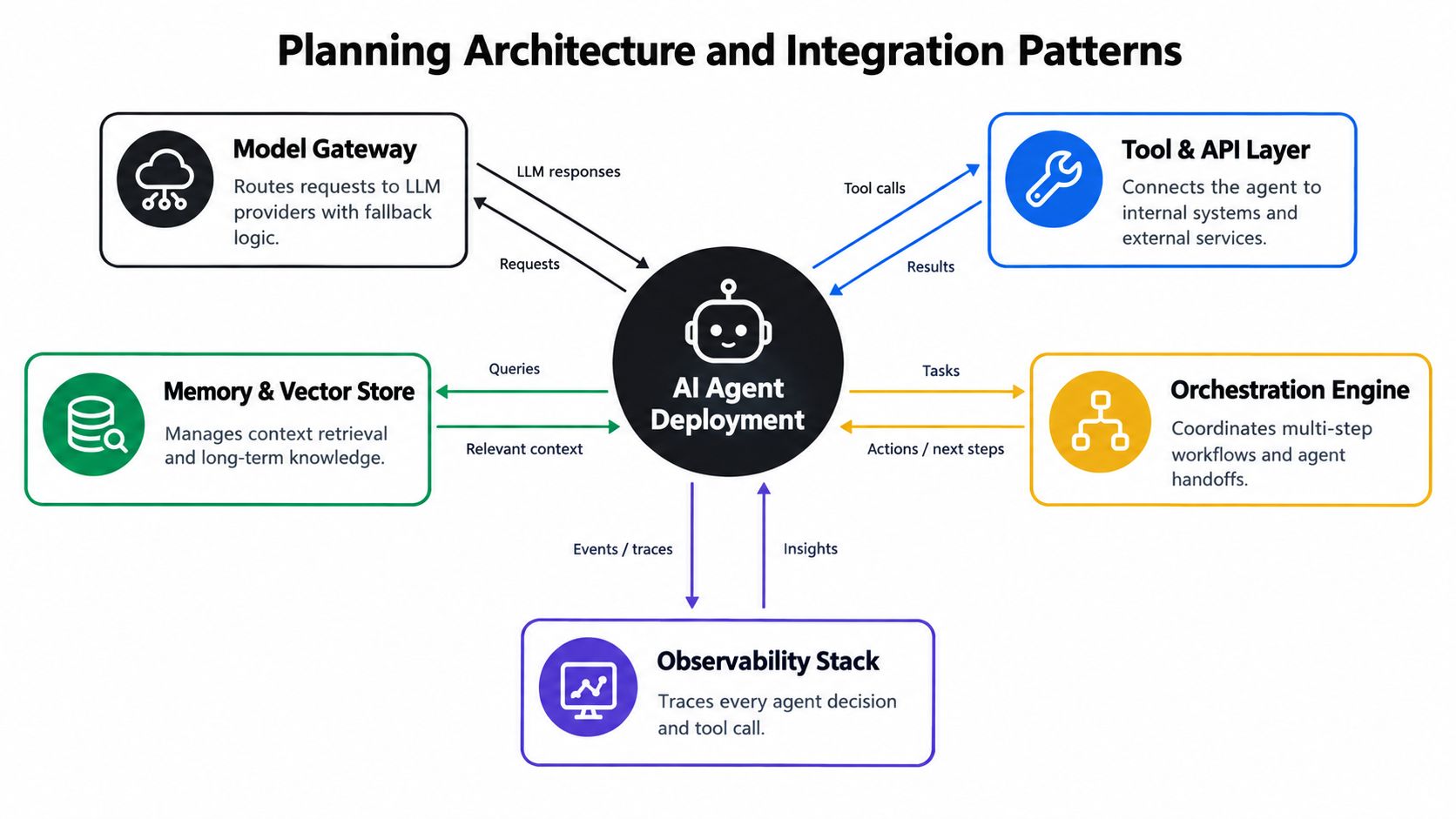
An agent that performs useful work needs more than an LLM endpoint. It needs a controlled route to business tools, durable state, authentication, orchestration, and evidence about what happened during each run. The architecture should make those boundaries explicit before the first autonomous action reaches production.
The field's shift from prototypes to operational systems became visible in March 2023, when BabyAGI and AutoGPT brought autonomous LLM workflows into the mainstream. By 2025, a widely cited industry study reported that 50% of organizations had 10 or more agents in production, while many still struggled to move beyond pilots (Microsoft's guidance on integrating, managing, and operating AI agents). The lesson isn't that every company needs a fleet. It's that multi-step execution creates infrastructure requirements that a chatbot doesn't have.
Start with one workflow and define its operating envelope:
- Business objective: State the completed outcome, not merely the conversation. “Resolve an eligible support request and update the ticket” is testable. “Help support agents” isn't.
- Allowed tools: Expose only the CRM methods, knowledge sources, and communication channels the workflow requires.
- Restricted actions: Identify actions that need approval, such as refunds, deletions, external messages, or changes to financial records.
- State model: Decide what the agent must remember between steps, what can be recomputed, and what must never be stored.
- Failure behavior: Specify whether the agent pauses, retries, escalates, or rolls back when a tool fails.
Treat the agent as a system component
A model gateway should centralize provider routing, credentials, fallback logic, and usage controls. The tool layer should sit behind an API boundary rather than granting the agent broad network access. Memory and vector retrieval should serve a defined purpose, with retention and deletion rules that match the data involved.
The orchestration layer determines whether a run can pause and resume, whether completed side effects are recorded, and how handoffs work between specialized agents. For multi-agent designs, document why a handoff is necessary. A group of agents isn't automatically safer or more capable. Extra handoffs introduce more state, permissions, latency, and failure points. Teams comparing these patterns can use this overview of multi-agent architectures as an architectural reference, not as a substitute for workflow testing.
Cloud orchestration usually simplifies managed scaling and operational access. On-premise or private-cloud deployment may fit stricter data residency, network, or legacy-system constraints, but it transfers more responsibility to the internal platform team. The right decision depends on where sensitive data lives, how much runtime control the organization needs, and whether existing operations teams can support the chosen environment.
Practical rule: Choose the deployment boundary around the data and side effects, not around the model's popularity.
Commerce teams often need this discipline across catalog data, orders, support, merchandising, and marketing systems. A focused AI agents for ecommerce guide can help map those use cases, but the production design still needs explicit access boundaries and verifiable outcomes.
Connecting Tools and Building Data Pipelines
An agent becomes useful when it can retrieve trustworthy context and perform bounded actions. It becomes dangerous when it can reach too many systems through vague tools with inconsistent inputs and unclear failure behavior.
Start with the system of record. For a sales workflow, that might be the CRM. For operations, it could be an ERP, ticketing system, warehouse, or finance platform. Create a narrow adapter for each system rather than exposing a raw API surface. The adapter should normalize fields, validate arguments, enforce authorization, and return structured results that the agent can interpret.
A reliable integration sequence looks like this:
- Map the workflow's reads and writes. List every field the agent needs, where it comes from, and which system owns it.
- Create purpose-built tool schemas. Use explicit names, required parameters, allowed values, and clear descriptions. A tool called
update_customershould not make direct modifications to billing status, marketing consent, and account ownership unless the workflow requires all three. - Normalize data before retrieval. Convert dates, currencies, identifiers, statuses, and ownership values into consistent formats at the pipeline boundary.
- Separate retrieval from mutation. Read-only tools can often run automatically. Write tools need stronger validation, idempotency, and approval rules.
- Design for degraded services. Define what happens when an API times out, returns partial data, reaches a rate limit, or changes its response shape.
- Record provenance. Store the source system, record identifier, retrieval time, and transformation applied to important context.
Make legacy systems explicit
Legacy applications rarely fail because they lack an endpoint. They fail because their data model is implicit, their sessions expire, their exports contain ambiguous fields, or their screens encode business rules that were never documented. Treat those constraints as part of the architecture.
A wrapper service can translate modern tool calls into the legacy system's required sequence, while a queue can absorb bursts and prevent the agent from overwhelming a fragile application. For asynchronous work, the agent should receive a durable job identifier and poll or await a callback instead of assuming the action completed immediately. The legacy system integration guide offers useful context for handling these boundary conditions.
Data pipelines need the same care. A warehouse query may return stale or duplicated records, while a CRM webhook may arrive out of order. Add validation at ingestion, reconciliation checks for important entities, and explicit freshness metadata. If the agent can't establish whether its context is current, it should ask for review or use a safer read path.
Keep tools narrow and recoverable
Tool design should make the safe path easy. Include dry-run behavior where possible, require confirmation tokens for destructive actions, and make repeated requests idempotent. If a payment, ticket closure, or customer update can be submitted twice, the integration needs a deduplication key before autonomy is enabled.
Teams building complex pipelines can also consult this Web3 data pipeline guide for broader principles around ingestion, transformation, validation, and system boundaries. The domain differs, but the operational lesson transfers: data quality and failure handling belong in the pipeline, not inside a prompt.
Establishing Security and Agent Governance
The hard part of enterprise deployment is rarely launching an agent. It is controlling the operational layer around it: which agents exist, who owns them, what they can access, and when they must be removed. Treat governance as a runtime control, not a document completed after release.
McKinsey's State of AI analysis reports that only 17% of organizations have visibility into agent performance or conformance, while 48% have no clearly defined management and governance responsibilities. These figures point to an ownership gap. Without a registry and accountable owners, an agent can become shadow IT with access to customer data, internal systems, and external communication channels.
Create an agent inventory registry before deployment. Record:
- Business owner: The person accountable for the workflow outcome.
- Technical owner: The team responsible for runtime, integrations, and incident response.
- Purpose and scope: Approved tasks, data domains, and channels.
- Permission set: Every available tool, action, environment, and credential.
- Approval policy: Actions requiring human confirmation.
- Evaluation status: Latest test version, known failure modes, and release decision.
- Lifecycle state: Proposed, testing, supervised, autonomous, paused, or retired.
- Decommission process: Credential revocation, scheduled-job removal, data-retention review, and user communication.
Control permissions outside the model
Prompt instructions do not authorize actions. Enforce least privilege through the gateway, service identity, API layer, and tool policy. Scope access by agent and action, rather than granting broad departmental access. A support agent may read an order and draft a response, while refund issuance and account-status changes remain restricted.
Set approval gates for destructive, financial, legal, and externally visible actions. Keep low-risk work out of a permanent review queue by defining concrete triggers, such as unusual amounts, missing fields, policy ambiguity, low confidence, or an unfamiliar tool path. The AI governance and compliance resource provides further guidance on connecting these controls with organizational compliance practices.
Security monitoring must cover more than logins. Capture tool calls, parameters, identity, retrieved records, model and prompt versions, approvals, denials, errors, and resulting state changes. Mask sensitive information in prompts and outputs. Test retrieved content for attempts to manipulate the agent into violating its tool policy.
Prevent sprawl deliberately
Every new agent needs a retirement owner and review date. Consolidate overlapping workflows, block unmanaged credentials, and require an approved deployment template. A kill switch should stop new runs and revoke tool access without waiting for a code release.
Governance succeeds when business owners can understand the boundaries and operators can enforce them automatically. That operating discipline prevents agent sprawl from becoming another integration and security backlog.
Testing Validation and Environment Evaluation
A polished final response can hide a failed workflow. An agent may say that it updated a record even when the API rejected the request, select the wrong tool, execute steps in an unsafe order, or create a duplicate side effect. Evaluation must inspect the environment state, not just the language returned to the user.
Define the success condition before collecting test cases. If the agent processes a support ticket, verify the ticket status, required fields, internal notes, customer message, and assignment. If it updates a CRM, compare the actual record state with the intended state. The final response is evidence of what the agent claims, not proof of what the system accepted.
Build a gated evaluation loop
Use real workflow traces rather than synthetic examples alone. Capture the user's request, retrieved context, plan, tool calls, parameters, observations, approvals, errors, and final environment state. Remove or mask sensitive information, then preserve representative variations, including incomplete inputs, conflicting records, service failures, and ambiguous requests.
A practical release sequence is:
- Define acceptance criteria. Specify the required state change, prohibited actions, response constraints, and escalation conditions.
- Create a baseline offline evaluation. Run a small but representative dataset through the current version and record failures by category.
- Check trajectories. Inspect the sequence of decisions, not only the final answer.
- Convert production failures into regression cases. Every meaningful incident should strengthen the test set.
- Gate changes. Re-run the evaluation before changing a prompt, model, tool schema, retrieval source, or orchestration rule.
Track metrics that explain why a run succeeded or failed:
- Task success: Did the intended side effect occur?
- Steps per success: How much work did a successful run require?
- Tool-call accuracy: Did the agent choose the correct tool and parameters?
- Latency: How long did the complete workflow take?
- Cost per successful task: What usage did the completed outcome require?
- Failure-mode distribution: Were failures caused by planning, tool calls, or environment mismatches?
Pair automation with human judgment
Deterministic checks work well for required fields, state transitions, permission rules, and tool ordering. Human review remains important for high-stakes edge cases, nuanced customer communication, and failures where the business rule isn't machine-readable.
Public benchmark suites can provide a comparative floor when run across 3 to 5 trials, but a domain-specific dataset matters more for go-live decisions (NVIDIA's guidance on agent evaluation). The evaluation target should reflect the organization's own records, policies, tools, and acceptable risk.
The question isn't “Did the model answer correctly?” It's “Did the workflow reach the right state through an authorized, efficient path?”
Orchestrating CI/CD and Continuous Observability
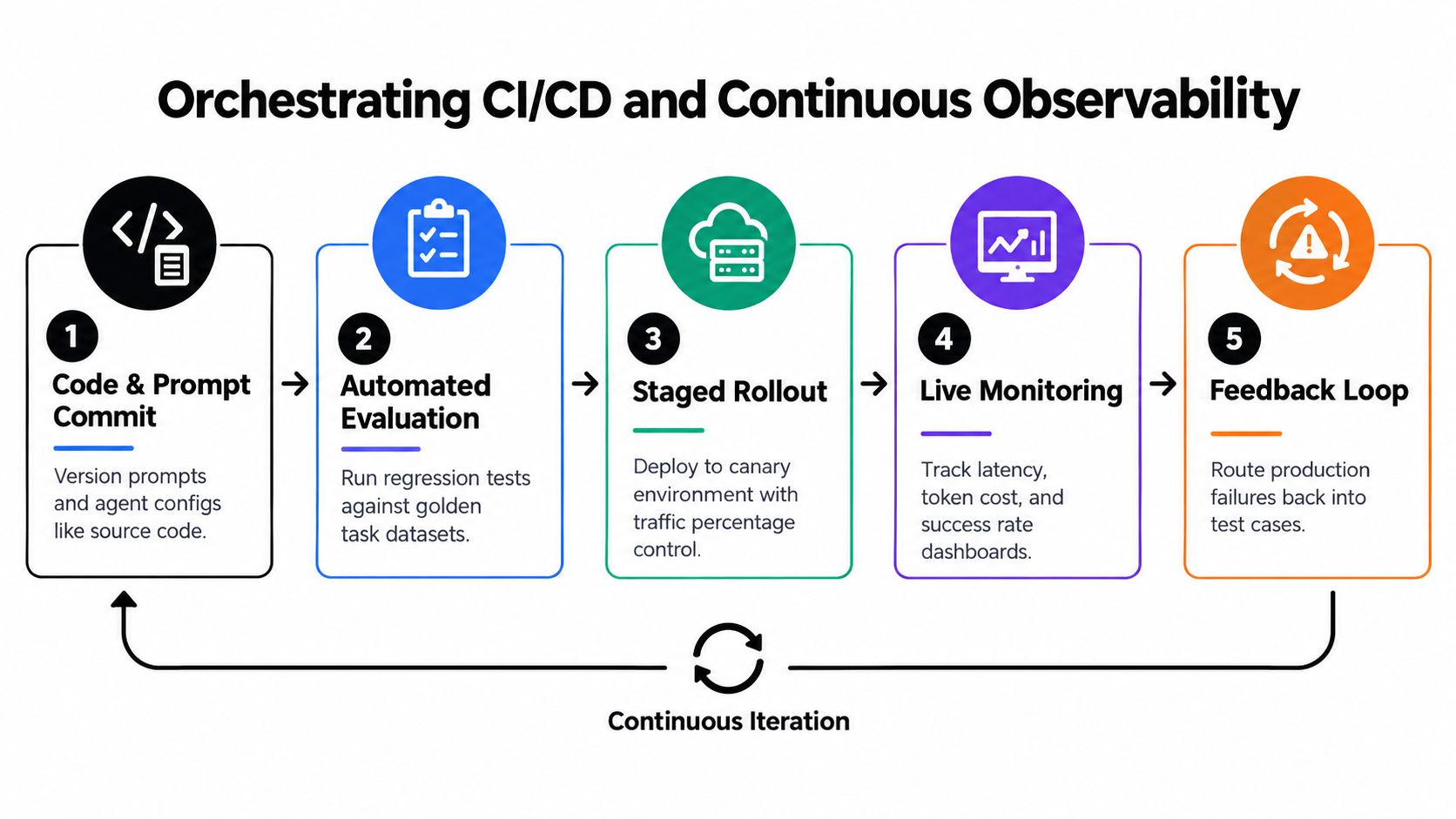
An agent release should look more like a software release than a prompt edit. Prompts, model versions, tool schemas, retrieval configuration, policies, and evaluation datasets all affect behavior. Version them together so an incident can be traced to the exact combination that produced it.
The deployment pipeline should stop a change before it reaches users when it introduces a forbidden tool call, lowers task success, increases unnecessary steps, or breaks a state transition. A canary environment can expose the new version to controlled traffic while the previous version remains available for rollback.
Log the complete trajectory
A single application log entry isn't enough. Store the sequence of plans, tool names, parameters, observations, retries, approvals, and outcomes, with appropriate redaction. Trace identifiers should connect the agent run to the downstream API requests and the final record state.
Sample production traffic continuously rather than relying only on pre-release tests. Set alerts for spikes in negative evaluations, error rates, latency, unsafe tool attempts, and state mismatches. The evaluation approach described by LangChain's agent evaluation guidance is useful here because it distinguishes run-level, trace-level, and thread-level behavior.
A useful operating loop is:
- Commit: Version code, prompts, policies, tools, and datasets together.
- Evaluate: Run regression cases and deterministic state checks.
- Stage: Deploy to an isolated environment with production-like integrations.
- Observe: Compare live traces and outcomes with the approved baseline.
- Learn: Turn failures into tests before changing the system again.
This prevents teams from fixing one visible failure while introducing another in a different path.
Observability should also support incident response. Operators need to pause a workflow, inspect its last safe checkpoint, identify the affected records, and replay or repair work without repeating external side effects. For long-running agents, durable state and recovery semantics are as important as container uptime.
The Production Playbook and Cost Controls
A quiet launch is a successful launch. Start with a workflow whose business outcome is clear, whose data boundary is documented, and whose exceptions can reach a human reviewer without stopping every run. Keep the first release supervised, even after strong staging results.
Set four operating controls before enabling production traffic:
- Release scope: Enable only the approved workflow, channels, tools, and user group.
- Approval queue: Send sensitive or ambiguous actions to named reviewers, with a defined response-time expectation.
- Circuit breakers: Stop runs after repeated tool failures, excessive retries, invalid state transitions, or unusual action volume.
- Rollback path: Keep the prior workflow available. Document how to pause credentials, jobs, queues, and outbound communication.
Agent costs usually come from repeated work. Unnecessary retrieval, duplicate tool calls, oversized context, retries, and loops that never reach a valid state can outweigh the cost of an individual model call. Measure usage per successfully completed task, then optimize the workflow path instead of selecting a cheaper model in isolation.
Use smaller models for classification, routing, extraction, and straightforward validation when they meet the acceptance criteria. Reserve more capable models for ambiguous reasoning, complex synthesis, or decisions where an error carries greater operational cost. Cache stable retrieval results, cap context deliberately, and require the orchestrator to record completed side effects before allowing a retry.
The first operating cycle
During the early lifecycle, review sampled traces each day and classify failures. Correct source-system data problems instead of compensating with longer prompts. Tighten tool schemas when the agent misuses an API repeatedly, and revise approval rules when reviewers identify risk patterns missing from testing.
Increase autonomy only when the evidence supports it. The useful signal is stable environment-state success, acceptable tool behavior, controlled latency and usage, low incident severity, and a review queue focused on genuine exceptions rather than routine work.
The infrastructure burden remains substantial. MIT Sloan research identifies infrastructure and implementation as difficult parts of deploying AI agents. IBM's overview of AI agent deployment reports that 46% of organizations cite integration with existing systems as a primary obstacle and 42% cite data access and quality issues (IBM's overview of AI agent deployment). Operating costs also limit adoption for some organizations, as noted earlier. These constraints make measurement, scope control, and failure handling part of the product rather than administrative overhead.
A managed implementation partner can translate business workflows into governed agents, connect tools, configure approval modes, and train teams to operate the system. Cyndra provides AI transformation services and an AI workforce platform for deploying AI employees into business workflows and channels, with connected tools and approval controls.
If you're ready to move beyond an agent demo, Cyndra can help audit a workflow, design its integration and governance layer, and deploy an AI employee with human review controls. Start with one measurable workflow, define its safe operating boundary, and use the deployment to build a repeatable operating model.