 CYNDRA
An agentic workflow is a multi-step process in which AI agents decide what to do next at runtime instead of following a fixed script. In 2025, 79% of organizations had some level of agentic AI adoption, while only 23% had scaled it in at least one function, which means the technology is moving quickly but most operators are still deciding where it belongs.
That decision matters because a chatbot can sound intelligent without changing how work gets done. A real agentic workflow reads the situation, gathers information from business systems, chooses an action, checks the result, and stops or escalates when the evidence isn't strong enough. For an operations leader facing a crowded backlog, that distinction is more useful than another vendor promise about autonomous AI.
Table of Contents
- The Moment Traditional Automation Stops Working
- What an Agentic Workflow Actually Means
- How Agentic Workflows Differ From Traditional Automation
- The Core Components of an Agentic Workflow
- Design Patterns That Keep Agentic Workflows Safe
- Why Operators Are Adopting Agentic Workflows in 2026
- Real Business Use Cases Across Sales, Support, and Operations
The Moment Traditional Automation Stops Working
It's Monday morning at a mid-sized SaaS company. The head of RevOps is looking at 412 support tickets that arrived over the weekend, and the automation bot has already sorted the easy ones. Password resets are routed correctly. Known invoice disputes reach billing. CRM fields are synchronized without anyone touching them.
Then a customer writes that they want a refund because their team hit a usage cap, received the wrong billing credit, and tried to apply a promotion that expired before the renewal. The bot finds the word “refund,” sends the ticket to a billing queue, and stops. It doesn't know whether the usage cap changes eligibility, whether the credit has already been applied, or whether the expired promotion should be treated as a policy exception.
Where fixed scripts reach their limit
Rule-based automation is excellent when the input, decision, and next action are stable. A flow can check a field, match a condition, call an API, and move the record to the next stage. Teams should keep using that approach for repeatable work, including password resets, standard invoice routing, and controlled data synchronization. Fixed paths are easier to test and easier to audit when every possible branch is known.
The difficulty appears when ambiguity and exceptions stack up. A script may need to look across a ticketing system, billing platform, subscription database, promotion rules, and account history. If the workflow wasn't designed to call one of those systems, it can't gather the missing context. If the policy doesn't match a known branch, the process either stalls or produces an answer that looks precise but ignores the actual case.
Teams dealing with financial operations can still benefit from carefully controlled automation. A practical reference on deterministic finance workflows helps clarify where predictable rules remain the right tool, particularly when the same transaction conditions should always produce the same result.
Practical rule: Use deterministic automation when you can describe the path in advance. Look for an agentic design when the goal is clear but the path depends on what the system discovers.
The change from fixed execution to adaptive execution didn't happen in one jump. Earlier automation approaches were too rigid for tasks requiring interpretation, while machine learning and large language models made it possible for systems to interpret context, make decisions, and refine a process. Anthropic's December 19, 2024 essay on building effective agents is widely cited as a milestone in this evolution, describing patterns including prompt chaining, routing, parallelization, orchestrator-workers, and evaluator-optimizer, as summarized in this overview of agentic workflows.
What an Agentic Workflow Actually Means
An agentic workflow is a multi-step process in which one or more AI agents decide what to do next at runtime rather than following a fully fixed script. The workflow still has a defined goal, permitted tools, available context, and stopping conditions. What changes is that the system can choose among valid next actions after it sees the result of the previous one.
The agent isn't the entire workflow. Think of it as the decision-maker inside a controlled operating environment. The surrounding workflow supplies the goal, tools, state, memory, permissions, validation, and escalation path. Without that scaffolding, an AI model is mostly responding to text. With it, the model can inspect a live record, select a tool, evaluate the returned data, and decide whether to continue.
The practical test
A chat assistant answers a question and waits for another prompt. A fixed LLM pipeline may classify a ticket, retrieve a document, draft a reply, and end. Both can be useful, but neither necessarily decides what to do next based on intermediate evidence.
Ask three questions when a vendor demonstrates an agent:
- Next-action choice: Can the system choose between checking usage, reviewing policy, or escalating based on what it has already found?
- Tool access: Can it call authoritative systems such as a billing API, CRM, database, or ticketing platform instead of guessing?
- Safe stopping: Can it change its plan, ask for human help, or stop when the result doesn't satisfy a defined condition?
If the answer is no to all three, you're probably looking at a chatbot or a scripted chain with an AI step, not an agentic workflow.
The workflow behaves more like a controlled investigation than a single prompt. It plans an initial sequence, calls tools, inspects intermediate results, and revises the next step until it reaches a stopping condition. This technical explanation of agentic workflows describes runtime adaptivity as the key distinction from fixed automation, especially when inputs change, tools fail, or new evidence appears.
The useful question isn't “Does the model reason?” It's “Can the system take the next appropriate operational action, and can a human see why it took it?”
For a buyer, this definition changes the evaluation conversation. Don't ask only which model powers the product. Ask which systems it can access, which actions it can take, what evidence it records, how it handles uncertainty, and who owns the decision when the process reaches a boundary.
How Agentic Workflows Differ From Traditional Automation
Return to the refund ticket. A traditional workflow might classify the message, detect the refund keyword, route the ticket to billing, wait for a human, and escalate if another keyword appears. That design is predictable, but it has no meaningful way to decide which missing fact would resolve the case.
An agentic workflow starts with the same business goal, resolve the customer's request within policy, but treats the path as conditional.
One ticket, two execution paths
A bounded agent might take these actions:
- Read the full ticket and identify the usage cap, billing credit, promotion, and requested outcome.
- Retrieve subscription and usage data from the billing system.
- Check promotion eligibility against the current policy and the account's renewal history.
- Compare the evidence with refund and credit rules.
- Draft a proposed resolution with the relevant facts and policy rationale.
- Act or hand off. It could issue an approved adjustment, prepare a response for review, or escalate with a concise summary if the case falls outside its authority.
The important branch isn't that the agent can write a better email. It's that it can decide what information to obtain next. If the usage data shows the customer stayed within the cap, it may focus on the promotion. If the promotion is clearly expired but the account manager documented an exception, it may retrieve that note before drafting anything. If the billing API fails, it should stop safely rather than invent a balance.
Traditional automation would need those branches specified ahead of time. An agentic workflow can select among pre-approved branches at runtime, while the surrounding system limits the available tools and actions.
What you're actually buying
| Dimension | Traditional Rule-Based Workflow | Agentic Workflow |
|---|---|---|
| Trigger type | A known event or matching condition | A known event plus interpretation of context |
| Branching logic | Predefined if-then paths | Runtime selection among bounded paths |
| Data access | Systems explicitly wired into the script | Tools the agent can select from an approved set |
| Error handling | Retry, route, or stop according to fixed rules | Inspect the failure, revise the plan, retry within limits, or escalate |
| Observability | Logs of executed steps | Logs of decisions, tool calls, results, validation, and handoffs |
The distinction is not autonomy versus no autonomy. Production systems should not be given unlimited freedom. The stronger pattern is a bounded execution graph, where the goal, state, tools, and guardrails are defined, but the model chooses the next branch. That approach preserves observability while supporting database queries, code execution, API calls, and human escalation, as described in this analysis of bounded agentic workflow architecture.
The Core Components of an Agentic Workflow
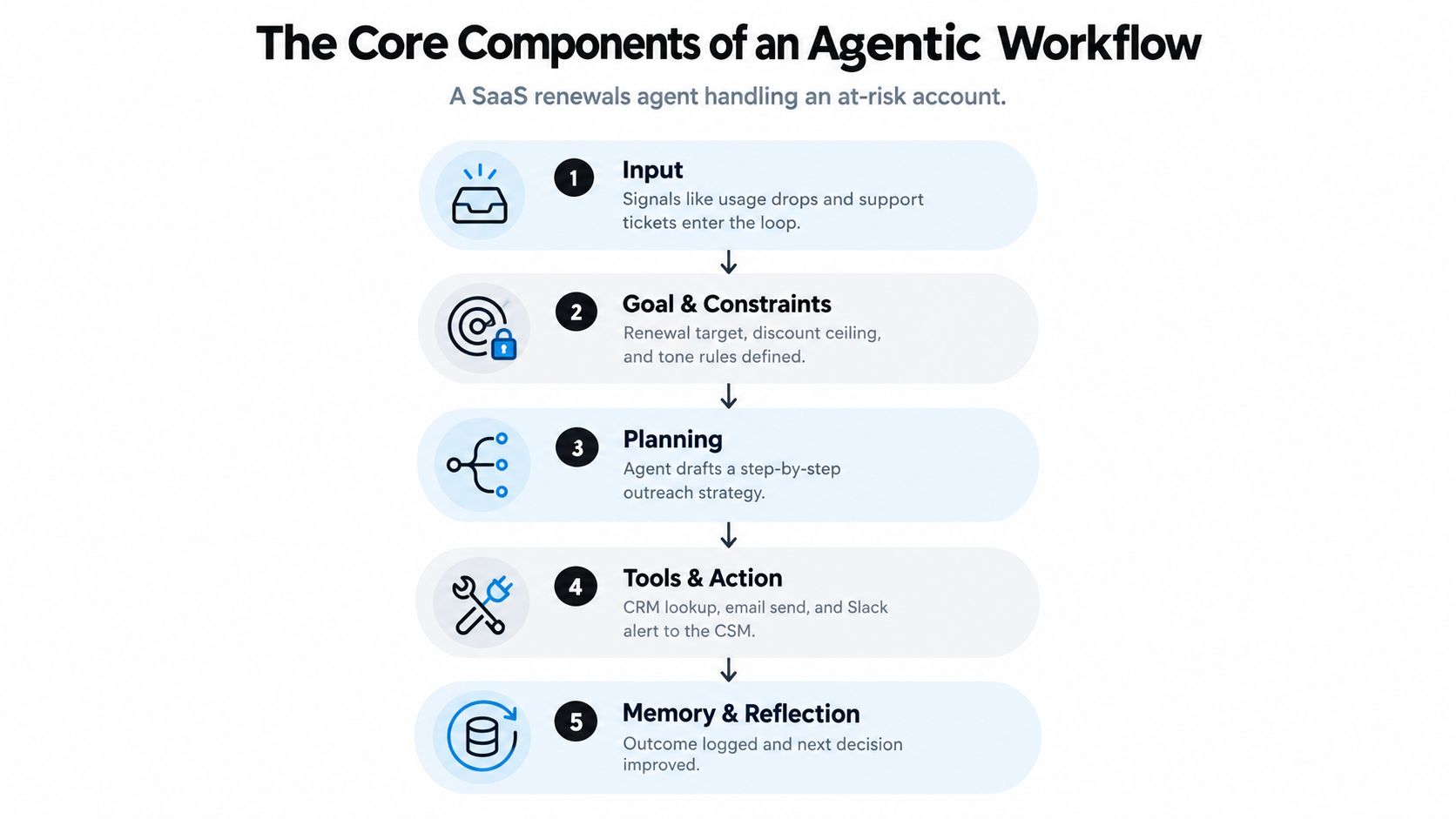
A SaaS renewals agent provides a useful model. Its job is not only to write an email. It must assess whether an account is at risk, decide what evidence matters, choose an appropriate outreach action, and record the outcome without exceeding a discount limit or making an unauthorized commitment.
Five pieces that make the loop work
Goal and constraints define success. “Protect the renewal” is too vague. A usable goal might specify the renewal date, the account segment, the permitted discount ceiling, the approved tone, and the point at which a customer success manager must approve the message.
Tools and actions connect the agent to reality. The renewals agent might read CRM history, query product usage, inspect recent support tickets, draft an email, create a task, and notify the account owner in Slack. Each tool should have a narrow purpose, structured inputs, and a clear permission boundary. A model without live tools can only approximate current account state.
Memory gives the workflow continuity. Short-term state holds what happened during the current run, such as the usage result and the last outreach attempt. Longer-term records may preserve account preferences, prior objections, and outcomes. More memory isn't automatically better. Broad retrieval can increase latency, expose irrelevant information, and make the decision harder to audit.
Guardrails constrain behavior before side effects occur. They can limit which accounts qualify, block unapproved discounts, require validation of recipient addresses, and route sensitive cases to a person. Tool permissions should reflect the smallest action the workflow needs, not every capability available in the connected system.
Planning, acting, and reflecting form the loop. The agent proposes a next step, calls a tool, checks the result against the goal, and either continues, changes direction, or stops. The loop needs explicit success conditions and a maximum execution boundary, or a confusing account record can lead to repeated investigation without a useful outcome.
The same components can support different degrees of control:
| Execution pattern | How decisions are controlled | Suitable use |
|---|---|---|
| Bounded execution graph | Predefined states, approved tools, validators, and human checkpoints | Customer communication, financial review, account changes |
| Supervisor with specialist workers | A coordinator delegates read, analysis, and validation tasks | Cross-system investigations with distinct responsibilities |
| Fully autonomous loop | The agent chooses a longer sequence within broad limits | Read-only research and internal investigation where side effects are limited |
A useful implementation reference is agent orchestration, particularly when several specialized agents must share state and hand work to one another. The architecture matters less than the operating discipline. Every action should be attributable to a goal, a tool result, and a permission that someone approved.
The video below offers a visual introduction to the broader agent concept and its operating loop.

For most business deployments, the bounded graph is the sensible starting point. It gives an operations team a way to inspect decisions, test failure modes, and tighten permissions before allowing the workflow to touch customer records or send messages.
Design Patterns That Keep Agentic Workflows Safe
The most dangerous agentic workflow is often the impressive demo that has no clear stopping rule. A system that can investigate a read-only knowledge base has a different risk profile from one that can email customers, change production data, or move money.
Adoption is already broad at the experimentation and implementation level. Industry summaries reported 79% of organizations had some level of agentic AI adoption in 2025, while 23% had scaled agentic AI in at least one function, according to this 2025 agentic workflow overview. Those figures describe a category still being operationalized, not a reason to remove human controls.
Match autonomy to consequence
| Pattern | Control mechanism | Best fit |
|---|---|---|
| Single agent with retries | Narrow tool allowlist, bounded retries, structured output validation | Classification, research, draft creation, internal triage |
| Supervisor over workers | Separate planning, retrieval, execution, and review roles | Investigations spanning several systems or domains |
| Autonomous loop | Broad planning authority, loop breakers, extensive monitoring, limited side effects | Read-only research and internal data exploration |
A single agent with retries works well when one role can complete the task and the tools are easy to validate. A supervisor pattern adds separation when the workflow needs different skills, such as retrieving account facts, evaluating policy, and preparing a recommendation. Fully autonomous loops are appropriate only when the cost of an incorrect action remains contained and the system can stop without damaging an account or process.
Controls that belong in the design
- Tool allowlists: Expose only the APIs and functions required for the job.
- Spend and action ceilings: Limit discounts, messages, records changed, or execution attempts.
- Human checkpoints: Require approval before external communication or irreversible changes.
- Output validators: Check schema, policy, recipient, and required evidence before an action fires.
- Safe failure paths: Use timeouts, bounded retries, clear escalation, and loop breakers.
- Decision traces: Record the goal, selected tool, returned data, next decision, and final disposition.
If an action can email a customer, move money, or change production data, it shouldn't run unattended yet.
Security is part of workflow design, not a review added after the prototype. Teams evaluating permissions, prompt injection, data access, and auditability can use this guide to secure AI agents as a focused checklist.
The business payoff comes from applying autonomy where it improves coverage and throughput, while reserving judgment for exceptions. Speed alone isn't a sufficient success metric. A safe workflow that handles more routine work and gives staff a clear, evidence-based exception queue can be more valuable than an unrestricted agent that produces unpredictable side effects.
Why Operators Are Adopting Agentic Workflows in 2026
A sales team may use an agent to research an inbound account, enrich the record, identify missing information, and prepare the next outreach step. A support team may use one to inspect ticket history, check an order or subscription record, and draft a response before escalating an unusual case. An operations team may use the same pattern to compare records across systems, identify a mismatch, and prepare a review packet.
The tools differ, but the operating problem is the same. Each process begins with an event, requires context from several systems, and contains exceptions that a simple copilot can't resolve in one response.
The operational case
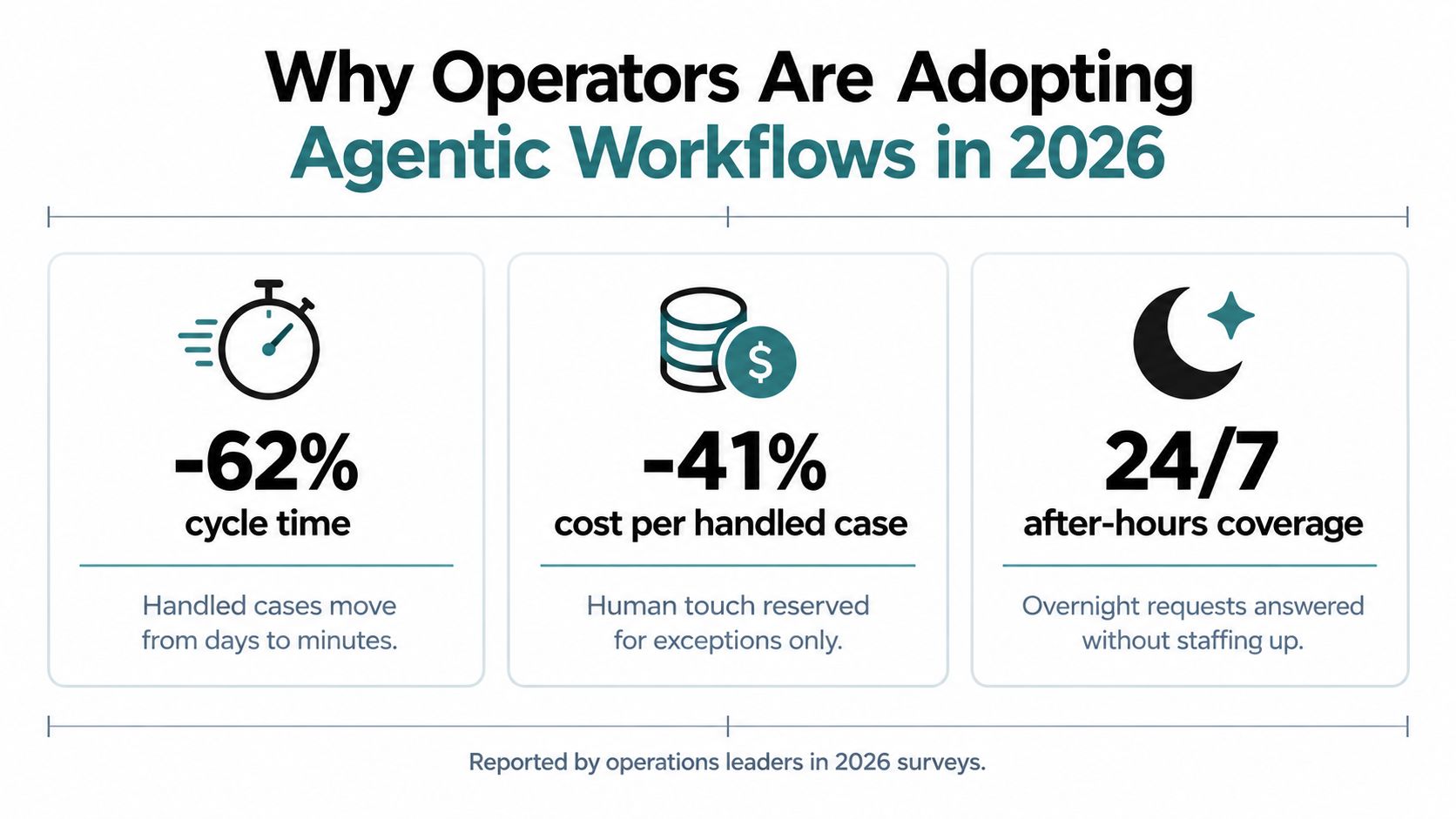
Operators usually care about three outcomes:
- Cycle time: Can a case move through research, decision, and handoff without waiting in several queues?
- Cost per handled case: Can people focus on exceptions instead of copying information between systems?
- After-hours coverage: Can the workflow collect facts and produce a useful response when the specialist who normally handles the task isn't available?
The shift from copilot to workflow happens when drafting is no longer the bottleneck. A copilot can suggest a response, but an agentic workflow can retrieve the record, verify the facts, select the next step, and deliver the output to the right queue. That creates a path to higher throughput per team without assuming that every decision should be delegated.
The category is also moving toward mainstream enterprise use. One industry projection expects around 40% of enterprise applications to include AI agents by 2026, while the same summary distinguishes broad adoption from scaled deployment. Treat that projection as a planning signal, not a guarantee. It suggests buyers should establish governance and measurement before agents become embedded across more processes.
Real Business Use Cases Across Sales, Support, and Operations
The strongest pilot isn't the one with the most impressive conversation. It's the one where the team can identify the source systems, define the handoff, and measure whether the queue improves.
Consider three deployments built around the same pattern.
Sales qualification
An SDR workflow receives an inbound form, reads enrichment data, checks the CRM for account history, and asks a targeted follow-up question by email when intent is unclear. If the response meets the team's qualification rules, it checks a representative's calendar and prepares or books the next meeting according to the permissions provided.
The human handoff occurs when the account has strategic importance, the contact's intent remains ambiguous, or the requested meeting falls outside the approved scheduling rules. The team should track qualified conversations, booked meetings, and the share of records requiring review, rather than treating message volume as success.
Support resolution
A tier-one support workflow handles a password reset, order-status request, or straightforward refund inquiry by retrieving current information from the CRM, ticketing system, and payment platform. It validates the proposed response against policy, then either completes an approved action, drafts a reply, or escalates with the evidence already collected.
The handoff point is a policy exception, a failed tool call, conflicting records, or insufficient confidence. Useful measures include deflection quality, escalation quality, resolution time, and reopened cases. A high deflection rate is not valuable if customers must contact the company again because the first answer was wrong.
Operations reconciliation
An invoice reconciliation workflow compares records across three ERP systems, identifies mismatches, and groups them by likely cause. It can draft a corrective action for an analyst, but the analyst approves changes before the workflow updates a financial record.
The measurable result is the quality and speed of the review queue, including mismatches identified, analyst approval time, and unresolved exceptions. The agent should not alter records just because two values appear inconsistent.
| Dimension | Sales, SDR Copilot | Support, Tier-1 Resolver | Operations, Invoice Reconciler |
|---|---|---|---|
| Primary inputs | Lead form, enrichment, CRM history | Ticket, account, order, payment data | Invoice and ERP records |
| Typical tools | Enrichment API, CRM, email, calendar | CRM, ticketing, payment system, knowledge base | ERP queries, validation rules, analyst queue |
| Human handoff | Strategic account or unclear intent | Policy exception or conflicting evidence | Any proposed financial correction |
| Core measure | Qualified conversations and booked meetings | Quality of resolution and escalation | Review speed and exception accuracy |
| Safe first output | Research summary or draft outreach | Suggested response and evidence packet | Mismatch report and proposed correction |
These are patterns, not promises of automatic performance improvement. Teams should verify data freshness, identity and access controls, tool failure behavior, prompt-injection handling, audit logs, and escalation ownership before expanding a pilot. A useful collection of AI agent use cases can help operators compare candidate workflows, but the right starting point is always the backlog that contains clear goals, repeated context gathering, and manageable consequences.
The practical buying checklist is short:
- Define the outcome: State what a successful run produces and what it must never do.
- Map the systems: Identify the authoritative source for each fact and the exact tools available.
- Set the handoff: Name the person or queue that receives exceptions and specify the evidence they need.
- Test failure: Disconnect tools, return conflicting data, provide incomplete inputs, and verify safe stopping.
- Measure the queue: Track throughput, quality, cycle time, and exception handling rather than activity alone.
- Start with bounded authority: Begin with read-only research, drafts, recommendations, or reports before enabling side effects.
Cyndra helps teams map real workflows, decisions, exceptions, and controls, then deploy and manage AI employees that integrate with their existing tools. If you want to identify a safe, high-value agentic workflow for sales, support, or operations, visit Cyndra to discuss a governed implementation.