 CYNDRA
The most popular advice in AI agent development is also the most misleading. Pick a strong model, connect your tools, write a good prompt, and let it run. That recipe produces a convincing demo. It rarely produces a system an operations lead can trust with a live CRM, a support queue, or a finance record. Production agents fail at the boundaries, in permissions, ownership, messy data, and ambiguous requests. Build for those boundaries first, and autonomy becomes something you can earn.
Table of Contents
- Why AI Agent Development Is Harder Than It Looks
- Understanding What an AI Agent Is
- Following the AI Agent Development Lifecycle
- Choosing Architecture Patterns and Stacks
- Securing Agent Identity and Tool Access
- Testing and Monitoring Production Agents
- Applying AI Agent Development to Real Workflows
- Planning the Move From Pilot to Production
Why AI Agent Development Is Harder Than It Looks
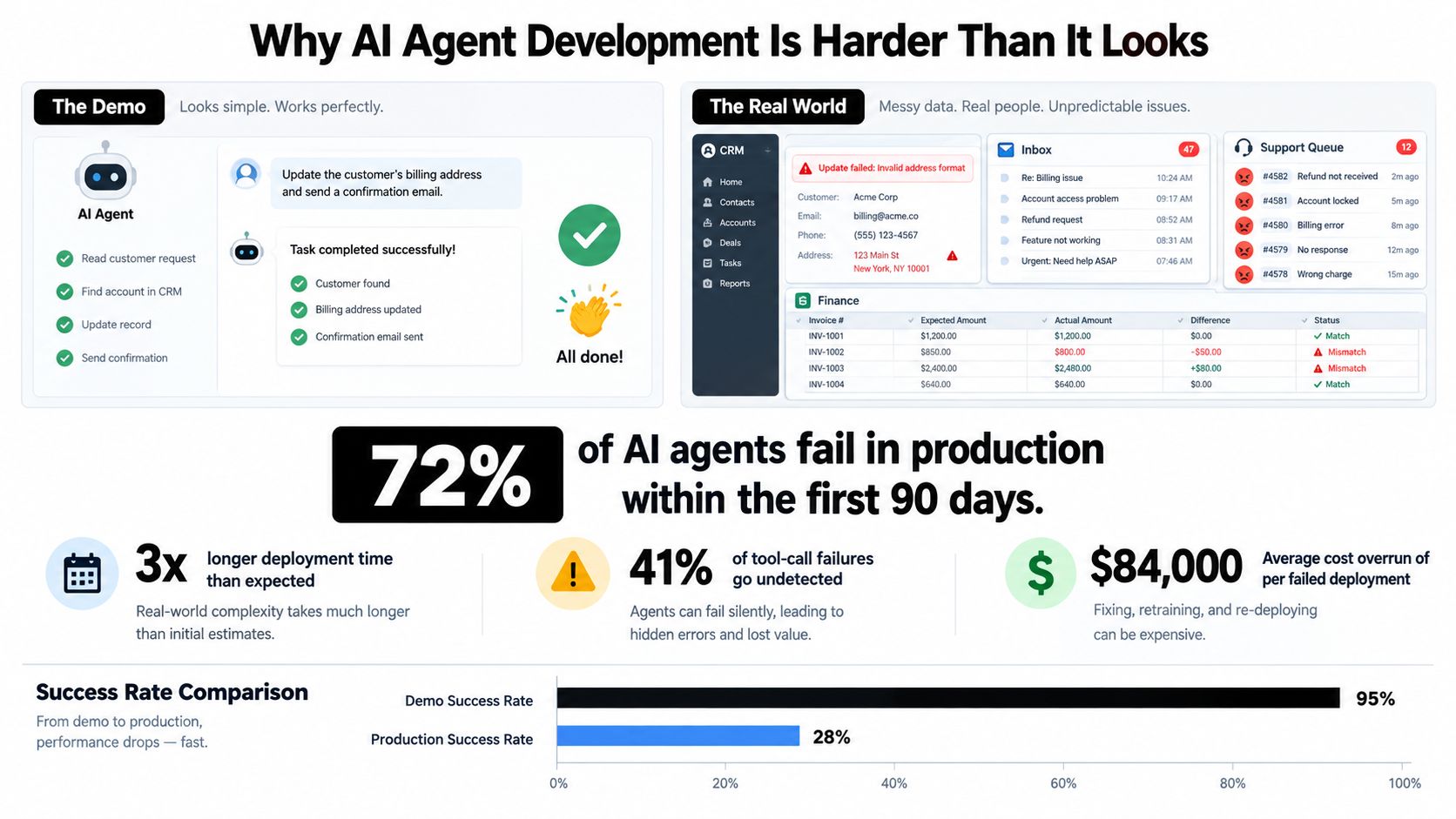
A demo agent usually works on clean inputs, a cooperative user, and a short task with no real consequences. Then you point it at production. The CRM has duplicate contacts. A customer email contains instructions buried in a forwarded thread. A finance record doesn't match the source system. An API times out halfway through a sequence. None of that is a model problem alone, and prompt tuning won't fix it.
Adoption data shows the same gap between interest and maturity. McKinsey's 2025 Global Survey on the State of AI, based on 1,993 participants in 105 countries between June 25 and July 29, 2025, found 62% of respondents were at least experimenting with AI agents, while 23% were scaling at least one agentic AI system in a business function, as reported in McKinsey's 2025 State of AI findings. The same source notes that in any individual function, no more than 10% reported scaling, and most scaling organizations were doing so in only one or two functions.
The split between polished demos and messy operational reality is where most projects stall.
What Counts as Real Progress
A prototype matters only when it proves something specific. Reliable execution on representative tasks matters. Tool integration that survives errors matters. Governance that lets an owner explain who acted, on what data, and under which permission matters more than a fluent answer in a sandbox.
That's why sensible teams start with bounded, measurable workflows. IT service operations, knowledge management, software engineering, and sales support work as starting points because inputs, outputs, and escalation paths can be defined. A founder doesn't need an agent that can do anything. A COO needs an agent that does one consequential workflow predictably, stops when it's uncertain, and leaves a record.
A demo proves the model can reason through your example. Production readiness proves the system can recover when the example stops behaving.
That distinction changes who needs to be in the room. Engineers own the loop and integrations. Business owners define acceptable outcomes and approval thresholds. Security and operations teams own identity, monitoring, and incident response. If any of those roles is missing, you'll discover the gap after launch, when it's most expensive to argue about.
Understanding What an AI Agent Is
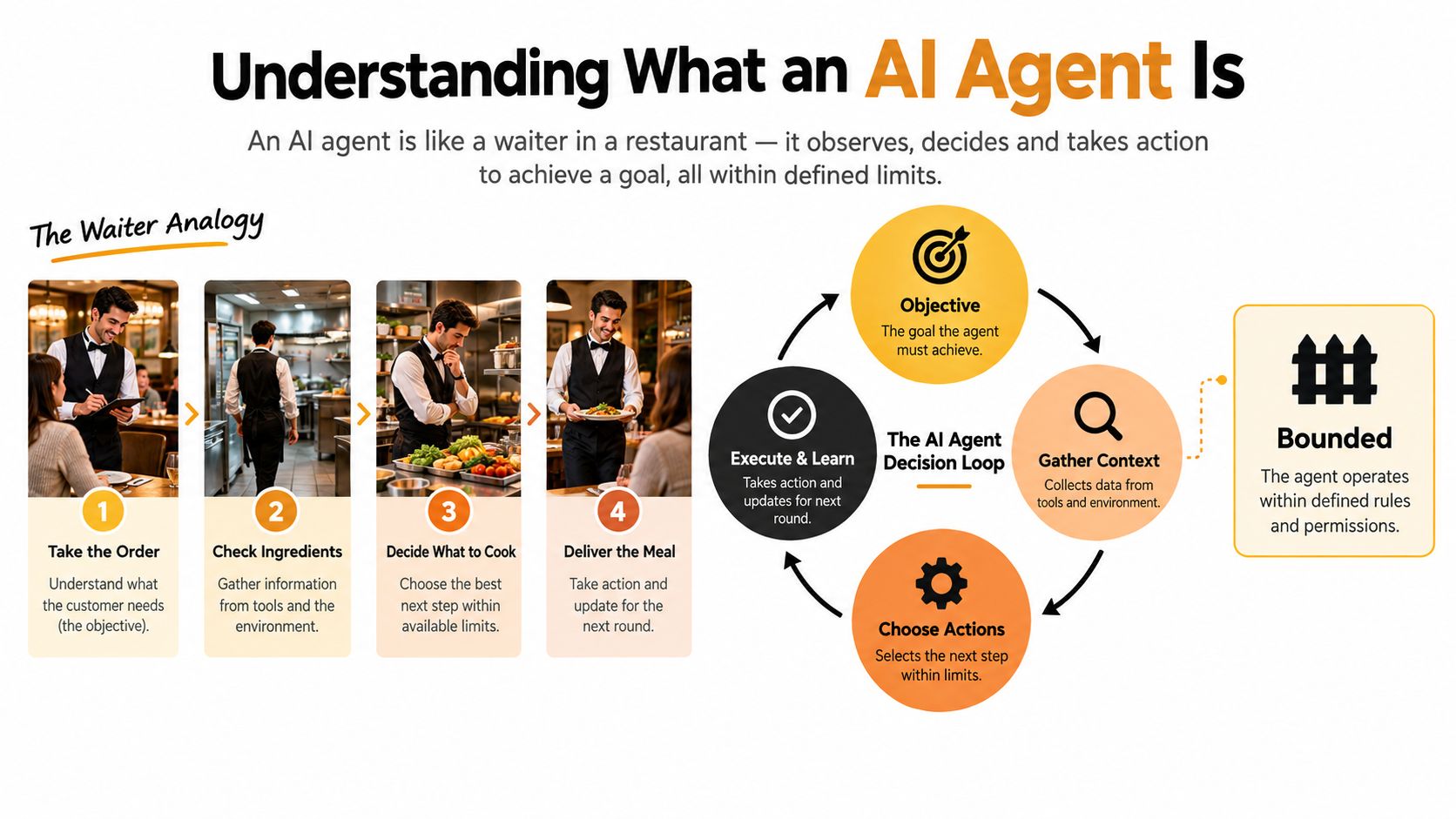
Think of a capable waiter handling a complicated table. They take an objective, check what's available, clarify ambiguity, place orders with the kitchen, watch what comes back, correct mistakes, and know when to bring in a manager. They're not reciting a script. They're running a loop inside clear limits.
An AI agent works the same way. It receives an objective, gathers context, chooses an action, uses tools, observes the result, and continues until it hits a completion condition or asks for help. The loop is the product. The model is only one component inside it.
The diagram below maps that loop and the bounds that keep it useful instead of risky.
Agent Anatomy in Practical Terms
- Instructions: The role, objective, constraints, and stop conditions the agent must follow.
- Context and state: The current task, relevant records, prior steps, and what's already been tried.
- Model: The reasoning engine that interprets context and proposes the next action.
- Memory: Stored information the agent can reuse, scoped so one workflow doesn't leak into another.
- Tools: APIs and systems such as a CRM, inbox, ticketing platform, database, or browser.
- Guardrails: Validation, permissions, approval gates, and rules that limit what actions can execute.
- Evaluation: The checks that tell you whether the final state is correct, not just plausible.
A static chatbot answers from a script or a knowledge base and stops. Deterministic automation follows a fixed path that a developer specified in advance. A standalone foundation model generates output but doesn't independently sequence actions across systems. An agent earns the label when it can adapt its next step based on tool results while staying inside defined bounds.
That gives you a simple test. If the system can't observe a result, revise its plan, and decide whether to continue or escalate, it's probably a chatbot with connectors. That isn't a failure. Many workflows only need that. Calling it an agent just creates false expectations about autonomy.
The video below is useful background if your team is still aligning on that vocabulary before you scope a build.

Before choosing technology, describe the workflow in one sentence. Given this trigger and these inputs, the agent may use these tools to produce this outcome, and it must stop under these conditions. If you can't write that sentence, you don't have an agent requirement yet. You have an automation idea that still needs operational definition.
Following the AI Agent Development Lifecycle
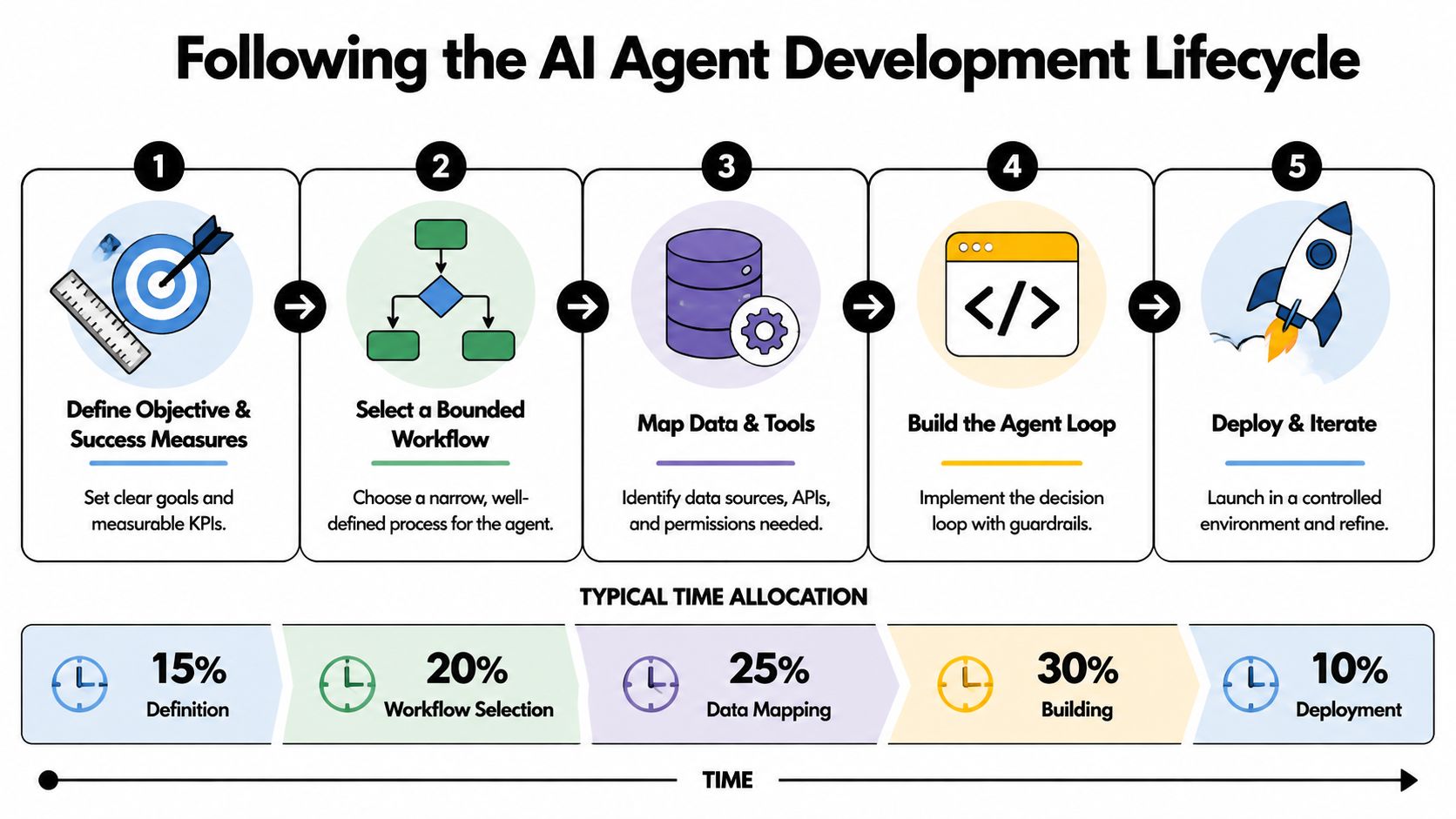
Good AI agent development is gated, not linear. Each stage should produce an artifact that a named owner can review, challenge, and sign off. If a stage ends with only a conversation, the next stage inherits ambiguity. Ambiguity becomes tool misuse, rework, or a quiet production failure.
The lifecycle view below keeps the sequence simple. The discipline is in the evidence you require at each gate.
Start With the Outcome and the Bounds
Write an outcome brief before you touch a model. Name the business owner, the trigger, the desired end state, the baseline you're trying to improve, and the KPI that will prove value. Time to resolution, qualified pipeline created, tickets correctly classified, or cost per completed outcome all work if they're measurable.
Then map the workflow as it runs today, including exceptions. Who approves edge cases? Which records conflict? Where do people copy data between systems because integration is missing? Your workflow map should mark every decision, handoff, and irreversible action. Those marks later become checkpoints and approval gates.
Build a data and permissions inventory next. List each source, its sensitivity, who owns it, how fresh it is, and whether the agent needs read access, write access, or no access at all. Don't grant access because a connector exists. Grant it because a step in the workflow requires it.
Build for Collaboration, Not One-Shot Autonomy
Model selection belongs after the workflow is clear. Compare models on your representative tasks, tool-calling reliability, latency needs, and cost per completed outcome. Produce a short model comparison tied to those tasks, not a preference based on reputation. Then write a prompt and context specification covering instructions, retrieval rules, output schemas, and escalation conditions.
Evidence from real development work supports designing for iteration. In an observational study of 19 developers resolving 33 real repository issues, developers resolved approximately half of the issues, and incremental problem solving with active collaboration outperformed one-shot execution, according to Microsoft Research on developers using agentic AI. A practical loop follows from that finding: retrieve context, propose an action, execute in a sandbox, validate against tests or business rules, then request approval when an action is irreversible or confidence is low.
Integrate, Test, Release, Then Operate
Tool integration needs a tool contract for every connection. Define allowed operations, required parameters, response validation, timeout handling, retries, and what the agent must do when the result is incomplete. Pair that with a threat model that identifies sensitive actions, untrusted inputs, and failure modes before testing begins.
Your evaluation suite should exist before release, not after users complain. Include normal tasks, ambiguous requests, failed tool calls, and cases where the correct behavior is to stop. Measure final task completion, recovery quality, number of human interventions, time to resolution, and error severity. A release decision then states which actions may run automatically, which need sampling, and which always require approval.
Deployment isn't the finish line. It's the start of controlled improvement. A monitoring dashboard should track outcomes, overrides, escalations, latency, and cost alongside versioned prompts, models, and tools. Begin with research and drafting, add read-only access, and only then permit controlled writes such as CRM updates or email dispatch. Each expansion needs fresh evidence, not optimism carried forward from the pilot.
Choosing Architecture Patterns and Stacks
Don't start with a platform shopping list. Start with the workflow's need for control. A predictable process with clear branches doesn't need open-ended autonomy, and a research task with shifting sub-questions won't fit comfortably inside a rigid flow. The simplest pattern that satisfies the workflow usually wins because it's easier to test, secure, and explain.
For a broader enterprise perspective before you commit, this guide for IT leaders on AI agent development is worth reading alongside your internal architecture notes. It reinforces a point delivery teams learn quickly. Toolkits don't replace operating decisions.
Patterns and Their Trade-Offs
A deterministic workflow engine fits approvals, reconciliations, and processes where the path is known and auditability matters most. You give up flexibility, but you gain predictability. Use it when the business risk of improvisation outweighs the benefit.
A single-agent tool loop fits bounded research, drafting, triage, and record enrichment. One agent plans, calls tools, checks results, and escalates. It's the easiest agentic pattern to observe because there's one transcript, one identity, and one owner to debug.
Supervisor-and-worker systems can help when a task naturally splits into specialized sub-tasks, but they multiply failure points. Coordination errors, duplicated work, and unclear accountability appear fast. Adopt this pattern only when a single loop demonstrably can't handle the workload or specialization required.
A retrieval-augmented agent suits knowledge-heavy work where answers must be grounded in current internal content. Its quality depends on source hygiene, ranking, and citation discipline, not just the model. An event-driven agent suits monitoring and response workflows triggered by system changes, but it needs strong throttling and idempotency so repeated events don't create repeated actions.
Human-in-the-loop design isn't a failure of autonomy. It's an architecture choice for customer-facing, financial, or irreversible work. The agent prepares, validates, and recommends. A person approves the consequential step. That division often delivers most of the time savings with far less operational risk.
Selection rule: Choose autonomy because the workflow's evidence justifies it, not because the architecture makes it available.
Map the stack to layers you can replace independently. You need model and inference services, orchestration, retrieval and memory, tool connectors, identity and access management, observability, evaluation, and deployment infrastructure. Keep provider-specific logic at the edges so a model or connector change doesn't force a rebuild. Our internal overview of AI agent frameworks and how to compare them can help structure that layer-by-layer assessment without treating a framework as the whole strategy.
Securing Agent Identity and Tool Access
Tool access is the security boundary. A model that only drafted text can embarrass you. An agent with a shared credential, long-lived token, and write access to payments, email, and production systems can act on a malicious instruction before anyone notices. That's why agent identity and permissions belong in the architecture from day one, not in a cleanup phase.
Recent security research shows how unprepared many organizations are. Only 21% of surveyed organizations maintain a real-time agent registry, and only 18% are highly confident their identity and access systems can manage agent identities effectively, according to the Cloud Security Alliance guidance on securing autonomous agents. If you can't inventory your agents, you can't credibly say who owns them, what they can reach, or how to shut one down.
Practical controls start with separation. Give every agent a distinct identity. Bind permissions to a specific workflow and resource set. Issue short-lived, least-privilege tokens. Rotate credentials on a schedule owned by a person, not a shared inbox. Our deeper notes on AI agent security controls for production systems cover how those decisions translate into implementation work.
NIST-oriented guidance points in the same direction, recommending strict tool scopes, sandboxing, per-action approval, workflow-bound tokens, continuous authorization, memory isolation, and signed manifests with pinned dependency versions, as set out in NIST-hosted material on agentic AI threats and mitigations. That is a future-dated presentation reference in the source material, so treat it as guidance to evaluate against your current policies rather than a settled compliance standard.
Agent Permission Tiers
| Permission Tier | Typical Actions | Required Gate | Best Initial Use |
|---|---|---|---|
| Tier 1 Research and draft | Search approved sources, summarize, draft content | Human reviews before use | Prospect research, ticket summaries |
| Tier 2 Read-only systems | Query CRM, support, finance, or product data | Scoped read access, logged queries | Enrichment, reporting, triage |
| Tier 3 Controlled writes | Update fields, create tasks, prepare sends | Policy check or explicit approval | CRM hygiene, internal task creation |
| Tier 4 High-impact actions | Send external messages, move money, delete data, change production | Named approver and deterministic policy gate | Only after sustained evidence |
Payments deserve extra care because transaction authority and custody are different problems. If payments are in scope, this overview of non-custodial agent payment infrastructure is useful context for separating an agent's ability to initiate a workflow from direct control of funds.
Partition memory by tenant, workflow, and sensitivity class. Validate content before storage. Treat retrieved text as data, never as executable instruction. Log every consequential tool call with agent identity, business principal, requested operation, data scope, policy result, and outcome. That record is what lets you investigate an incident, answer a compliance review, roll back a change, and retire an agent cleanly.
Your operations checklist should name the owner, risk class, credential rotation process, approval thresholds, monitoring alerts, rollback path, incident responder, and retirement procedure. Production-grade development isn't mainly about maximizing autonomy. It's about making autonomy bounded, observable, and attributable.
Testing and Monitoring Production Agents
Test the whole system, not the model's reputation. A capable model can still fail through bad retrieval, an over-permissioned tool, stale memory, or an escalation rule nobody exercised. The unit of evaluation is the agent as deployed, with its prompts, data, tools, permissions, and human checkpoints included.
Adversarial testing shows why happy-path demos mislead. A public red-teaming competition covering 22 frontier agents across 44 realistic deployment scenarios collected 1.8 million prompt-injection attempts, with more than 60,000 inducing policy violations, as reported in the arXiv paper on red-teaming frontier agents. The same research found limited correlation between resistance to attacks and model size, capability, or inference-time compute. Bigger doesn't automatically mean safer.
The layered view below is a practical way to organize coverage before you argue about release thresholds.
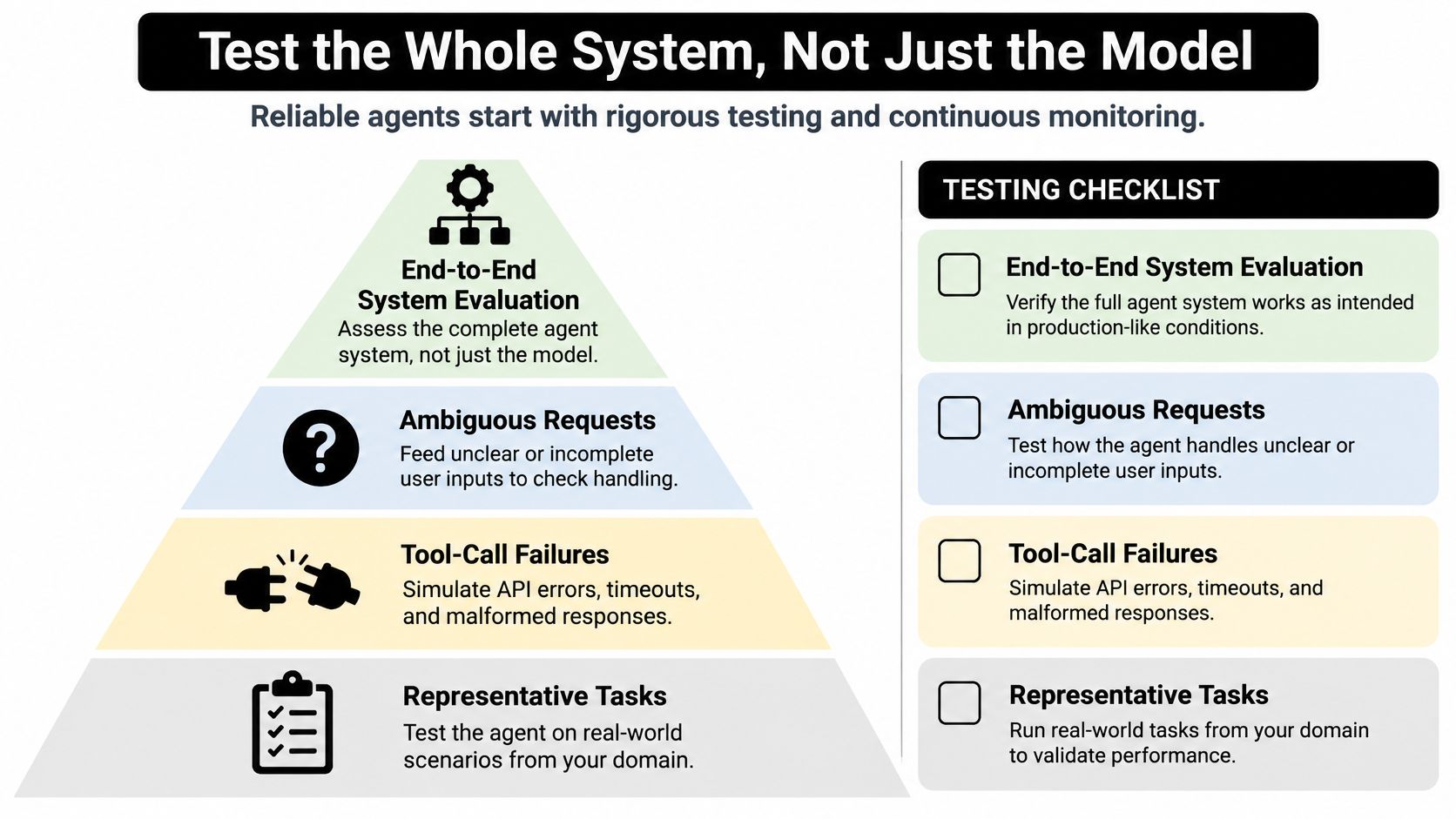
Build a Production Readiness Scorecard
- Representative tasks: Real requests from your domain, including messy formatting and incomplete information.
- Failure injection: API timeouts, malformed responses, missing records, conflicting sources, and permission denials.
- Adversarial cases: Prompt injection, sensitive-data requests, fraud attempts, and instructions hidden in retrieved content.
- Human factors: Ambiguous intent, multilingual inputs, frustrated customers, and situations where stopping is correct.
- Outcome checks: Verification of the final system state, not just the agent's claim that it succeeded.
Score task accuracy, unsafe-action rate, recovery quality, escalation frequency, latency, cost per completed outcome, and business impact. Add human-review burden, because an agent that saves drafting time but creates endless checking hasn't improved the workflow. For subjective work, calibrate model-based graders against human reviewers and read transcripts regularly. Graders can be wrong, tasks can be ambiguous, and a clean score can hide a brittle test.
Convert results into an autonomy policy. Low-risk, reversible actions with strong evidence may run automatically. Medium-risk actions get sampled review. High-impact actions always require approval until your data supports a change. Write those thresholds down before launch so a deadline doesn't rewrite them informally.
In production, monitoring should combine traces, tool logs, prompt and model versions, human overrides, drift signals, and outcome dashboards. Sample transcripts weekly. Turn every meaningful failure into a regression case. Treat evaluation suites as living artifacts with a named owner. For implementation detail, our guide to AI agent observability in production explains how to connect those signals so a team can diagnose a bad action and roll back safely instead of guessing.
Applying AI Agent Development to Real Workflows
Consider a sales-support agent. It starts safely by researching a prospect from approved sources, summarizing fit, and drafting outreach for a rep to approve. Essential integrations are the CRM, enrichment sources, and email, but the sending permission comes last. Evaluate it on source accuracy, duplicate detection, correct account matching, and whether drafts follow your claims policy. The operating KPIs are research time saved, meetings influenced, and rep override rate, not messages generated.
A support agent has a different risk profile. Ticket classification and knowledge retrieval can run with limited autonomy. Suggested replies need sampling. Refunds, account changes, and anything touching identity verification need explicit gates. Test frustrated language, conflicting order records, policy exceptions, and requests for another customer's data. Useful KPIs include correct resolution, escalation quality, and time to first useful response.
Same Loop, Different Controls
An operations agent might synthesize commerce, advertising, CRM, and finance data into a KPI dashboard with explanations for unusual movements. Read-only access can deliver value early, which lowers risk. The hard part is data semantics. Revenue definitions, attribution windows, and timezone handling must be validated before anyone trusts the narrative. Evaluation should compare the agent's outputs against known reports and flag when source data is missing rather than letting it improvise an explanation.
A recruiting agent can manage intake, structure candidate information, schedule next steps, and prepare interviewer summaries. It shouldn't make final hiring decisions or handle sensitive candidate data outside strict access controls. Human checkpoints belong at shortlist decisions, rejection communications, and any assessment that could create bias or legal exposure. KPIs should cover pipeline completeness, scheduling speed, reviewer burden, and error rates by stage.
The pattern repeats. Start where work is reversible and evidence is easy to collect. Add system access in stages. Raise the approval bar as customer impact, financial consequence, and data sensitivity rise. Similar architecture doesn't mean identical controls. The workflow's downside determines how much autonomy it has earned.
Planning the Move From Pilot to Production
Pick one bounded workflow with a named business owner and a baseline you can measure. Classify its risk by data sensitivity, reversibility, and customer impact. Choose the simplest architecture that fits, build a narrow evaluation set from real cases, launch with limited permissions, and expand only when the scorecard supports it. That's a production plan, not a pilot that drifts.
The build-versus-partner decision should be equally concrete. Build internally if your team already owns model integration, identity, evaluation, observability, and incident response, and if someone accountable will still own the agent after the launch excitement fades. Use a partner when integration complexity, security requirements, or delivery speed exceed your current capacity, or when no internal owner can run the operating layer. Cyndra is one implementation option in that situation, providing workflow analysis, agent design and development, tool integration through managed connections, approval configuration, and deployment support for business teams.
Deployment discipline from conventional software still applies. This guide to safer deploys is relevant reading for release gating, rollback thinking, and limiting blast radius, even though agents add model and prompt versioning on top of normal release risk. Don't treat an agent launch as a prompt edit with a bigger audience.
Before committing to full autonomy, answer five questions in writing: Who owns it? What can it do without approval? How will we know it's wrong? How do we stop it? What business result justifies expanding it?
Your next steps are small and concrete. Select a high-value workflow. Document its trigger, inputs, tools, outputs, exceptions, and approval points. Name the accountable owner. Define the baseline and success KPI. Then request or run a scoped readiness assessment covering architecture, permissions, evaluation, and operating ownership before you fund a broader build.
If you're ready to move one workflow from a promising pilot to a secure production agent, Cyndra can audit the process, design the permissions and approval model, build and integrate the agent with your existing tools, and help your team operate it against measurable KPIs. Start with a scoped readiness conversation and leave with a bounded build plan, not a vague automation roadmap.