 CYNDRA
Many teams get email follow-up automation wrong because they treat it like a copywriting problem. It isn't. The underlying issue is control, knowing when to send, when to stop, when to escalate, and when to leave a prospect alone so you don't burn trust and sender reputation chasing a reply that isn't there.
The history backs that up. A review in the Journal of Computer-Mediated Communication found an average response rate of 36.83% across 31 email-survey studies, with later studies dropping to about 31% in 1998 to 1999, and it identified both study year and follow-up count as the strongest influences on response rates. That doesn't mean more emails always work, it means a lone message is a weak bet, and persistence only helps when it's governed. The original review points to the same truth revenue teams run into every day, automation should enforce disciplined follow-up, not mindless repetition.
Table of Contents
- Why Most Email Follow-Up Automation Quietly Fails
- The Four Building Blocks of an Automated Follow-Up System
- Designing Sequences That Branch on Real Behavior
- Personalization at Scale Without Burning Out Your Data Team
- Deliverability Controls That Gate Every Send
- Measuring Incremental Revenue, Not Just Replies
- A 30-Day Rollout Plan and the Mistakes to Avoid
Why Most Email Follow-Up Automation Quietly Fails
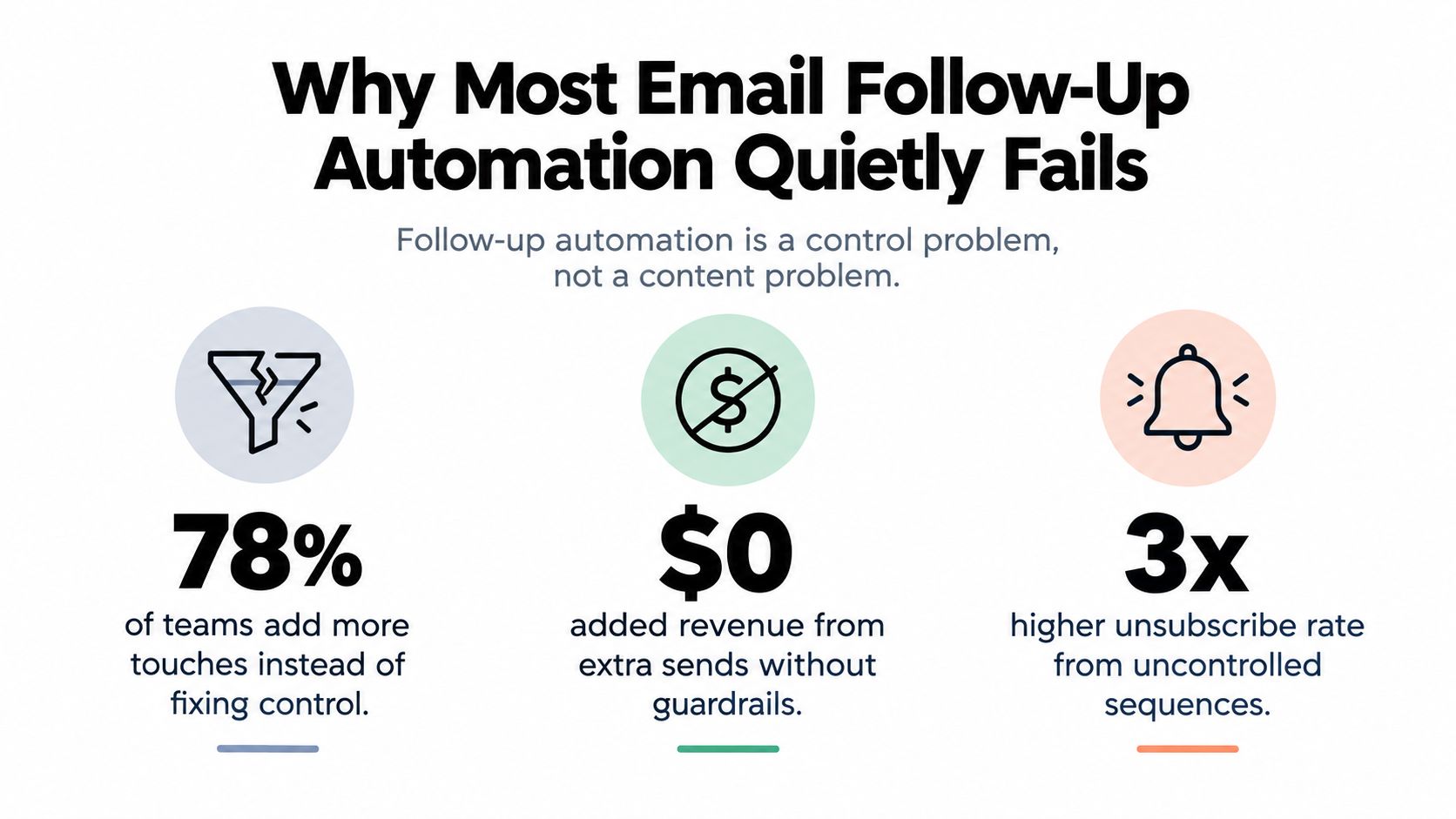
The popular advice says to add another touch. That's lazy. More touches without controls just means more chances to annoy a buyer, duplicate a reply, or keep sending after the conversation has already moved on.
The three failure modes I see over and over
First, teams keep sequences running after a human reply. That's a systems failure, not a writing failure. Once a person responds, the automation should stop, hand off, and update the record, or you've just created a support problem with better subject lines.
Second, teams blast unverified lists and then act surprised when bounce rates rise. Poor list hygiene turns follow-up into reputation damage, and reputation damage reduces the chance the next message lands where it should. If you're buying or enriching data, the first job is suppression and validation, not volume.
Third, teams optimize for opens because opens are easy to screenshot. That's a trap. Opens don't pay invoices, replies do, and even replies can mislead you if you aren't separating positive intent from auto-replies and complaints.
Practical rule: if your automation can't tell the difference between silence, interest, objection, and unsubscribe, it isn't a follow-up system, it's a spam machine with a calendar.
A lot of generic playbooks push templates as the answer. Templates help, but they don't fix control. If you want a straightforward template library to borrow from, Fypion Marketing's follow-up playbook is useful, but only if you pair it with stop conditions and suppression rules.
The right mental model is simple. Email follow-up automation is a governed workflow, every send needs a behavioral reason and a deliverability reason. If either one fails, the message shouldn't go out.
The Four Building Blocks of an Automated Follow-Up System
A working system has four parts, triggers, states, messages, and controls. If one of those is weak, the whole thing drifts into inconsistency. I've seen teams obsess over copy while their trigger logic was broken, their state model was missing a reply flag, and their suppression rules were basically decorative.
Start with the trigger, not the email
A trigger is the event that earns the next action. In practice, that could be a form fill, a demo no-show, a pricing page visit, or a CRM stage change. A good trigger is specific enough that a rep would agree the follow-up makes sense without reading the email itself.
The state model is the second block. At minimum, your sequence needs clear states like queued, sent, delivered, replied, bounced, unsubscribed, complaint, and converted. That matters because the system can't be trusted to act twice on the same event if it doesn't know what state the contact is in.
Messages and controls should be separated
Message variants are the content options attached to each step. Controls are the rules that decide whether the message can go out. Don't mix those together in your head. A strong message still shouldn't send if the domain is overloaded, the contact already replied, or the sequence conflicts with another campaign.
Here's the operating model I'd use in any CRM:
| Platform type | Trigger sources | State model | Message variants | Controls |
|---|---|---|---|---|
| Marketing automation tool | Form fills, page visits, lifecycle changes | Basic lead status and campaign membership | Nurture blocks, newsletters, re-engagement | List suppression, global unsubscribe, frequency caps |
| Sales engagement platform | Demo requests, reply events, meeting outcomes | Sequence step status, reply detection, task completion | Rep-written templates, light personalization, follow-up branches | Reply stop rules, bounce suppression, send windows |
| AI-agent stack | CRM events, inbox replies, webhook events, app actions | Event-driven states, explicit handoff states, audit logs | Dynamic copy, contextual variants, human-approved drafts | Policy gates, rate limits, idempotent handling, review paths |
If you're comparing tools, Cyndra's sales outreach automation guide is a useful reference point for how automation sits inside a broader workflow, not just a sequence builder.
Build the state machine before you build the sequence. If you don't know what the system should do after a reply, a bounce, or a complaint, you don't have automation. You have a liability.
Designing Sequences That Branch on Real Behavior
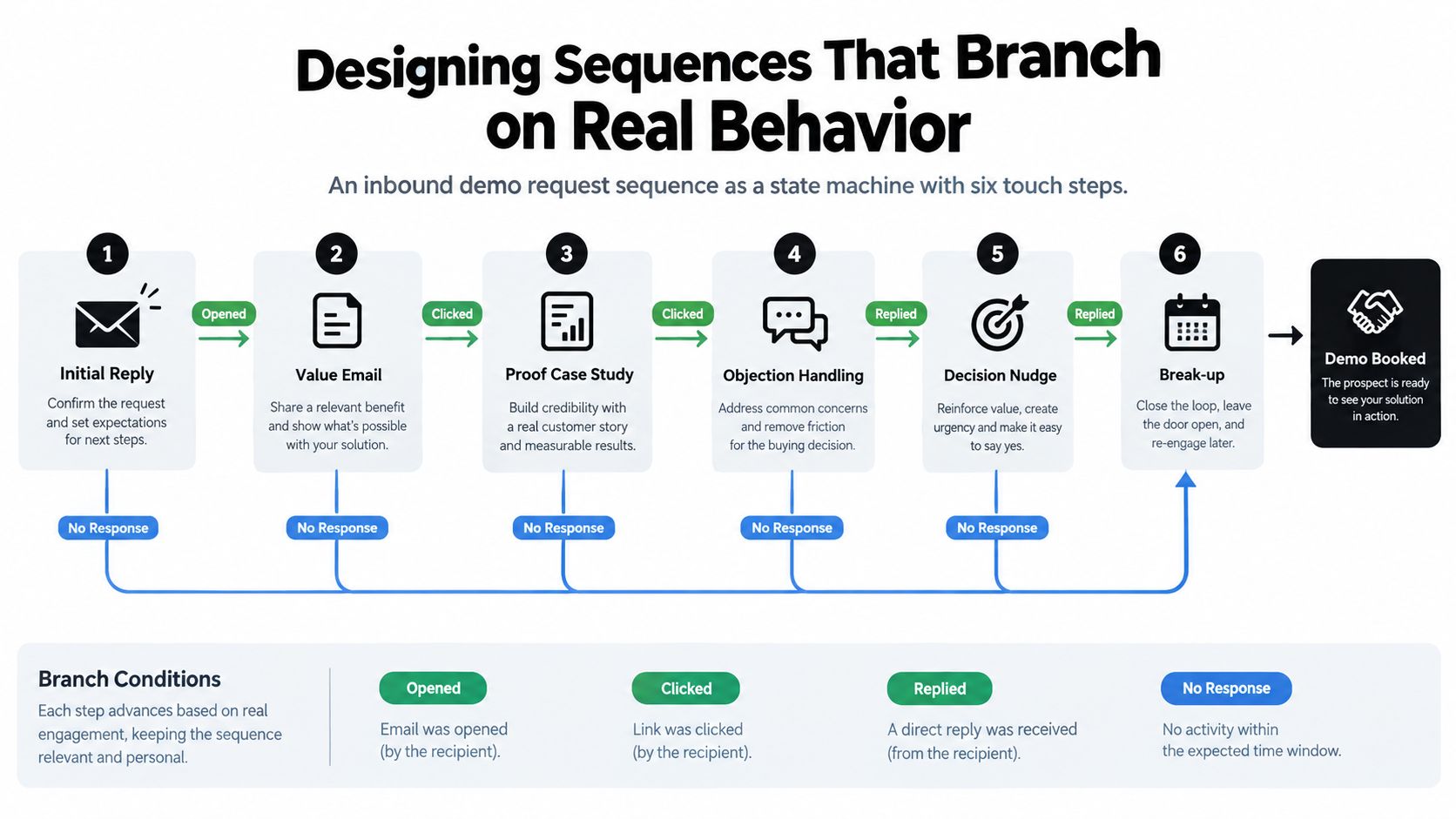
A sequence should behave like a decision tree, not a drip. The easiest place to get this right is an inbound demo request, because the buyer has already raised their hand. The job is to keep momentum without forcing a fixed path on every contact.
Use behavior to shorten, pause, or hand off
A practical pattern is six touches over roughly three weeks, spaced so you're persistent without being noisy. That cadence aligns with the large-scale outreach findings summarized by Cirrus Insight, which point to about six touches over roughly three weeks, with messages spaced three to four days apart, and with the first follow-up generating about 40% more replies than the opening message. That same analysis also found that sequences with 4 to 7 messages outperformed shorter ones, but only when cadence and message quality held up.
The branching logic matters more than the count. If the prospect opens and clicks but doesn't reply, the next message should be shorter and more direct. If they visit pricing, the sequence should tighten. If they reply with buying intent, the automation should stop and hand off immediately.
Build explicit exits for negative signals
Negative signals deserve just as much logic as positive ones. Out-of-office replies should pause the sequence, not trigger the next touch. Unsubscribe requests should suppress the contact across all campaigns, not just the current one.
Role changes and competitor mentions need a human decision. Sometimes that means the contact is no longer the right person. Sometimes it means the deal still exists, but the message should come from a rep, not a workflow.
A clean demo-request branch looks like this:
- Initial reply, sent quickly after the form fill.
- Value email, focused on a useful next step.
- Proof case study, only if there's no reply and the contact still looks active.
- Objection handling, used when behavior suggests hesitation.
- Decision nudge, short and direct.
- Break-up message, with a final exit path.
That structure gives you control. It also makes the system easier to debug, because every branch has a reason to exist.
If you want another example of structured follow-up logic, EmailScout's guide to tripling reply rates is a useful benchmark for thinking about branch design, not just message order.
Personalization at Scale Without Burning Out Your Data Team
Personalization only works when the depth matches the value of the account. Too many teams over-engineer low-value contacts and under-serve the people who matter most. That's backwards, and it wastes both ops time and seller attention.

Match the personalization layer to the deal value
Token replacement is the cheapest layer. Use it for cold outbound at volume, where basic relevance is enough and speed matters more than deep research. It should still be clean, which means no wrong names, no stale job titles, and no embarrassing references.
Behavioral triggers are the next layer. These make sense when someone has already shown first-party intent, like visiting a pricing page or downloading a useful asset. At that point, referencing the action isn't gimmicky, it's respectful.
Dynamic block assembly belongs with known prospects and accounts where the message needs more context. That's where you swap in industry proof, role-specific pain points, or a relevant customer example. AI-drafted copy is the most expensive layer, and I'd reserve it for high-value accounts where message quality materially affects revenue and a human still reviews the output.
For data hygiene, Cyndra's CRM data enrichment article is worth reading if your team keeps fighting stale fields and mismatched records.
The mistake to avoid is obvious once you've been burned by it. Personalized copy with the wrong facts kills trust faster than a generic follow-up ever could. If your enrichment is weak, keep the personalization shallow until the underlying data is stable.

Deliverability Controls That Gate Every Send
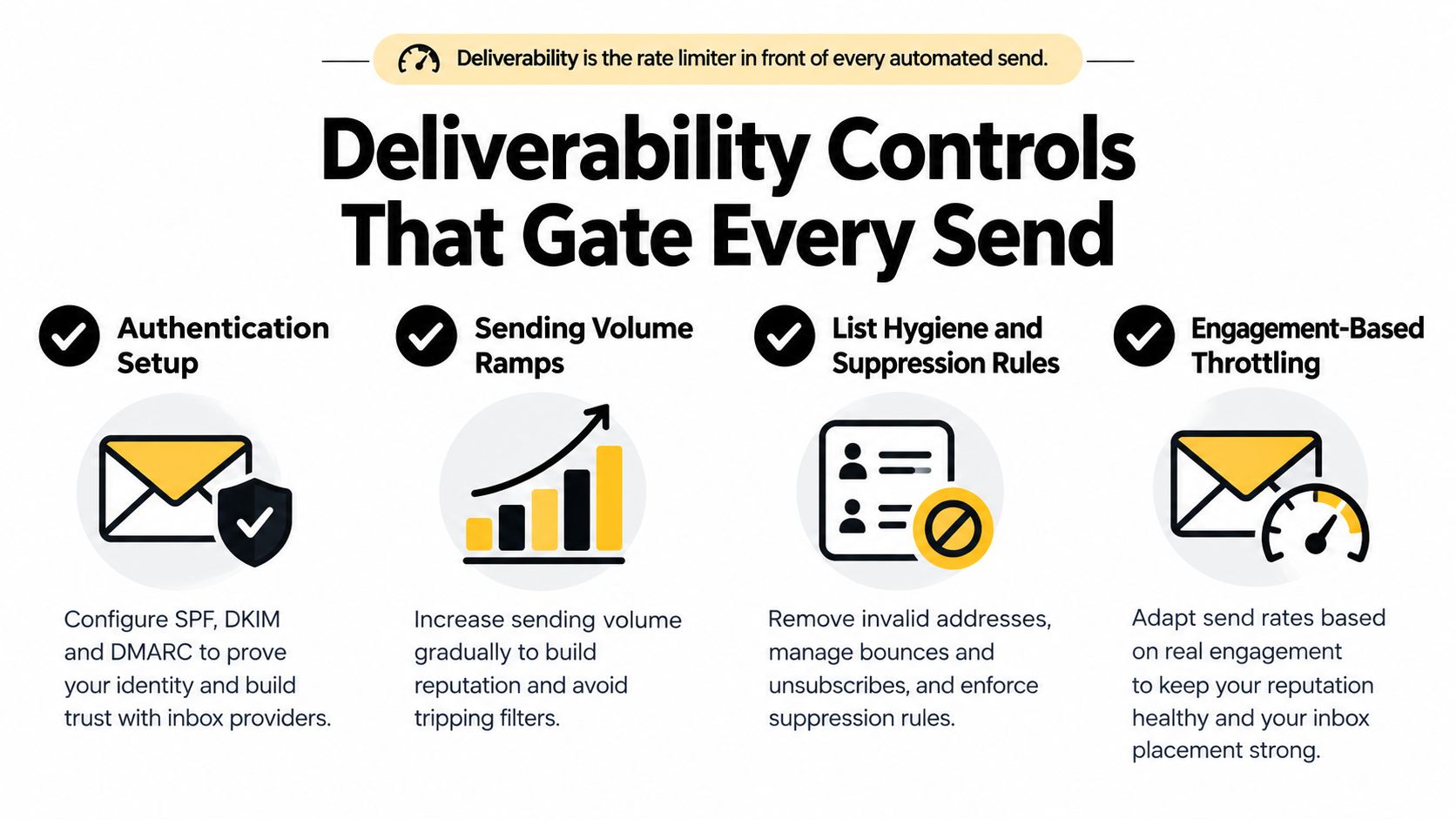
Deliverability should sit in front of every automated send like a gatekeeper. If the message can't pass the gate, it doesn't go out. That's how you protect sender reputation, and sender reputation is what keeps the whole machine working.
Four controls I'd never ship without
Authentication comes first. SPF, DKIM, and DMARC need to be in place before scale, not after complaints show up. That's basic hygiene, and it should be a firm requirement.
List hygiene is the second control. Remove hard bounces immediately, process unsubscribe requests globally, and never let one contact sit in two overlapping sequences. If you're working from imported lists, validate them before they ever reach the sending workflow.
Frequency caps matter just as much. A contact shouldn't be able to receive repeated asks from three different campaigns just because three teams own different parts of the funnel. Set cross-campaign limits, not just sequence-level limits.
The fourth control is complaint monitoring. Gmail requires bulk senders to authenticate, keep spam complaints below 0.3%, and provide easy unsubscribing, with enforcement ramping up since November 2025. That makes complaint rate a hard operational signal, not a vanity metric. MakeAutomation's deliverability guide is a useful technical companion if your team needs a refresher on the practical side.
If a domain is seeing a complaint spike, pause it. Don't “test one more send” to see if it recovers.
Troubleshoot the failures operators actually see
Sudden open-rate drops usually mean inbox placement changed or tracking got noisy. Rising spam-folder placement often traces back to poor list quality, repetitive content, or weak authentication. Bounce rates that climb after a list import usually mean the import was the problem, not the sequence.
A 2024 preregistered panel study found no significant day-of-week effect on overall follow-up response rates, although Friday and Saturday were less favorable when immediate response was the priority. That's a useful reminder not to overfit on calendar superstition. Schedule around recipient behavior, but don't pretend a magic weekday will save a broken system. The study summary also reinforces a deeper point, operational discipline beats folklore.
Measuring Incremental Revenue, Not Just Replies
Replies are useful, but they're not the finish line. If you credit follow-up automation for revenue it didn't create, you'll scale the wrong sequence and defend the wrong budget. Measurement has to isolate what the system caused.
Use a holdout group and clean denominators
The cleanest setup is a no-follow-up control group. Keep a portion of eligible contacts out of the automated sequence, then compare delivered messages, positive replies, meetings held, opportunities created, revenue won, unsubscribe rate, complaint rate, and time-to-response by segment. That's the only way to separate sequence impact from normal pipeline motion.
Don't measure on opens as your primary signal. Privacy features make them noisy, and they don't tell you whether a contact was qualified or ready. Measure against delivered messages instead, because that denominator tells you whether the system reached the inbox you intended to reach.
Separate positive intent from everything else
A reply isn't always a win. Auto-replies, objections, and unsubscribes all count as responses in a raw dashboard, but only one of those usually moves revenue. Your reporting needs explicit categories for positive replies, negative replies, and automation-generated replies so you don't inflate your own performance.
The other trap is attribution. A lead may reply after the third follow-up, but the first message, the second message, or a rep call may have driven the action. Holdout testing won't make attribution perfect, but it will keep you honest about incrementality.
Track the outcome the CFO cares about, not the metric the inbox makes easiest to count.
A 30-Day Rollout Plan and the Mistakes to Avoid
Start with the plumbing. Week one is authentication, suppression rules, and data cleanup. Week two is sequence design, branching logic, and send limits across all campaigns.
Week three is the pilot. Launch on a small set of contacts with a holdout group and real instrumentation. Week four is review, and the review should decide what to pause, what to keep, and what to hand to a human. If your team needs a reference for how these systems connect to downstream workflows, Cyndra's AI agent integration article is a useful companion.
The mistakes are consistent across stacks:
- Continuing after a reply: the sequence should stop the moment a human responds.
- Sending near-identical reminders: repetition raises fatigue and lowers trust.
- Using unverified lists: bad data turns automation into a bounce generator.
- Optimizing for opens: opens don't equal revenue.
- Ignoring negative intent: objections and unsubscribes need suppression logic.
- Skipping rate limits: overlapping sequences create collisions.
- Never reviewing complaint patterns: sender reputation degrades over time.
The goal isn't more emails. The goal is the right next message at the right moment, with a system that knows when not to send one at all.
Cyndra builds governed AI workflows that handle follow-up, monitor replies, and update CRM stages without turning your inbox into a spam engine. If you want email follow-up automation that respects deliverability, stops on a reply, and hands high-value conversations to humans, visit Cyndra and see how it fits your revenue stack.