 CYNDRA
Workflow automation is software executing a defined sequence of business activities, such as routing requests, transferring data, requesting approvals, sending notifications, or updating records, according to preset rules and triggers. Its real value comes from standardizing a process that connects multiple steps and systems, not from automating an isolated task.
The popular advice to “pick a tool and connect your apps” gets the order wrong. A fast automation built on unclear rules or unreliable data can move mistakes across systems faster than a person could. Define the process first, decide how to handle exceptions, and only then choose the technology.
That distinction matters as automation becomes a normal operating model rather than a niche IT project. One industry summary reports that approximately 60% of businesses have implemented automation in at least one workflow, while McKinsey research cited in the same reporting found that 66% of organizations had experimented with business-process automation in at least one function (workflow automation statistics). Adoption alone, however, doesn't prove that a workflow works well. The useful question is whether the automated process produces a reliable business outcome with clear ownership and enough visibility to improve it.
Table of Contents
- A Working Definition That Goes Beyond the Buzzwords
- How Workflow Automation Differs from RPA, BPM, and Orchestration
- The Anatomy of a Production-Ready Automated Workflow
- Cross-Functional Use Cases That Actually Move the Numbers
- Measuring Whether Automation Is Actually Working
- An Implementation Roadmap That Puts Process First
- Build Versus Buy Without the Vendor Marketing
- Common Pitfalls and the Signals That Predict Them
A Working Definition That Goes Beyond the Buzzwords
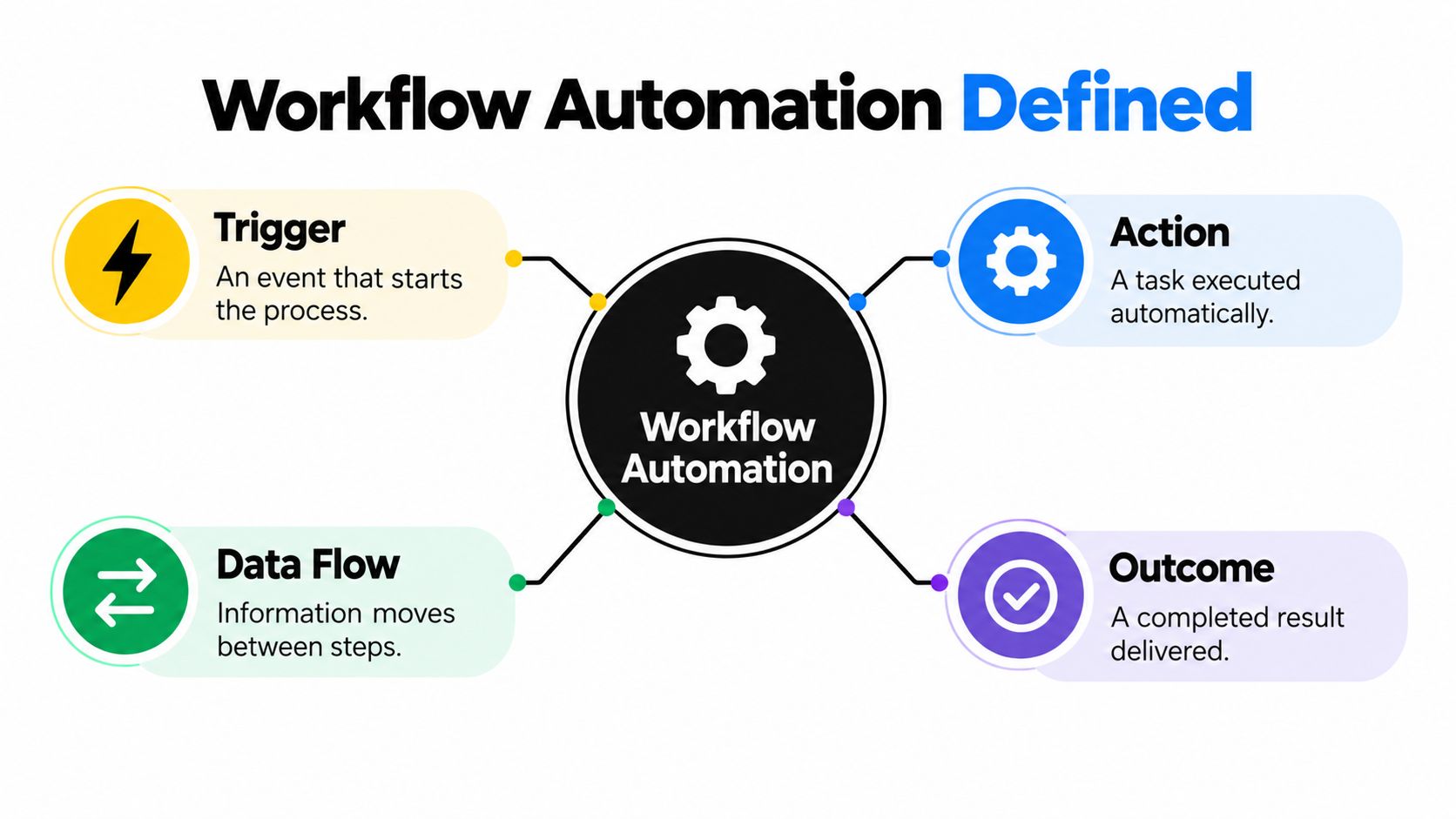
Start with the process, not the software. Workflow automation is the use of software to execute a defined sequence of business activities according to preset rules and triggers. Those activities might include routing a request, moving data between applications, collecting an approval, sending a notification, or updating a record.
The key word is sequence. A macro can automate an isolated task; a workflow connects steps, people, applications, and decision points into a repeatable process. That process should be clear enough for a person to explain before anyone configures a tool.
Follow the process from start to finish
Consider a new lead submitted through a web form. The workflow can enrich the lead's details, assign it to a salesperson based on territory or account rules, create a CRM record, send an acknowledgment, and alert a manager if nobody responds by the agreed deadline. Each step has a trigger, an owner or system, and a defined result.
That's more useful than saying “we automated lead entry.” The process makes handoffs visible and exposes the decisions that need to be consistent. If a lead lacks a required field, the workflow should have a known route for correction rather than creating a partial record.
Standardization is the strategic payoff. A well-designed workflow applies the same rules each time, records what happened, reduces unnecessary handoffs, and leaves people to manage exceptions, judgment, and relationships. Teams looking to reduce errors through operations automation can use that principle as a practical starting point: make the work repeatable and observable before trying to make it faster.
The right unit of automation is therefore the end-to-end process, not a collection of disconnected actions. Tool selection follows process clarity. If no one can agree on what should happen when a request is incomplete, an automation platform won't settle the question for you.
How Workflow Automation Differs from RPA, BPM, and Orchestration
Buying an automation tool before settling the process is a reliable way to automate confusion. These terms describe different layers of an automation program, and treating them as interchangeable produces vague requirements and demos that miss the actual constraint.
A workflow defines the sequence of work, its rules, owners, and outcomes. RPA, or robotic process automation, uses software to interact with screens like a person, often when a legacy system lacks a suitable integration. It can bridge that gap, but a changed interface can break the automation. BPM, or business-process management, covers how teams model, execute, and monitor business processes. A BPMN 2.0 model represents activities, events, and gateways in a format intended for business teams and execution systems (BPMN workflow model).
Orchestration coordinates work across applications, APIs, and human approvals while tracking process state. The workflow defines what should happen; orchestration coordinates how the work moves between the tools and people involved. For a closer look at the coordination layer, see this guide to workflow orchestration.
| Layer | Best fit when | Typical limitation |
|---|---|---|
| Workflow | The team needs to define sequence, rules, owners, and outcomes | A process description alone doesn't execute work |
| RPA | A repetitive task must use a screen, especially in a legacy tool without a useful API | Interface changes can break the automation |
| BPM | A process needs formal modeling, governance, and monitoring | Modeling can add overhead when the process is simple |
| Orchestration | A process must coordinate applications, APIs, and human tasks | Integration and exception handling need clear ownership |
Choose by constraint, not by label
Start with the process and the systems it touches. If a finance system exposes work only through its interface, RPA may be a practical bridge. If a regulated process needs defined control points and a formal model, BPM techniques help specify and govern it. When applications offer APIs and work crosses departments, orchestration can coordinate the steps without depending on screen clicks.
These approaches can coexist in one process: BPM techniques can model it, an orchestration engine can coordinate it, and RPA can handle one system with no usable API. Each layer brings a trade-off, so name the constraint before choosing a tool. Ask where the process breaks, what information must be ready at each handoff, and who owns exceptions. Tool labels won't answer those questions, and a higher count of automated actions won't prove the process works. Measure whether work reaches the intended outcome, with reliable data and exceptions handled, rather than counting activity alone.
The Anatomy of a Production-Ready Automated Workflow
A demo can run on a trigger and a few actions. Production automation needs a designed process, dependable data, clear decision rules, and records that show what happened at every handoff. Start by deciding how work should move. Choose tools only after the process and its information requirements are clear.
A useful technical model separates process logic from the systems that perform each step. In a BPMN-style design, activities, events, and gateways define the process structure. Execution details connect those activities to interfaces, data, rules, and resources. With those pieces defined, a workflow can route a qualified lead, call a CRM API, request approval, and send an email while tracking its current state.
Make every transition observable
A notification can say a workflow succeeded while the downstream record remains unchanged. That gap makes activity a poor measure of performance. Keep durable records of meaningful state changes so the team can see whether an item was received, validated, approved, completed, failed, or escalated.
For each important transition, record the timestamp, actor or system, correlation ID, and exception reason. Process mining uses event logs to reconstruct how work moved through operational systems, revealing rework, bottlenecks, and deviations. Its findings depend on the quality of the information the workflow captures (process-mining implementation guidance).
Operations rule: If a workflow can fail without leaving a trace, it isn't production-ready.
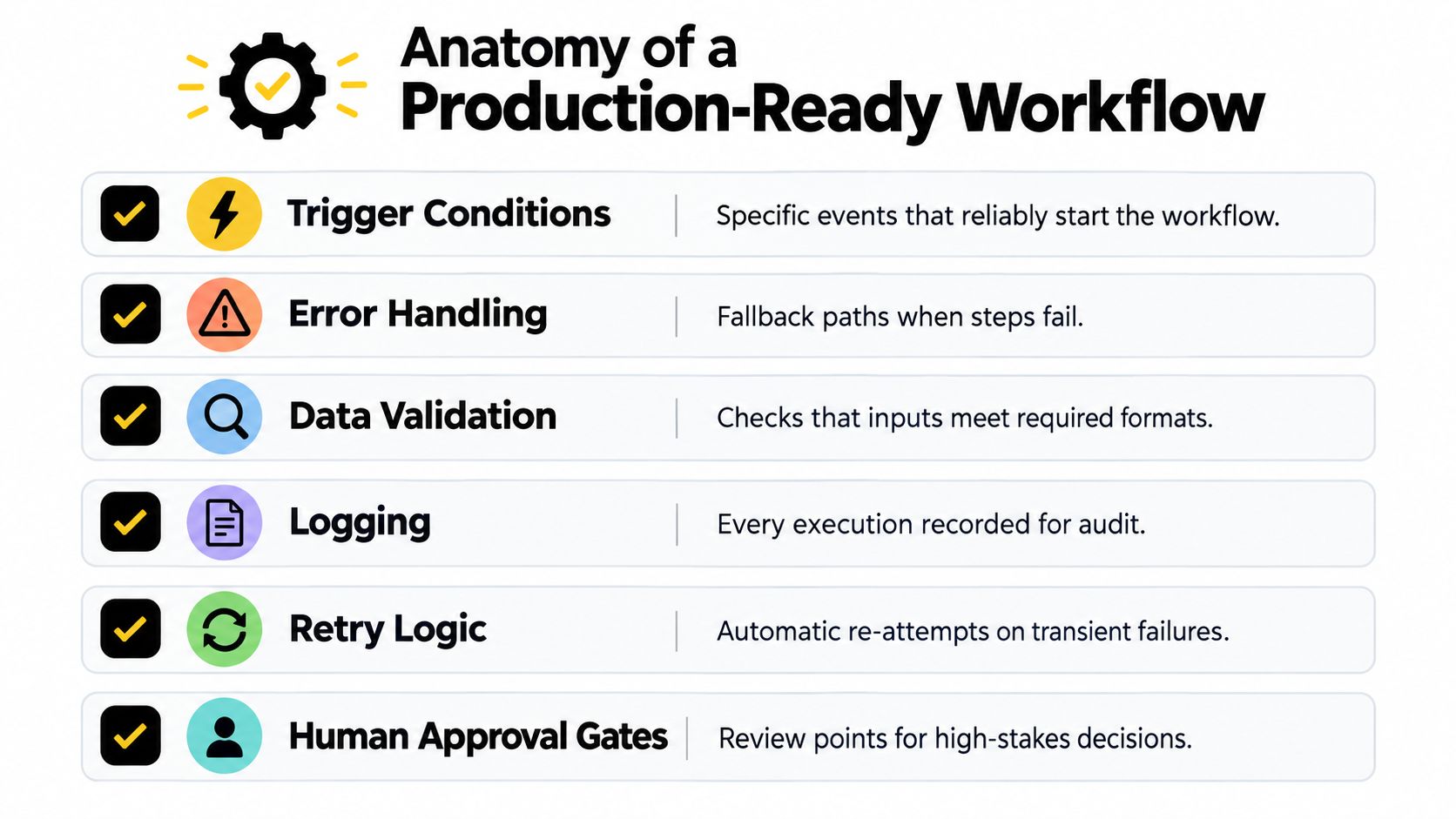
Before launch, check that the workflow has:
- Reliable triggers: Work starts only when the required conditions are met.
- Validated inputs: Checks catch missing fields and incompatible formats before downstream actions.
- Defined rules: Each decision point has a documented route, including a path for cases the rules don't cover.
- Failure paths: Transient problems can be retried, and unresolved failures go to a named owner.
- State and audit records: Each meaningful transition can be traced to a system or person.
- Human approval gates: Consequential decisions have review points and clear escalation paths.
Payroll automation is a good test of process and data readiness. Restaurant tip calculations depend on business rules being clear before a workflow handles them. Use this guide to tip calculations for restaurants to clarify the rules before automating those steps.
The video below shows workflow automation in practice.

Cross-Functional Use Cases That Actually Move the Numbers
The same pattern works across departments: capture an event, apply a decision, act in the right systems, and record the result. The details change, but good automation doesn't mean removing every person from the process. It means assigning people the decisions that need them.

Five workflows, one operating pattern
A sales workflow can start when a prospect submits a form. It enriches the lead, checks territory and account ownership, creates or updates a CRM record, and prepares outreach. A salesperson reviews the message or handles an unusual account before the workflow books a meeting or flags a delayed response.
In customer support, a new ticket can be categorized and matched to account details. The system handles routine questions using approved material, then sends ambiguous, sensitive, or unresolved cases to a person with the conversation history attached. The point isn't to deflect every customer. It's to give an agent the right context when human judgment matters.
Operations teams can reconcile transactions across a store platform such as Shopify, advertising systems, and finance tools. The workflow matches records, flags discrepancies for review, and logs the resolution. Finance keeps control over exceptions instead of manually checking every routine transaction.
Marketing can connect a campaign brief to content production and approval. The workflow can prepare brand-consistent drafts, route them for review, and track publication status. Recruiting can similarly move an application through screening, recruiter review, and interview scheduling, while keeping people responsible for consequential candidate decisions.
A useful way to assess each candidate process is to ask what starts it, which systems need to act, where a person must approve or intervene, and what completed work looks like. For more scenarios to adapt, browse these workflow automation examples.
Don't count a workflow as successful just because it connects applications. A sales flow should support a qualified handoff; support automation should resolve appropriate requests without hiding unresolved ones; reconciliation should surface discrepancies clearly. Define the outcome before deployment, then measure the result against the existing process.
Measuring Whether Automation Is Actually Working
Automation can make a workflow look busy while leaving the result unchanged. A faster process is only an improvement when it delivers the intended outcome without adding hidden review, exceptions, or harm to customer experience. Measure the work completed, not the actions a tool records.
A Federal Reserve CFO survey of 603 executives reported a 1.8% increase in output per worker attributable to AI use in 2025. Respondents also projected routine clerical employment would decline by 0.76% in 2026 and 2.19% by 2028. Those employment figures are forecasts, not observed outcomes (Federal Reserve CFO survey commentary).
The International Labour Organization review summarized in the available evidence found that more than 80% of firms reporting active AI use reported no employment or productivity impact over the prior three years. That is a useful warning against treating deployment as proof of value. A workflow can run exactly as configured and still fail because the process, data, or outcome was poorly defined.
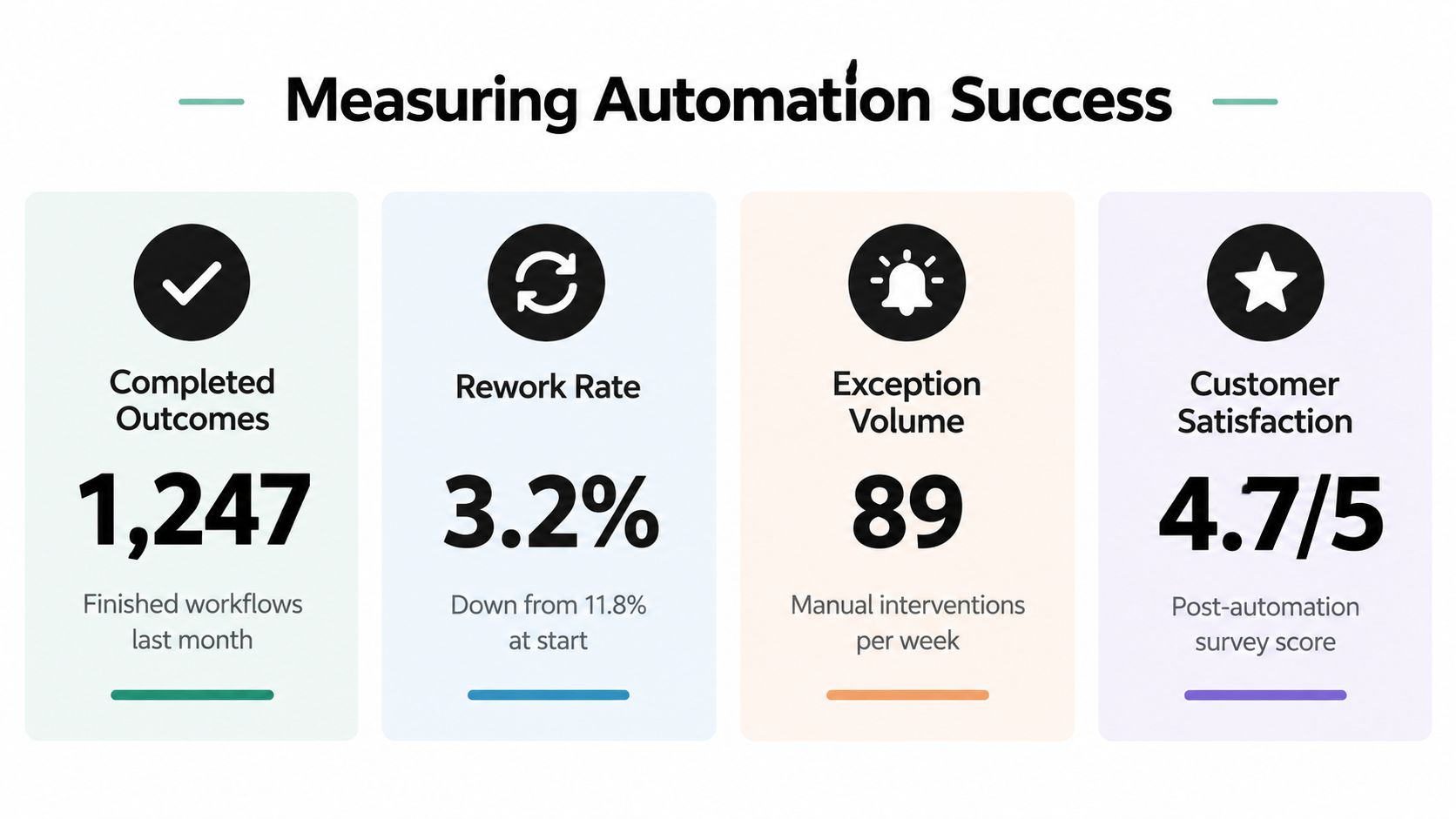
Record the existing process before launch, then compare results after deployment. The scorecard should reflect the workflow's purpose and expose the work automation may shift out of sight:
- Completed outcomes: Did the process reach its intended result, such as an approved invoice or answered support request?
- Rework and exceptions: How often did staff need to correct an error, repeat a step, or rescue the workflow?
- Customer and employee experience: Did the interaction become clearer, and did the process make work more manageable?
- Control failures: Did an approval get bypassed, a record become inaccurate, or an action go untracked?
- Business impact: Did the workflow improve revenue per employee or another outcome the team can substantiate?
Pair workflow-level indicators with broader operational efficiency metrics, but do not mistake a fuller dashboard for better evidence. Review the results regularly and make a decision: expand when outcomes and controls improve, revise the design when exceptions expose a flaw, or stop when the workflow shifts labor without producing worthwhile results. Count oversight and maintenance as costs. Invisible labor is still labor.
An Implementation Roadmap That Puts Process First
Software does not resolve disagreement about how work should flow. It makes those disagreements run faster. Define the process, data rules, and accountable owner before choosing or configuring automation. The cited operations survey found that integration complexity was the leading reason technology investments missed expected results for 59% of respondents. Poor data quality had affected value realization for 60%, while only 51% said their organization had established a clean, structured data foundation before scaling digital initiatives (operations survey findings). Those findings point to a practical priority: fix the conditions around the workflow before increasing its speed.
Start with a real case, not an idealized process map. Follow a sales handoff, invoice approval, support escalation, or recruiting step from trigger to outcome. Ask the people doing the work where information goes missing, who resolves exceptions, and which approvals are required. Assign one person ownership of the process and its decisions.
Then make the data usable. Set consistent field definitions, identify the system of record, resolve duplicate customer identities, and document who may approve each action. Establish a baseline for cycle time, errors, rework, and the business result the workflow is meant to improve. Without that starting point, a busy automation can look successful while changing little.
Choose a bounded process with repeatable rules and failures that staff can detect and contain. Instrument a pilot to record meaningful state changes, define acceptable errors, and give a named owner authority to pause it. Expand only when the process meets its criteria. If exceptions expose a design flaw, fix the design first.
The rollout pace should follow readiness, not a calendar. Mapping and data cleanup may come before a pilot; scaling comes only after the pilot demonstrates that the workflow works under real conditions. A fixed schedule is a poor substitute for evidence.
Use deterministic automation when rules are stable and repeatable. AI-enabled automation can handle less structured inputs, but it needs evaluation, confidence thresholds, human escalation, audit logs, and a rollback plan. If the team cannot explain what happens when the system is uncertain, keep that decision with a person.
Build Versus Buy Without the Vendor Marketing
Choose a tool only after you know what the workflow must do and what your team can maintain. The decision turns on how distinct the process is, how strongly it must connect to existing systems, and what your organization can operate safely over time.
Packaged automation platforms suit routine processes where quick setup, familiar integrations, and predictable upkeep matter more than differentiation. Custom development fits better when the process creates a competitive advantage, handles sensitive data, or relies on connections that packaged tools cannot support reliably. A custom build also means your team owns its maintenance. Count that work before you commit.
Compare the full operating cost
Evaluate the operating fit, not the vendor demo:
- Process uniqueness: Is this a standard business task, or does the workflow reflect how your company competes?
- Integration depth: Can the option handle your actual systems, data rules, and failure paths?
- Compliance and residency: Does it meet your security, audit, and data-handling requirements?
- Time to usable results: What configuration, testing, and operational changes stand between a demo and dependable use?
- Ownership and maintenance: Who updates rules, monitors failures, and adapts the workflow when systems or responsibilities change?
- Total cost of ownership: Count implementation, licenses, integration work, support, and staff time spent reviewing exceptions.
A self-serve tool makes sense when the process is straightforward and an internal owner can keep it working. An external partner can be a better choice when you need the workflow designed and integrated but do not plan to hire a dedicated team. Cyndra, for example, offers AI coaching and development, including custom agents connected to business tools for workflows across sales, support, operations, marketing, and recruiting.
Use your own failure scenarios as the buying test. Ask vendors to show what happens when required data is missing, an API fails, or an approval is denied. If they can only demonstrate the happy path, you have seen a presentation, not proof that the product can run your process. Choose the option that fits the work and that someone on your team can support after launch.
Common Pitfalls and the Signals That Predict Them
Automation projects often degrade. The workflow still runs, but employees work around it, managers stop trusting the dashboard, and exceptions pile up in inboxes. Watch what people do when the system's rules meet the messy process they run.
The first trap is automating a broken process. If teams disagree about approval authority or customer identity, software won't resolve that ambiguity. It will apply whichever rule was configured, sometimes consistently and incorrectly.
Catch degradation before it becomes technical debt
- Invisible failures: A record didn't update, but the workflow reported a completed run. Watch for mismatches between system status and real outcomes; improve event logging and reconciliation.
- Ownership gaps: Sales, finance, and operations each assume another team handles exceptions. Watch for unresolved cases with no clear owner; assign a named process owner and an escalation route.
- Alert fatigue: Notifications arrive for routine events as well as failures. Watch whether people stop responding; route alerts by severity and send only actionable messages.
- Vendor lock-in: Critical processes depend on proprietary connectors or undocumented configuration. Watch for workflows nobody can explain or export; document dependencies and keep a recovery plan.
- AI overreach: A model takes consequential action without a clear confidence threshold or human review. Watch for rising overrides and corrections; narrow its authority and preserve a human decision point.
A rising exception rate, flat time-to-resolution, frequent owner changes, and increasing manual overrides all deserve investigation. Don't assume they're temporary noise. Find out whether the process changed, the data deteriorated, an integration broke, or the automation was given a decision it can't handle reliably.
The standard isn't “automated.” It's dependable, measurable, and owned. The question isn't whether to automate, but how to build the process discipline that makes automation compound rather than corrode.
Cyndra works with teams to turn real business processes into AI-powered workflows connected to their existing tools, with implementation and ongoing management. If you're ready to map a process, build the right controls, and test whether automation delivers a meaningful outcome, visit Cyndra.