 CYNDRA
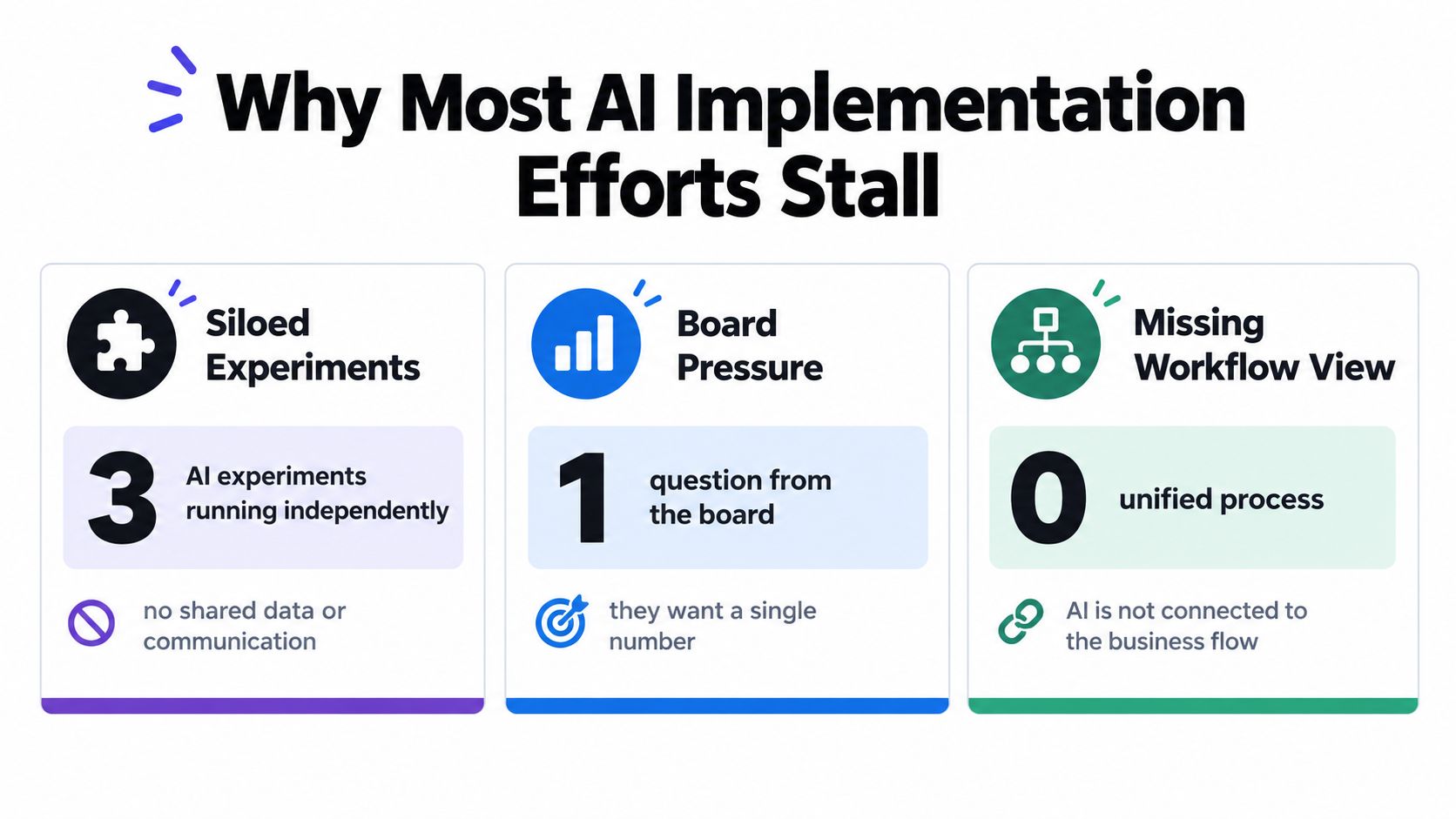
You've got three AI experiments running at once. Sales is drafting outreach in one tool, support is testing a chatbot in another, and someone in operations built a spreadsheet agent that only they understand. None of them share data, none has a clear owner, and your board wants one number that proves it's working.
That's where most operators start. The AI implementation process that survives this moment isn't about picking a better model. It's about redesigning one workflow properly, wiring it to real systems, gating it with real tests, and running it like an employee after launch.
Table of Contents
- Why Most AI Implementation Efforts Stall
- Discovery and Workflow Mapping Before Any Code
- Designing the Agent, Data, and Tool Integrations
- Training, Evaluation, and Pre-Launch Testing
- Deployment, Monitoring, and Day-Two Operations
- Build In-House, Buy a Platform, or Partner With an Implementation Team
- Governance, Trust, and the First 90 Days After Go-Live
Why Most AI Implementation Efforts Stall
Many teams treat implementation as a shopping problem. They compare models, run demos, buy seats, and then wonder why usage does not turn into margin, speed, or capacity. A demo proves a model can answer. It does not prove your data is clean, your permissions are safe, or your team will trust the output on a busy Tuesday.
The adoption numbers hide that gap. Stanford University's 2025 AI Index reported that 78% of organizations used AI in at least one business function in 2024, up from 55% in 2023, according to Stanford's 2025 AI Index economy chapter. Generative AI use in at least one function rose from 33% to 71% in the same period in that report. That's real acceleration, but use somewhere in the business isn't the same as a redesigned operation.
Adoption Is Not Scale
Scale is the harder milestone. McKinsey's 2025 global survey found 88% of organizations regularly use AI in at least one function, but only about one-third report scaling programs across the organization, as detailed in McKinsey's State of AI 2025 findings. Only 7% in that survey said AI had been fully scaled across the enterprise. The bottleneck sits between pilot and production, not between awareness and first login.
If you can't name the workflow owner, the baseline KPI, and the escalation path, you don't have an implementation. You have access.
The practical question is how you cross that gap without creating shadow tools and security debt. A useful way to frame the work is as a from pilot to production AI strategy, where each use case earns wider permissions only after it proves quality, cost control, and adoption in a constrained slice of real work. That framing forces hard choices early. Which workflow matters enough to redesign, who owns failures, and what evidence would make you stop.
What You're Actually Buying
You're not buying intelligence in the abstract. You're buying repeatable decisions inside a workflow, with data access, tool actions, human handoffs, and an audit trail. When teams optimize model benchmarks instead of those operating pieces, pilots stall for predictable reasons, disconnected systems, unclear ownership, weak data, and no baseline to judge value against. Fix the operating layer first, and model choice becomes a smaller, later decision.
Discovery and Workflow Mapping Before Any Code
Start by shadowing work, not writing prompts. Pick one workflow, watch it end to end, and write down every step, exception, approval, and system touch. You'll find the process rarely matches the SOP, and that gap is exactly where agents break.
A strong candidate has volume, repeatable decisions, and a measurable outcome. Tier-1 support resolution, sales outreach drafting, lead enrichment, and KPI dashboarding usually qualify because someone already tracks cycle time, error rate, or conversion. Ad-hoc research and one-off PDF parsing rarely repay the integration and governance effort.
Before you score anything, run a structured check of data, owners, and constraints using an AI readiness assessment for your workflows and systems. That check keeps you from selecting a use case your permissions, data quality, or team capacity can't support.
A One-Week Discovery Sequence
You can run this in five working days without a large team.
- Day one, baseline the workflow: Measure current cycle time, cost per task, rework rate, and backlog from existing tickets or CRM records.
- Day two, map decisions: List each decision, who makes it today, what information they use, and what happens when they're unsure.
- Day three, map exceptions: Collect the messy cases, refunds, angry customers, missing fields, duplicate accounts, policy conflicts.
- Day four, define rights: Decide what the agent can do alone, what needs approval, and what it must never do.
- Day five, write the brief: Produce one page with KPI, baseline, scope, data sources, owner, risks, and launch gate.
That brief is your contract with legal, IT, and the process owner. If you can't fit it on one page, the scope is probably too wide.
Workflow Scoring Sheet
| Dimension | What to measure | Strong signal |
|---|---|---|
| Volume | Tasks per week and peak load | Repetitive work your team dreads but must complete |
| Repeatability | Share of cases following known rules | Most cases use the same inputs and decision logic |
| Measurability | Baseline KPI availability | Cycle time, resolution, conversion, or cost already tracked |
| Data access | Source quality and permissions | Clean records in CRM, helpdesk, or warehouse |
| Risk | Cost of a wrong action | Errors are reversible or gated by human approval |
| Ownership | Named process owner | One person reviews failures and approves changes |
Decision Rights Come Before Automation
IBM Institute for Business Value research found only 37% of organizations had delivered the business value expected by senior leaders by the end of 2025, with processes, data, and unclear decision rights as central obstacles, according to IBM research on AI process redesign. That finding matches field experience. Automating a workflow with three unnecessary approvals preserves waste at machine speed. Remove steps first, then decide which remaining decisions the agent owns, which stay human, and what confidence threshold triggers escalation.
Designing the Agent, Data, and Tool Integrations
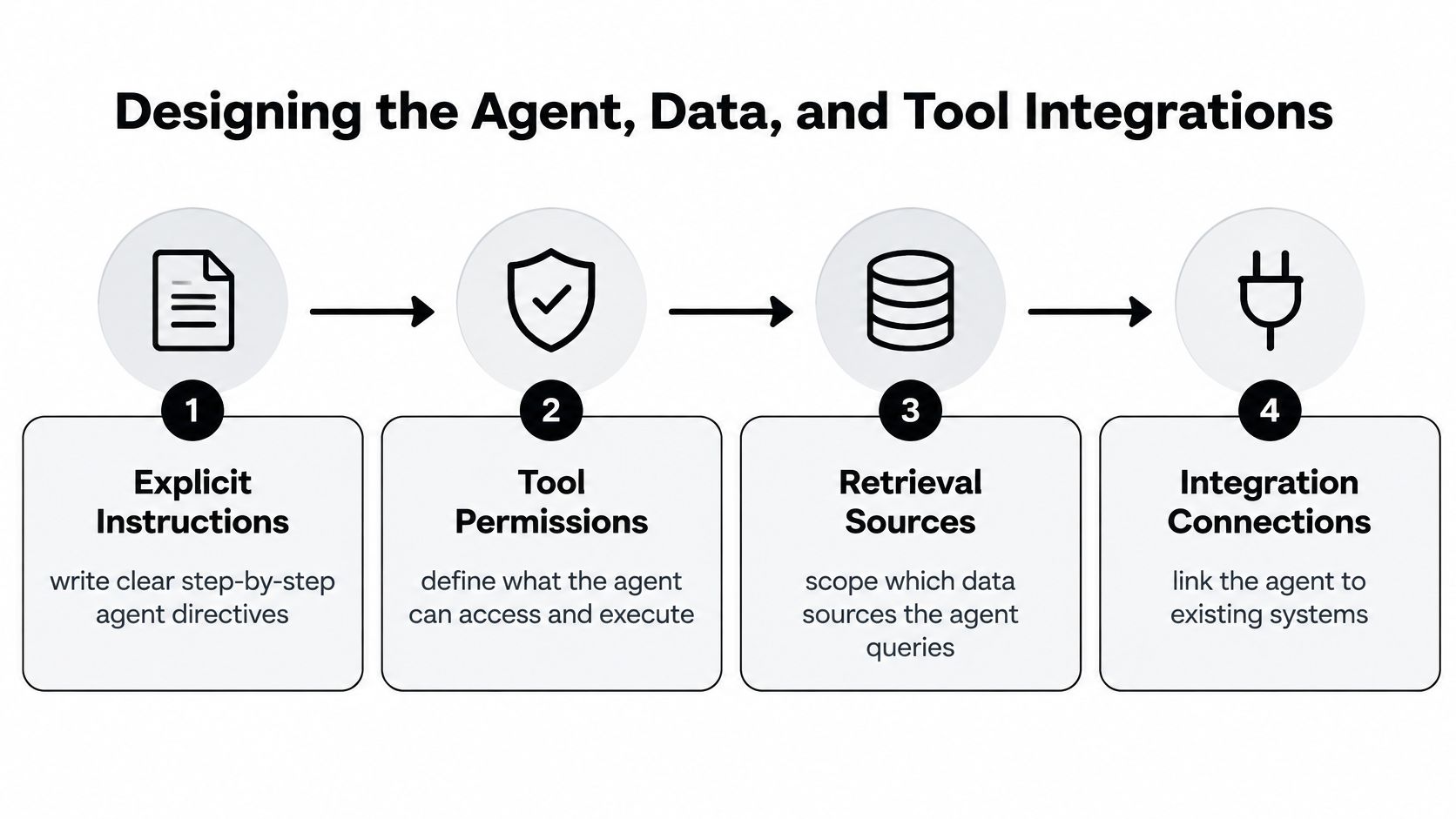
Design starts with a plain-language job description for the agent. Write what it does, in what order, using which sources, and what a finished task looks like. Vague instructions produce vague behavior, especially when the agent can call tools.
The diagram below shows the four design pieces you need to lock before build work begins.
Instructions, Retrieval, and Grounding
Give the agent source-grounded retrieval, not open-ended memory. For support, that means approved help center articles, policy documents, and resolved ticket patterns, each with ownership and review dates. For sales, it means CRM records, product documentation, and pricing rules, not generic web search results the team can't verify.
Write instructions as operating rules. State the required output format, the fields that must be present, the tone constraints, and the exact condition for escalation. If the agent produces structured output, such as a CRM update or a reconciliation entry, add deterministic validation so malformed records fail loudly instead of writing bad data.
Tool Permissions and System Connections
Connect only the systems the workflow touches. A commerce operations agent might read orders from Shopify, check customer history in HubSpot or Salesforce, pull spend from ad platforms, and reconcile against finance tools. A recruiting agent might read an ATS, draft outreach, and schedule through calendar tools. Each connection is a risk surface, so scope it.
- Least-privilege access: Start read-only, then grant write access per action after testing proves it's safe.
- Separate credentials: Give the agent its own service account so logs show agent actions distinctly from human actions.
- Approval gates: Require human approval for irreversible actions, refunds, sends to customers, payments, record deletions.
- Scoped retrieval: Limit each role to the documents and tables its workflow needs, nothing broader.
IBM's 2024 survey of companies with more than 1,000 employees found 42% had actively deployed AI and 40% were exploring or experimenting, with limited skills cited by 33%, data complexity by 25%, and integration and scaling difficulty by 22%, as reported in IBM's enterprise AI adoption release. Those barriers explain why integration design matters more than model novelty. Your agent is only as useful as the data it can legally and reliably reach.
The short walkthrough below is useful for seeing how instruction design and tool boundaries fit together in practice.

Augment the Stack or Replace Part of It
Sometimes the right move is augmenting existing SaaS. Sometimes you're paying for a bloated platform when a focused internal tool built around the agent would be simpler to govern. Decide based on integration cost and data control, not novelty. If the existing system has clean APIs and your team trusts it, augment it. If staff work around it daily and exports are painful, a bespoke internal system may be the cleaner foundation, provided you budget for maintenance and ownership.
End design with a spec an engineer can quote against. It should list instructions, sources, tools, permissions, evaluation criteria, logging requirements, and explicit non-goals.
Training, Evaluation, and Pre-Launch Testing
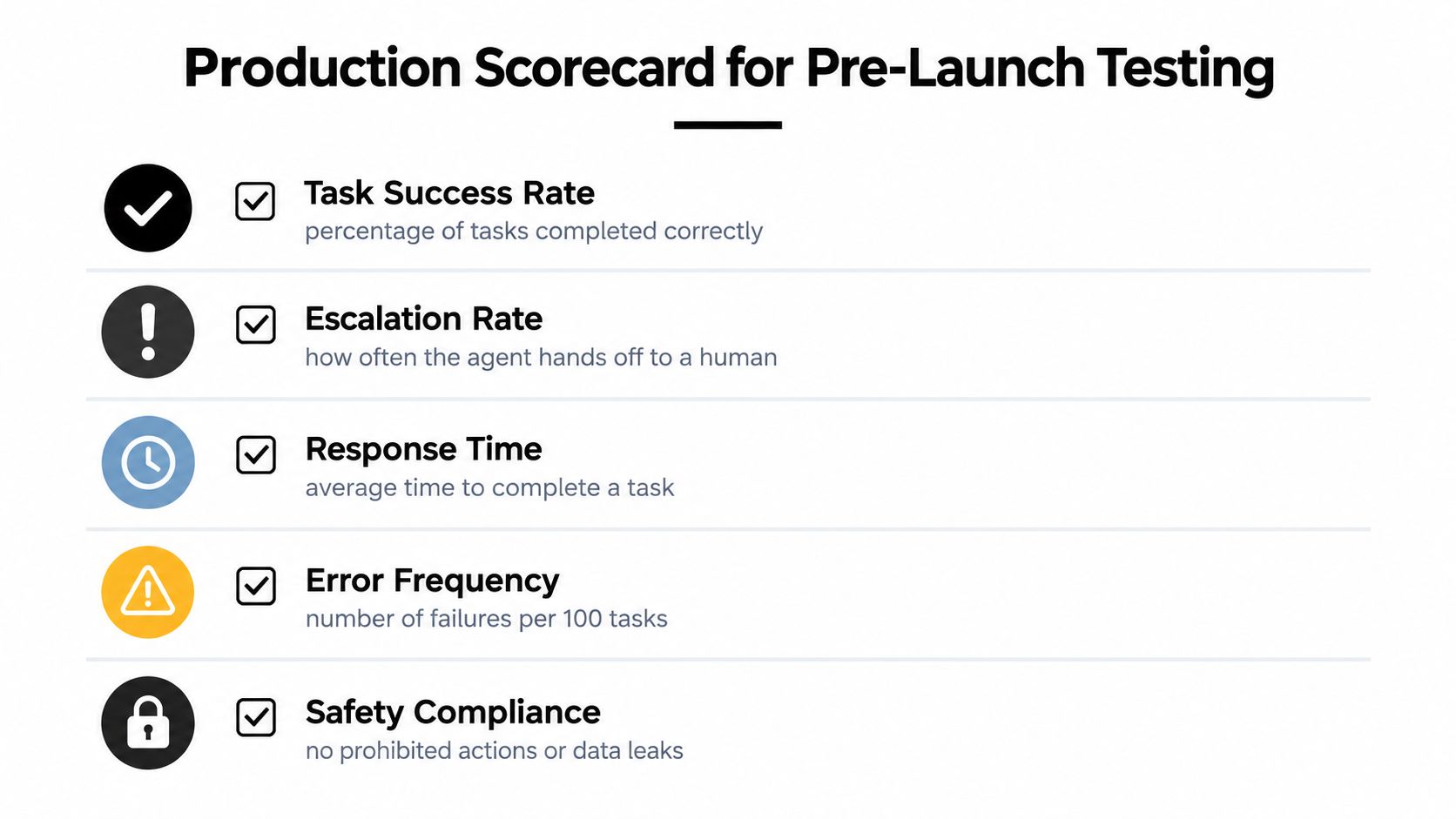
No agent should touch a real customer or transaction because it sounded good in a demo. It earns production access by clearing a scorecard tied to the KPI you chose in discovery. That gate protects customers and gives your team a shared definition of ready.
Build your evaluation set from real historical work. Pull resolved tickets, call transcripts, outreach threads, or completed operational tasks, then label the correct outcome and acceptable variations. Include easy cases, edge cases, and cases where the right answer is to escalate.
Practical guidance on building those examples and feedback loops is covered in this overview of training AI agents on real company workflows. The core principle is simple. Train and test on the work as it arrives, including typos, missing context, and contradictory records.
The Production Scorecard
Measure the whole task, not just answer quality.
- Task success rate: Share of tasks completed correctly without human rescue.
- Escalation rate: How often the agent hands off, and whether those handoffs were appropriate.
- Factual-error rate: Incorrect claims, wrong records, or invented details in completed work.
- Latency: Median and p95 time to completion, because slow agents get bypassed.
- Cost per completed task: Model, tool, and infrastructure cost divided by successful outcomes.
- Override frequency: How often humans reverse the agent, a direct trust signal.
- Business impact: Movement in the discovery KPI, resolution time, conversion, backlog, or cost.
Set thresholds before you test. If you set them after seeing results, you'll rationalize weak performance under launch pressure.
Gating rule: A failed threshold isn't a discussion topic for launch day. It's a reason to narrow scope, fix data, or keep the agent in shadow mode.
Red-Teaming and Rollback Triggers
Test how the agent fails, not only how it succeeds. Run prompt injection attempts where a customer message tries to override instructions, data leakage tests where users ask for records they shouldn't see, incorrect tool call scenarios, and adversarial edge cases drawn from your exception list. Structured outputs need schema checks, and tool calls need argument validation before execution.
Define rollback triggers in advance. If error rate, escalation rate, cost per task, or override frequency crosses a preset limit during canary release, traffic returns to the human process automatically. Your team should know who can pull that lever, how customers in flight are handled, and what evidence is required before a second launch attempt.
Deployment, Monitoring, and Day-Two Operations
Launch to a slice, not the whole operation. A canary release might cover one support queue, one sales segment, or internal users first, with the existing human process running in parallel. You compare outcomes on live work while blast radius stays small.
On day two, the operations lead's job changes. Instead of asking whether the agent is live, they review yesterday's failures, check escalations for patterns, and decide whether an instruction, a retrieval source, or a permission needs to change. That weekly rhythm is where value compounds or decays.

What the First 30 Days Should Look Like
Week one is observation. The owner reviews every escalation and a sample of successes, because silent wrong answers matter more than loud failures. Staff get a simple feedback path inside the tools they already use, not a separate form they'll ignore.
Weeks two and three are correction. You'll tighten instructions where the agent misread policy, add missing sources, and remove permissions that proved unnecessary. Each change goes through the same evaluation set before release, so a fix for one failure doesn't create another.
Week four is a decision point. Expand traffic, hold scope, or roll back based on the scorecard, not enthusiasm. The dashboard the owner watches should show task success, cost, latency, overrides, and the business KPI in one view.
Logging, Handoff, and Orchestration
Every agent action needs a structured log, inputs considered, sources retrieved, tools called, output produced, and any human approval. Without that trail, you can't audit a complaint, reproduce a failure, or prove compliance. For teams coordinating multiple agents or stricter controls, this breakdown of AI agent orchestration and security is a helpful reference on deployment patterns and guardrails.
Handoff to non-technical stakeholders means more than credentials. Deliver a runbook that covers common failures, escalation contacts, rollback steps, and change approval. Train staff on their actual workflow with the agent in it, what to check, when to override, and how to report a bad output. People adopt systems that make their day easier and that they know how to correct.
An agent without a named owner becomes a side tool within a quarter. Ownership is a person with a calendar slot, not a team name in a document.
Build In-House, Buy a Platform, or Partner With an Implementation Team
There's no universally right path, only a fit between your capacity, integration complexity, and compliance posture. The wrong choice usually comes from underestimating maintenance. Building the first version is the visible cost. Owning evaluations, permissions, updates, and user support is the recurring one.
Three Paths, Honest Trade-Offs
Build in-house when you have engineers, a process owner with time, and workflows specific enough that packaged tools would fight you. You gain control over data and architecture. You also own hiring, on-call, model changes, and every integration break. This path suits companies treating AI as core infrastructure with budget to staff it.
Buy a platform when your workflow is common, speed matters, and an internal owner can configure and govern it. Low-code tools can get a constrained agent live quickly. The trade-off is fit and dependency, you accept the vendor's data model, roadmap, and limits on customization. Check export options and audit logging before you commit, not after.
Partner with an implementation team when you need production discipline without building a full internal function first. Coverage of the MIT NANDA 2025 report described externally supported implementations deploying successfully at roughly 67% versus about 33% for internally developed projects, a directional comparison discussed in Forbes coverage of why AI pilots fail. Treat that as a signal about focus and experience, not a guarantee. A partner like Cyndra, which installs and manages AI employees inside existing tools, is one option in this category, and regional buyers may also compare providers such as those offering AI implementation for Canadian firms when local compliance or support matters.
Questions for Your CTO or Board Conversation
- Capacity: Who owns this after launch, by name, and what work do they stop doing?
- Complexity: How many systems, permission models, and exception paths are involved?
- Compliance: What data can the agent see, where is it processed, and who audits access?
- Exit: Can you export instructions, evaluation sets, logs, and data if you change approach?
- Economics: What is total cost per completed task, including human review and maintenance?
Pick the path you can operate well for a year. A modest agent that's monitored and trusted beats an ambitious build nobody maintains.
Governance, Trust, and the First 90 Days After Go-Live
Governance isn't a policy you sign before launch. It's the operating habit that keeps permissions current as people change roles, sources change, and the business changes its offers, policies, and tools. Trust follows that discipline.
Capgemini's 2025 research reported 71% of organizations could not fully trust autonomous AI agents for enterprise use and only 46% had governance policies, according to Capgemini's generative AI in organizations research. That distrust is rational when agents launch without owners or audits. Your counter is visible control, clear limits, honest communication with staff and customers, and proof that failures get fixed.
Use a practical structure for roles, reviews, and incident handling such as an AI agent governance framework for ongoing operations. Then put it on a calendar, because unwritten governance doesn't survive a busy quarter.
A 90-Day Cadence You Can Run
- Weekly failure review: Owner inspects escalations, overrides, and sampled successes, then approves instruction or source changes.
- Monthly access audit: Confirm agent credentials, tool permissions, and retrieval scope still match the workflow and current staff roles.
- Monthly evaluation refresh: Add new real cases, especially failures and changed policies, to the test set.
- Quarterly governance reset: Review risk, customer disclosure, retention, incident history, and whether scope should expand or shrink.
Tell customers when AI is materially involved in a decision or communication, and give them a human path. Tell staff what the agent owns, what it doesn't, and how their role changes, with training tied to real tasks rather than generic AI awareness sessions. Measure adoption by completed workflow outcomes, not logins or prompt counts.
By day 90 you should know whether the agent is part of your operating system or a tolerated side tool. If overrides stay high and staff work around it, don't expand. Fix trust, data, or scope first. The AI implementation process compounds when each release is narrower, better tested, and more clearly owned than the last.
If you're ready to move one stalled pilot into a governed, production workflow, Cyndra installs, trains, and manages AI employees inside the tools your team already uses, starting with workflow mapping and ending with monitored day-two operations. Visit Cyndra to book a consultation and scope your first implementation.