 CYNDRA
The popular advice on marketing automation in CRM is to connect your tools, build nurture sequences, and add AI scoring. I'd reverse that order. First, prove that your customer records support a defensible decision. Otherwise, you're paying software to execute mistakes faster, and asking sales to clean up afterward.
Table of Contents
- Why Most CRM Automation Quietly Fails
- What Marketing Automation in a CRM Actually Is
- Benefits and the KPIs That Actually Matter
- Core Workflows and High-ROI Use Cases
- How AI Agents Fit Inside the Same CRM
- Integration and Data-Quality Prerequisites
- Security, Consent, and Scaling Without Burning Trust
- A 30-60-90 Launch Checklist and Decision Points
Why Most CRM Automation Quietly Fails
My operating assumption is that a failed automation deserves a data audit before a tool replacement. A workflow can execute exactly as configured and still produce the wrong business outcome. Successful execution isn't evidence of a sound decision.
Consider a hypothetical demo request. Marketing creates a new lead, but sales already owns a contact with a different email address. The new record enters nurture while the existing record enters a sales sequence. Both teams followed their process, yet the prospect receives conflicting outreach.
A CRM interface can make the records look organized without making them decision-ready.
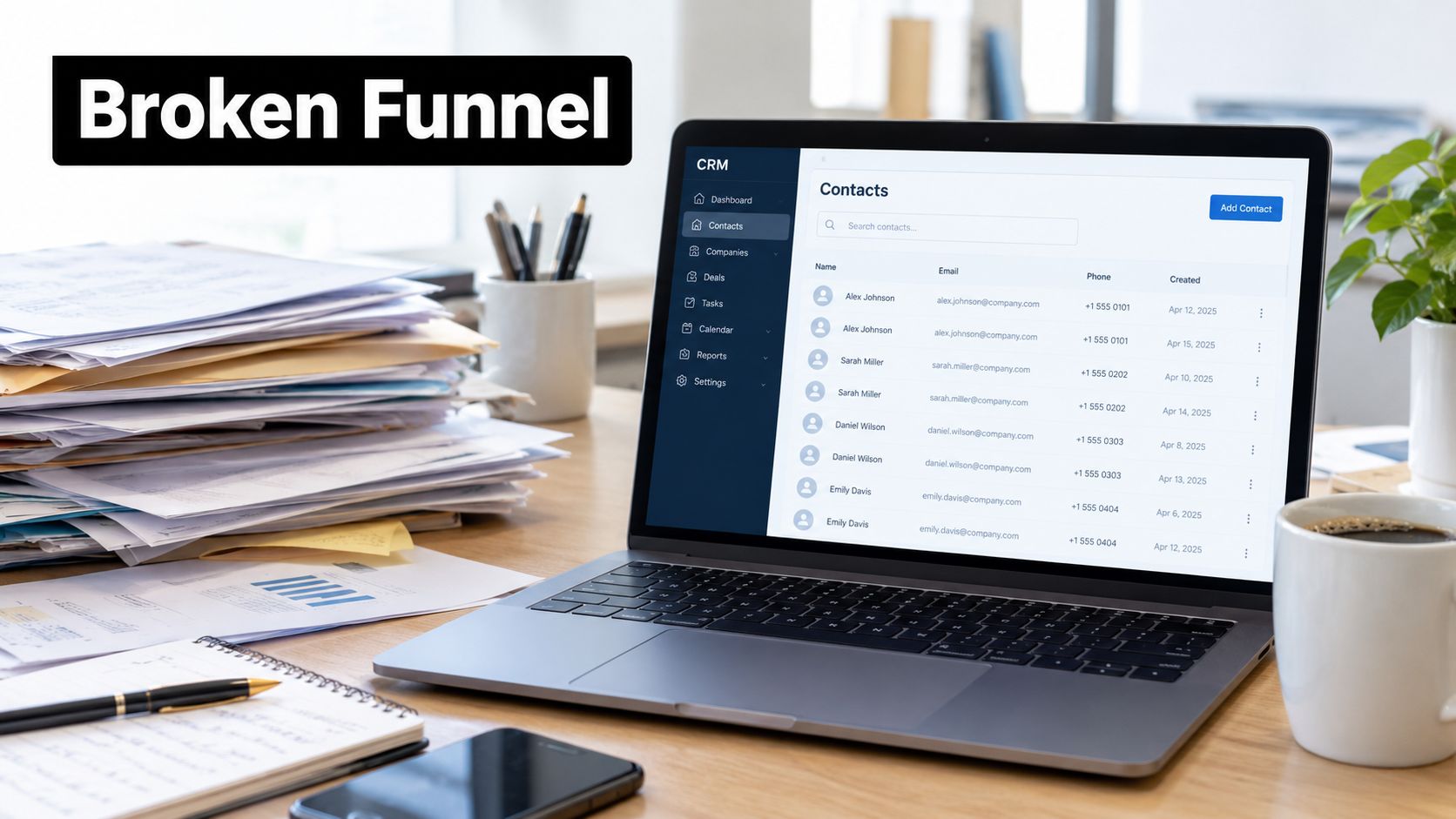
Execution isn't the same as correctness
Misrouted handoffs create a similar problem. If territory or ownership fields are wrong, faster assignment delivers the lead to the wrong person sooner. An AI agent researching that record will not repair the underlying ambiguity unless someone explicitly gives it a reliable resolution process.
I wouldn't approve an automation program because its dashboard shows more completed tasks or sent emails. Those measures answer whether the system ran. They don't answer whether the team should have taken those actions.
Pre-launch question: Would you let a machine send this email based on the data you have today?
Use that question at the record level, not just during a campaign review. A segment can look sensible in aggregate while containing contacts who shouldn't receive its message.
Diagnose the decision before the workflow
When reviewing a broken funnel, I'd separate the investigation into distinct questions:
- Identity: Did the workflow act on the correct person and account?
- Eligibility: Was that person eligible for the action?
- Responsibility: Did a named owner receive the handoff?
- Outcome: Can the team connect the action to a meaningful result?
Don't rebuild the sequence until you can answer those questions. Changing software may change the interface, but it won't settle disagreements about qualification, customer ownership, or which record is authoritative.
The practical objective isn't maximum automation. It's a CRM trustworthy enough that an automated action is worth taking.
What Marketing Automation in a CRM Actually Is
A CRM automation program is only as sound as the customer record behind each decision. Marketing automation in a CRM is a closed-loop decision system: behavioral inputs update customer records, rules determine which actions are appropriate, and the outcomes feed back into the next decision. The CRM should preserve the customer identity and lifecycle state teams agree to use.
A comparative review of CRM, marketing automation, and engagement platforms describes behavioral data, predictive analytics, omnichannel orchestration, and lifecycle measurement as mechanisms linking automation with lead generation, conversion, and retention. Use those responsibilities to assess the system, rather than comparing it by the number of email templates.
Trace one decision from input to outcome
A prospect submits a product inquiry. That event alone does not justify outreach. The system first matches it to the right contact, updates the relevant CRM fields, and applies the qualification rules. Depending on the result, the appropriate next action might be a sales alert, not a nurture email. Sales acceptance or rejection then informs later decisions.
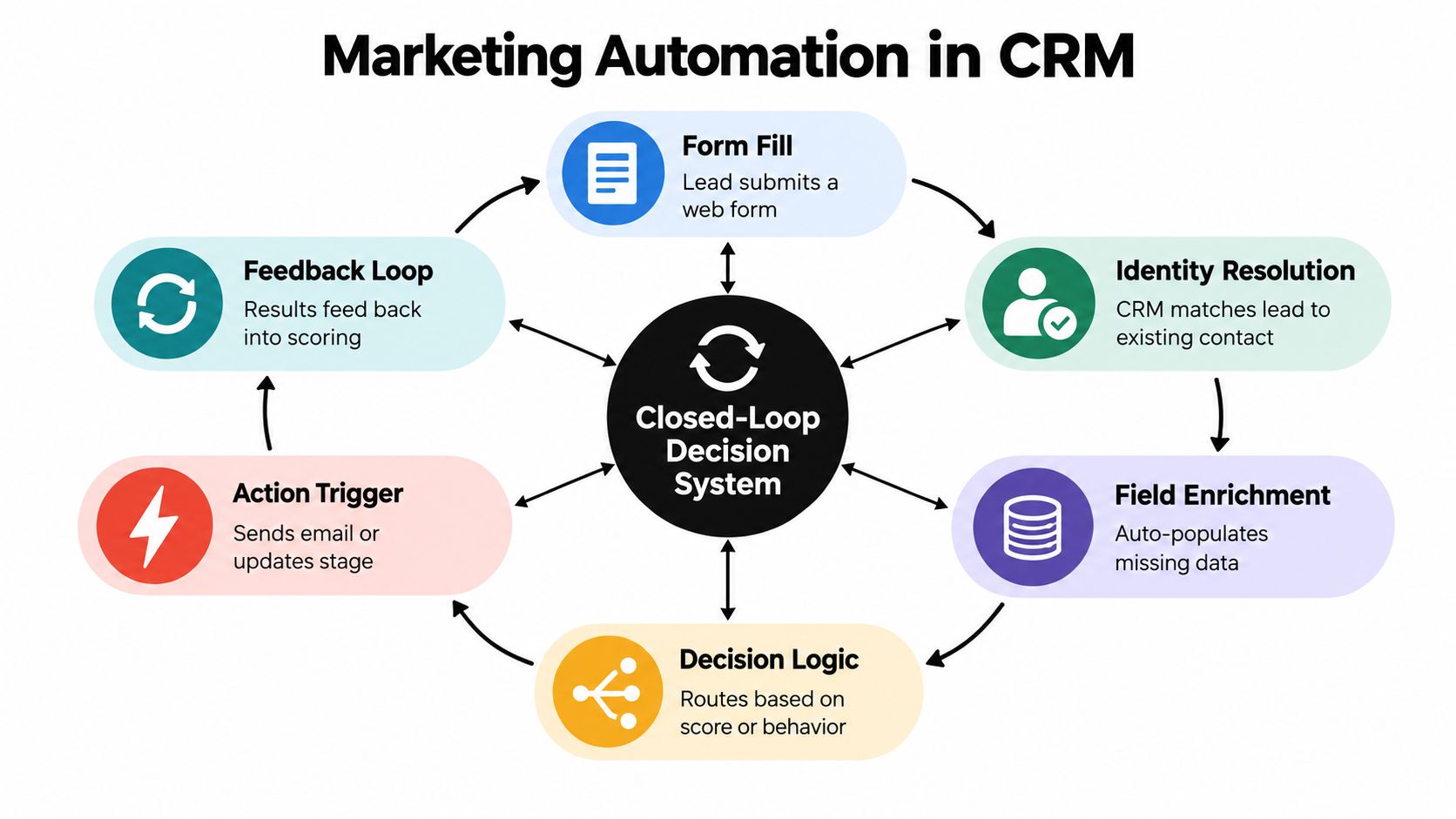
Feedback is what closes the loop. If sales rejects a lead as a poor fit but the marketing system continues to classify it as qualified, the workflow is acting on stale or conflicting information. Fix the record logic before adding more steps.
Set the system boundary before choosing tools
Map each responsibility to the application that can perform it reliably:
- Behavioral inputs capture form submissions, engagement, website activity, and campaign responses.
- Decision logic applies rules or predictive scoring to determine the next eligible action.
- Orchestration coordinates actions across channels and teams.
- Lifecycle measurement connects actions with conversion, pipeline, revenue, and retention.
Keep the CRM as the shared source of customer identity and lifecycle state, but don't force every department's work into it. When post-sale delivery needs dedicated project management, use when separate CRM and project tools win to assess where that boundary belongs. Specialized applications can work together; conflicting customer definitions undermine the decisions they depend on.
Benefits and the KPIs That Actually Matter
A busy automation dashboard can hide a weak funnel. Measure whether the system improves handoffs, progression, and customer outcomes. Cleaner handoffs, more relevant segmentation, and consistent follow-up matter when they produce a result the business can verify.
Open and click rates help diagnose message performance. They do not prove that sales received stronger opportunities or that customers stayed longer. Keep them in operational monitoring, not the executive scorecard.
Build the dashboard around decisions, not a uniform set of metrics:
| Business outcome | Leading metric | Lagging metric |
|---|---|---|
| Cleaner sales handoffs | Time-to-acceptance and rejection reasons | Accepted-lead-to-opportunity conversion |
| Faster pipeline movement | Stage age and overdue follow-up | Pipeline velocity and time-to-close |
| More relevant segmentation | Qualified engagement by segment | Stage-to-stage conversion |
| Consistent follow-up | Eligible follow-up completion | Qualified opportunity creation |
| Revenue contribution | Sales acceptance of campaign-sourced leads | Pipeline sourced and revenue |
| Durable customer relationships | Response quality and reactivation eligibility | Retention and long-term customer value |
Use this as a dashboard design, not a promise that automation will improve every measure. Tie each metric to the workflow's intended outcome, then agree on its definition before launch. Otherwise, teams can report different answers under the same label.
Take time-to-acceptance. Start the clock when a lead becomes eligible for sales review and stop it when a representative accepts responsibility. Assignment time measures routing, not acceptance. The distinction matters: a system can assign a record without securing a real handoff.
Each review should end with a clear operating choice. Continue when the intended outcome improves and controls hold. Investigate when activity rises but qualification or progression does not. Pause when the team cannot reconcile the result with the underlying CRM records.
Keep cohort definitions stable enough to compare performance. If marketing changes qualification criteria while sales changes stage definitions, the resulting conversion chart cannot show which change drove the outcome. Fix the definitions before drawing conclusions.
Separate pipeline sourced from broader campaign influence. Report both when leadership needs visibility, but use a defensible account of opportunity origin rather than letting loosely defined influence stand in for sourcing.
A dashboard earns its place when it changes the team's next decision, not when it makes a campaign look productive.
Core Workflows and High-ROI Use Cases
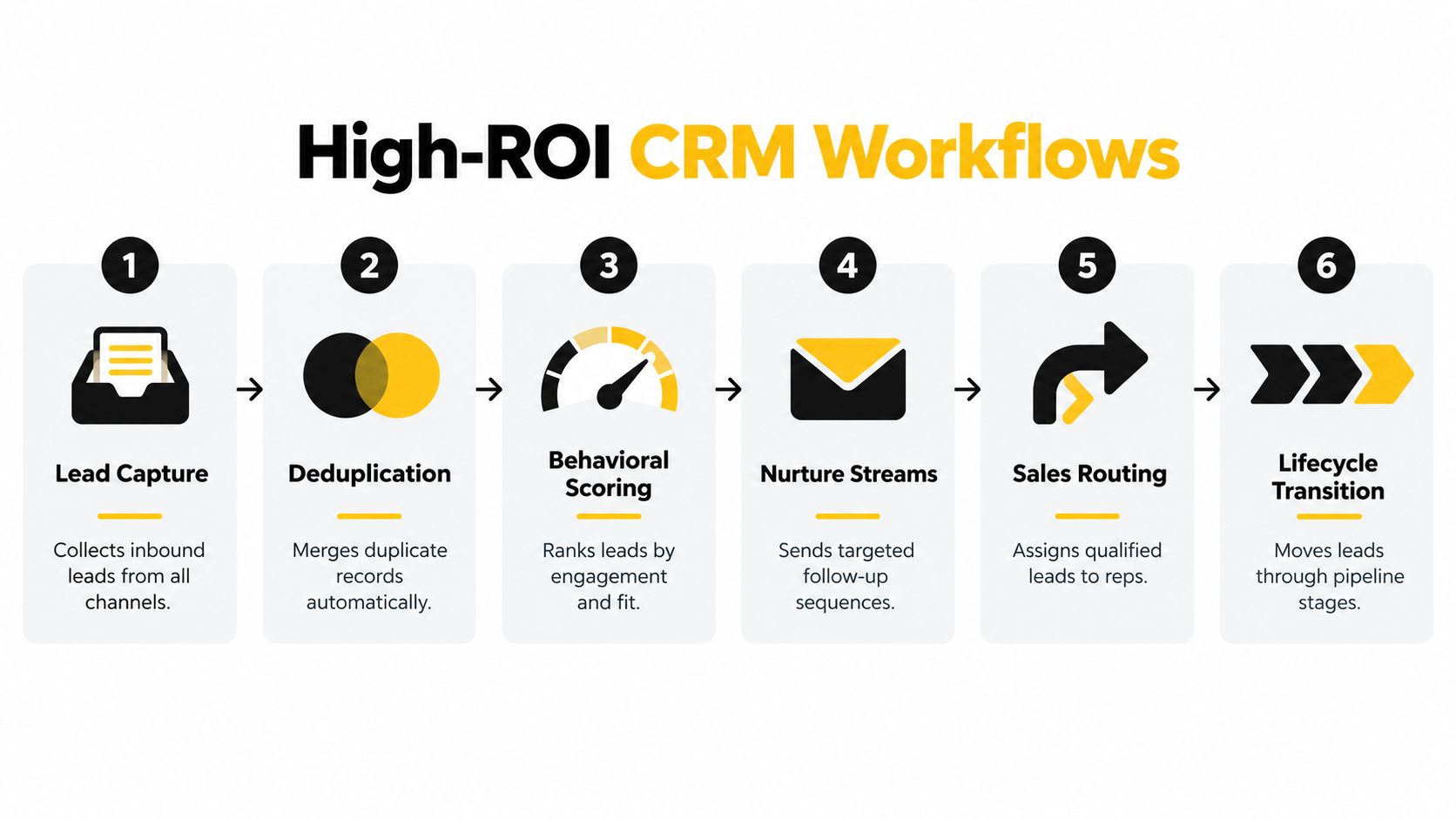
Start with workflows that have clear triggers, observable outcomes, and manageable exceptions. I'd prioritize lead capture and sales handoff before elaborate cross-channel journeys. Those workflows force marketing and sales to agree on what a lead means.
The flow below is a useful starting pattern, but it shouldn't be interpreted as permission to merge every apparent duplicate or route every engaged contact automatically.
Separate explicit intent from engagement
A demo request and a content download shouldn't receive the same treatment. In a proposed demo workflow, the trigger is an explicit request, the required data includes account fit and ownership, and the handoff requires sales to accept or reject with a reason.
A content download is different. Use the requested topic and known lifecycle state to select an appropriate nurture stream. Don't interpret curiosity as purchase readiness because the scoring engine can assign points.
Build the supporting workflows around these distinctions:
- Capture and deduplication: Resolve incoming submissions against existing records. Send ambiguous matches for review rather than automatically combining different people.
- Behavioral scoring: Combine engagement with fit. Require marketing and sales to agree on what qualifies a lead, and retain the explanation behind the score.
- Nurture: Enroll eligible contacts around their expressed interests. Define exit conditions before writing the messages.
- Routing and acceptance: Assign qualified leads using approved ownership rules. Require a recorded acceptance or rejection rather than assuming assignment completes the handoff.
Extend the lifecycle selectively
Lifecycle transitions should require evidence appropriate to the stage. A representative accepting a lead can justify a sales-accepted state; an email click shouldn't justify an opportunity.
For win-back, require a defined inactivity condition and current outreach eligibility. For expansion, use verified customer context and account-owner review. Neither workflow should bypass the people responsible for the relationship.
When evaluating execution options, Captiwate's automated engagement workflows provide a relevant resource for considering the engagement layer separately from CRM decision logic. For the follow-up design itself, use this guide to email follow-up automation alongside your routing specification.
The handoff contract should name the receiving team, acceptance conditions, response expectations, rejection reasons, and next action after rejection. AI agents can assist with research and drafting inside that contract. They shouldn't invent a different qualification process.
How AI Agents Fit Inside the Same CRM
CRM agents fail when teams mistake a convincing answer for a reliable one. The weak point is usually the record behind the answer: stale fields, conflicting inputs, or missing context. Set the agent's job around what the CRM can support, then limit what it can change.
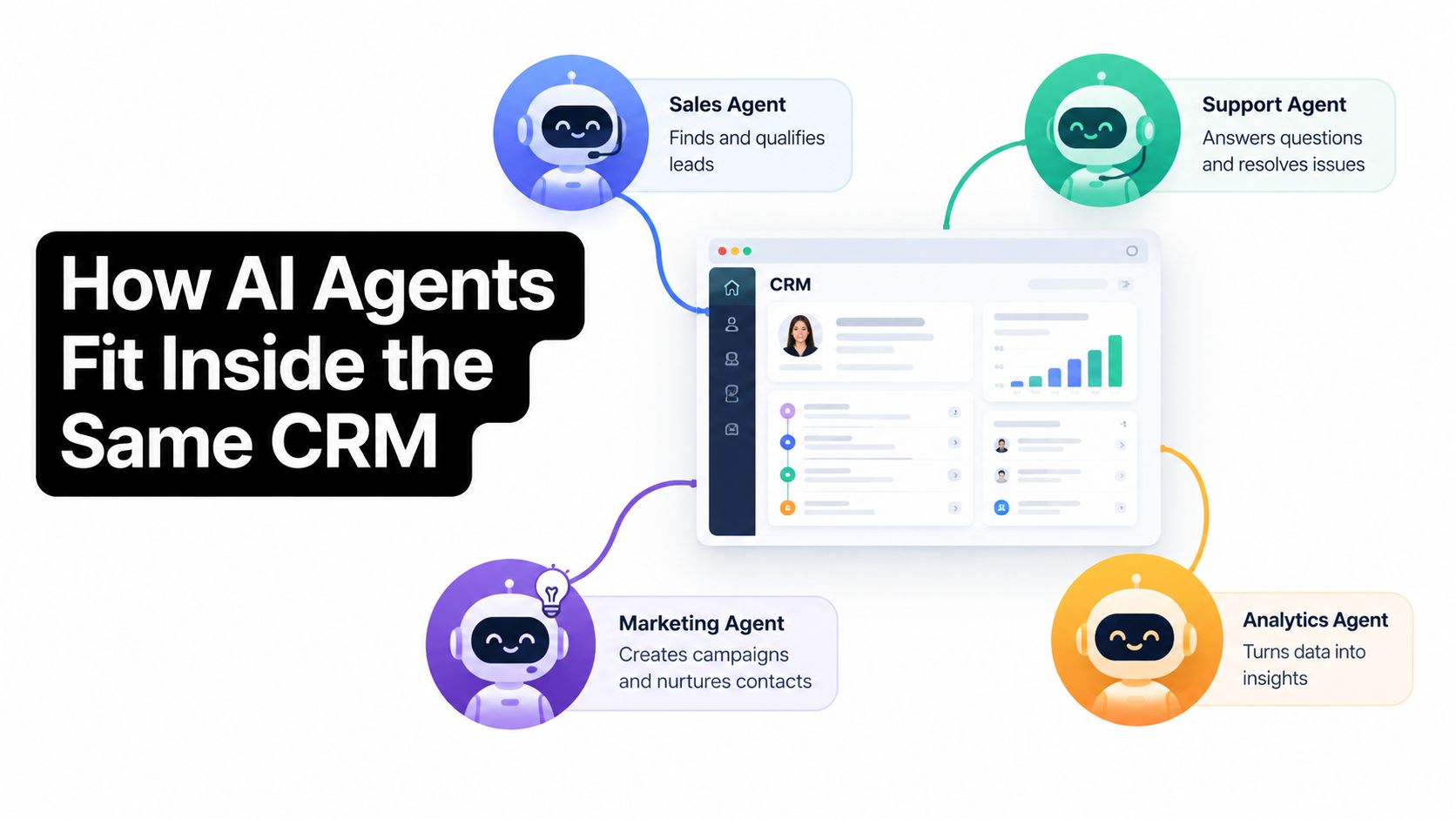
A BDR workflow shows the boundary. An agent can assemble account research and draft outreach on the CRM record. The representative checks the evidence and edits the message before sending. If intent signals are uncertain, the agent should flag them for review, not turn a hypothesis into a customer-facing claim.
Marketing tasks need the same discipline. An agent can prepare campaign analysis from approved CRM, ad-platform, and Shopify inputs, while marking gaps or conflicting values. If those records disagree, it should expose the disagreement rather than present a polished but unsupported conclusion. The guide to AI agents for marketers offers examples of tasks to assess against this standard.
Support agents can handle routine questions using approved material and summarize unresolved conversations for a person. Keep commercial terms and sensitive account changes under authorized human control.
Before deployment, write down four boundaries:
- Read scope: Which approved records and fields the agent may use.
- Write scope: Which specific notes or outputs it may add.
- Review threshold: Which recommendations require human approval.
- Escalation path: The named owner and queue for exceptions.
This is an authority decision, not a features checklist. Give the agent only the access needed to produce a reviewable work product. Broader permissions increase the cost of bad source data, especially when the agent can update customer records or act without review.
For implementation options, AI GTM engineers for CRM is a relevant resource. Use it to assess how an agent fits your CRM operating model, not as a substitute for defining its boundaries.
This video offers additional context for evaluating an agent-led operating model.

Start with an agent that prepares work for a person to inspect. Expand its authority only when the team can check its outputs, resolve exceptions, and verify that its actions are correct.
Integration and Data-Quality Prerequisites
Integration is a launch gate, not a setup checkbox. A successful connection test proves that systems exchanged data. It doesn't prove that they exchanged the right data or preserved its meaning.
The marketing automation statistics coverage from Webtonic reports that 65.7% of marketing teams identify data integration as a major stack-management challenge, while only 4% report widespread CRM adoption and understanding. Those figures support a practical concern: connecting applications is easier than establishing shared operating definitions.
Define the minimum data contract
Before production, document the contract each workflow depends on:
- Canonical identity: The contact and account identifiers used across connected systems.
- Lifecycle state: Allowed values, transition evidence, and who may change them.
- Consent status: The authoritative record of channel eligibility and its last update.
- Source taxonomy: Consistent campaign and acquisition-source values.
- Ownership: Field-level responsibility across marketing, sales, service, commerce, and finance.
Make precedence explicit. If commerce updates customer status while a marketing connector submits an older prospect value, the team needs a rule that prevents the stale update from winning.
For enrichment decisions, the guide to CRM data enrichment is a useful companion. Additional fields are valuable only when they resolve a decision requirement.
Audit readiness against the action
| Audit | Evidence to inspect | Launch decision |
|---|---|---|
| Duplicate records | Ambiguous matches and conflicting histories | Quarantine unresolved identities |
| Completeness | Required decision fields | Exclude incomplete records |
| Freshness | Update timestamps and source history | Hold actions using stale inputs |
| Attribution coverage | Campaign and source mappings | Limit reporting claims where mapping is missing |
| Suppression accuracy | Test records across connected destinations | Block sending if eligibility diverges |
Don't choose a universal cleanliness target and declare victory. Set requirements according to the consequence of the action. A draft for human review can tolerate uncertainty that an automatic customer email cannot.
Launch gate: An uncertain record belongs in a review queue, not in an automated send queue.
Record the exception owner and resolution process before enabling the workflow. Otherwise, quarantine becomes an unattended backlog, and someone eventually bypasses it to make the campaign launch.
Security, Consent, and Scaling Without Burning Trust
Marketing teams move personal data through forms, enrichment services, audience files, attribution tools, and connectors. Each destination deserves a documented purpose and an accountable owner.
The customer-data risk guidance for marketing teams recommends data minimization, sensitivity classification, restricted API and export permissions, retention controls, vendor review, and monitoring of exports and synchronization failures. Build those safeguards into the workflow specification, not a cleanup project after launch.
Make consent an executable condition
Channel-specific consent means checking eligibility for the particular action being considered. Don't use a broad engagement field as a substitute for email or other channel permissions. When consent is incomplete, the workflow should stop or enter an approved review path.
The AI marketing automation statistics review identifies privacy concerns as the leading adoption barrier for 40.44% of surveyed marketers and describes a review of 162 academic studies that treats explainable AI and ethical governance as distinct strategic domains. Privacy and explainability belong in architecture decisions, not just policy documents.
Require the operating controls that make those decisions enforceable:
- Least-privilege access: Restrict API scopes, agent actions, and export permissions.
- Protected transfers: Use encrypted transport and review third-party data-processing terms.
- Consent propagation: Ensure restrictions reach every connected activation destination.
- Retention rules: Remove dormant records and audience files according to approved policy.
- Operational visibility: Keep audit logs and alert on unusual exports or synchronization failures.
Scale business value, not message volume
Under load, plan for repeated events, delayed updates, and failed synchronization. Use retry handling that doesn't create duplicate outreach, and retain a manual fallback for campaign-critical work.
Measure incremental impact with an eligible, compliant control group when the experiment is appropriate. Attributed revenue alone can include conversions that would have happened without the automation.
Review opt-outs, complaints, conversion quality, and long-term customer value alongside the revenue result. A campaign that claims more revenue while generating poorer-fit opportunities deserves investigation, not automatic expansion.
A simpler rule with an understandable rationale can be preferable to an opaque recommendation. Defend that choice by showing the action's purpose, its eligibility conditions, and the evidence that it helps.
A 30-60-90 Launch Checklist and Decision Points
Use the launch schedule as a sequence of proposed operating milestones, not a deadline to automate everything. A calendar doesn't make an unsafe workflow ready.
Days 1–30 establish a defensible pilot
Assign owners to the data contract and lifecycle definitions. Complete the readiness audits, resolve critical identity conflicts, and choose a narrow pilot with a clear business outcome.
- Deliverable: A documented workflow, exception queue, baseline dashboard, and rollback procedure.
- Decision: Launch only when the pilot's eligible records satisfy its requirements.
Lead capture and handoff are sensible candidates. Resist adding channels while the team is still debating which records should enter.
Days 31–60 test decisions in production
Expand into scoring and routing only where the pilot has demonstrated reliable operation. Introduce an AI agent for a bounded task, such as preparing account summaries for review, rather than granting broad outreach authority.
- Deliverable: Recorded sales acceptance, rejection explanations, agent-review outcomes, and resolved exceptions.
- Decision: Continue only if the receiving team trusts the output enough to use it.
If representatives bypass the process, investigate why. More workflow enforcement won't fix a qualification model they reasonably reject.
Days 61–90 decide what earns scale
Review business outcomes and run an appropriate incrementality test. Examine whether improvements came with more bad-fit outreach, weaker customer responses, or additional manual cleanup.
- Scale: Workflows with improving pipeline outcomes, dependable controls, and manageable review demand.
- Retire: Automations that add activity without defensible value.
- Keep supervised: Tasks where agents still need human judgment to resolve uncertainty.
Readiness means the team can explain the decisions, reconcile the outcomes, and recover from failures. Your next action is to select a workflow and name the person accountable for its data, exceptions, and result.
Cyndra installs, trains, and manages AI agents that work inside existing tools across sales, marketing, support, and operations. Visit Cyndra to discuss a CRM-connected workflow, bringing its required fields, handoff rules, and target KPI so the implementation starts with a decision the team can trust.