 CYNDRA
Your team already has AI open in half a dozen tabs. One tool drafts campaign briefs, another summarizes sales calls, a third researches accounts, and someone still spends Friday afternoon copying numbers from Shopify, ad platforms, the CRM, and finance software into a dashboard. The work feels faster in isolated moments, but the campaign still depends on a person to move every result into the next system.
That's the operational gap behind the current interest in AI agents for marketers. An assistant helps with a task after a prompt. An agent can monitor a workflow, make a plan, take bounded actions, and return to the data when conditions change. The difference isn't another writing feature. It's whether your marketing operation can execute a repeatable process without making a human coordinate every handoff.
Table of Contents
- Why Marketers Are Moving Beyond AI Writing Assistants
- What AI Agents Actually Are in Marketing Workflows
- Core Marketing Workflows That AI Agents Can Automate
- The Reality of AI Agent Adoption and Performance Gaps
- How to Integrate AI Agents Into Existing Marketing Stacks
- Next Steps for Marketing Teams Ready to Adopt Agents
Why Marketers Are Moving Beyond AI Writing Assistants
A campaign manager might begin the morning by asking an AI tool for three email angles. Then they research target accounts manually, turn sales notes into a brief, request ad variations, check performance in a separate platform, and explain the results in a weekly report. Each step can benefit from AI, yet the manager remains the system of coordination.
That model has a ceiling. Adding more assistants often creates more review queues, duplicated context, and disconnected outputs. The team produces drafts faster but still spends its time checking whether the right audience, data, approval, and next action are connected.

The shift toward agents addresses coordination rather than generation. A prospecting agent can research a company, enrich the record, identify relevant buying signals, draft an outreach message, and route the result for approval. A reporting agent can collect campaign data, flag an anomaly, and prepare an explanation without waiting for someone to remember which dashboards need checking.
Adoption is high, but workflow maturity is uneven
The market is already using AI extensively. Gartner said in January 2026 that two-thirds of brands will use agentic AI for personalized, one-to-one customer interactions by 2028, while reporting from the same period says 88% of marketers use AI daily and 96% of marketing organizations have adopted AI in some form. Those figures come with an important qualification: adoption is ahead of demonstrated return on investment. (Digital Commerce 360's coverage of the Gartner research describes that tension directly.)
The practical lesson is simple. Don't buy another AI feature because it produces a better first draft. Invest where the system can own a clearly defined loop, connect to the tools your team already uses, and expose its decisions for review.
Operator's rule: If a person still has to copy the output into the next system, you've automated a task, not the workflow.
What AI Agents Actually Are in Marketing Workflows
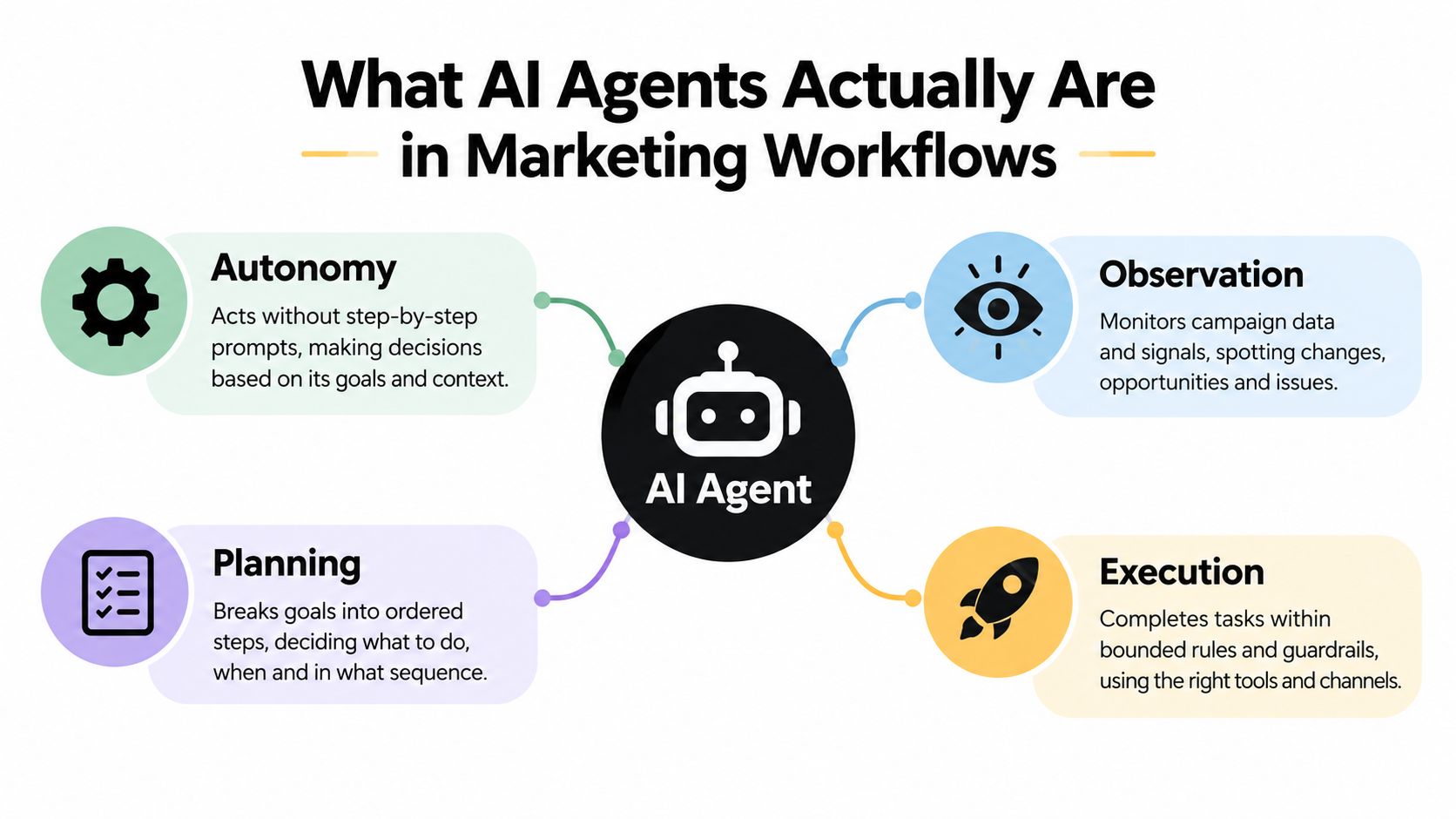
A marketing agent is a bounded decision-maker embedded in a workflow. It observes approved inputs, interprets the objective, plans the next steps, performs permitted actions, and records what happened. It may look conversational on the surface, but its value comes from its connections, permissions, memory, and rules.
A standard generative assistant waits for a request such as “write five subject lines.” An agent might watch a campaign brief, consult the audience definition, check previous performance, create variants, submit them for approval, and update the content system after a marketer signs off. It doesn't need step-by-step prompting for every movement, but it does need a defined mission and a safe operating boundary.
The four capabilities that matter
- Autonomy: The agent can proceed through an approved process without a new prompt at each step.
- Observation: It can monitor relevant campaign signals, records, deadlines, and exceptions.
- Planning: It can break a goal into an ordered sequence, such as research, qualification, drafting, review, and routing.
- Execution: It can complete actions in connected systems, subject to permissions and approval rules.
The distinction matters because marketing activity is moving from occasional experimentation into routine operations. The SurveyMonkey overview of marketing AI statistics reports that AI use nearly doubled from 13.1% of marketing activities in 2024 to 24.2% in 2026, while generative AI rose from 7.0% to 22.4%. It also reports that 95% of marketing and advertising professionals used generative or agentic AI at least monthly by 2025.
Those numbers describe usage, not successful autonomy. A team can use AI every day and still run a manual operating model. For a useful example of how a narrower agent can handle qualification logic and handoffs, see Orbit AI lead qualification insights. The use case is more instructive than a feature list because it starts with a job, its inputs, and the action that follows.
For a deeper explanation of the underlying mechanics, how AI agents work is a useful reference. The mental model to retain is bounded autonomy. Agents aren't magic buttons and shouldn't receive unrestricted authority. They're persistent workflow operators that need a measurable objective, reliable context, explicit constraints, and a human checkpoint where judgment matters.
Core Marketing Workflows That AI Agents Can Automate
The strongest use cases begin with a repetitive process that already has a clear definition of “good.” They don't begin with a vague ambition to automate marketing.
Lead research and qualification
Input: New form submissions, CRM records, firmographic information, prior interactions, and account criteria.
Agent loop: The agent checks whether the record is complete, researches the company using approved sources, summarizes relevant context, scores fit against the team's criteria, and prepares a recommended route. It can update the CRM and alert a sales representative when the record meets the agreed threshold.
Human checkpoint: Sales or marketing owns the qualification definition and reviews uncertain matches. The agent shouldn't invent intent, overwrite valuable CRM history, or send a sensitive message without approval.
This workflow works because the agent has a constrained decision surface. It isn't deciding the entire go-to-market strategy. It's reducing the delay between an incoming signal and an informed handoff.
Outreach preparation
Input: A qualified account, approved positioning, product information, relevant research, and the representative's preferred communication style.
Agent loop: It gathers context, selects a suitable message angle, drafts an email or social message, checks it against brand and compliance rules, and places the draft in the correct review queue.
Human checkpoint: A marketer or seller approves claims, personalization, and timing. Automation can remove preparation work, but relationship judgment remains a human responsibility.
Campaign monitoring and optimization
An agent connected to advertising platforms and analytics tools can watch agreed KPIs, compare performance with thresholds, identify unusual movement, and recommend an action. With the right permissions, it might adjust a bid, pause a variation, or shift a budget within predefined limits. The safer production pattern starts with recommendations and moves toward controlled execution only after the team understands the agent's decisions.
The human checkpoint isn't a ceremonial approval click. It covers budget changes, audience changes, claims, and strategic deviations. The agent handles continuous observation, while the marketer decides whether the underlying strategy still makes sense.
Content production and refreshes
Input: A brief, search intent, brand guidelines, existing page content, product facts, and performance signals.
Agent loop: It creates a brief, drafts the asset, identifies missing evidence, proposes internal links, checks terminology, and prepares the content for editorial review. A content agent can also compare an older page with current positioning and suggest a refresh rather than generating another disconnected article.
Human checkpoint: The editor validates accuracy, originality, tone, and commercial judgment. An agent can enforce a checklist, but it can't take responsibility for a promise the company shouldn't make.
AI agent use cases provides a broader view of these patterns. In practice, the best candidate is often the workflow with frequent volume, stable inputs, visible bottlenecks, and a clear owner. Don't automate a process nobody has defined.
The Reality of AI Agent Adoption and Performance Gaps
The most useful adoption data is also the least flattering. A 2026 BCG survey found that 42% of CMOs still use generative AI mainly to assist humans with discrete tasks, only about one-third have moved to agent-led workflows, and just 8% run campaigns where multiple agents operate autonomously. (The survey discussion shows that widespread access hasn't translated into widespread delegation.)
That gap changes how teams should evaluate vendors. A polished interface can make a tool feel autonomous while leaving the operator responsible for prompting, transferring, validating, and publishing every output. The system may be excellent at generation and still fail to reduce operational load.
Assistance versus agency
| Operating mode | What the system does | What the team still owns |
|---|---|---|
| Task assistance | Produces a draft, summary, idea, or analysis after a request | Context gathering, prompting, review, transfer, and follow-up |
| Workflow support | Runs connected steps and prepares recommendations | Approval of sensitive actions and exception handling |
| Agent-led execution | Observes signals, plans actions, executes within limits, and logs outcomes | Strategy, governance, escalation, and accountability |
| Multi-agent operation | Coordinates specialized agents across a campaign process | Operating model, conflict resolution, and final authority |
The bottleneck is usually workflow design. Agents need clean definitions of inputs, ownership, permissions, escalation, and success. If the CRM contains conflicting lifecycle stages, the brand guide is outdated, or the KPI has no agreed interpretation, autonomy amplifies confusion instead of removing it.
Governance creates a second constraint. Customer-facing copy, audience changes, spend decisions, and personal data need different levels of control. A single “approve everything” workflow is too slow for low-risk work and too casual for high-risk actions.
The uncomfortable truth: Raw model capability rarely fixes an undefined process. The agent can only move as reliably as the rules, data, and handoffs around it.
The gap is an opportunity, but not a reason to deploy recklessly. Teams that move from assistants to agents should start with one bounded workflow, document its failure modes, and expand authority only when the evidence supports it.
How to Integrate AI Agents Into Existing Marketing Stacks
Integration shouldn't mean replacing your CRM, analytics platform, ad accounts, or content management system. It means giving an agent controlled access to the systems where work already happens and making its actions visible to the people responsible for outcomes.
Start with the stack, not the agent
Map the workflow before choosing the technology. Identify where the request originates, which data the operator consults, where the decision is recorded, and which system receives the output. This usually exposes a small number of high-friction handoffs that are better starting points than a broad “marketing automation” project.
Then separate read access from write access. An agent can begin by reading campaign results and drafting recommendations. Once the team trusts the analysis, it can receive permission to update a report or create a draft. Publishing, budget changes, and customer communication should require stronger controls.
Use a practical integration checklist
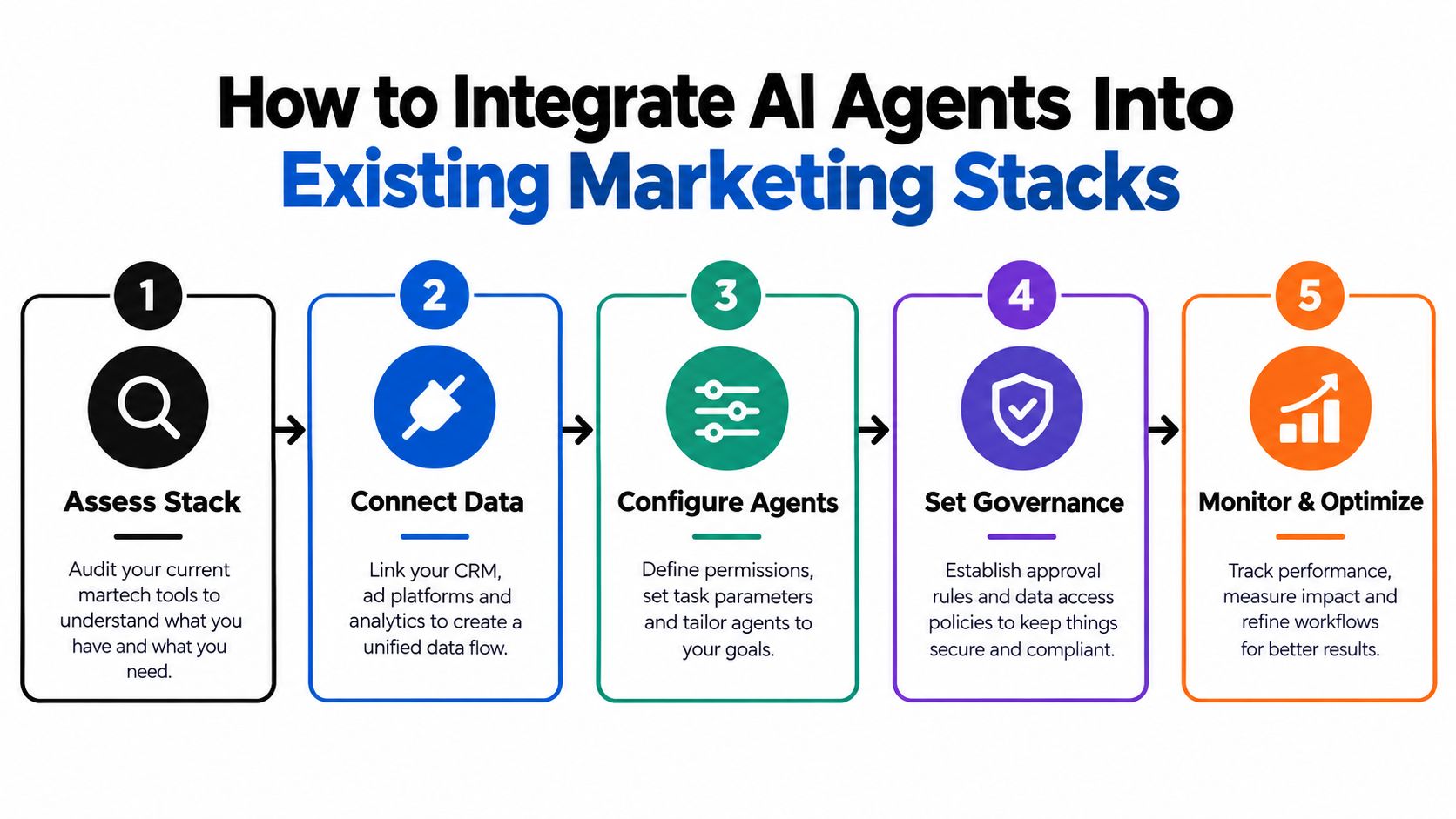
- Assess the workflow: Choose a process with a clear owner, repeatable inputs, and an outcome that can be inspected.
- Connect the sources: Link only the CRM fields, ad data, analytics events, product information, and content repositories the agent needs.
- Define permissions: Specify which actions are read-only, which create drafts, and which may execute automatically.
- Create approval rules: Route claims, spend changes, customer messages, and exceptions to named reviewers.
- Instrument the outcome: Put agent activity and workflow KPIs in the same reporting environment as human activity.
- Review the logs: Record inputs, decisions, actions, approvals, and failures so the team can improve the process.
The implementation principle is supported by an open-source systematic review that mapped 26 studies of marketing-relevant agentic AI. The review emphasizes that autonomy configuration and oversight mechanisms shape outcomes, which is why bounded agents with monitored approval and brand-safety controls offer the most practical advantage. (The systematic review of agentic AI in marketing provides the research context.)
For teams planning the technical handoff, AI agent integration offers a useful starting point. The goal isn't maximum autonomy. It's a dependable connection between business rules, live data, human judgment, and accountable execution.
Next Steps for Marketing Teams Ready to Adopt Agents
A marketing team usually gets better results by starting with a workflow it already understands, rather than the most impressive agent demo. Choose a process with recurring coordination, enough volume to matter, a stable definition of success, and a named owner who can review decisions.

Use a staged rollout:
- Choose one workflow. Lead enrichment, weekly reporting, outreach preparation, and content briefing are easier to control than an entire campaign.
- Document the current process. Record inputs, decisions, systems, approvals, exceptions, and the time spent coordinating them.
- Set the initial authority level. Start with read access and draft outputs where risk is high. Allow controlled writes only after review.
- Define the dashboard. Track completion, review time, error types, accepted recommendations, and the business KPI tied to the workflow.
- Run a real operating cycle. Test normal work, including incomplete data and unusual cases. Have the owner record where the process fails.
- Expand deliberately. Add another workflow only after the first has a reliable owner, useful logs, and a clear path to improvement.
The team does not need to build every component internally. Cyndra installs and manages AI employees that can support prospect research, prepare outreach drafts, and assemble KPI dashboards from Shopify, advertising platforms, CRMs, and finance tools. That model can suit teams that need an operating workflow rather than another isolated assistant. (Cyndra's AI employee overview explains the service model.)
For a narrower growth motion, teams can evaluate an AI-powered LinkedIn growth tool when prospecting and professional-network activity are the specific bottlenecks. Apply the same controls: define the audience, constrain the messaging, review outputs, and measure qualified conversations rather than activity alone.
A production agent should make work easier to inspect. Keep a human accountable for positioning, customer trust, and material decisions. Assign the agent the repetitive monitoring, preparation, and controlled follow-through that consume the team's attention.
The practical adoption curve moves from task assistance to bounded workflows, then to agent-led execution. Select one process, connect it to the existing stack, assign permissions, measure the result, and expand only when the operating evidence supports it.
Here's a short overview of the implementation mindset:
Cyndra helps marketing teams turn repetitive workflows into secure, production-grade AI employees that research prospects, prepare outreach, connect data, and generate brand-consistent content. Visit Cyndra to discuss a bounded marketing workflow and move from scattered AI assistance to accountable agent-led execution.