 CYNDRA
A supplier sends a blurry phone photo of an invoice. The purchase order sits in your ERP, the receiving note is buried in email, and someone on your operations team has to work out why the quantities don't match before finance can proceed.
A multimodal AI agent could handle much of that work. Whether it should do so depends less on an impressive demo than on the records it can trust, the actions it can take, and the cost of checking its work.
Table of Contents
- What a Multimodal AI Agent Actually Is
- How Perception, Reasoning and Action Fit Together
- Modalities That Matter and What Each One Unlocks
- Four Use Cases From Research to Dashboards
- Securing Integrations and Setting Action Limits
- Measuring Reliability, Latency and Return on Investment
- Pick One Workflow and Pilot It in 90 Days
What a Multimodal AI Agent Actually Is
A multimodal AI agent is software that takes a goal, interprets different kinds of input, reasons over the evidence, and uses tools to move a task toward completion. Those inputs can include text, images, screenshots, audio, video, and tables.
For the invoice task, it might read the photograph, retrieve the purchase order, compare line items, and create an exception for the accounts-payable team. If the image is unreadable or the supplier identity is ambiguous, a well-designed agent stops and asks for help rather than inventing the missing information.
The document capture is only the beginning of the workflow.

A model interprets while an agent carries out work
Think of the multimodal model as trained eyes and reading ability. The agent is closer to an employee who uses that ability, checks business records, updates the appropriate system, and reports what happened.
The distinctions matter when you're comparing software:
- A chatbot answers a question or generates a response.
- A multimodal model interprets information presented in different formats.
- An agent acts toward an outcome across connected steps, subject to its permissions.
A chat interface can sit in front of any of these. A conversational screen doesn't tell you how much work happens behind it.
Judge the workflow, not the label
According to DataM Intelligence, the global multimodal AI agents market reached US$13.17 billion in 2025. That market label still covers systems with very different operating boundaries.
Recruiting illustrates the difference: interpreting a résumé isn't the same as managing candidate records, scheduling interviews, or controlling who can change a hiring stage. Teams evaluating that workflow can use erecruit's resource to compare AI recruitment software for ICT, then assess the actual execution and permission boundaries.
Ask the vendor to show what changed in the business system and the audit trail behind that change.
A polished answer isn't proof of operational capability. A traceable, correct outcome is much more useful evidence.
How Perception, Reasoning and Action Fit Together
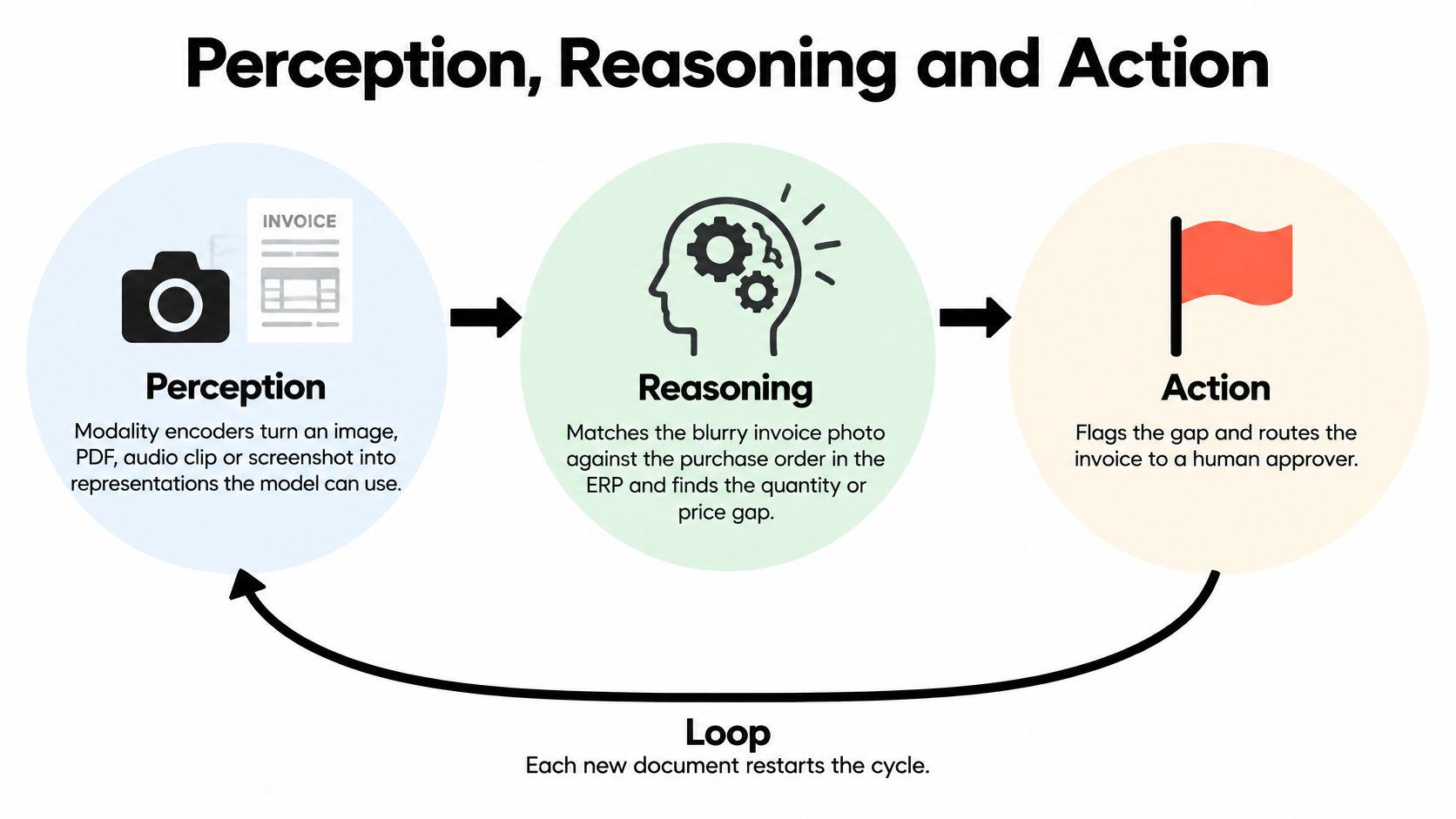
The invoice workflow depends on a loop, not a single model response. Each stage produces something the next stage must be able to check.
Follow the invoice through the loop
Perception converts the invoice photograph into usable information. Modality encoders turn an image, PDF, audio clip, or screenshot into representations the model can process; document extraction may also preserve text, tables, and layout.
The system needs to retain uncertainty. If a quantity is unclear, it should preserve the original image and mark the field for review rather than treating a guess as a fact without notice.
Reasoning connects that observation to the business goal. The model identifies the supplier, retrieves the purchase order, compares quantities and prices, and decides whether it has enough evidence to classify the discrepancy.
Calculation and policy checks shouldn't rely entirely on generated prose. Use code for arithmetic, explicit rules for matching tolerances, and authoritative records for supplier and order identities.
Action happens through APIs, connectors, browser automation, or desktop control. The agent might create an exception record and route it to an approver, then retrieve the record again to verify that the intended change occurred.
The cycle below shows how those stages connect.
Keep state and verification outside the answer
Short-term state records what's already happened, including retrieved identifiers and pending actions. Retrieval supplies current policies and business records; persistent memory, where appropriate, stores approved information across sessions.
A verifier checks the proposed result against explicit requirements. The audit log captures observations, tool arguments, approvals, and resulting changes without requiring anyone to reconstruct the workflow from a chat transcript.
A survey of multimodal mobile agents distinguishes prompt-based systems, which orchestrate tools through instructions, from training-based systems adapted specifically for mobile interaction. Prompt-based orchestration is easier to revise as workflows change; task-specific training requires suitable examples, maintenance, and evaluation when the interface changes.
Perception doesn't guarantee reasoning
The multimodal benchmark survey reports that GPT-4V achieved 17.97% overall on OlympiadBench, including 21.70% in mathematics and 10.74% in physics. These are demanding academic tasks, not invoice-processing results, but they demonstrate why visual understanding isn't evidence of dependable multi-step reasoning.
Scope the objective tightly, validate the evidence before acting, and log each transition. When a stage fails, the system should expose that failure instead of carrying an unsupported assumption into the next action.
Modalities That Matter and What Each One Unlocks
Connect inputs because they resolve a business question, not because the model supports them. Each additional modality introduces capture, storage, privacy, and evaluation work.
Text is useful for understanding requests and retrieving policy. An email asking for a refund still needs account context and an applicable policy before the agent can recommend a response.
Images preserve information that plain text extraction can miss, including document layout, product condition, and chart labels. Keep the original file available so a reviewer can inspect ambiguous fields.
Choose the cheapest dependable evidence
Audio helps with voice intake, call summaries, and meeting actions. Speaker attribution matters: a customer proposing a change isn't the same as an authorized employee approving it.
Video adds sequence and timing. Use it when movement or event order matters, because processing selected frames can miss the moment that explains an incident.
Structured data provides identifiers, amounts, statuses, and dates that tools can validate. An agent should query the underlying ledger rather than estimate a financial total from a dashboard image.
Screen and UI inputs help when software lacks a suitable API. They're useful fallbacks, but interface changes can break an otherwise working automation.
Modalities, business tasks and main failure modes
| Modality | Typical business inputs | Typical task | Main failure mode |
|---|---|---|---|
| Text | Emails, tickets, contracts, chat logs | Triage, drafting, policy lookup | Confident answers built on missing context |
| Image | Scanned invoices, product photos, charts | Field extraction, listing checks, chart reading | Misread small or low-resolution text |
| Audio | Call recordings, voice notes, meeting audio | Call summaries, action-item logs, voice intake | Accents, crosstalk and background noise distort transcripts |
| Video | Security footage, product demos, screen recordings | Incident review, QA, training-content indexing | High compute cost; sampled frames miss the event |
| Structured data | CRM records, ledger rows, database tables | Reconciliation, KPI calculation, anomaly flags | Stale or conflicting records across systems |
| Screen and UI | Web apps, desktop software, dashboards | Form entry, navigation, cross-app updates | Wrong button or field selected, breaking the workflow |
For document-heavy operations, agentic document extraction is a useful starting point because it connects reading a file with resolving missing information and preparing a usable result.
Most operational tasks combine modalities. Use the table to choose which inputs to connect first, then test whether each extra input actually improves the outcome enough to justify its processing and review costs.
Four Use Cases From Research to Dashboards
The most useful applications have recognizable deliverables. Give the agent a specific job, define the acceptance check, and choose a measure tied to the work rather than the amount of content generated.
Research with traceable claims
Say a strategy lead needs a competitor brief. The inputs are competitor pages, product PDFs, and screenshots; the output is a concise comparison that links each factual claim to its supporting material.
Require citations and check whether the source is still current before accepting the brief. Measure cost per accepted research brief, including the time an analyst spends checking evidence and removing unsupported claims.
For teams turning evidence into proposals, Bidwell's guide to the key features of bid writing tools provides a useful comparison point. Assess how the workflow carries source material into a reviewable draft, not merely how quickly it produces paragraphs.
Support with bounded authority
A customer sends an email and a screenshot of a checkout error. The agent combines those inputs with the order record, drafts an initial reply, and prepares an escalation when the request involves refunds or account changes.
The control is a hard routing rule for requests the agent can't resolve independently. Measure time to first response, but only count a response that addresses the customer's issue rather than an automatic acknowledgment.
At Cyndra, we place AI inside Slack, Teams, WhatsApp, and email rather than behind another login the team has to remember. That keeps requests and review work in channels people already use.
Content that still has an accountable editor
A marketing manager supplies a campaign brief, approved brand guidelines, and product photographs. The agent produces draft copy and visual concepts, with a reviewer checking product accuracy, usage rights, and brand fit before publication.
Brand-review sign-off is the release control. Track revision rounds per accepted asset: a cheap draft that repeatedly needs rewriting can cost more than a slower, better-constrained process.
Dashboards with agreed definitions
An operations lead needs a daily view assembled from storefront, advertising, CRM, and finance records. The output should include reconciled figures, source timestamps, and visible exceptions rather than a confident narrative over inconsistent totals.
Assign an agreed definition to each metric, including how refunds, cancellations, and attribution are handled. Measure reconciliation mismatches per week, because a dashboard is only useful if leaders can trust the figures behind their decisions.
Securing Integrations and Setting Action Limits
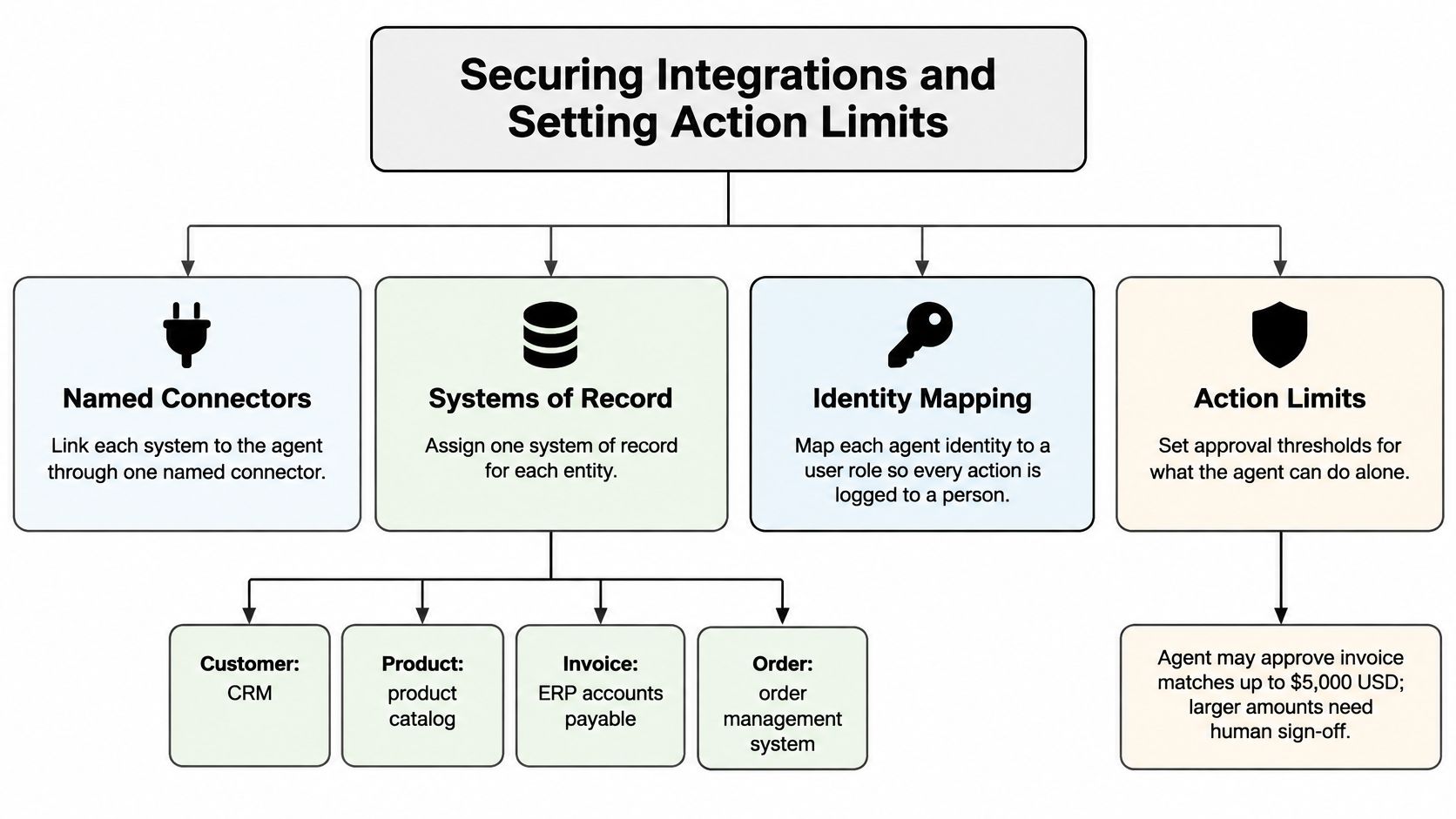
Enforce authority in the tools, not in the prompt. A model instruction can describe a boundary, but the connector must reject a request that crosses it.
Start by naming each connector and its owner. Assign an authoritative system for each entity, such as the CRM for customers, the product catalog for products, the ERP accounts-payable module for invoices, and the order management system for orders.
Establish identity before granting access
Map customer, supplier, employee, and account identifiers across systems. Keep the requesting person's identity separate from the agent's service identity so reviewers can distinguish who requested an action from what executed it.
Give each tool a scoped credential, separate read access from write access, and test new actions in a sandbox. Avoid a shared administrator account that lets a low-risk lookup become an unrestricted write.
This diagram summarizes the integration structure; any illustrated approval amount is an example policy, not a universal threshold.
Action risk tiers and the controls each one requires
| Risk tier | Example actions | Autonomy level | Required control |
|---|---|---|---|
| Read-only | Summarize records, look up order status, draft text | Autonomous | Logged calls and weekly sampled review |
| Reversible write | Tag a ticket, create a task, save a draft | Autonomous within set limits | Rollback path and daily exception report |
| Customer-facing or financial | Send a customer email, issue a refund under a set amount, change a CRM stage | Human approval before execution | Approval queue with a named approver and time limit |
| Irreversible or high-impact | Delete records, make payments, send legal notices, make hiring decisions | Human only, or dual approval | No direct credentials; blocked at the tool layer |
Treat documents, webpages, screenshots, and transcripts as evidence, not authenticated instructions. A supplier's attachment mustn't be able to grant itself payment authority or redirect exported records.
For a deeper implementation checklist, use AI agent security to structure credential, input-handling, and execution controls. Approval requests should show the actual proposed change, its destination, and the evidence supporting it.
Make monitoring actionable
Record every tool call and alert on out-of-scope attempts. Sample completed work weekly, and assign someone to resolve exceptions rather than merely collecting them in a dashboard.
Set response budgets by workflow: live conversation needs fast turn-taking, while batch reconciliation can tolerate more processing. Smaller models may improve responsiveness, but test their accuracy before routing consequential decisions through them.
Permission rule: Human approval authorizes a specific action; it doesn't justify leaving unrestricted credentials available to the agent.
For the invoice workflow, allow purchase-order retrieval, a draft match, and exception tagging. Payment execution should remain unavailable without the named approver and the finance system's authorization controls.
Measuring Reliability, Latency and Return on Investment
Computer-use benchmarks show why a polished demo is a weak measure of readiness. In the OSWorld benchmark, humans completed 72.4% of 369 realistic computer tasks, while the best evaluated agents reached about 12%. The gap reflects the difficulty of grounding actions in interfaces and completing application-specific workflows. It is not a universal failure rate for every deployed agent.
Evaluate the whole job on representative cases. A correctly extracted field or sensible response is not a completed outcome if the record was changed incorrectly or the task stalled before verification. Count safe, verified completions, including cases that required human rescue.
Define an acceptable outcome
Measure safety separately from task success. In an agent-safety evaluation, the top system achieved a 35.19% success-and-safety rate. A task can appear successful while still violating permissions, so track both measures.
Agent metrics, how to measure them and target logic
| Metric | What it measures | How to set the target |
|---|---|---|
| End-to-end task completion | Correctly finished tasks without human rescue, divided by attempted tasks | Compare with the human baseline on the same task set |
| Success-and-safety rate | Correct tasks completed inside permissions, divided by attempted tasks | Set an acceptance threshold for each risk tier |
| Tool-call accuracy | Calls using the correct tool and arguments, divided by evaluated calls | Set a pilot threshold per tool; investigate shortfalls |
| Grounding error rate | Wrong field, button, or record selections, divided by evaluated selections | Sample weekly; require improvement before expanding scope |
| Unauthorized-action rate | Out-of-scope attempts divided by action attempts | Accept no unauthorized high-impact actions; investigate blocked attempts |
| p95 latency | Response duration at the ninety-fifth percentile | Set by conversational needs or the batch deadline |
| Human escalation rate | Cases handed to people, divided by attempted cases | Set per tier; reduce only when safe completion remains acceptable |
| Cost per completed outcome | Model, integration upkeep, and review costs divided by safely completed tasks | Must beat manual cost for equivalent accepted work |
For dashboard automation, check data freshness and reconciliation as part of acceptance. A dashboard built quickly from stale records has not completed the job.
Calculate savings without hiding the operating costs
Compare the manual cost of an accepted outcome with the agent's cost of producing the same outcome. Include model usage, connector maintenance, monitoring, human review, escalations, and rework. These operating costs, along with permissions and data readiness, shape whether the apparent savings become real returns.
Multiply the difference per outcome by monthly accepted volume, then subtract remaining fixed operating costs and the chosen allocation of build costs. Avoid counting integration upkeep twice if it is already included in the unit cost.
The AI voice agent ROI for cleaners guide offers a workflow-level way to think about economics beyond model pricing. Apply the same discipline to the task being evaluated, including the labor that remains after automation.
Lower inference costs do not create a return if employees spend the savings checking and repairing results.
Pick One Workflow and Pilot It in 90 Days
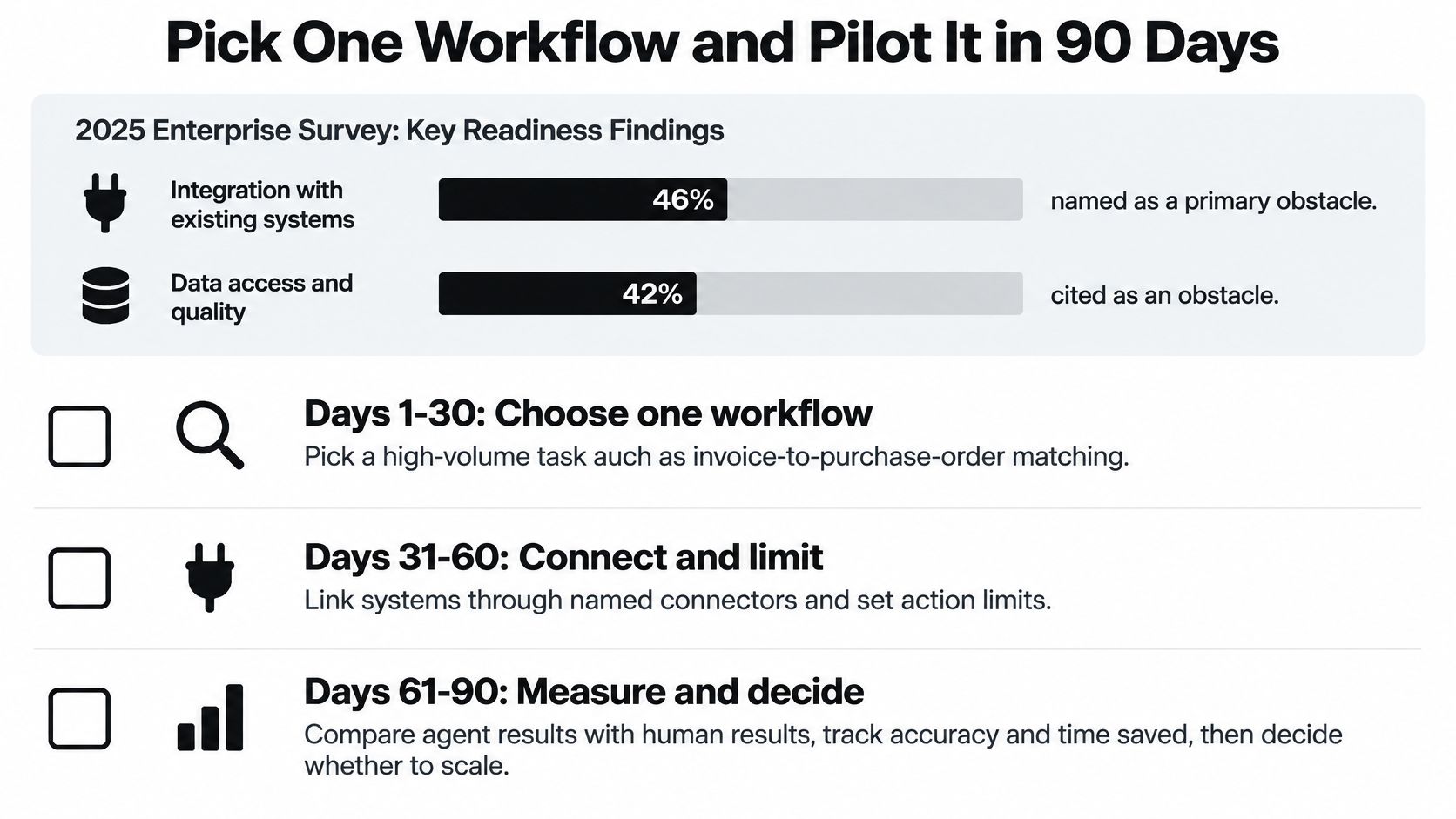
A state-of-AI-agents report cites a 2025 enterprise survey in which 46% of organizations identified integration with existing systems as a primary obstacle and 42% cited data access and quality. Resolve those dependencies before committing to a model or promising an autonomous workflow.
Use the pilot as a controlled deployment plan, not a deadline that overrides readiness. The visual groups the work into selection, connection, and evaluation.
Follow the deployment sequence
- Map the workflow and list every system, handoff, record owner, and exception path it touches.
- Choose a bounded task with recurring volume, manageable risk, and an end state that a reviewer can verify.
- Test real cases across clean inputs, unreadable files, missing records, and conflicting identities, fixing data problems before execution.
- Assign action tiers and name the approver for every customer-facing or financial change.
- Record the manual baseline for cost per accepted outcome and time to resolution, including exception handling.
- Run in shadow mode until the evaluation covers routine work and meaningful exceptions without changing production records.
- Gate go-live explicitly on documented ownership, written scope, a named escalation contact, and acceptable success-and-safety results, initially enabling only read-only and reversible actions.
- Review operating results monthly and document escalations, repairs, permission changes, and the evidence supporting any expansion.
Expand only when the operating case holds
Keep the original test cases and rerun them after changing models, connectors, prompts, or policies. Expansion should mean a proven workflow can handle a broader approved scope, not merely that the team has become comfortable with the interface.
At Cyndra, we handle strategy, build, integration, and ongoing optimization end to end, and train the client's people to use the agents. The operational owner still needs a clear acceptance decision: continue, revise, or stop.
Use the following video as a companion to the workflow review, while keeping your written acceptance criteria authoritative.

Cyndra maps where AI is worth using, builds agents inside your existing tools, and trains your team to operate them within scoped permissions. Visit Cyndra to identify a bounded workflow and define the integrations, approvals, and outcome measures needed for a production pilot.