 CYNDRA
65% of inventory records were inaccurate in a 2008 study of nearly 370,000 records across 37 stores operated by one U.S. retailer, according to DeHoratius and Raman's study in Management Science. That's the right starting point for automating inventory management: not a forecasting demo, but whether the stock your system reports exists.
When records drift, software can replenish items you already have, overlook shortages and turn receiving mistakes into purchasing decisions. The first project is data trust and integration. The second is deciding which actions software may take, which need approval and who handles exceptions.
Table of Contents
- Quick-Start Timeline From Audit to Production
- Readiness Checks to Run Before Any Automation
- Choosing Rules, ML or Agents for Each SKU Group
- How to Build the Replenishment Workflow
- Connecting Systems Without Corrupting Stock Data
- KPIs to Track and What a Miss Means
- Pick Your First Pilot, Set Go-Live Gates and Staff the Change
Quick-Start Timeline From Audit to Production
Start with a bounded replenishment pilot, not a company-wide promise of autonomous inventory. Choose a SKU group whose movements you can trace from receipt through sale, return and adjustment. You need to explain changes in stock before you let software act on them.
The schedule below is an illustrative implementation plan, not a guaranteed delivery time. Its exit criteria matter more than its dates. A supplier confirmation delay or unresolved stock discrepancy should hold the project at its gate rather than become somebody else's production problem.
Phase timeline for a first automated replenishment pilot
| Phase | Weeks | Exit criterion |
|---|---|---|
| Audit and data cleanup | 1–2 | Cycle-count match rate measured for A-items and duplicate SKU IDs resolved |
| Automation-level selection | 2–3 | Every SKU group tagged by demand pattern, margin, lead time and stockout cost |
| Workflow build and backtest | 3–6 | Rolling backtest beats the current reorder rule on fill rate at equal or lower total cost |
| Integration and shadow mode | 6–8 | Suggestions run beside manual orders for two full order cycles, with every material variance explained |
| Controlled go-live | 8–10 | One SKU group live under order caps and approval thresholds |
| Scale-up | 10–12 | Additional SKU groups considered weekly after KPI review |
Give each gate an accountable owner
The inventory controller should approve count reconciliation. The buyer should accept the replenishment comparison. The integration owner should demonstrate that failed messages can be recovered without duplicating stock movements or orders.
Don't accept “the dashboard looks right” as evidence. Ask for a receipt, transfer, cancellation and return to be traced through the connected systems. For purchasing, ask why a proposed quantity differs from the buyer's existing rule.
Practical rule: A phase is complete when the next owner can verify its output, not when the implementation team finishes configuring it.
The illustrative schedule covers a pilot group, not every warehouse, channel and supplier. Longer purchasing cycles may require a longer observation period, even when the technical work is finished.
Adding groups should become easier when they share established identifiers, integrations and approval paths. But a new supplier process or different fulfillment model deserves its own validation. Reusing infrastructure is sensible; copying an untested inventory policy isn't.
Readiness Checks to Run Before Any Automation
An inventory export can look clean while hiding operational uncertainty. A saleable unit, a damaged unit and a unit promised to another customer may all appear in the same on-hand total. Before automating, define which quantities a replenishment decision may use.
Use these checks as release gates, with evidence attached to each pass. Don't substitute a project manager's confidence for a reconciled count or a supplier's confirmation.
Check the stock and master records
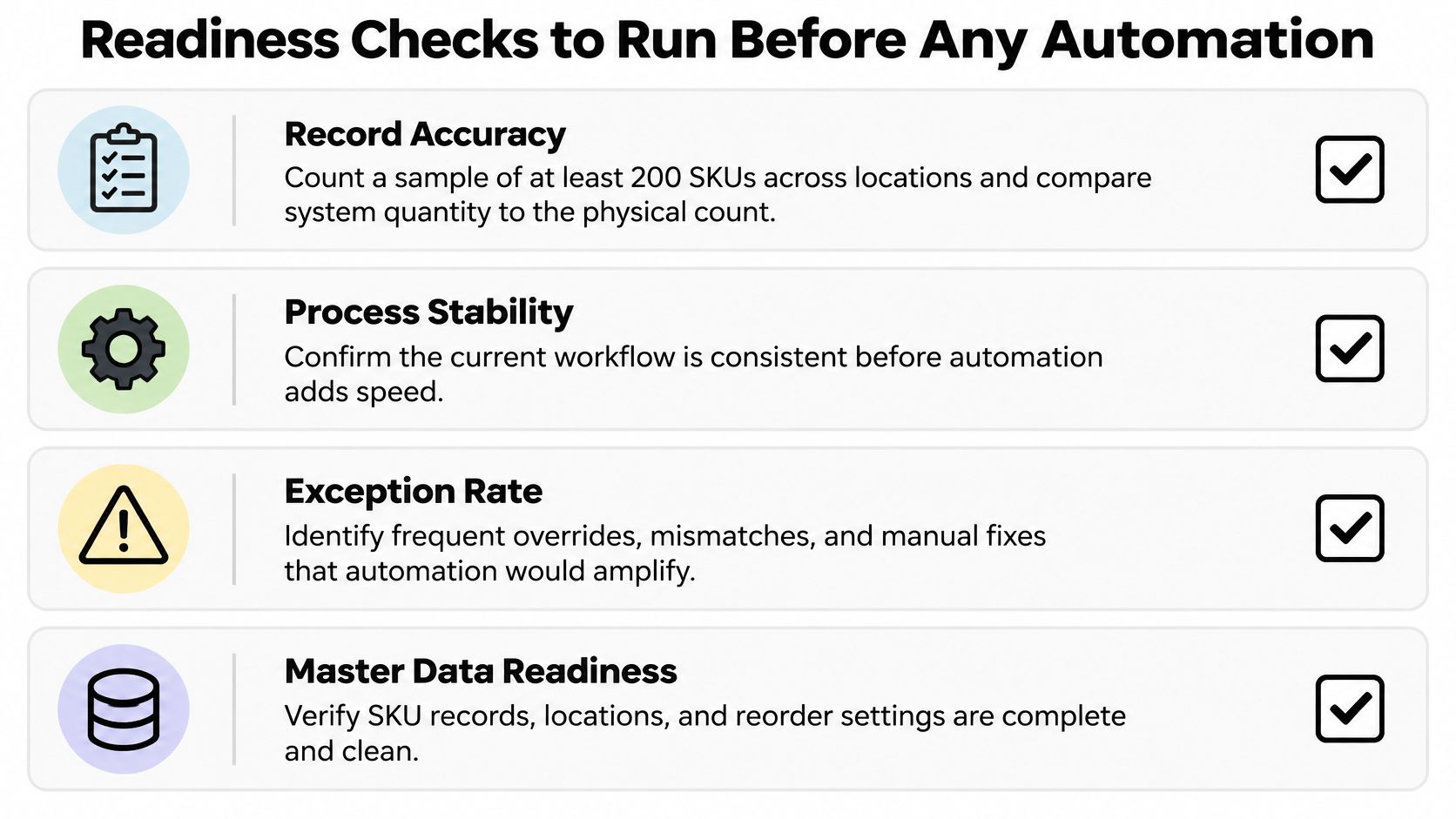
- Record accuracy: Count a representative sample across locations, including fast movers, valuable items and products with frequent adjustments. Compare physical quantities with a timestamped system snapshot, accounting for movements during the count. Pass only when the pilot meets its agreed accuracy target and material discrepancies have explanations.
- SKU identity: Search for duplicate barcodes, supplier aliases, inconsistent pack sizes and inactive codes still receiving transactions. A product split across identities produces fragmented demand history. Pass when each sellable variant has an unambiguous mapping.
- Supplier information: Compare stored lead times with recent receipts and current supplier commitments. Confirm open purchase orders, including quantities already received or cancelled. Pass when purchasing can explain the outstanding inbound position.
- Stock disposition: Document how returns, quarantine, damage and write-offs become available stock or leave inventory. Pass when staff can follow the same disposition process without inventing adjustments.
Investigate shrinkage rather than treating every count gap as theft. Late receiving, incorrect units of measure and transfers posted to the wrong location can create similar symptoms. Reconcile recorded write-offs against unexplained differences, then assign a cause.
Check whether the process is stable enough
Measure the delay between a point-of-sale transaction and the inventory update. Set the acceptable delay from depletion speed and overselling risk, not from whatever interval the connector happens to offer.
Then make ownership explicit:
- Field ownership: Name who maintains supplier lead times, pack sizes, location codes and replenishment settings.
- Rule visibility: Record the current reorder logic, including spreadsheet adjustments and buyer overrides.
- Exception handling: Identify recurring mismatches and manual repairs. Give each a documented resolution path.
- Operational consistency: Watch receiving and transfer workflows on the floor. A written SOP doesn't prove that staff use it.
Failing a gate means fixing the input or process before enabling automatic purchasing. You can still automate diagnostics, discrepancy alerts and data collection while order release remains manual. That's useful progress without giving unreliable records spending authority.
Choosing Rules, ML or Agents for Each SKU Group
Segment SKUs by demand regularity, margin, lead time and stockout cost before choosing technology. A predictable consumable and a promoted fashion line don't need the same replenishment policy. Neither automatically needs an agent.
Choose the lightest approach that meets the operational objective. Rules are easier to inspect; statistical models can represent patterns; machine learning can incorporate additional demand drivers; agents can coordinate work across tools. Complexity is justified only when it changes a decision worth improving.
Automation levels compared for inventory replenishment
| Automation level | Best for | Data needed | Main risk |
|---|---|---|---|
| Rule-based reorder points | Stable, low-value SKUs with steady demand | Accurate stock positions, demand estimates and current lead times | Rules go stale during promotions and supplier changes |
| Statistical forecasting | Slow-moving or intermittent items with usable history | Clean time series spanning relevant demand cycles | Weak performance on new products and abrupt shifts |
| ML models such as gradient boosting | Large catalogs influenced by promotions and price changes | Sales, pricing, promotion and availability history | Better error scores can still produce poor inventory decisions |
| AI agents with approval gates | Exceptions spanning email, portals and several systems | Scoped tool access, reliable records and explicit permissions | Actions taken beyond the granted scope |
Match the method to the decision
For stable items, a maintained reorder point may be enough. Don't pay for an elaborate model when a supplier lead-time correction would solve the problem.
For statistical forecasting, use exponential smoothing where level, trend or seasonality is meaningful. Consider Croston-style methods for intermittent demand, but test their replenishment consequences rather than assuming that sparse sales require a particular algorithm.
Gradient-boosted models become more useful when promotion calendars and price changes explain demand. Those inputs must be available at the time of prediction. A model trained with information buyers wouldn't yet have had will look better in testing than it behaves in production.

Separate prediction from purchasing authority
Research using M5 competition data found that the most accurate forecast may not minimize inventory cost, particularly when lost-sales costs dominate under the conditions examined, according to the forecast-to-inventory study in the European Journal of Operational Research. That's why a vendor's forecast leaderboard isn't an adequate buying-policy evaluation.
Your sales forecasting process should produce inputs for inventory decisions, not determine spending authority without oversight. Purchasing still needs a cost objective, supplier constraints and a defined response to uncertainty.
Agents fit a different problem: collecting a late confirmation, comparing it with an open order and preparing an escalation. Give the agent permission to retrieve information and draft an action before granting permission to commit money.
Keep a simple, tested fallback policy for every SKU group using a more complex method. A failed model run shouldn't leave the buyer without a usable decision path.
How to Build the Replenishment Workflow
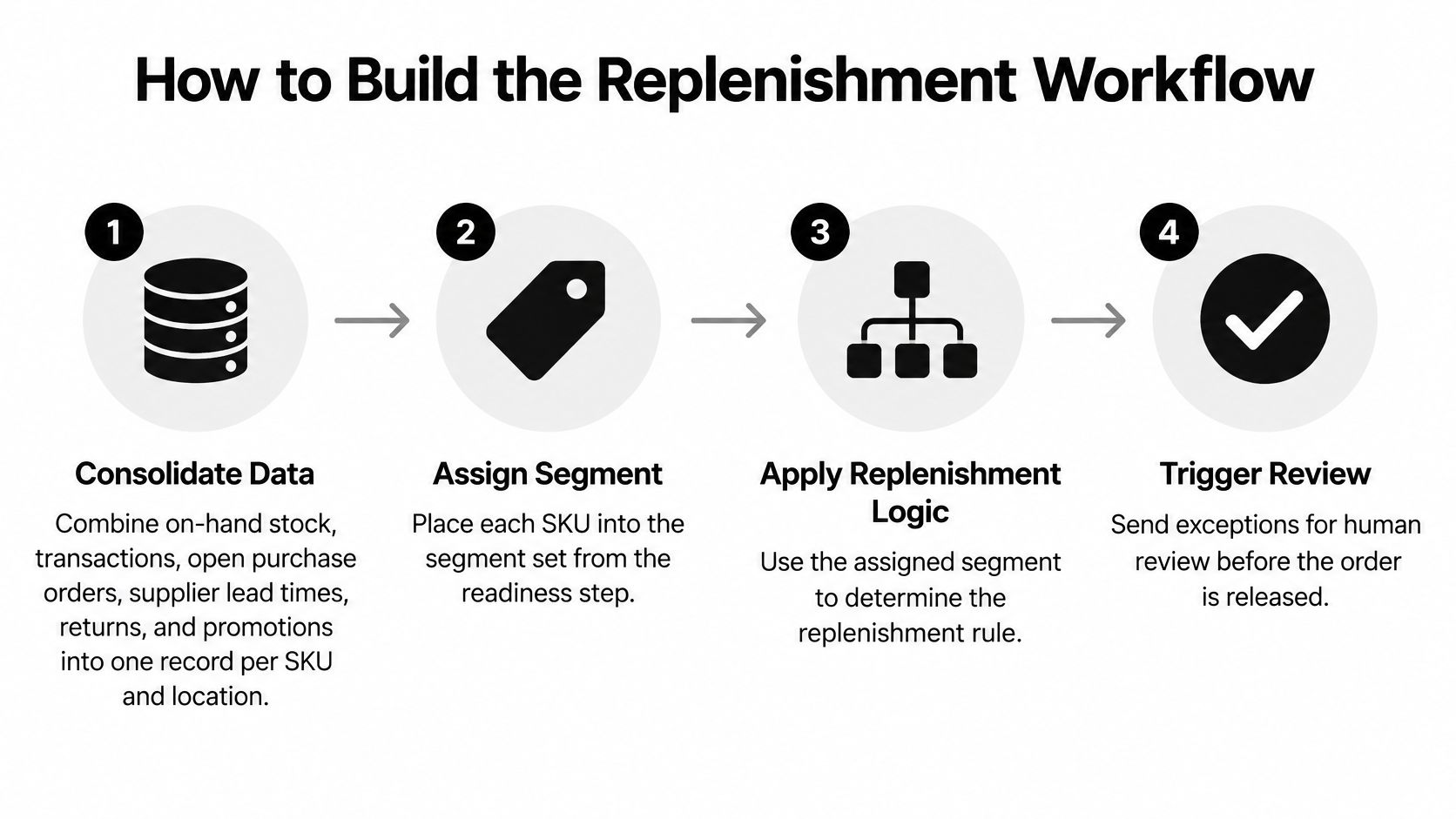
Build a decision workflow, not a forecast that somebody must manually translate into orders. Every recommendation should carry its input timestamp, policy version, explanation and approval status.
The core sequence is straightforward. The difficult work is making the definitions consistent enough that purchasing, finance and warehouse staff interpret the result the same way.
Establish the decision inputs
Consolidate the stock position. Build a decision record for each SKU and location containing on-hand stock, reservations, usable inbound orders, returns and known promotions. Preserve the underlying transaction references so staff can investigate a recommendation. Don't count quarantined stock as available or cancelled purchase orders as incoming supply.
Assign the SKU's replenishment segment and policy owner. Store the ordering calendar, supplier minimums, pack multiples and relevant service objective alongside the policy. These constraints belong in the calculation, not in an undocumented buyer correction afterward.
Backtest with rolling decision dates. At each historical decision point, use only information available then. Advance through time and repeat. Include periods with stockouts, but don't mistake suppressed sales for evidence that demand disappeared.
For a supporting review of receiving, stock control and purchasing practices, Wistec's inventory management guide is useful alongside the technical build. Operational discipline and model design should use the same stock definitions.
Translate uncertainty into an order
Calculate the reorder point from expected demand during replenishment lead time plus safety stock. Include the review interval where orders aren't reviewed continuously. Estimate lead-time variability as well as demand variability, because a steady-selling item can still become unreliable when supply slips.
Service targets have a working-capital price. In an integrated forecast-to-inventory study hosted by the National College of Ireland, an approximately 98% service target required about 3 units of safety stock, compared with roughly 0.5 units at a 90% target in the studied setting. Those quantities aren't transferable settings for your catalog; they illustrate why higher targets need a cost check.
Simulate the ordering policy. Apply holding, ordering and lost-sales costs, then include realistic pack sizes, minimum orders and supplier calendars. Compare the proposed policy with the existing rule under the same assumptions. Test delayed supply and promotion spikes rather than judging only an average trading period.
Add release controls before connecting purchasing execution. Check order value, quantity, supplier status and freshness of inputs. Route exceptions to an approver with enough context to accept, edit or reject the proposal without rebuilding the calculation.
Review outcomes and re-estimate parameters. Examine service, inventory and cost together. Adjust the policy when its assumptions have changed, and preserve the previous version so the team can explain what changed and why.
At Cyndra, our implementation process maps where AI is worth using, connects agents to actual business tools, trains the team and keeps production actions within scoped permissions. Human approval stays on the actions that matter most.
Apply the workflow to an apparel pilot
Say an apparel business separates core basics, promoted seasonal lines and supplier-confirmation exceptions. Basics use maintained reorder points; seasonal lines use demand models with buyer approval for unusual commitments.
An agent checks late confirmations against open purchase orders and prepares supplier follow-ups. It doesn't independently increase seasonal buys because an email sounds urgent. Each group keeps its own policy, while the shared workflow records the recommendation, decision and eventual receipt.
Connecting Systems Without Corrupting Stock Data
62% of distribution leaders said their current networks couldn't support planned technology deployments in the 2025 Verizon State of Smart Distribution study. Before selecting connectors, map how stock events move between the warehouse system, point of sale, ERP, transport tools and partners.
Identify the authoritative system for each event. The warehouse may confirm physical receipt while the ERP owns the purchase order and accounting treatment. Allowing both to overwrite the same quantity without reconciliation creates ambiguity, not integration.
Integration patterns compared for stock data flows
| Pattern | Best for | Main risk |
|---|---|---|
| Direct API sync | Main system of record with stable endpoints | Vendor field changes can cause silent failures |
| Middleware event routing | Several tools exchanging stock events | Adds a failure point and maintenance cost |
| Scheduled batch files | Partners that cannot stream events | Stock becomes stale between batches |
| Custom connector | Legacy tools without a suitable API | Specialized maintenance can concentrate knowledge |
| Browser automation | No API, as a temporary fallback | Screen changes can break the workflow |
Protect transaction meaning
Use a master mapping for SKU, location and unit-of-measure identifiers. Give each event a unique identifier so retries don't create duplicate receipts or deductions. Record event time separately from processing time to identify delayed updates.
Define what happens when events arrive out of order. A cancellation arriving before its original order shouldn't disappear because the destination system can't find the order yet. Hold it for reconciliation and alert the owner.
For channel-to-ERP workflows, NanoPIM's guide to automating ecommerce order transfers to ERP provides context for mapping order information between systems. Broader customer and financial dependencies also belong in the design, including those addressed in integrating CRM and ERP.
Make recovery part of the connection
At Cyndra, we build custom connectors for internal tools without an API or use browser automation as a fallback. Screen-based workflows need explicit monitoring and a maintenance owner, not an assumption that successful setup means permanent reliability.
- Detect failures: Alert on rejected events, growing queues and updates arriving later than the agreed operational limit.
- Control changes: Freeze nonessential integration changes before peak trading and keep approved configuration snapshots.
- Rehearse recovery: Restore prior settings, reconcile pending events and verify that recovery won't release duplicate orders.
- Compare like with like: Reconcile a physical count to system stock at the count timestamp, then account for subsequent movements.
Recovery test: Staff should be able to identify what failed, stop affected actions and resume safely without guessing which transactions already posted.
Don't compare today's stock export with an old physical count without accounting for movements between them. That produces false exceptions and trains staff to ignore the alert queue.
KPIs to Track and What a Miss Means
One company's average inventory accuracy was only 51%, according to the Kang and Gershwin work summarized in an MIT-hosted inventory-inaccuracy paper. The management trade-off is important: buying more can protect availability, but it also ties up cash. Evaluate automation on both outcomes.
Set targets by SKU segment and business economics. The operating targets below are decision rules to agree before launch, not universal industry benchmarks.
Inventory automation KPIs, targets and review cadence
| KPI | Target | Review cadence | A miss usually means |
|---|---|---|---|
| Record accuracy on cycle counts | Meets the approved pilot accuracy gate | Weekly | Shrinkage, scanning gaps or duplicate SKUs |
| Fill rate on A-items | Meets the segment's approved service objective | Weekly | Safety stock too low or lead times drifting |
| Stockout events per SKU per month | Falling trend toward zero | Weekly | Reorder points out of date |
| Inventory turns | Relevant category benchmark or approved baseline | Monthly | Overordering or slow-moving stock |
| Forecast bias | Within the segment's agreed tolerance | Monthly | Model drift after a demand shift |
| Cost per fulfilled unit | Falling or flat at comparable service | Monthly | Hidden expedite fees or extra handling |
Diagnose before changing the model
Record accuracy should measure exact matches between counted and recorded quantities using a consistent counting procedure. Unit fill rate measures demand units fulfilled immediately from available inventory. Neither should be replaced by a convenient dashboard field with a different denominator.
A declining fill rate alongside reliable records points toward policy or supply issues. A declining fill rate alongside unexplained discrepancies calls for transaction investigation first. Increasing safety stock won't repair missing receipts.
Use operational efficiency metrics to connect these measures to fulfillment work. Reduced planner effort isn't a win if warehouse staff spend more time handling emergency transfers.
Monitor the human control loop
The DPT-Zebra retail research report identifies employee competency and skills as an implementation barrier. Treat training and override behavior as operating controls, not launch activities that disappear after deployment.
- Rejected recommendations: Require a reason code such as incorrect stock, missing promotion, supplier constraint or commercial judgment.
- Approval delays: Check whether the queue reaches someone authorized to decide, rather than merely someone copied on the alert.
- Repeated overrides: Determine whether staff are correcting a real policy defect or bypassing a control they don't understand.
Schedule periodic model reviews, but change a parameter only when you can state the hypothesis and measure the result. Changing lead times, safety stock and forecast logic together makes it difficult to identify what improved performance.
Pick Your First Pilot, Set Go-Live Gates and Staff the Change
Choose a manageable group of active SKUs with clean counts, an accountable buyer and a meaningful cost of stockouts. Avoid a first pilot dominated by launches, unresolved supplier disputes or unusual fulfillment arrangements. You want interpretable results, not an easy-looking dashboard.

Require evidence before order release
- Shadow comparison completed: Buyers have reviewed proposed orders against manual decisions across complete replenishment cycles.
- Rollback demonstrated: Staff can restore the approved fallback and reconcile transactions already in flight.
- Authority bounded: Order caps, approval thresholds and permitted suppliers are configured and tested.
- Exceptions staffed: A named person owns decisions, with cover when they're unavailable.
Set deferral rules around input freshness, unfamiliar demand patterns and recommendations outside the tested operating range. New products and promotions need commercial context; a confident-looking output isn't permission to ignore missing information.
Train buyers and warehouse leads using actual tasks: approve a recommendation, reject it with a reason, investigate its inputs and recover from a failed update. Assess whether they can complete those tasks, not whether they attended training.
Resistance can reveal a bad rule or an impractical approval path. Capture it, investigate it and change the policy deliberately. Automating inventory management succeeds when people know what they may delegate and what they still own.
Cyndra offers a free Readiness Audit and Cost Calculator to help you assess where inventory automation is worth starting. Our AI Consulting team works alongside your staff to audit workflows, build and train agents, and deploy them into the systems your team already uses. Visit Cyndra to scope a pilot with clear data gates, permissions and human approval paths.