 CYNDRA
Most advice about customer service and support automation starts with the wrong question: How many tickets can the bot deflect? That metric is easy to display and easy to misuse. A conversation that ends because a customer gave up isn't a successful resolution, even if the dashboard labels it “automated.”
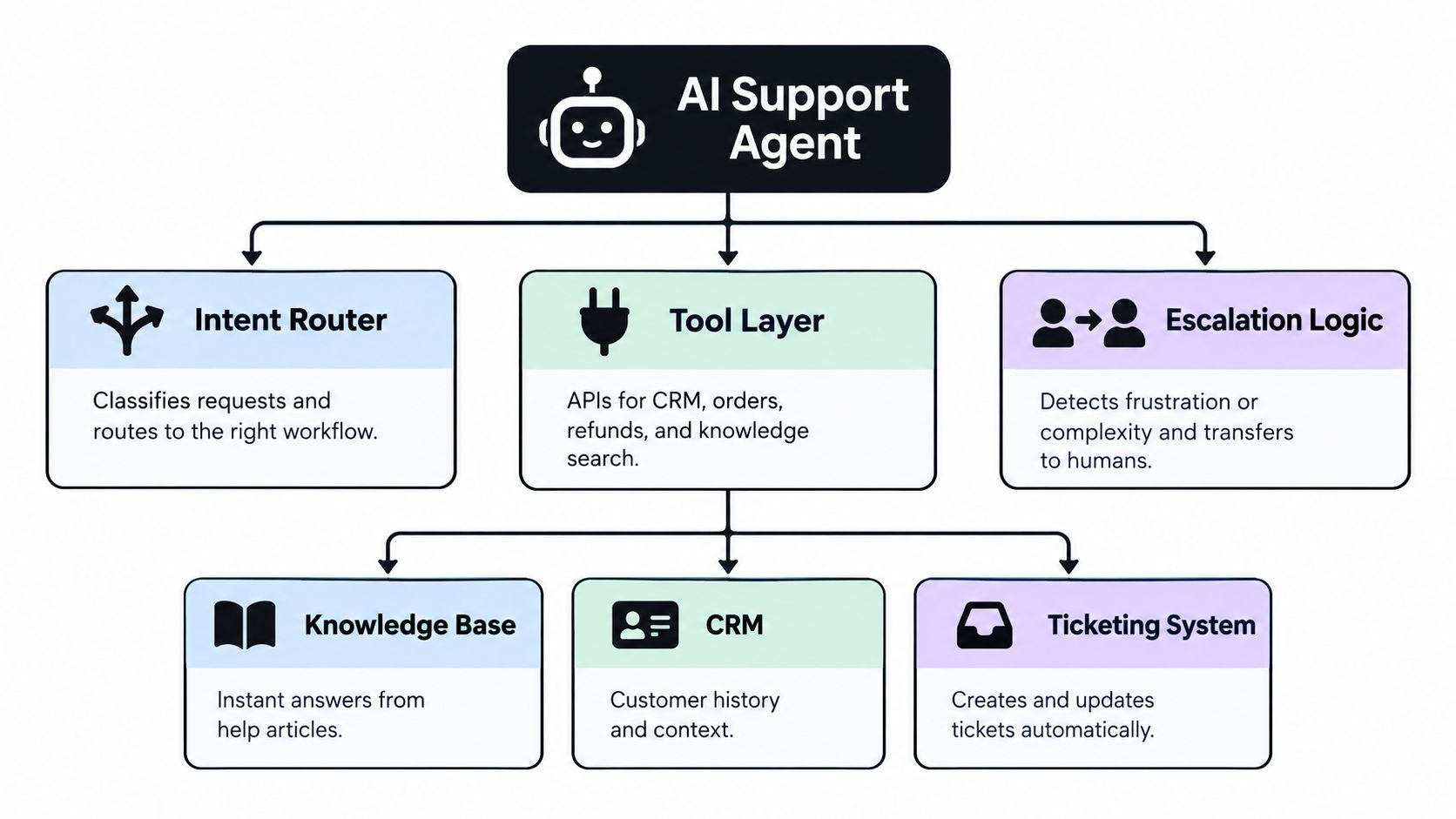
Production support automation works differently. It connects intent detection, customer context, business tools, escalation rules, and feedback into one operating system. The agent answers when it can, acts when it has permission, explains what it did, and hands over the full context when a human needs to take control.
The shift matters because AI support agents can now handle substantial parts of routine service work, but vendor benchmarks rarely describe the conditions behind those results. Teams that succeed treat automation as a learning system driven by CX data, not as a chatbot bolted onto a help center.
Table of Contents
- The Reality of Customer Service and Support Automation
- Mapping Workflows and Identifying Automation Candidates
- Designing Agent Workflows and Tool Integrations
- Building Fallback Patterns and Human Handoffs
- Monitoring SLAs and Measuring Real Impact
- Rollout Best Practices and Avoiding Common Pitfalls
The Reality of Customer Service and Support Automation
The assumption that adopting automation automatically improves customer experience is wrong. A 2026 industry roundup reports that 99% of CX organizations use some form of automation, yet only 23% say their interactions are both highly automated and consistently optimized with CX insights (industry roundup on automation maturity). Adoption has become widespread. Operational maturity hasn't.
That gap usually appears in familiar forms. A company launches a chatbot using old help-center articles, gives it no access to order or account data, and measures success through containment. Customers ask for a refund, receive a policy paragraph, ask again, and eventually reach an agent after repeating the entire story. The company may report strong deflection while customers experience delay, repetition, and uncertainty.
The practical distinction: Deflection removes a conversation from an agent queue. Resolution removes the customer's problem.
A mature automation stack must answer four questions for every interaction:
- What does the customer need? Classify the underlying intent, not just the keywords in the message.
- What information is authoritative? Retrieve current data from the right system instead of guessing from general language.
- What action is allowed? Separate harmless information retrieval from changes to accounts, payments, orders, or access.
- What happens when the workflow fails? Escalate quickly, preserve context, and make the handoff useful.
This is why support leaders should evaluate automation as an operational capability rather than a software feature. The competitive advantage comes from connecting AI routing, self-service, CRM context, ticket workflows, and quality review. Teams assessing the financial side can also use this practical resource on how to protect ad spend with AI support, particularly when support friction risks undermining acquisition efficiency.
A useful implementation reference is AI agents for customer support, but the technology itself won't fix an undefined process. Before deployment, decide what a successful resolution means for each intent, which actions require approval, and which signals should trigger a human handoff. Without those decisions, automation makes an inconsistent process faster.
Mapping Workflows and Identifying Automation Candidates
Don't begin by writing prompts. Begin with the work.
Export a representative sample of conversations, tickets, call summaries, and contact reasons from your help desk. Remove sensitive information where necessary, then group interactions by the job the customer is trying to complete. “Where is my order?” and “My order arrived damaged after a promised delivery date” may contain similar words, but they represent different workflows, different emotions, and different escalation requirements.
A practical audit looks at five dimensions:
- Intent frequency: Which requests appear repeatedly across channels?
- Process complexity: Can the workflow follow clear rules, or does it depend on judgment?
- Data availability: Does the system have reliable, current information to answer or act?
- Risk exposure: Could an incorrect answer create financial, legal, security, or safety problems?
- Customer pressure: Is the customer confused, anxious, angry, or dealing with a high-impact failure?
Start with high-volume, low-ambiguity work. Order status, password recovery, appointment changes, subscription questions, and basic policy lookups often have clear inputs and predictable outputs. Don't assume every frequent topic belongs in the first release. A common issue with poor documentation may be frequent precisely because the underlying process is broken.
The data-use gap is substantial. A 2026 survey found that 68% of organizations don't use CX data to its best advantage, while only 22% use it to decide what should be automated (survey on CX data and automation decisions). That means many teams choose automation candidates based on enthusiasm, vendor demos, or executive preference instead of observed customer friction.
Build an intent inventory
Create a working inventory with one row per intent. Record the customer wording, required data, permitted action, expected outcome, fallback owner, and evidence that the workflow completed successfully. Add examples of near-miss intents, because customers rarely use the labels your support team uses internally.
For each candidate, inspect the full journey rather than a single message. A “refund status” request may require payment data, order data, delivery status, and an explanation of timing. If the agent can only read one of those systems, it can't provide a dependable answer.
Use historical outcomes to rank candidates. Keep complex complaints, exceptions, account disputes, security incidents, and emotionally charged failures with trained human agents until the organization has strong controls and reliable handoff patterns. The right first use case isn't the one that produces the most impressive demo. It's the one that can resolve a clearly defined customer job without creating hidden rework.
Teams that need a repeatable method for translating support requests into logic can use this guide to design a workflow. Treat the inventory as a living operational document. New failure patterns, policy changes, and customer feedback should change the ranking of what gets automated next.
Designing Agent Workflows and Tool Integrations
An AI agent without live business context is a conversational search box. It may phrase an answer naturally, but it can't reliably resolve a customer problem unless it can retrieve the relevant record and take an authorized action.
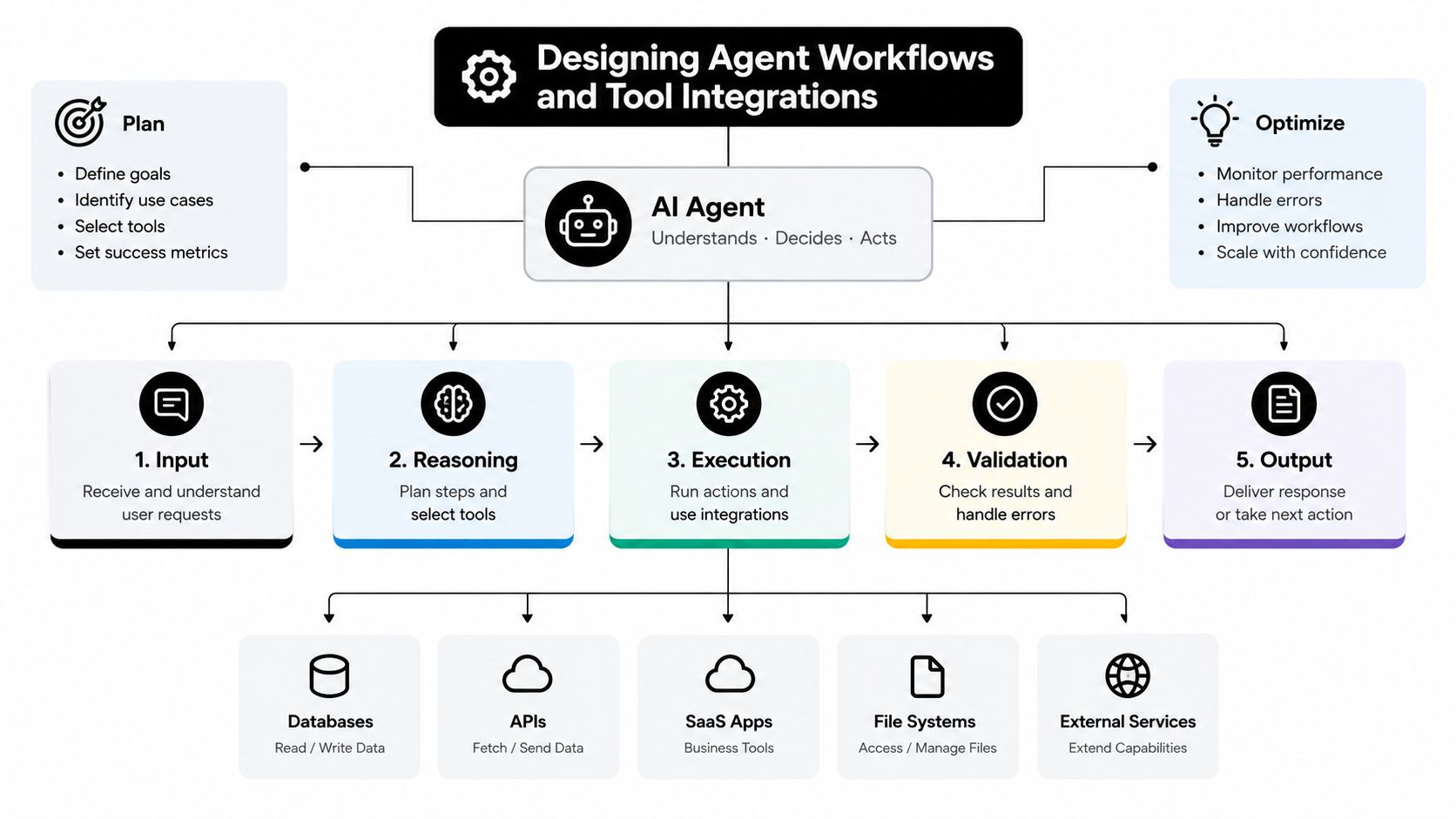
A production workflow usually has five layers:
- Intent recognition identifies the customer's objective and any important constraints.
- Context retrieval gathers account, order, billing, entitlement, or prior-contact information.
- Decision logic determines which path is valid and whether the request falls within policy.
- Tool execution performs a specific read or write operation through a controlled integration.
- Verification and communication confirms the result, explains the next step, and records the interaction.
The tool layer deserves more attention than the prompt. Define narrow functions such as get_order_status, check_refund_state, create_ticket, or update_shipping_address. Each function should specify required inputs, allowed users or workflows, expected responses, error states, and logging requirements. Avoid giving an agent broad, unrestricted access to a CRM or payment platform and hoping the model behaves responsibly.
Give the agent evidence, not just instructions
A support agent needs a clear source hierarchy. Current account data should outrank a general article. A published refund policy should outrank an improvised interpretation. A system error should trigger a fallback instead of a confident explanation.
Design retrieval around the task:
- For account questions, fetch the authenticated customer's record and relevant entitlements.
- For order questions, retrieve the latest fulfillment event, status, and exception details.
- For policy questions, return the applicable article version and market or plan conditions.
- For technical problems, collect product version, recent events, known incidents, and troubleshooting history.
- For escalation, create or update the ticket and attach the transcript, intent, actions attempted, and unresolved question.
Write operations need stronger controls than read operations. A refund, cancellation, address change, or account access change should pass through policy checks, confirmation requirements, and audit logging. Where risk is material, let the agent prepare the action for approval rather than execute it automatically.
Conversation design also affects resolution quality. Ask only for information the connected systems don't already contain. Confirm sensitive actions before execution. Don't force customers through a rigid menu when they have already described the problem clearly. At the same time, don't let the agent improvise across unrelated workflows. A short, explicit state model is safer than an open-ended conversation that forgets what has already been verified.
Organizations that need help connecting agent behavior to operational systems can review Agentic AI development offerings as one example of the implementation work involved. The important question isn't whether an agent sounds human. It's whether every answer and action can be traced to the right data, rule, and permission.
Building Fallback Patterns and Human Handoffs
A handoff isn't a failure of automation. A bad handoff is a failure of design.
Customers accept automated service when it resolves the issue end to end. In a 2026 customer experience report, 69% of people who currently prefer a human agent said they'd switch to automated service if it could fully resolve their issue (customer experience report on automation expectations). The condition matters. Customers aren't asking for a bot at any cost. They're accepting automation when the outcome is dependable.
Create escalation rules before launch. A workflow should hand over when:
- The customer repeats the same request after the system has already answered or failed to understand it.
- The conversation shows mounting frustration, hostility, distress, or urgency.
- The agent lacks required data or encounters an integration error.
- The request involves an exception outside documented policy.
- The customer disputes a financial or account decision.
- The customer explicitly asks for a person after a reasonable automated attempt.
- The account or issue carries special risk, such as a security concern or a high-impact service interruption.
Don't rely on sentiment scoring alone. Frustration often appears through behavior, including repeated rephrasing, increasingly short replies, refusal to provide information already supplied, or requests to cancel. Combine language signals with workflow state and failed tool calls.
Make the transfer useful
The human agent should receive a structured handoff, not a transcript dump. Pass the customer's stated intent, verified identity status, relevant account details, actions already attempted, tool responses, unresolved question, sentiment signal, and any policy constraints. Highlight the exact point where the automated flow stopped.
A good handoff lets the human start with ownership: “I can see the order was marked delivered, but the carrier exception is still open. I'll take this from here.” A poor handoff asks the customer to repeat the order number, describe the problem again, and explain why the previous answers didn't help.
Keep the customer informed during transfer. State what will happen next and avoid promising a response time unless the support operation can meet it. If no human is immediately available, create a ticket with the correct priority and show the customer the reference details.
Handoff rule: Transfer the work already completed, not just the conversation that happened.
Review escalations as product and process feedback. If agents repeatedly receive the same missing context, improve the intake workflow. If a policy creates frequent exceptions, clarify the policy or create a dedicated path. If customers escalate because an article is technically correct but hard to follow, improve the content rather than adding another bot response.
Monitoring SLAs and Measuring Real Impact
Deflection is a useful diagnostic, but it isn't a business outcome. A workflow can deflect conversations by ending them prematurely, blocking access to a human, or giving an answer that creates a later contact. Operations teams need a measurement system that connects automation activity to verified resolution, service levels, customer sentiment, and downstream workload.
A large cross-industry benchmark analyzed 220 million live chat interactions and reported an AI agent chat handling rate of 75.3%, with chatbot satisfaction up 9.1% (cross-industry AI support benchmark). The useful lesson isn't to copy those figures as a target. It's to separate handling from resolution and satisfaction, then inspect performance by intent, channel, customer segment, and escalation reason.
| Metric Type | Vanity Metric Avoid | Core KPI Track |
|---|---|---|
| Volume | Conversations touched by AI | Resolved customer issues by intent |
| Containment | Sessions ending without an agent | Verified end-to-end resolution |
| Speed | Instant first response | Time to meaningful resolution |
| Productivity | Messages generated | Human effort removed without repeat contact |
| Quality | Bot completion rate | CSAT, reopen rate, and escalation quality |
| Coverage | Number of automated intents | Successful performance across supported intents |
| Reliability | Workflow executions | Tool success rate and integration errors |
| SLA control | Average queue movement | Breaches, backlog age, and priority response |
Define verified resolution
A verified resolution requires evidence beyond the final bot message. The system should confirm that the requested action completed, the customer received the relevant result, and no follow-up contact or reopen signal indicates failure. For an order-status workflow, that might mean the agent retrieved the current status and the customer confirmed the answer helped. For an account change, it means the write operation succeeded and the updated state is visible in the system of record.
Track the full path. Monitor intent recognition errors, knowledge-base searches with no useful result, tool failures, fallbacks, repeat contacts, human corrections, and negative feedback. Break dashboards down by workflow instead of averaging everything into one automation score. A strong overall number can hide a dangerous failure in billing, security, or cancellation flows.
Turn monitoring into a learning loop
Assign an owner to each automated workflow. That person reviews performance, approves knowledge changes, investigates incidents, and decides whether coverage should expand or contract. Set alerts for rising fallback rates, unresolved tool errors, new phrases that don't map to an intent, and sudden changes in customer feedback.
SLA monitoring should also include the human side of the system. Automation may reduce routine work while concentrating difficult cases in the queue. Track whether escalated conversations reach the right team, whether agents receive sufficient context, and whether priority tickets move within the promised service window.
The strongest teams run a weekly review that turns failures into changes. Update an article when retrieval fails. Add a tool when agents repeatedly perform the same lookup. Narrow permissions when an action creates risk. Retire a workflow when its maintenance burden exceeds its value. Automation improves when the organization treats every interaction as evidence.
Rollout Best Practices and Avoiding Common Pitfalls
A big-bang launch creates too many unknowns at once. Release one workflow, one channel, or one customer segment first, then expand only when the evidence supports it. Internal testing should include ordinary requests, incomplete information, contradictory statements, policy exceptions, integration outages, and deliberate attempts to make the agent invent an answer.
The first production cohort should have low operational risk and clear success criteria. Keep a human review path visible, sample completed conversations, and compare automated outcomes with the outcomes a trained agent would have produced. Don't hide the agent from support staff. Human agents need to see what the system is doing so they can correct it and build trust.
Independent benchmark coverage across six industries reports verified end-to-end AI resolution near a median of 41%, while ecommerce and retail reach 70–84% because structured intents are easier to automate (independent benchmark coverage across industries). That range reinforces a practical point: start where the data, rules, and system access are strongest, not where the marketing story sounds most ambitious.
Use this rollout checklist:
- Pilot a defined job: Automate one intent with a clear start, action, and completion state.
- Test the exceptions: Include ambiguous language, missing records, failed integrations, and frustrated customers.
- Review the knowledge base: Remove contradictory articles and assign owners for policy updates.
- Give agents control: Let human staff correct answers, flag unsafe behavior, and report missing context.
- Expand by evidence: Add coverage only after verified resolution and customer feedback remain healthy.
- Keep a rollback path: Disable a workflow quickly when an integration, policy, or product change makes it unreliable.
The common pitfalls are predictable. Teams automate a broad category instead of a specific customer job. They treat knowledge content as a one-time upload. They give the agent permission to act without a clear audit trail. They optimize for containment while ignoring repeat contacts. They announce an AI assistant to customers before training the people who must handle its escalations.
A connected implementation can help coordinate the operational pieces. See this guide to AI agent integration for a practical perspective on connecting agents with existing systems. The durable approach is simple: launch narrowly, measure carefully, fix the workflow, and let successful evidence earn the next expansion.
Cyndra helps teams install, train, and manage AI employees for support workflows, including queue triage, drafted replies, tool integration, and context-rich escalation to human staff. If you want to turn customer service and support automation into a production system that learns from real CX data, visit Cyndra to discuss your workflow and implementation path.