 CYNDRA
In 2025, 93% of organizations considered automation essential for future customer-onboarding success, while only 25% reported having fully automated processes, according to the Moxo report based on data from more than 300 companies. That gap explains most disappointing customer onboarding automation projects. Teams buy the ambition, automate the easy messages, and leave the hard part untouched, which is what happens when customer information is missing, contradictory, or stuck between departments.
I'd treat onboarding automation as an exception-management system, not a welcome sequence. The clean path should run fast, the broken path should recover predictably, and a person should take over early enough to save the account without guessing what already happened.
Table of Contents
- Stage Targets That Define Onboarding Success
- How to Design Build and Test the Workflow
- Recover Missing Inputs and Hand Off to People
- Security Controls and Pitfalls to Design Out
- Rollout Timeline KPIs and Effort
- Choose the First Workflow to Automate
Stage Targets That Define Onboarding Success
Start with the scoreboard, because teams otherwise automate activity and call it progress. Your program has one job, which is to shorten time-to-first-value across five stages: identity and permissions, data or tool connection, configuration, first successful execution, and handoff to recurring operation. A tour finish doesn't prove value, and an opened email proves even less.
| Stage | Operating target | Pass condition |
|---|---|---|
| Identity and permissions | Same session, least privilege | Account exists and only required access is granted |
| Data or tool connection | Automatic validation | A test record round-trips without a manual retype |
| Configuration | Prefilled from CRM or billing | Only fields the value event needs remain |
| First successful execution | Median 22 min; top quartile 8–12 min; top decile under 5 min | The core workflow completes once |
| Activation | Median about 30% and average about 36% of signups | First retained-value event, not a tour |
| Day-30 retention | Tracked by channel, role, plan, and path | Activated users still using the workflow |
| Handoff to recurring operation | Named owner and SLA | Open exceptions are closed or assigned |
Define Activation Before You Build Anything
Activation is the first action that predicts retained value. For an AI workflow, that might be the first successful agent-run task, a verified integration output, or an approved production artifact. For a tutoring business, it could be the first lesson completed after you track enrollments and student progress in one place, rather than the parent opening a welcome message.
Instrument the funnel in this order: signup completed, onboarding step started, integration or data connection completed, first core workflow executed, activation event, and Day-30 retention. Calculate activation as activated users divided by users who completed signup. The Userflow SaaS onboarding benchmarks across more than 500 products place median SaaS activation around 30% and the average around 36%, which means roughly two-thirds of signups never reach the defined value moment.
Practical rule: If the activation event doesn't predict a customer staying, you're measuring politeness, not value.
Set Stage SLAs You Can Paste Into a Brief
Use spread, not just averages. The Konabayev customer onboarding statistics for 2026 report a median time-to-first-value of 22 minutes, top-quartile performance of 8–12 minutes, and top-decile performance below 5 minutes. Your internal target doesn't need to match those numbers on day one, but it does need the same shape, with a median, a stretch band, and a failure threshold per stage.
Segment every result by acquisition channel, role, company size, plan, and integration path. A healthy overall median can hide one plan tier that always stalls on permissions. Before you quote any external benchmark in a review, document your numerator, denominator, cohort window, and milestone, because another vendor's definition will rarely match yours.
- Identity and permissions: Same-session completion, with only the access the first value event requires.
- Connection: Automatic validation passes when a real test record moves in both directions.
- Configuration: Prefill from CRM or billing data, then delete fields that don't change the first outcome.
- Execution: One completed core workflow, not a sandbox click-through.
- Retention check: Activated accounts still running the workflow at Day 30.
That scoreboard gives you a defensible baseline. It also tells you where automation earns its keep, which is usually at the stage with the longest wait and the highest failure rate, not the stage with the prettiest email template.
How to Design Build and Test the Workflow
Don't start by picking messages. Start with four prerequisites: one product or service line, a named activation event, the current manual path, and access to CRM, billing, support, and the system where work already happens. Without those, you'll automate a guess and spend the pilot arguing about what the workflow was supposed to do.
The process map below shows the build order I recommend, from prerequisites through a tested launch.
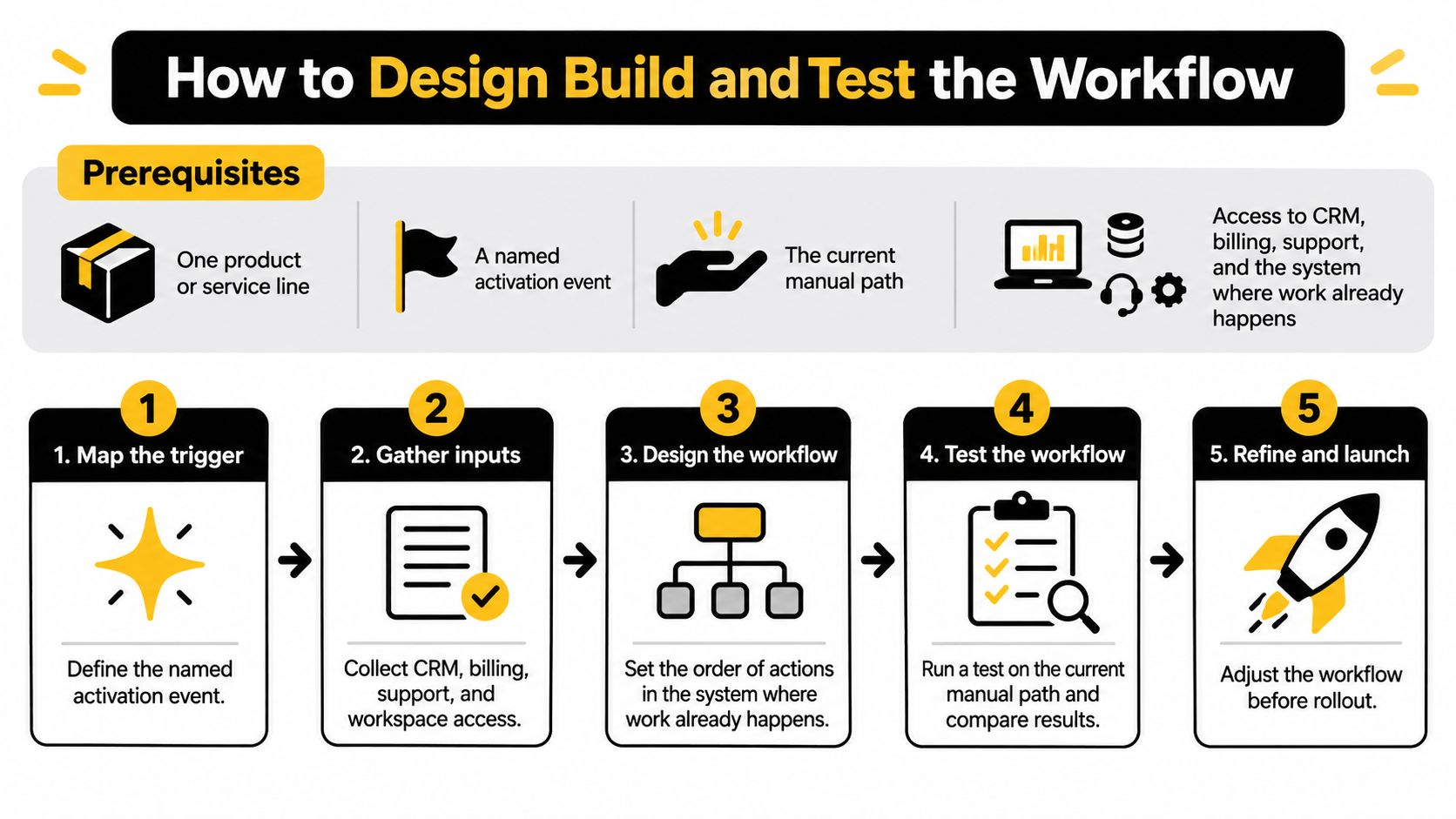
Build in This Order
Write the outcome in one line. Use something testable, such as first successful data sync or first approved deliverable. Drop any step that doesn't change that outcome, because every extra step adds a wait, a field, or an owner who can stall it.
Map the as-is path with owners, waits, and retypes. Mark where work sits, where someone copies data between systems, and where the customer is asked twice. In our discovery work, the team sits with the client's team, audits existing workflows, and identifies the 3 to 5 highest-ROI AI opportunities, ending with a prioritized roadmap. Rank your delay points the same way before you build.
Split customers into two or three paths by role or plan. A single checklist forces simple accounts through enterprise steps and gives complex accounts nowhere to branch. Keep the paths few enough that an operator can explain them on one page.
Delete nonessential fields and approvals, then prefill the rest. Pull company, plan, and billing contact data from the CRM or billing system. Ask the customer only for information those systems don't already hold.
Specify each automated action as a shared skill. Write the trigger, inputs, tool calls, pass condition, and the exact message if it fails. What works in training becomes a shared, tested skill, meaning a written procedure the AI follows every time, owned by the client's company. If you want a deeper walkthrough of that discipline, our guide on how to design a workflow covers the same structure.
Draft three customer-facing scripts. Write the first ask, the confirmation, and one recovery note. Suppress each message once its milestone is done, because congratulating a customer for a step they finished yesterday destroys trust in the system.
Test with three fixtures. Run a clean signup, a missing required document, and a broken integration. Record retry count, integration latency, support contacts, and whether the audit log explains the decision without a person narrating it.
Pilot on one cohort for two weeks. Compare time-to-first-value and activation against your manual baseline. Add paths only after the first one holds up under real volume.
Watch the Build Logic in Practice
The short video below is useful as a working reference while you spec triggers and failure messages, because the discipline is in the details, not the diagram.

Apply a Hard Go or No-Go Gate
Ship only if two conditions hold. First, the clean path beats the manual median on time-to-first-value. Second, both broken fixtures reach a named owner with enough context to act. If the clean path is fast but the failures disappear into a shared inbox, you haven't built customer onboarding automation. You've built a faster way to lose accounts.
If a step doesn't change the activation outcome, cut it before you automate it. Automating a pointless step just makes the pointless step faster.
Say a consultancy onboards clients who must connect a CRM and approve a first report. The outcome line is the first approved report, the CRM connection is validated with a test record, and the broken-integration fixture proves the workflow stops, explains itself, and routes the case instead of sending a cheerful reminder about a report that can't exist yet.
Recover Missing Inputs and Hand Off to People
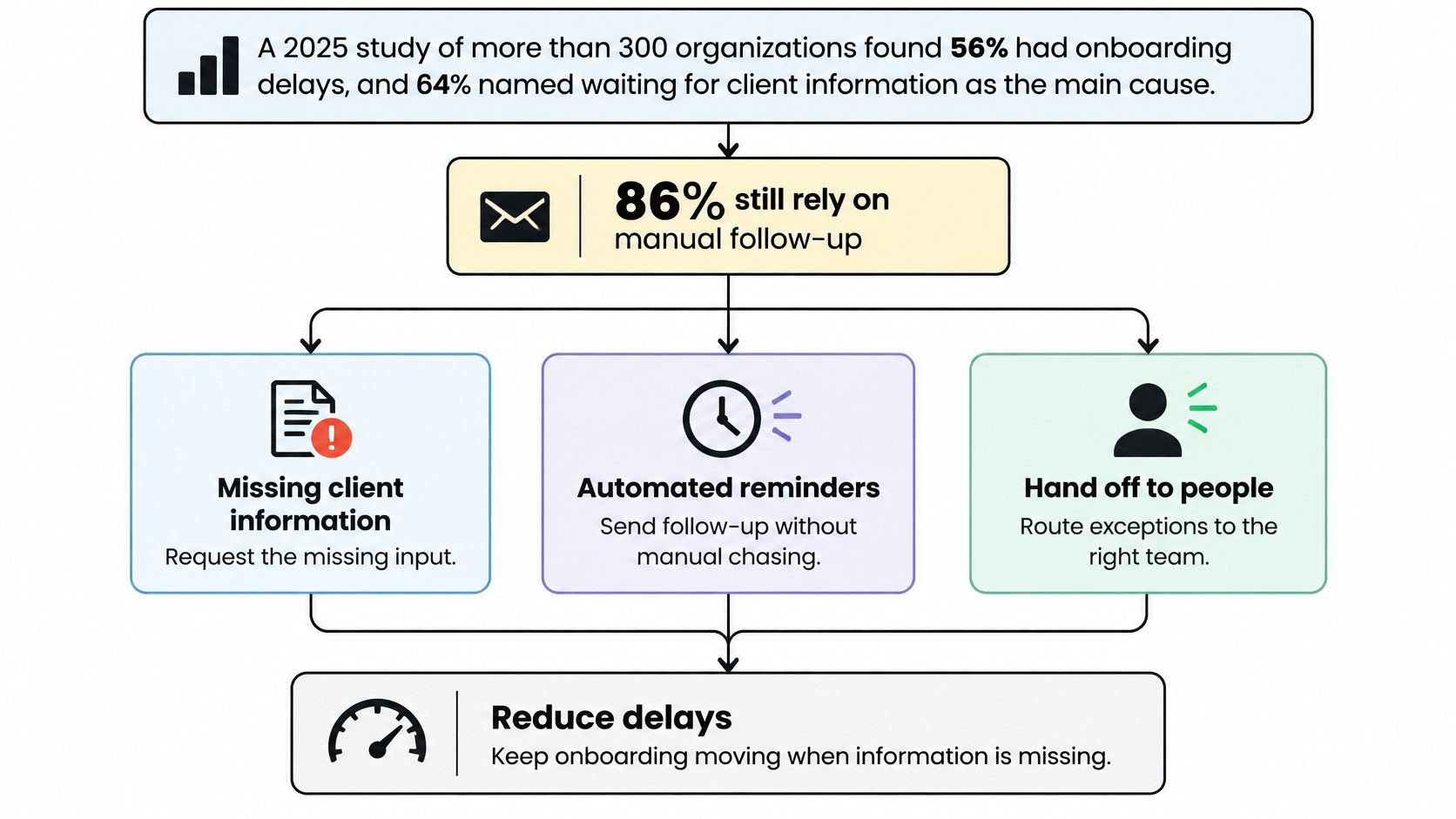
The constraint isn't task speed. It's getting complete information out of the customer. The Moxo study reported by Morningstar, covering more than 300 organizations, found that 56% experienced onboarding delays, with waiting for client information identified as the primary cause by 64% of respondents. The same reporting found that 86% of organizations still rely on email, 54% of CRM users report integration difficulties, and 60% of customers believe onboarding takes too long.
More reminders won't fix that. A generic nudge sent to a customer who's blocked by a permissions error or a contradictory record just trains them to ignore you.
The diagram below frames the operating problem, with missing inputs at the top and human rescue as a designed branch, not an afterthought.
Give the Agent Three Narrow Jobs
Define three roles before you build. An intake validator checks each submission against the form and the CRM and flags contradictions. A recovery sender makes one targeted ask per missing field and then stops. A router assigns the handoff packet to a named owner according to the table below.
Run the agent where the team already works, in Slack, Teams, or email, under its own identity with read-only access first. Team members message the AI employee in plain English, and it does multi-step work across connected tools and reports back in the conversation. That matters during recovery, because an operator can ask what the customer sent, what failed validation, and what's still missing without opening four systems. Our notes on human-in-the-loop automation describe how that working relationship stays accountable.
The same logic applies outside software. A trip operator collecting passports and waivers before departure faces the identical pattern, where one missing document blocks the whole party and a precise ask beats five broadcast reminders.
Use the Handoff Table as the Operating Rule
| Situation | Who acts | Trigger |
|---|---|---|
| Incomplete required field | Agent validates and asks once | Submission fails the data check |
| Contradictory data | Human confirms | Form and CRM or billing disagree |
| Customer stall | Named owner | No reply after two targeted asks |
| High-value or regulated step | Human with case brief | Plan tier, risk flag, or compliance step |
| Repeated failure | Human | Three retries or a hard integration error |
| Ambiguous use case | Human recommends the path | Agent confidence is low |
Every handoff packet needs four things: why the agent stopped, which data it used, what the customer already tried, and one recommended next action. Without that packet, the human restarts the conversation, asks for information the customer already sent, and confirms the customer's suspicion that nobody's paying attention.
Adjust the next step by account risk instead of advancing a stalled record. A low-risk missing field gets one precise ask. A regulated identity mismatch goes straight to a person. Track automated versus assisted completion and time-to-value by segment, so rescue cost stays visible and you can see which segments genuinely need people and which ones just need a better form.
Security Controls and Pitfalls to Design Out
Governance isn't a review you schedule after launch. It's a go-live gate. The Chameleon 2025 onboarding benchmark reporting found that only 18% of onboarding flows used personalization even though 65% of tools collected relevant signup data, and that click-triggered tours achieved twice the completion rate of time-based tours. Teams are collecting plenty of data and using little of it well, which is exactly the combination that creates exposure without benefit.
Four Controls to Build From Day One
Give the automation its own service identity and start read-only. Widen access only after the clean-path fixture passes. Shared credentials make every later question about who did what unanswerable.
Log every automated action. Record the actor, data used, recommendation, and outcome for each step. A compliance question should be answered from the log, not reconstructed from a chat thread three weeks later.
Keep documents and credentials in the systems that already hold them. Pass references into the workflow rather than copies. The workflow needs to know a document passed validation, not carry the document around in prompts and logs.
Gate regulated and enterprise accounts separately. Require a data-processing agreement, a security review, and a named owner for retention and deletion before the workflow touches identity data. Our guide to best practices for data security sets out the same control posture in more depth.
Pitfalls and Their Mitigations
Silent integration stalls are the most damaging failure mode, because the customer sees nothing happen and your team sees nothing wrong. Give every connector a recoverable error state, a visible status, and a named owner. If a sync fails, the workflow should say so, to the customer and to the operator, in plain language.
Over-broad data in prompts is the quiet second risk. Send the workflow only the fields the value event needs. If the step checks whether a billing contact exists, it doesn't need the full account history, support transcripts, and contract terms in context.
Unlogged autonomy fails socially before it fails technically. A recommendation nobody can trace will be bypassed by your own team within a month. Operators route around tools they can't explain to a customer or an auditor, and they're right to.
Autonomy should be governed, not removed. The goal isn't a timid workflow, it's a workflow whose decisions you can defend.
Personalization belongs inside these controls, not outside them. Branch on role, use case, and demonstrated behavior, using the signup data you've already collected with permission. Don't branch on data you scraped together from systems the customer never connected, because the first time the workflow reveals knowledge the customer didn't knowingly share, you'll spend the trust you were trying to build.
Rollout Timeline KPIs and Effort
You don't need a new platform to run a disciplined rollout. You need a calendar, one workflow, and exit gates you won't negotiate away when the quarter gets busy. The spending context is real, since Verified Market Research valued the global digital customer-onboarding software market at $1.42 billion in 2025, with a projected value of $6.81 billion by 2033 and a 21.8% compound annual growth rate, but market growth is no argument for buying coverage you haven't instrumented.
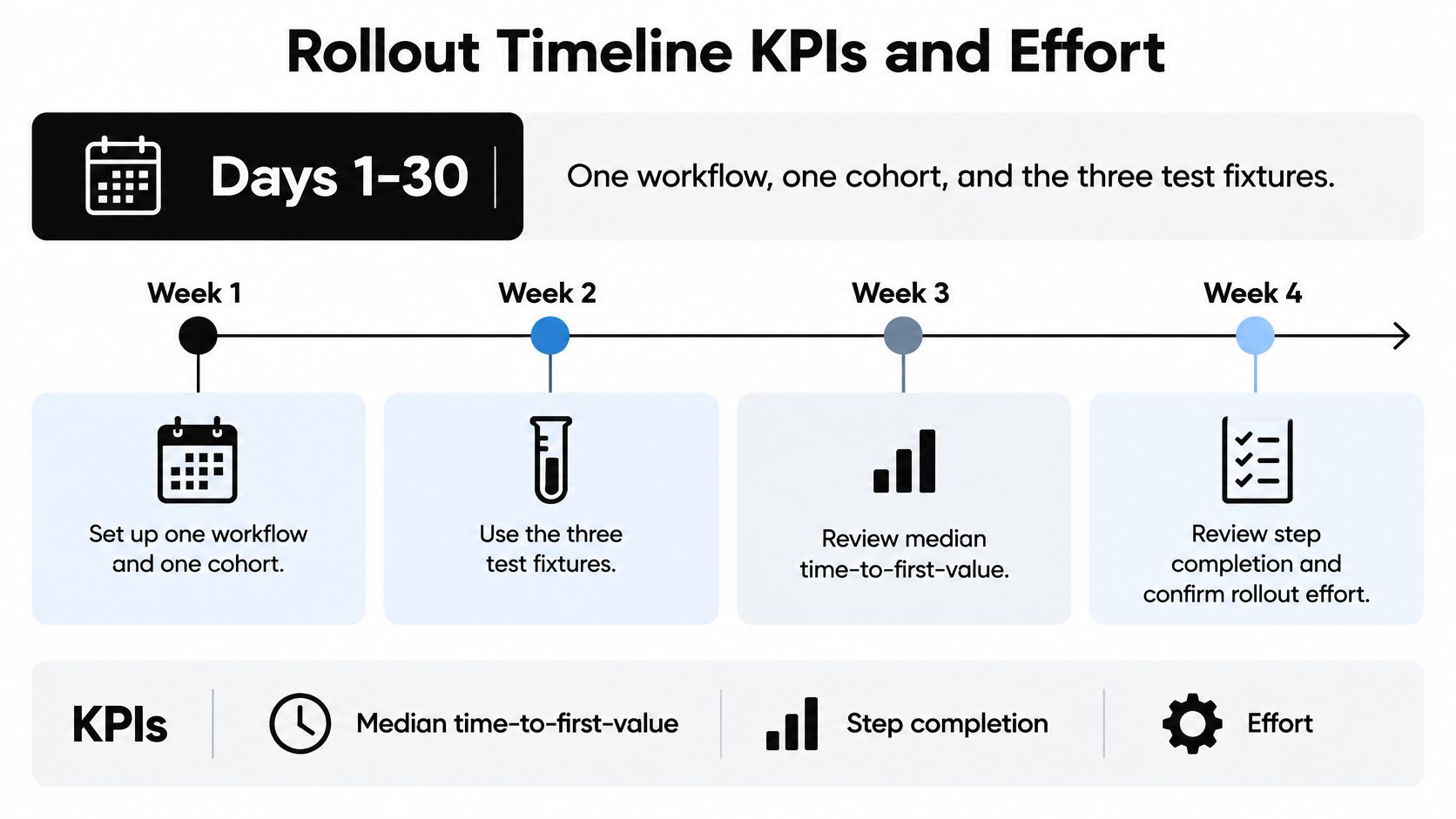
The timeline below shows the first month in weekly blocks, which is the phase where most rollouts either prove themselves or sprawl.
Run the Rollout in Three Gated Phases
| Phase | Scope | Exit gate | Effort |
|---|---|---|---|
| Days 1-30 | One workflow, one cohort, three fixtures | Clean path beats manual median time-to-first-value | Days to a few weeks of operator and specialist time |
| Days 31-60 | Second customer path | Activation beats manual baseline and assisted share falls | Operator and specialist time per added path |
| Days 61-90 | Neighboring team and versioned shared skill | Activation-to-Day-30 retention reviewed by channel and plan | Monthly optimization cycle |
In Days 1-30, run one workflow for one cohort against the three test fixtures. Review weekly: median time-to-first-value, step completion, failure rate, retry count, support contacts, and integration latency. Resist adding a second path in week two because someone senior asked for it.
In Days 31-60, add the second customer path only if activation beats the manual baseline and assisted cases are falling as a share of volume. If assisted volume is rising, your automation is generating exceptions faster than it resolves them, and another path will multiply the problem.
In Days 61-90, extend to a neighboring team, version the shared skill, and review activation-to-Day-30 retention by channel and plan. Versioning matters because two teams editing the same procedure informally will diverge within weeks, and you'll lose the ability to say which version produced which result.
Cost the Effort Honestly
A focused single-workflow pilot takes days to a few weeks of combined operator and specialist time. A multi-department rollout runs as a monthly optimization cycle rather than a quarter-long install. The staffing stays light when the procedure is written down: one operations owner, one system owner for CRM and billing, and the people who do the work inside the build.
- Specialist time: Design, integration, and fixture testing.
- Integration work: Connectors, validation rules, and error states.
- Exception hours: The human time still spent rescuing stalled accounts, which should shrink as a share of volume.
Track hours per activated account and support contacts per signup before and after launch. Those two numbers tell you whether customer onboarding automation is buying capacity or just moving work into a rescue queue. The first weekly dashboard the operations owner opens each Monday should show median time-to-first-value, step completion and failure by stage, retry count, exception volume by type, and activation by segment. If a number isn't on that dashboard, it won't get managed.
Choose the First Workflow to Automate
Pick the path with the most repeated waits for customer information and a clear value event. Don't pick the noisiest email sequence. Volume of messages is a symptom, and automating a symptom gives you a louder version of the same stall.
I'd start with identity plus one integration plus the first successful execution. That trio exposes missing inputs immediately, tests your validation and error states under real conditions, and produces an outcome the customer can see. Hold retention campaigns, multi-language personalization, and extra departments until the pilot cohort beats the manual baseline on time-to-first-value and support contacts.
Three questions decide the choice. Which path has the longest wait for customer information? Which activation event is already measurable? Which account stalled last month, and can you reconstruct exactly why? Bring the scoreboard, the current manual map, and that one stalled account to an internal working session, and let the answers pick the workflow.
If you want outside help building it with your team, we work through Discovery, Build, Deploy, and Optimize, starting from the first call to production AI in weeks, not quarters, and we offer a free 30-minute call to scope the engagement around the workflows you run. The action this week is smaller, though. Name the activation event and its owner, then run the clean, missing-document, and broken-integration fixtures before automating anything else.
Bring us your scoreboard, your manual onboarding map, and one account that stalled, and we'll scope a first workflow that handles the clean path automatically and routes exceptions to a named owner with full context. Visit Cyndra to book a free 30-minute call and start with the path where your customers wait longest.