 CYNDRA
The most popular advice on how to scale operations is to move faster, hire ahead of demand, and buy automation before competitors do. I'd do the opposite first. If your definitions, data, and ownership are shaky, speed doesn't fix the work. It just helps your team produce inconsistent outputs more quickly, at higher volume, with more people to coordinate.
Slowing down for a few weeks isn't caution for its own sake. It's how you find the one constraint that's limiting output, prove a better method on one process, and then copy that method without copying the chaos. Tools come later, after you've got something stable worth automating.
Table of Contents
- The Five-Stage Scaling Sequence at a Glance
- Find the Constraint with Five Operating Metrics
- Pick One High-Volume Process to Scale First
- Write the Standard Procedure and Control Plan
- Automate in Gates with Risk-Tiered Autonomy
- Redesign Roles, Change Management and Scorecards
- Confirm Your First Gate Before You Scale Further
The Five-Stage Scaling Sequence at a Glance
Two teams counting a completed order differently will argue louder once you add volume. A handoff with no owner breaks faster once you add speed. Automation applied to that instability scales the mess, so the fastest route starts by slowing down to fix definitions, data and ownership.
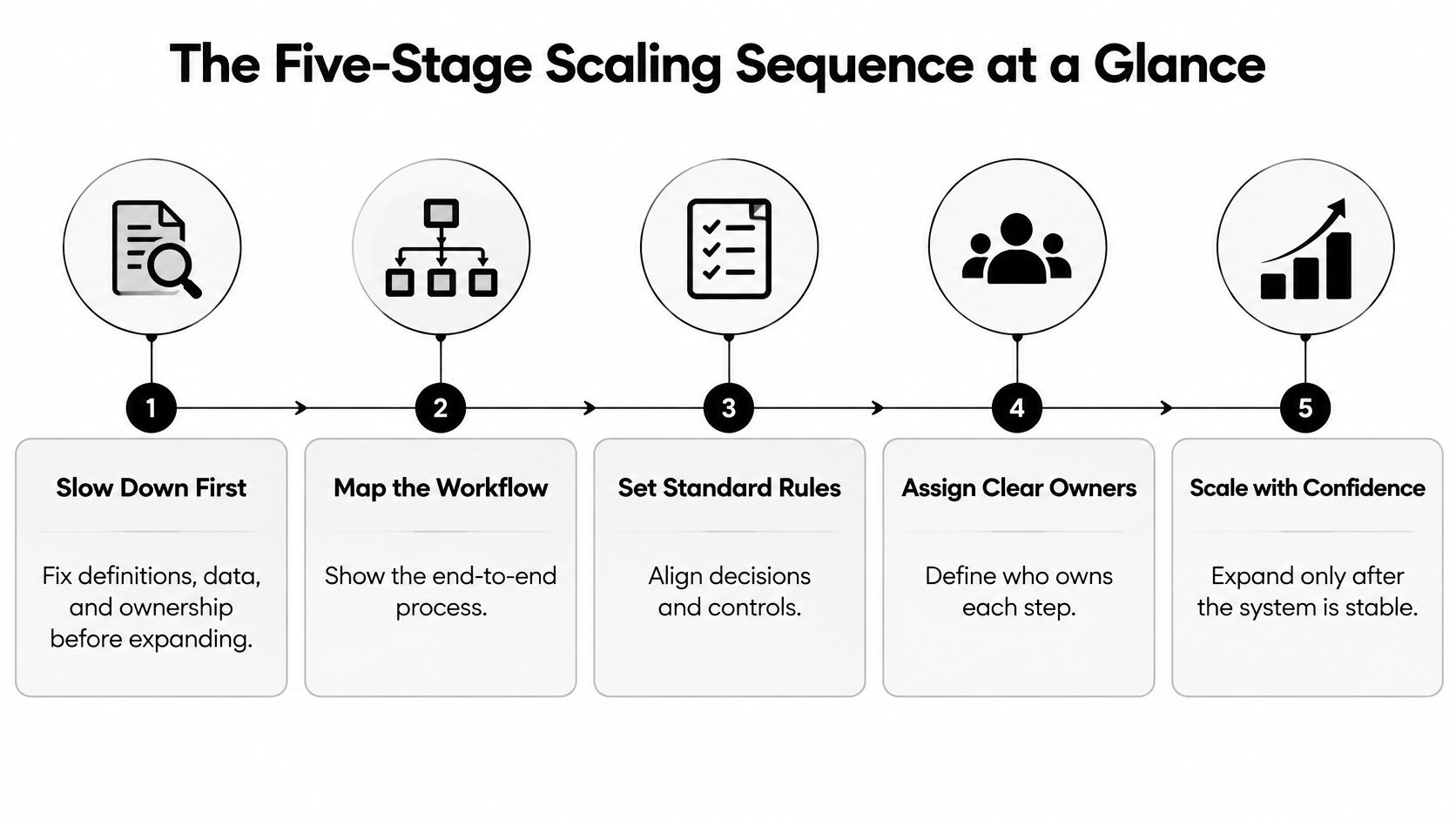
Run this sequence this quarter. Map and measure the end-to-end workflow, find where work queues up, and record baseline metrics before you change anything. Pick one high-volume workflow and document its current best method, with a clear reason it earned priority. Standardize it with inputs, decision rules, handoffs, exception paths and a named owner. Work that process for three to four months and compare results against the baseline, not against optimism. Copy the validated method to adjacent teams only after it beats the baseline, with a rollback plan and a 30-day audit.
Why the Order Matters
The World Bank Enterprise Surveys across 164 economies show the most productive firms are 5.9 times as productive as the least productive firms in low- and lower-middle-income economies, narrowing to 2.8 times in high-income economies. That gap does not close because weaker firms add headcount. It closes when firms reproduce the routines, management practices and quality controls that top performers already use.
Practical rule: Don't expand a process you can't yet measure. You'll get a faster version of the same inefficiency.
Governance belongs in that foundation, not as an afterthought. Work on AI governance in post-production makes the same point in a creative workflow context. Clear decision rights and review points let teams move quickly without losing control of quality.
Find the Constraint with Five Operating Metrics
A constraint is the step where work piles up while downstream capacity sits idle. Adding people everywhere else doesn't help, because output still can't move faster than that one step allows. Adding people at the constraint without understanding it can make the queue worse, since more hands create more handoffs and more variation.
Pull four weeks of data from tools you already use, such as your CRM, ticketing system, ERP, or project board. Then check a boring but critical question. Does every team define each metric the same way?
| Metric | What It Reveals | Warning Sign |
|---|---|---|
| Cycle time | How long one unit takes from start to finish | Most elapsed time is spent waiting, not working |
| Queue size | How much work is waiting in front of each step | Queue grows steadily in front of one step |
| Rework rate | How often finished work returns for correction | Rework traces back to one upstream handoff |
| Error rate | How often outputs fail a quality check | Errors cluster after one input source or rule |
| Capacity utilization | How much available time each step actually uses | One step runs near full while downstream steps sit idle |
Reading the Same Data Two Ways
Say approvals show a growing queue and the approver is running at full capacity while the next team waits for work. That points directly at approval as your constraint. The fix might be clearer approval thresholds, a second approver for low-risk items, or removing approval from work that doesn't need it.
High rework tells a different story. If one team keeps redoing work, don't automatically blame that team. Rework usually traces back to an upstream handoff where inputs arrive incomplete or ambiguous, so the proper fix sits with the team sending the work, not the team repairing it. Physical operations face the identical pattern, which is why guidance on how to design a more efficient warehouse focuses on removing the bottleneck rather than speeding up every aisle.
Fix Definitions Before You Trust the Numbers
In PwC's 2026 survey of 767 operations and supply-chain leaders, 87% said poor data quality had hampered digital value, and only 51% established a clean, structured data foundation before scaling initiatives. If your teams measure cycle time from different starting points, your constraint is a guess dressed up as analysis.
So do the unglamorous work here. Map exceptions, assign an owner to each metric, agree shared definitions in writing, and clean the fields you'll rely on. A deeper breakdown of operational efficiency metrics and how to define them consistently can help you lock those definitions down. Finish by writing your constraint in one sentence that names the step and the metric proving it. If you can't write that sentence, you're not ready to fix anything yet.
Pick One High-Volume Process to Scale First
Productivity gains aren't spread evenly, and your improvement effort shouldn't be either. In McKinsey's analysis of 16,200 German companies, only 29 firms, 0.2% of the sample, accounted for 47% of total productivity growth between 2019 and 2023. Scaling and portfolio optimization contributed 25% of growth, restructuring 22%, digitization and advanced analytics 19%, and internationalization only 7%. A few well-chosen moves did most of the work.
That's your argument for narrow focus. Spreading a small team across eight processes produces eight half-finished improvements. Concentrating on one process with real impact produces a result you can measure, defend, and copy.
Score Your Candidates in One Afternoon
List three to five candidate processes. Score each from one to five on these criteria, then add the totals:
- Transaction volume: How often does this run each week?
- Stable inputs: Does work arrive in a predictable format?
- Explicit rules: Can you state the decision logic in plain language?
- Measurable baseline: Do you know what a person produces today, and at what quality?
- Low cost of error: What happens when the process gets it wrong?
- Named owner: Is one person accountable for the outcome?
Watch for a common trap. The most visible process, often the one executives complain about loudest, is frequently low-volume. It should lose to a quieter workflow that runs hundreds of times a week, like invoice matching, ticket triage, status reporting, or request routing. Volume is where small improvements compound into real capacity.
One more filter matters. If your highest-scoring process has unstable inputs, send it back for data cleanup before you standardize or automate it. A high total built on messy inputs is a false signal.
Finish with a decision you can defend. Pick one process and write one sentence explaining why it beats the other candidates. That sentence becomes your answer when someone asks, three weeks in, why you're not working on their favorite problem instead.
Write the Standard Procedure and Control Plan
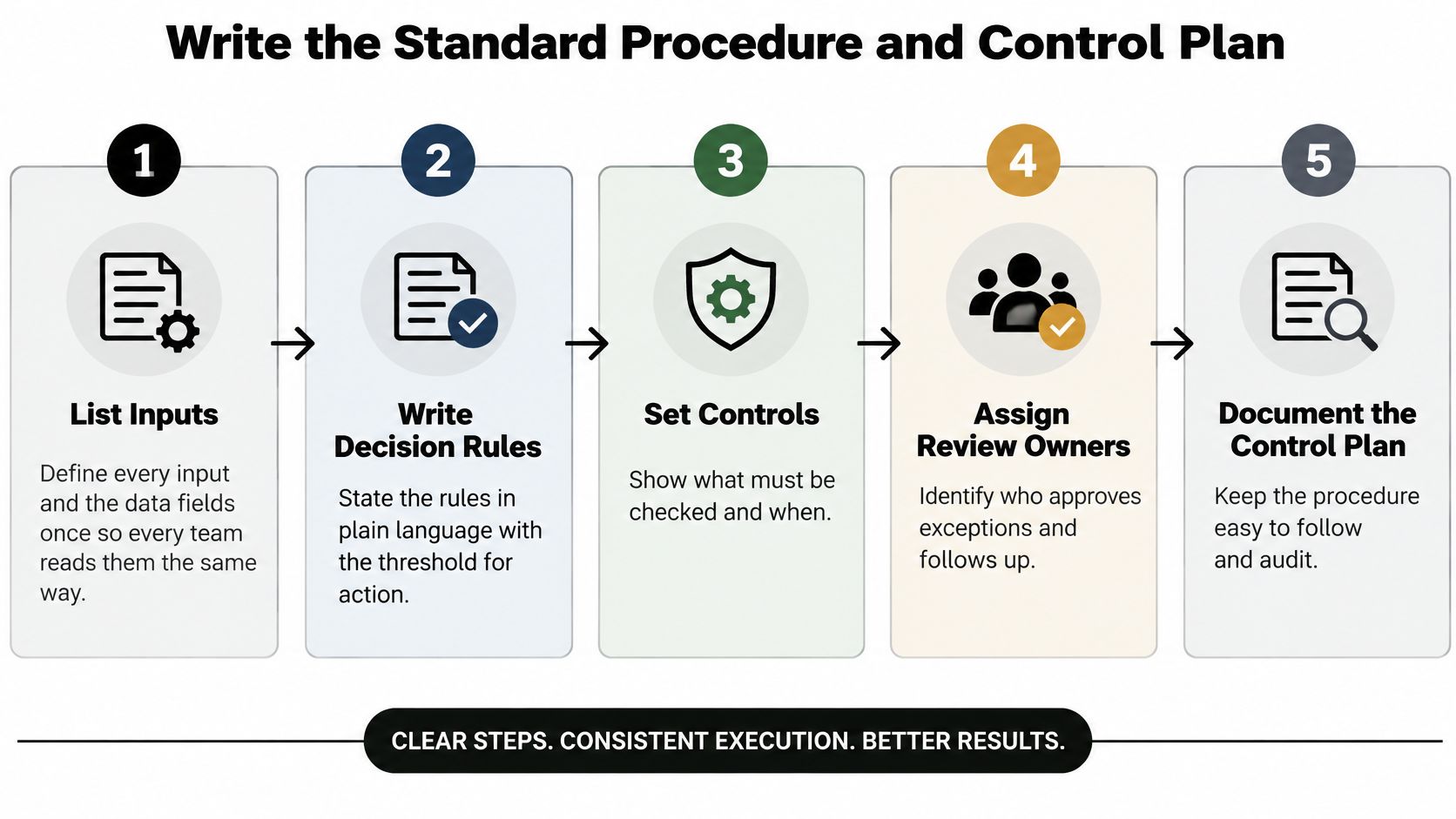
A standard procedure isn't paperwork for its own sake. It's how you make your current best method the default method, so results stop depending on who happens to be on shift. The diagram below shows the shape of a procedure that holds up under volume.
The Seven Steps
- List every input and define the data fields once. If "customer name" means legal entity to finance and trading name to support, you'll measure the same work differently. One definition, written down, ends that.
- Write decision rules in plain language with thresholds. "Escalate large orders" isn't a rule. State the amount, the condition, and who decides.
- Map each handoff and name the receiver. Work stalls in the gaps between teams. Every handoff needs a person, not a department.
- Define exception paths. Some work won't fit the rules. Decide in advance where it goes instead of letting staff improvise under pressure.
- Set service-level targets for speed and quality. Speed without a quality target invites shortcuts. Pair them so neither wins at the other's expense.
- Name the process owner and write a rollback procedure. One owner can change the procedure. The rollback tells everyone how to revert if the new method performs worse.
- Launch, then audit after 30 days. Compare real performance against the baseline and fix what the audit exposes.
Frontline staff must help write this. They know where the procedure will break, and a method handed down without their input gets worked around. For a structured approach to drafting these documents, see how to use AI for standard operating procedures without losing frontline input.
This short walkthrough shows how operators turn a documented method into day-to-day control:

Run the Control Plan
Hold a weekly bottleneck review, keep statistical process-control charts on the two or three measures that matter most, and log every exception by type. McKinsey's work on scaling quality transformations found standardized mini-transformations completed in three to four months, with intensive root-cause work reducing deviations by two- to threefold and cutting line-clearance events by 40–80%.
| Exception Type | Typical Cause | First Response |
|---|---|---|
| Training failure | Staff did not follow the procedure as written | Retrain the owner and recheck the procedure with them |
| Policy defect | A decision rule conflicts with real cases | Change the rule, record the version and tell the affected teams |
| Demand spike | Volume exceeds planned capacity for a period | Adjust staffing or queue thresholds for the period |
| System outage | A tool or integration stops working | Trigger the rollback path and run the manual fallback |
Scaling a locally good process before its inputs and thresholds are consistent creates standardized variation, not repeatable results.
That warning is the whole point. Consistency comes first, replication second.
Automate in Gates with Risk-Tiered Autonomy
Most automation programs don't fail in the pilot. They fail when a promising pilot meets messy production data, unclear exceptions, and teams who weren't part of the design. McKinsey's survey on operationalizing machine learning found only about 15% of respondents had successfully scaled automation across multiple business areas, and only 36% reported deploying machine-learning algorithms beyond the pilot stage.
Treat automation as a production-engineering program, not a pile of experiments. Move through four gates:
- Gate 1, pilot one process: Pick a workflow with stable inputs, high volume, explicit rules, and a measurable human baseline.
- Gate 2, prove it: Show quality and unit economics beat the manual baseline on a representative test set built from production data.
- Gate 3, expand to one adjacent function: Reuse components, but retest assumptions in the new context.
- Gate 4, standardize governance: Only then roll out enterprise-wide with shared deployment standards.
Controls Every Gate Needs
Version your prompts or models so you can trace any output to the exact configuration that produced it. Run regression tests for common cases and adversarial ones, such as malformed inputs or attempts to override instructions. Add access controls, audit logs, cost-per-transaction tracking, and latency monitoring from the first gate, not the last.
Then set your stop rule in advance. When confidence or data quality drops below a threshold your team agreed beforehand, automation halts and work returns to the manual path. Deciding that threshold during an incident is too late. A clear AI agent governance framework gives you the structure to define those thresholds before launch.
| Action Type | Example | Autonomy Level | Control |
|---|---|---|---|
| Financial commitments | Refunds or payments above a set amount | Human approval required | Audit log and a hard spending limit |
| Legal or compliance | Contract terms or sharing customer data | Human approval required | Named reviewer for each decision |
| Customer-impacting | Cancellations or price changes | Human review with escalation | Confidence threshold that triggers escalation |
| Low-risk and reversible | Tagging tickets or drafting internal notes | Autonomous | Weekly sample review of outputs |
One organizational warning. Don't route every change through a single specialist team, or you'll build a brand new queue while trying to remove the old one. Give cross-functional teams ownership of their workflows, with shared standards instead of centralized permission. Your next reachable gate is the one where quality, cost, and the stop rule are all proven on real data.
Redesign Roles, Change Management and Scorecards
Tool selection is rarely the hard part. Getting people to trust new workflows, and knowing who's accountable when an agent acts, is where scaling efforts stall. Grant Thornton's research on emerging enterprises found 46% of operations leaders identified workforce skill gaps as a primary AI obstacle, while 39% cited talent or upskilling gaps as a barrier to scaling. PwC likewise reported only 37% of operations leaders were comfortable assigning AI agents to execute complete end-to-end processes, despite 83% expecting agents and automation to weaken traditional functional silos.

Change Starts with the People Running the Work
- Involve frontline staff early: Bring them into writing the procedure and into the first audit, so the design reflects real cases.
- Train on workflows, not tools: Each role learns the work it will run, including exceptions, rather than sitting through generic platform training.
- Set escalation thresholds per role: Everyone should know exactly when to stop, approve, or hand off, and review the audit trail on a regular cadence.
- Treat resistance as design feedback: When staff work around a step, inspect the handoff causing friction before blaming adoption.
Approvals should follow risk, so routine reversible work doesn't wait behind sign-offs designed for financial or legal decisions. Tie incentives to business outcomes, such as resolved cases or error-free throughput, rather than activity volume like tickets touched. Review agent performance alongside staff performance, using the same quality bar for both.
Workforce structure has cost implications too. If new roles change your hiring or contractor mix, it helps to compare PEO costs for SMBs before committing to a support model that may not fit your new operating shape.
Build the Scorecard on the Same Baseline
| KPI | Target | Review |
|---|---|---|
| Cycle time per unit | Set after the baseline week | Weekly |
| Rework rate | Set after the baseline week | Weekly |
| Cost per transaction | Set after the baseline week | Monthly |
| Procedure deviations | Set after the baseline week | Weekly |
| Exceptions logged by category | Set after the baseline week | Weekly |
Every KPI carries a baseline, a target set only after that baseline week, and a review cadence. Growth-stage teams can review these five weekly and monthly as shown. Enterprises should run the same scorecard per business unit and add a quarterly review across units. Always compare against the original baseline, not just the last review, or slow drift will look like stability.
Scorecard discipline: A target set before you measure the baseline is a wish, not a target.
Confirm Your First Gate Before You Scale Further
Enthusiasm for a new tool isn't readiness. Before your first gate opens, complete this checklist thoroughly:
- Process chosen and scored: One workflow, picked against named criteria, not by volume of complaints.
- Baseline recorded: Numbers for cycle time, queue size, rework, error rate, and capacity utilization, all using shared definitions.
- One named owner: A single person accountable for the outcome and authorized to change the procedure.
- Stop rule written down: A specific threshold, agreed in advance, that sends work back to the manual path when crossed.
- Exception log running: Categories defined, first responses assigned, and entries reviewed weekly.
Teams often stall at step two. That's exactly why the checklist matters. If you can't produce baseline numbers, you don't yet know whether your process is improving, and any scaling decision is a bet rather than a judgment.
You can run this entire playbook internally. If you'd like a second view, we offer a free 30-minute live build where we walk through one of your real workflows, map the process, and scope what an engagement would look like against specific outcomes. Scope and cost are settled after that call and before any commitment, so you know what you're deciding on.
Set a date within the next two weeks for your first gate review. Put it in the calendar now, name the owner who'll run it, and bring the baseline numbers with you. That meeting, with real data on the table, is where scaling begins.
If your operations are growing faster than your processes can hold, we can help you map the constraint, score your most impactful workflow, and turn it into a governed, production-grade system your team owns. Book a free 30-minute live build to walk through a real workflow and see exactly how it would be scoped before you commit to anything. Visit Cyndra to get started.