 CYNDRA
You're copying the same customer details into a chat window for the third time this week. The answer comes back polished, but it doesn't know your refund limit, your CRM, or how your manager likes reports formatted. So you fix it, paste it into another system, and repeat the process tomorrow.
That's the gap personalized AI agents are meant to close. The useful question isn't whether an agent sounds smart. It's what it may read, what it may remember, and what it may execute, and how you'll check whether it has earned that access.
Table of Contents
- What Personalized AI Agents Are and Why They Differ
- How the Architecture Fits Together
- Memory Rules That Keep Agents From Going Stale
- Where Personalized Agents Pay Off First
- Measuring the Return on an Agent
- Trust and Access Controls for Personal Data
- From Consultation to Transformation in Three Phases
- Choose Your First Workflow and Partner
What Personalized AI Agents Are and Why They Differ
A personalized AI agent is software that works on a specific person or team's recurring tasks. It uses their role, tools, data and preferences, and it can take multi-step actions within limits they set.
Think of a capable new hire. They read the systems you use, learn how you like reports written, and ask before sending anything to a customer. A chatbot only answers prompts. Workflow automation follows fixed triggers and stalls when a request is unclear.

Three Tools Readers Often Confuse
| Capability | Chatbot | Workflow automation | Personalized agent |
|---|---|---|---|
| Starting point | A prompt you type | A fixed trigger and rules | A goal and a role inside your workflow |
| Context used | Only the current conversation | Only the fields in the workflow | Role, tools, past outcomes and stated preferences |
| Acts across tools | No, it answers | Yes, along fixed paths | Yes, with multi-step decisions inside approved limits |
| Learns preferences over time | No | No, unless rebuilt | Yes, through stored and reviewed memory |
| Handles unclear requests | Guesses or asks | Fails or routes to a person | Asks a clarifying question before acting |
| Human approval | Not applicable | Built into the flow | Set per action, by risk level |
The demand behind the term is already visible at work. A Federal Reserve review of workplace adoption studies found firm surveys reported adoption rates from 5% to approximately 40%, while worker surveys generally found 20% to 40% of employees were using AI at work. The spread reflects different measurement methods, not a lack of use.
If you must supply full context every time and the tool never acts in your systems, it's a chatbot. If it adapts to you and acts across systems within limits, it's a personalized agent.
How the Architecture Fits Together
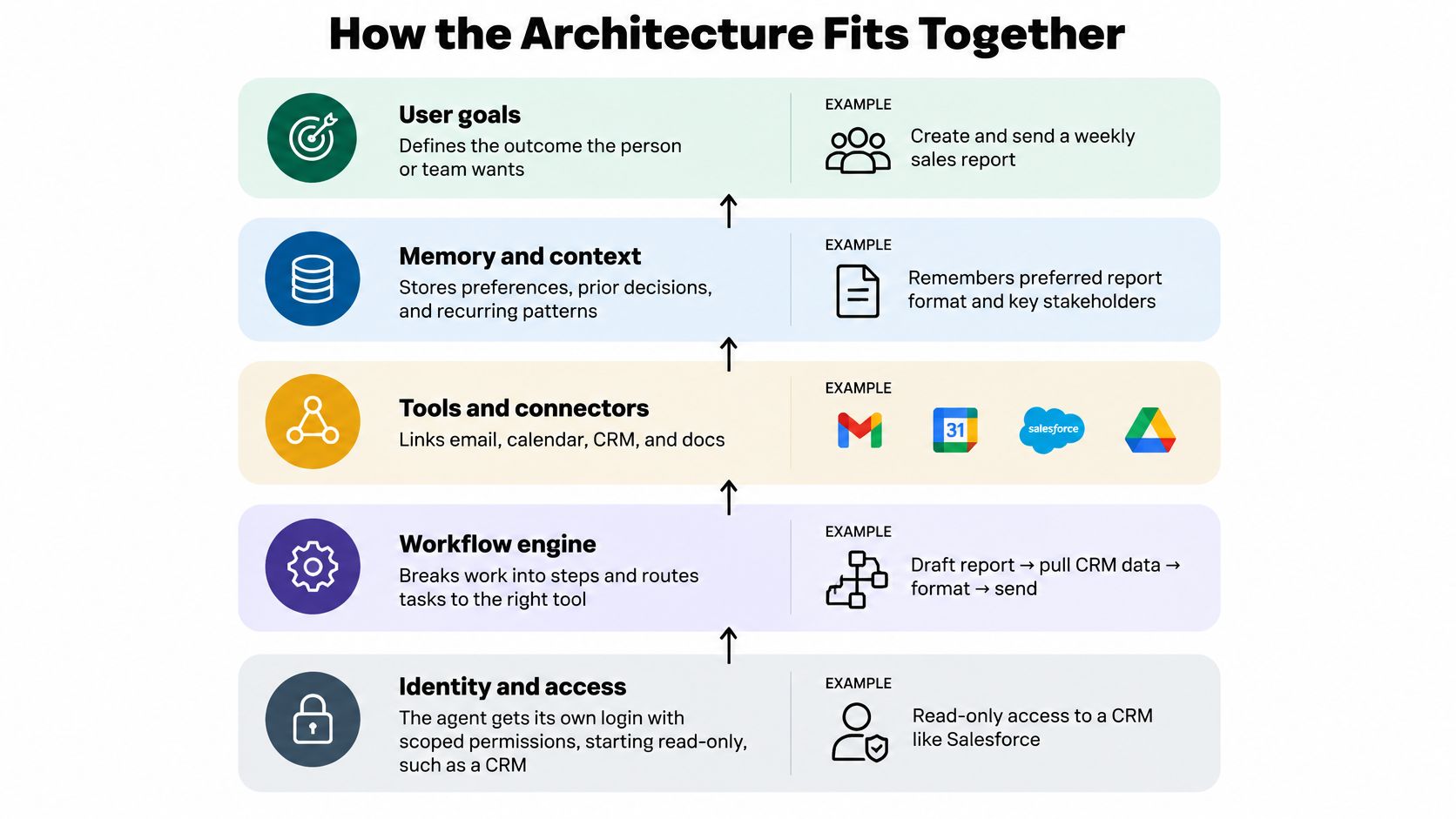
Build an agent from the bottom up. Each layer has one job, and a weakness in a lower layer makes the layers above it unreliable.
The diagram below shows the stack in plain terms.
The Five Layers
- Identity and access: The agent gets its own login with scoped permissions, starting read-only. A CRM account might view contacts but not edit them.
- Context and tools: Connectors link email, calendar, CRM, finance and support systems. The agent pulls order history from your store platform instead of asking staff to paste it in.
- Memory: Durable preferences live separately from the chat log. A client's preferred report format persists without dragging in every past conversation.
- Reasoning and planning: The agent breaks a request into steps and chooses tools. It checks account status before drafting a reply, rather than drafting first and discovering a problem later.
- Approval, audit and feedback: Every action is logged. Consequential steps pause for sign-off, such as a refund above a set amount, and corrections update stored preferences.
That last layer turns a static profile into a learning loop. The PAHF framework from Meta asks for clarification before acting when intent is ambiguous, retrieves explicit per-user preferences to ground the action, and uses post-action feedback to update memory. Evaluations in embodied manipulation and online shopping found that combining memory with both forms of feedback learned faster and outperformed no-memory and single-feedback baselines.
The logic is straightforward. Clarification reduces uncertainty before execution. Retrieval keeps output tied to known objectives. Feedback stops stale preferences from steering future work.
This short walkthrough shows how the pieces connect in practice.

Three Ways Agents Show Up at Work
Embedded in team chat fits questions and drafts. Staff message the agent and receive results in the same thread, where colleagues can see and correct them.
Scheduled background jobs fit routine reporting. A daily briefing can assemble sales, support and finance data before the owner arrives, with a source link on every figure.
Event-triggered actions fit predictable intakes. A new ticket or lead starts a defined workflow, such as gathering account history and preparing a draft for review.
Sound architecture test: Every action can be traced to a source, a permission and a person who approved it.
Memory Rules That Keep Agents From Going Stale
A support agent can remember a refund exception from March and quote it as policy in June. Extra history makes retrieval noisier when old instructions sit beside current ones with equal weight, so the agent can follow the wrong rule confidently.
Treat memory as a permission decision. Before an item is stored, decide what the agent may read, what it may remember, and what it may execute because of that memory. A safe default is an agent with its own login and read-only access first; write access and irreversible actions should be earned after the memory proves accurate in review.
Treat Memory Admission as a Decision
- Score each session for durability: Look for repeated preferences, future task relevance, explicit instructions and likelihood of expiry.
- Promote only validated recurring preferences: Keep one-off requests in short-lived context that disappears when the task ends.
- Record the metadata: Store confidence, recency, source session, expiration condition and conflict status with every durable item.
- Re-check before use: Confirm a stored fact again before it controls a tool call or an outgoing message.
Say a manager asks for one report to be shorter because a meeting runs late. That instruction should expire with the task. A standing instruction to send weekly summaries on Monday mornings belongs in durable memory, with a quarterly re-confirmation so it does not outlive the routine it supports.
Our guide to memory and context covers how to separate those two stores in practice. The distinction matters most when preferences conflict, because silent overwriting hides the disagreement until a customer sees its result.
When two stored instructions clash, flag the conflict and ask the user. Do not let the newer entry win without asking. A thirty-second question is cheaper than an agent that applies last month's pricing rule to this month's quote.
Where Personalized Agents Pay Off First
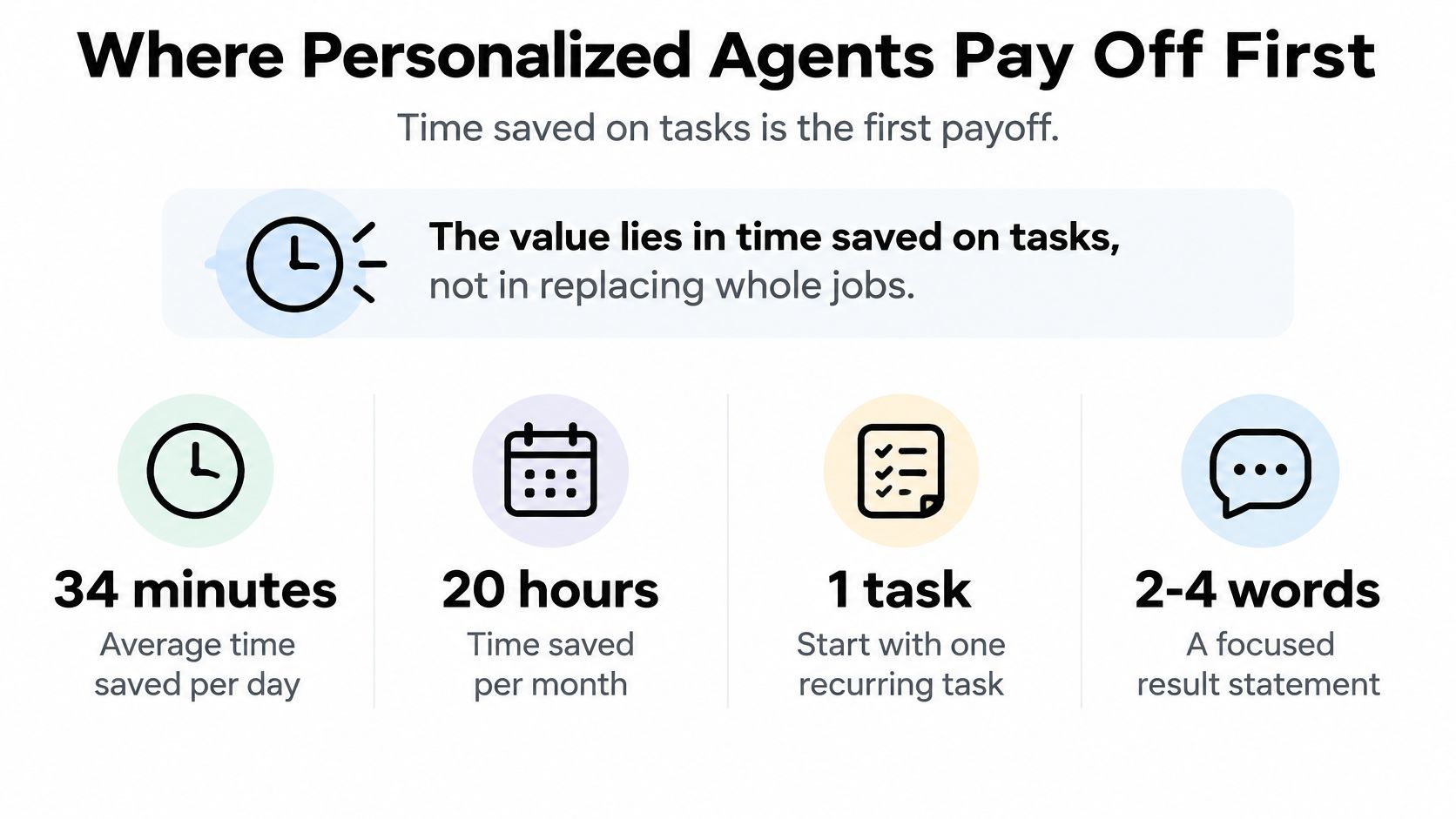
The early payoff is time saved on tasks, not whole jobs removed. A Federal Reserve Bank of St. Louis analysis reported users saved an average of 5.4% of their work hours, about 2.2 hours in a 40-hour week. About one-third of daily users reported saving at least four hours per week, compared with roughly one in ten people who used the technology only one day per week.
Frequency is the lesson. A task your team repeats daily gives an agent more chances to save small amounts of time, and more feedback to improve from.
| Function | Agent task | Success measure | Human checkpoint |
|---|---|---|---|
| Sales | Researches prospects and drafts first-touch emails | Reply rate and meetings booked per 100 drafts | Rep approves every outbound email |
| Customer support | Triages tickets and drafts replies with account history | First-response time and reopened-ticket rate | Agent reviews refunds and policy exceptions |
| Operations | Reconciles transactions and flags mismatches | Hours saved per week and mismatches caught | Finance signs off on corrections |
| Marketing | Creates brand-consistent drafts and repurposes content | Share of first drafts approved | Brand lead approves before publishing |
| Recruiting | Screens applications against stated criteria and schedules interviews | Time to shortlist | Hiring manager makes every decision |
| Executive reporting | Assembles a daily briefing from business systems | Briefing read rate and decisions it informs | Owner checks figures before acting |
Sales outreach is a common starting point, and specialist models such as an AI SDR for franchise sales show how narrow the first job can be. For a wider scan before you commit, our collection of AI agent use cases groups options by function.
Example scenario: A support lead's agent reads each new ticket against the customer's order history, drafts a reply, and flags anything involving a refund for review. The team spends its time on tickets that need real judgement instead of retyping tracking updates.
Choose your first function where the task repeats daily, source data already sits in a system, and a wrong draft is cheap to catch.
Measuring the Return on an Agent
An agent pays back when the hours it saves, valued at a fully loaded hourly cost, exceed platform fees, the spread-out build cost and the rework people still do. Fully loaded means salary plus payroll taxes, benefits and the tools that person uses, not base pay alone.
Use this worked example as a template and swap in your own volumes. It assumes a workflow saving 40 hours a month at a $40 fully loaded hourly cost.
| Line item | How to calculate | Worked example |
|---|---|---|
| Hours saved per month | Tasks per month × minutes saved per task ÷ 60 | 40 hours |
| Value of hours saved | Hours saved × fully loaded hourly cost | $1,600 (40 × $40) |
| Platform and model cost | Monthly subscription and usage fees | $400 |
| Build cost, spread over payback window | One-time build cost ÷ months in payback window | $540 ($6,480 ÷ 12) |
| Rework cost | Review and correction hours × hourly cost | $360 (12 hours × $30) |
| Net monthly return | Value saved − (platform + spread build + rework) | $300 |
Costs Most Calculations Miss
- Review and correction time: Reading drafts is real work, even when it's faster than writing them.
- Setup and supervision training: The people who'll oversee the agent need time to learn what good output looks like.
- Periodic re-checks: Permissions and stored memory need scheduled reviews, or they drift out of date.
Two measures prove the saving is real. Track cost per completed task against your manual baseline, and the share of tasks finished without rework. If the first falls while the second rises, you're gaining ground. If cost falls only because reviewers stopped checking, you're borrowing against future errors.
A return projected from a demo is not evidence.
Measure a baseline for two to four weeks before go-live. Record task volume, minutes per task and error rate, then compare the same tasks afterwards using the same definitions.
Trust and Access Controls for Personal Data
Personalization can reduce trust when it increases invisible data flows. A 2025 Worldpay survey of more than 2,500 consumers across the United States, United Kingdom, Australia, Brazil and China found only 5% had no concerns about agentic commerce. The leading concern was loss of visibility into where data is stored or shared.
The answer is bounded personalization. The agent adapts to your workflows, stays explicit about the data it uses, and pauses at consequential points. Our AI agent governance framework sets out how to document those boundaries.
| Action | Risk level | Autonomy | Control |
|---|---|---|---|
| Research, summarizing, classification | Low | Autonomous | Audit log of sources used |
| Drafting replies or outreach | Low to medium | Draft only, a person sends | Review before sending |
| Preparing dashboards and briefings | Low | Autonomous on read-only data | Source link on every figure |
| Updating CRM or ticket fields | Medium | Writes limited to named fields | Monthly permission review |
| Sending customer commitments or pricing | High | Human approval required | Approval threshold and record |
| Changing financial records or purchasing | High | Human approval, dual sign-off above a limit | Documented rollback procedure |
| Hiring decisions | High | Agent screens only, a person decides | Written criteria and bias review |
Controls to Set Before Go-Live
- Give the agent its own account: Start read-only, so you can revoke access without breaking a person's login.
- Set approval thresholds: Tie them to amount, customer and reversibility, not to a vague sense of importance.
- Keep an audit trail: Record each source, tool call and approver for every action.
- Define retention and deletion rules: State how long stored preferences live and who can delete them.
- Write a rollback procedure: Name who stops the agent and how its changes get reverted.
Before launch, list which personal data the agent reads and stores, confirm the lawful basis and retention period under applicable rules such as GDPR or CCPA, and sign a data processing agreement with each vendor. Record where data is hosted, and route hiring or pricing decisions through the review your legal or HR team already requires. It's also worth learning how testers evaluate agent reliability across repeated trials, because a single successful run proves very little.
Your team should state in one sentence what the agent can read, what it can change and who approves each.
From Consultation to Transformation in Three Phases
Launching an agent is the easy part. Keeping it dependable as workflows, tools and permissions change is the hard part, so plan for maintenance before you celebrate the demo.
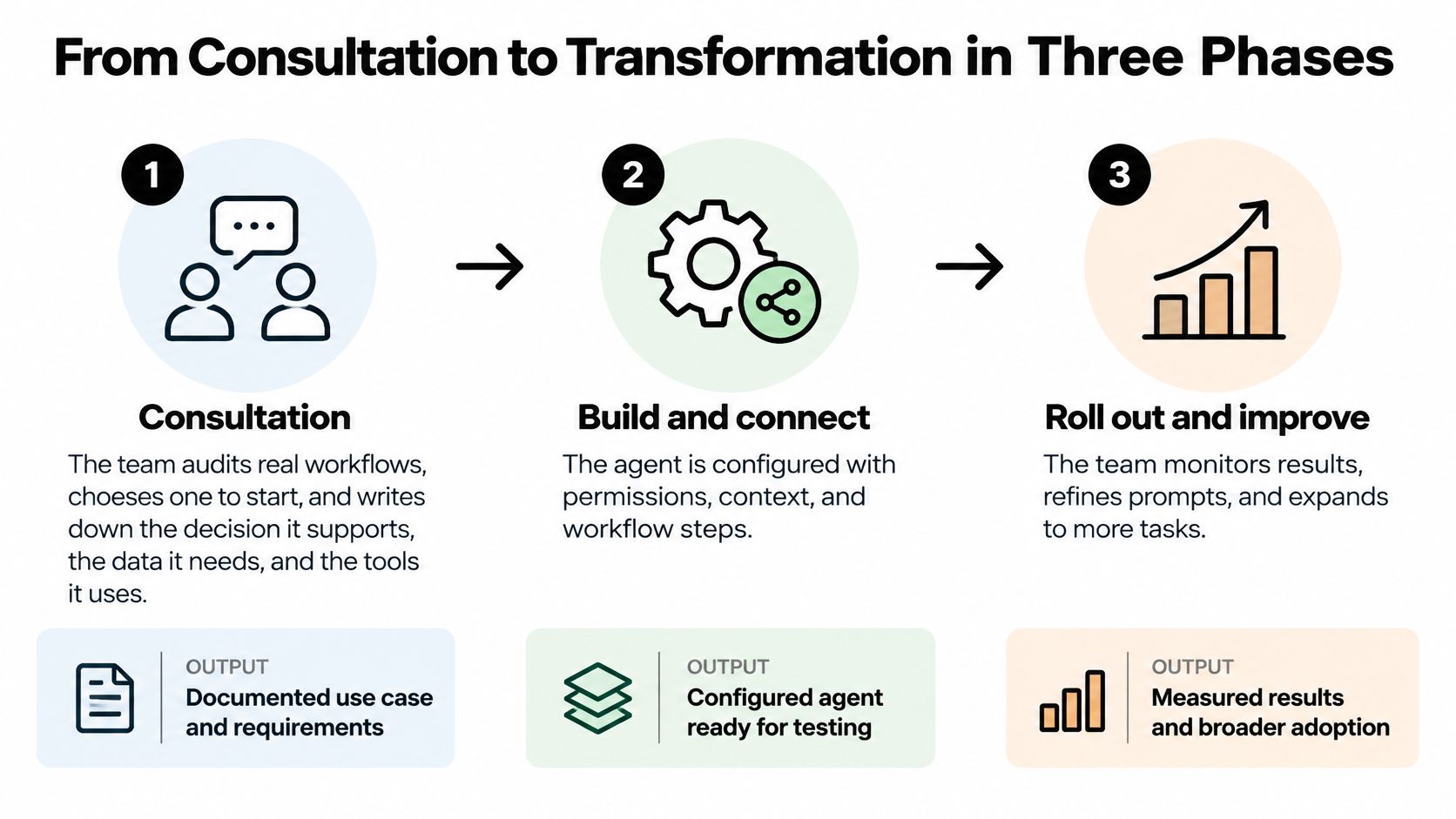
The Three Phases
1. Consultation. We sit with your team, audit real workflows and choose one to start. You write down the decision it supports, the data it needs and the approval points. The output is a short workflow brief, not a demo. Our AI Consulting service then designs the AI employee architecture around that brief.
2. Implementation. The agent is designed, built and tested live with the people who do the work, using your playbooks and past outputs. It's trained on the business and deployed into the systems and channels your team already uses, read-only first. Because the builders watch real tasks, they catch exceptions that never appear in a requirements document.
3. Transformation. Your team learns to supervise the agent, and what works becomes a written procedure your company owns. Every embedded AI department engagement includes training by default, so supervision skills spread instead of sitting with one enthusiast. Then you add more workflows, one at a time.
The Post-Launch Routine
That caution is widely shared. A 2025 Capgemini global survey of 1,100 leaders at organizations above $1 billion in revenue found 71% said they could not fully trust autonomous agents for enterprise use, even though 46% had governance policies.
Keep a weekly operating rhythm:
- Sample outputs weekly: Read a fixed set of completed tasks and score them against your criteria.
- Run adversarial tests: Try ambiguous, contradictory and out-of-scope requests on purpose.
- Version prompts and tools: Record every change so you can roll back to a known good state.
- Review permissions on schedule: Remove access the workflow no longer needs.
- Maintain an incident playbook: Define who pauses the agent and who contacts affected customers.
Track task success, escalation rate, error rate, latency, cost per completed task, unauthorized-action attempts and human rework. Retrain when errors cluster in one task. Restrict permissions when unauthorized-action attempts appear. Replace the workflow when cost per task stops beating your manual baseline.
Choose Your First Workflow and Partner
Pick one workflow that repeats daily, draws on data already in a system, and where a wrong output is cheap to catch. Pilot engagements tend to be smaller and focused on a single workflow, while full implementations cover multiple AI workflows across departments. Start small, and expand only once the metrics hold for several weeks.
Budget carefully while you compare options. Platform fees are only part of the picture, and procurement teams reviewing adjacent software can use benchmarks such as ITSM licensing costs for procurement teams to sanity-check how per-seat pricing stacks up against agent costs.
Six Questions for Every Vendor
Require written answers before any contract, and apply the same six questions when you assess us.
- Can you show a working agent on a workflow like ours, not only a demo built for the sales call?
- Does the agent get its own login, with read-only access first and a full audit trail?
- Does it work inside our existing tools? With Cyndra, team members message the AI workflow in plain English, and it does multi-step work across connected tools and reports back in the conversation.
- Do you run your own agents on comparable workflows, and can you show the results? We run our own AI agents on the same kind of workflows we build for clients.
- Is every procedure written down and owned by our company, so the knowledge stays if we part ways?
- Who monitors errors after go-live, who re-checks permissions, and who decides on retraining?
Every Cyndra plan includes one AI agent, which keeps a pilot scoped to that single workflow rather than a sprawling platform purchase. Judge any partner, including us, on whether the answers above name a person, a cadence and a record you can inspect.
This week: Write down one workflow, its weekly volume, the minutes each task takes and the person who would approve its output.
Run those four numbers through the ROI calculation. If the return is thin on paper, it won't improve in production, and a different workflow deserves the pilot slot.
Ready to give one recurring workflow to an agent with clear permissions, approval points and measures you control? Visit Cyndra to see how we audit your workflows, build an AI employee inside the tools your team already uses, and train your people to supervise it with confidence.