 CYNDRA
An AI lead generation agent researches prospects, enriches records, and drafts or routes outreach inside the CRM, with humans approving high-impact actions. That sounds simple, and that's where busy founders get misled. Vendors sell the draft as if the draft is the system.
It isn't. The draft is the last visible step in a chain that touches your website, data provider, CRM, email domain, and calendar. If any link in that chain is sloppy, the agent will happily produce sloppy work at a speed no junior rep could match. Treat it as a governed operating system instead. Judge it on qualified pipeline and speed-to-lead, not on how many emails it can produce before lunch.
Table of Contents
- What an AI Lead Generation Agent Is
- How the Agent Moves a Lead Through the Pipeline
- Benefits and the ROI Gap in Early Adoption
- Deliverability and Compliance Controls
- Implementation Across CRM and Team Boundaries
- Case Patterns From Real Deployments
- Choose One Workflow and Measure It
What an AI Lead Generation Agent Is
Adoption is already split inside revenue teams: HubSpot's State of AI in Sales survey found that 43% of sales professionals and 74% of marketing professionals used AI at work, with 36% reporting AI for forecasting, lead scoring, or pipeline analysis, 22% for lead qualification, and 20% for prospect outreach. The usage is real. The operating model around it usually is not.
A prospect from a 120-person logistics firm downloads your pricing guide at 9:04 p.m. Nobody on your team sees it. An AI lead generation agent does. It checks the company against your ideal customer profile, fills in the missing title and headcount, confirms whether the account already has an owner, writes a first draft from facts it can point back to, and parks that draft in the CRM for a person to approve in the morning. Nothing was sent. Every step was logged.
Three Tools That Get Mixed Up
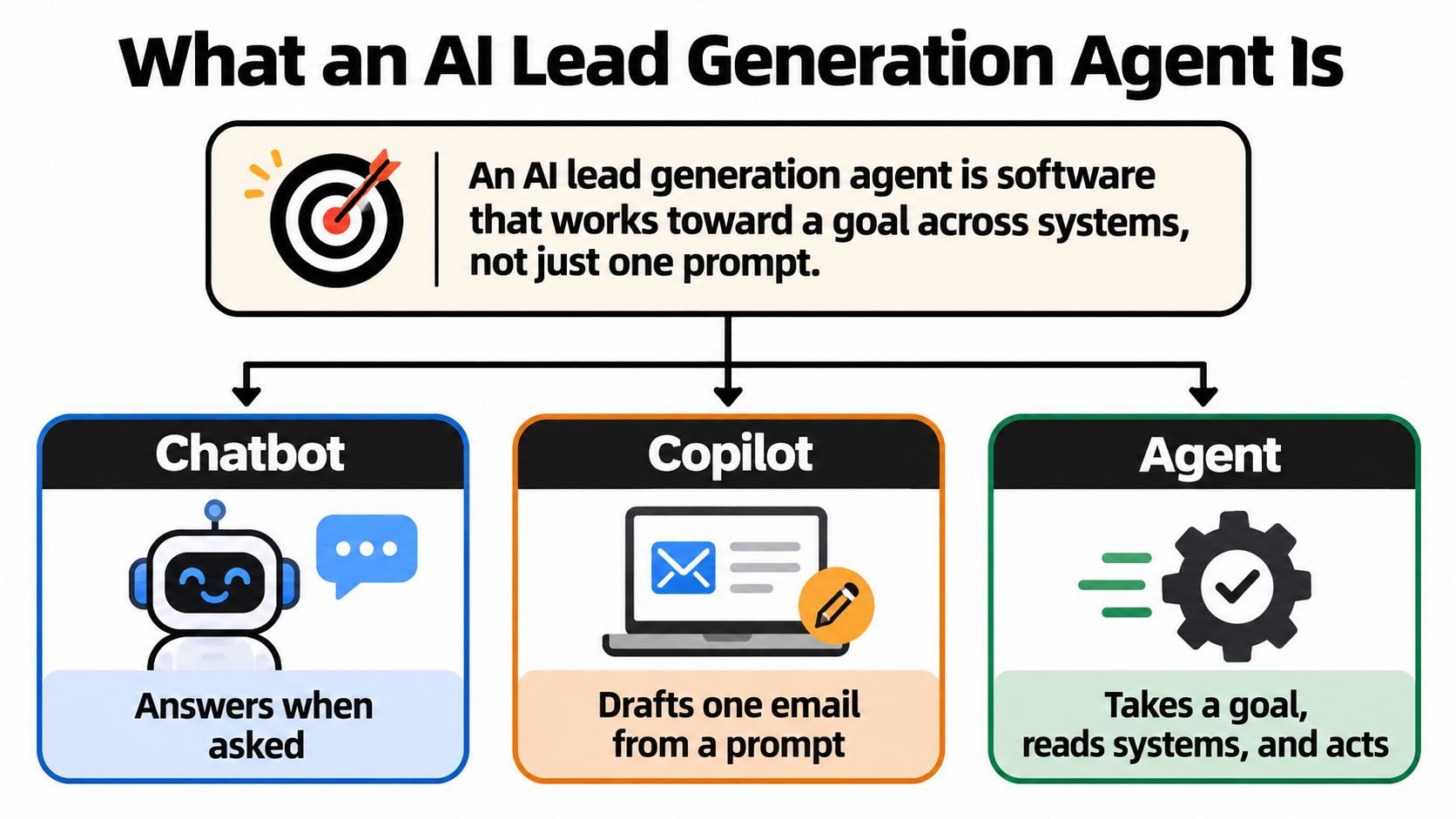
- Chatbot: answers when a visitor asks, then waits for the next question.
- Copilot: helps a person finish one task, such as drafting one email after you prompt it.
- Agent: takes a goal and runs a sequence across systems: research, enrich, score, route, draft, write back, then stop at the gate you set.
A useful comparison is a junior SDR who never sleeps, provided the manager's controls come with the analogy: approved talk tracks, named accounts held back for review, and a clear record of what happened. The agent version of that control is an audit trail showing what it read, which rule it applied, where it stopped, and who approved the risky step.
The visual below puts those three categories side by side so you can spot which one a vendor is really selling you.
Where Adoption Actually Stands
Revenue teams are ahead of the wider economy, where AI use remains uneven and often sits closer to pilot work than daily production workflow. Read that gap carefully. Your competitors' marketing teams may already be experimenting, yet broad deployment still looks shallow once you leave sales and marketing.
That changes what counts as advantage. Buying a license gives you no edge, since the license is the easy part. The edge comes from wiring the agent into your CRM, marketing, customer, and performance data so research and follow-up become a repeatable production workflow rather than a one-off experiment run from a spreadsheet. Teams that want a worked example of that wiring can review this overview of lead generation support for sales teams and compare it against their own stack.
An agent earns the name when it can show its work. If those records are missing, you have activity, not governed pipeline.
How the Agent Moves a Lead Through the Pipeline
Start with the map. It shows what the agent does at each stage, which system it touches, and where a person still decides.
Lead Agent Stages From Capture to First Touch
| Stage | Agent action | System touched | Human gate |
|---|---|---|---|
| Inbound capture | Read the form, ad, chat, or store event within minutes | Website, ads, commerce | None if consent is already stored |
| Enrichment | Match firmographics, role, and known tech | Data provider and CRM | Review when match confidence is low |
| Scoring | Apply ICP fit and buying-intent rules before any send | CRM and analytics | Override on named strategic accounts |
| Routing | Check territory, owner, consent, and suppression | CRM | Block if the account is already in a live deal |
| Outreach draft | Write a short note from approved facts only | Email and CRM | Approve first sends and any new segment |
| Follow-up | Queue the next touch only if no opt-out | Calendar and sequencer | Stop after complaint, bounce, or opt-out |
The diagram below shows that same movement as a flow, which is useful when you're explaining it to a rep who'll have to approve the output.
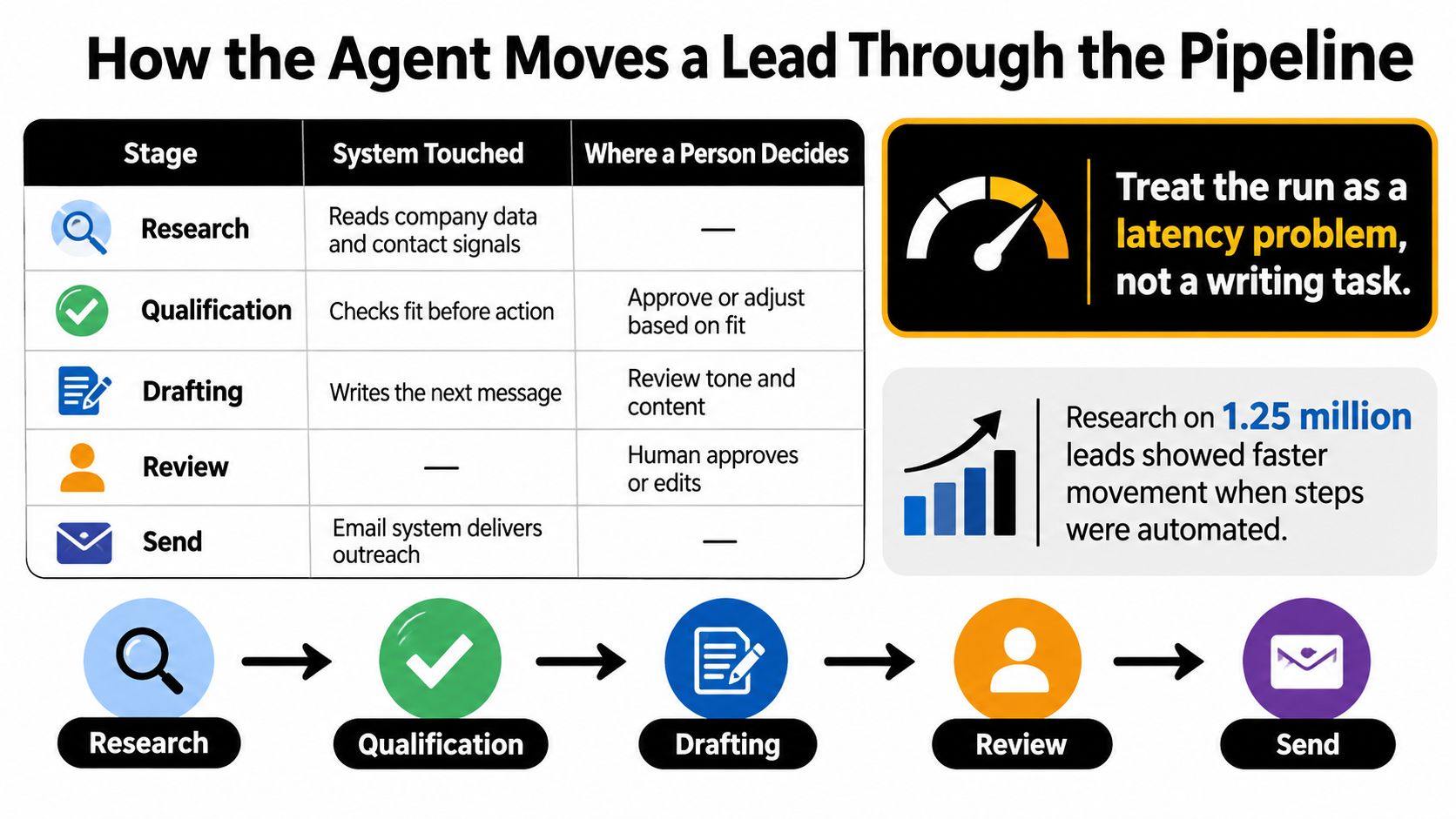
Treat each run as a latency problem, not a writing task. Plura's speed-to-lead research covering 1.25 million leads across 42 U.S. companies found that contacting an inbound lead within one hour made qualification nearly seven times more likely than waiting longer, while waiting at least 24 hours reduced the relative likelihood to roughly one-sixtieth of the under-one-hour benchmark. Intent decays fast. Your agent exists to close that gap without breaking the rules.
So set the service-level objective properly. Measure p50 and p95 time from lead creation to the first human-approved or policy-approved action, not a flattering average. Then split the delay in two. Technical latency covers the webhook, enrichment call, model, CRM write, and email provider. Business latency is the approval queue where a draft sits because nobody owns it. Those need different fixes, and lumping them together hides both.
Deterministic rules run before any model writes a word. Territory, account ownership, consent, and suppression are yes or no checks, so don't let a language model improvise them. Only after those pass does the agent draft, and only from approved facts. If you're wiring website conversations into this same flow, this walkthrough on connecting chatbot leads to your CRM is a practical reference for the handoff.
Three situations should land in an exception queue instead of a send queue: a stale CRM field that contradicts the enrichment data, an account already in negotiation, and a low confidence score on the match. A good run reaches the prospect while intent is still live, and the log explains every decision along the way.
The short video below walks through an agent handling a lead end to end, so you can see where the handoffs sit.

Benefits and the ROI Gap in Early Adoption
Here's the uncomfortable part of the conversation. Adoption is moving much faster than measurement, and the table below is the evidence.
AI Lead Generation Adoption and ROI in 2026
| Finding | Share | How to read it |
|---|---|---|
| Moved beyond fully manual prospecting | 80% (96 of 120) | Use is already common in this sample |
| Adopted within the previous six months | 53% of AI users | Most deployments are still new |
| Used AI for six to twelve months | 30% of AI users | A minority has a full quarter of history |
| More than one year of use | 16.7% of AI users | Long experience is rare |
| At least two years of use | 5.2% of AI users | Almost nobody has a mature baseline |
| Top use is defining or refining ICP | 46.9% of users | Strategy work leads sending |
| Account prioritization | 24.0% of users | Ranking beats raw list size |
| Buying-intent detection | 20.8% of users | Signal use is still a minority |
| Could not confirm positive ROI | 77% | 45% unmeasured and 32% too early |
| Confirmed positive ROI | 18.8% | Proof exists but is uncommon |
| Reported negative ROI | 4.2% | Harm shows up when someone measures |
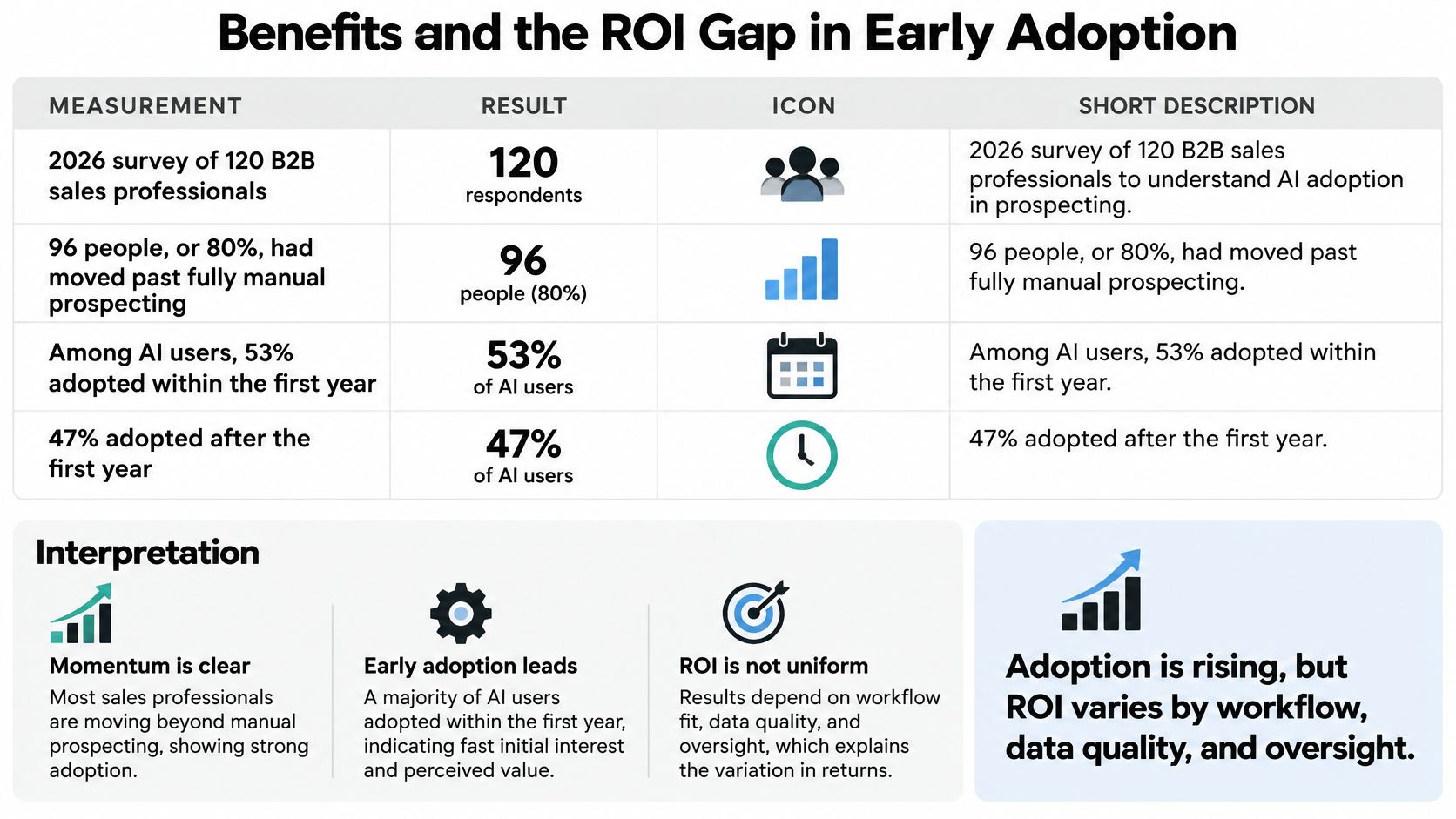
Those figures come from Belkins' 2026 study of AI for lead generation, a survey of 120 B2B sales professionals in which 96 respondents, or 80% of the sample, said they had moved beyond entirely manual prospecting and were using AI for lead generation in some form. The leading strategic application was defining or refining the ideal customer profile, cited by 46.9% of users, followed by account prioritization at 24.0% and buying-intent detection at 20.8%. Yet 77% could not confirm a positive return on investment, because 45% had not measured ROI and 32% said it was too early to tell. Only 18.8% confirmed positive ROI, while 4.2% reported negative ROI.
The chart below summarises that adoption picture if you want the quick visual version before reading the interpretation.
What the Benefit Actually Looks Like
Translate the benefit into operator language and it gets less glamorous, but more useful. You get faster research, because the agent assembles company and contact context while the rep is doing something else. You get cleaner prioritization, because fit rules get applied the same way to every record instead of depending on who's working the list. And you get more consistent first drafts, because the tenth email of the day follows the same structure as the first. Notice what's missing from that list. None of those three is revenue. They're inputs that may lead to revenue if the rest of your motion works.
Honest baseline: If you can't state your current qualified lead rate and meeting rate before switching the agent on, you will never be able to prove what it changed.
That forces a rule you should set before volume scales, not after. Write down a baseline for qualified leads, meeting rate, and pipeline influenced. Agree the attribution rules in advance, including how long after an agent touch a meeting still counts. And publish a written definition of a good lead that both sales and marketing sign. Without that definition, the agent will optimize for whatever is easiest to count, which is contacts generated.
Five Scores You Should Never Collapse
Keep these separate, because each one fails for a different reason and needs a different fix.
- Retrieval accuracy: Did the agent pull the right facts about the right company?
- Qualification accuracy: Did the leads it marked as a fit match your ICP?
- Meeting conversion: Did qualified leads turn into booked conversations?
- Pipeline influence: Did those conversations create real opportunities?
- Revenue attribution: Did any of it close, and can you trace it back?
Collapsing those into one vanity number is how teams end up celebrating a busy inbox while pipeline stays flat. If you're mapping where an agent fits inside a broader motion, our guide to AI for sales automation lays out how those measurement layers connect. An unmeasured agent is an experiment, even when it looks productive.
Deliverability and Compliance Controls
Most founders ask the wrong first question. They ask whether AI can write a prospecting email. It can, and that was never the hard part. The hard question is what stops your agent from contacting the wrong person, emailing someone who opted out last month, or inventing a reason for reaching out.
Mailbox providers don't care that a model wrote the sentence. As LoudDemand's guide to B2B AI lead generation explains, Gmail guidance focuses on sender behavior and complaint rates, not whether a message was written by AI, and it requires stronger authentication and one-click unsubscribe controls for high-volume senders. U.S. CAN-SPAM also applies to business-to-business email and makes the promoted company responsible even when an agency or software provider sends the message. You can't outsource that accountability to a tool.
The image below shows the unglamorous side of this work, an operator watching deliverability and CRM data rather than drafting copy.

The Policy Engine, in the Order a Send Gets Blocked
- Jurisdiction rules first: The agent checks where the prospect sits and applies that region's rules before anything else happens.
- Suppression and opt-out check: Every address gets checked against your suppression list immediately before the send, not when the list was built.
- Identity check: The from name, company, and physical details must match the actual business. No borrowed personas.
- Bounce and complaint monitoring: The agent watches both signals continuously rather than reporting them weekly.
- Automatic throttling: When complaints rise, volume drops on its own. Nobody has to notice first.
- Audit log: Every send records who approved the segment and which rules passed.
- Human escalation: Low confidence routes to a person instead of a mailbox.
Set some thresholds as operating choices, and be clear that they're your choices rather than universal law. Hold a new domain or a new segment to human approval until you trust it. Cap daily sends until the complaint rate is stable. And never let the agent invent a job title, a mutual connection, or a discount to make a draft sound warmer. Those inventions are where personalization turns into misrepresentation.
The same discipline applies if your outreach extends beyond email into calls or texts, since carriers police caller identity just as mailbox providers police sender identity. BubblyPhone's guide to STIR/SHAKEN explains how that caller authentication framework works if voice is part of your motion. Our own breakdown of email follow-up automation covers how those same checks should run on every follow-up, not only the first touch.
Now the trade-off, stated plainly. AI makes the next email almost free, so volume feels like progress. But irrelevant scale raises complaints, complaints damage your sender reputation, and a damaged domain takes your legitimate pipeline down with it. You can burn the channel your agent depends on by using it exactly as designed.
The agent may draft, but the company still owns every send.
Implementation Across CRM and Team Boundaries
The risk profile changes the moment your agent stops drafting and starts acting across systems. Anthropic's 2026 State of AI Agents Report, based on a survey of more than 500 technical leaders, found that 81% planned to move beyond simple task automation in 2026, 39% expected agents to handle multi-step processes, and 29% planned cross-functional agents spanning multiple teams. That's the direction of travel, and it's where a stale field or an uncertain match stops being a data annoyance and becomes a booked meeting with the wrong person, a promise nobody approved, or a duplicate record your reps have to clean up.
Six Steps, in Order
- Pick one motion. Choose inbound speed-to-lead or outbound ICP research. Not both, because they fail differently and you'll need to know which one you're debugging.
- Map the fields. Write down exactly what the agent may read, then name the single write it may make. One write, not a category of writes.
- Set confidence scores and reversible actions. A draft saved but not sent is reversible. A sent email is not. Start on the reversible side of that line.
- Build the exception queue. Legal questions, pricing questions, and accounts with an existing opportunity go to a person before the agent acts.
- Limit tool access by role, then audit. Each connection gets only the permission it needs, and every action gets reviewed after it happens.
- Train the approvers. Reps who'll approve output need practice on the stack they already pay for, not a generic AI workshop.
Your integration needs are probably shorter than you fear. The CRM is the system of record, so nothing the agent learns should live only inside the agent. Email needs working authentication before any sending starts. The calendar handles booked time so the agent never promises a slot that doesn't exist. And a data provider supplies enrichment, which is where record quality is usually won or lost. Our notes on CRM data enrichment go deeper on keeping those fields trustworthy enough for an agent to act on.
Security, Without the Jargon
Scope credentials per tool and per role using least privilege, and give the agent no standing access to finance systems at all. A lead agent has no business touching billing. Treat inbound form and chat text as untrusted input, because a prospect can type instructions into a form field and a careless agent might follow them. That sounds exotic until you remember the agent reads that text as context.
Minimize the personal data you send to the model in the first place. If a field doesn't change the decision, don't pass it. Set retention limits on prompts and logs so prospect data doesn't sit around indefinitely. Rotate API keys and review connected-app permissions monthly, since integrations accumulate over time. And keep the logs readable by a non-technical operator. Your revenue lead should be able to answer three questions from the log alone: what did the agent do, when did it do it, and why.
Readiness test: Run one week in shadow mode, where the agent proposes every action and a human accepts or rejects each one. If your team can't explain the rejections, the build isn't ready.
Case Patterns From Real Deployments
Founders ask for case studies, and they're right to. But a case study is only useful if it shows its working, so a credible one looks like this, and these are the signs that should make you suspicious.
Start with the builder's own shop. We automated our own entire sales cycle with a 10-step sales automation, and we use it as our proof of concept. Research, qualification, drafting, routing, and follow-up stay in one chain, and people own the exceptions rather than supervising every routine step. That structure is the claim worth testing. The honest way to report it is to publish the before-and-after hours or speed-to-lead once the logs exist, and to leave any figure you haven't measured yet blank instead of estimating it for the slide deck.
That discipline matters because the market context is easy to overstate. Salesforce's 2024 survey of 5,500 sales professionals found that 80% of sales representatives at organizations using AI said it was easy to obtain the customer insights needed to close deals, compared with 54% at organizations without AI. Read that for exactly what it says. It's evidence of easier access to insight. It is not evidence of more revenue, shorter cycles, or higher win rates, and any vendor who presents it as such is hoping you won't notice the substitution.
What a Measured Deployment Looks Like
Contrast that with a case where the hours were counted. Institutional Capital Partners, a private equity client, saved 220 hours per month with a research-automation agent that surfaces deal flow, drafts memos, and tracks portfolio companies, replacing two analysts. Notice the shape of that result. It's a research workflow with a clear before state, a defined output a person can inspect, and a time saving someone measured. It isn't a claim that the agent closed deals or picked better investments.
That's the pattern worth copying in lead generation, and it has four parts.
- One workflow: A single motion with clear edges, not the whole funnel at once.
- A before-and-after count: Hours saved or time-to-first-touch, measured the same way on both sides.
- A human on high-impact steps: People keep the decisions that carry legal or reputational weight.
- No contact volume as success: Contacts generated is activity, and activity is not an outcome.
Run your own 30-day pilot that way and publish hours saved or speed-to-lead. Don't publish a payback period you invented. Most early teams don't have a year of history behind them yet, and pretending otherwise is how agent projects lose credibility with the exact people who have to fund the next phase.
Choose One Workflow and Measure It
You have one decision to make, and it's smaller than you think. If your team already receives form, ad, or chat leads, start with inbound speed-to-lead, because the intent is already there and you're mostly losing it to delay. If your motion is outbound, start with ICP research and account prioritization, because better targeting improves everything downstream without sending a single extra email.
Don't add a second department until the first workflow has a written baseline, a working approval gate, and four weeks of p50 time-to-action or qualified meetings behind it. That constraint feels slow. It's what makes the second deployment fast, because you'll be copying something proven instead of debugging two unknowns at once.
Your First Week, Four Artifacts
- A field map: What the agent may read, and the single write it may make.
- A suppression check: Run against your live lists, not a sample export.
- A shadow-mode log: A human accepts or rejects every proposed action, and the rejections get reviewed.
- One named owner: A person, not a team, who's accountable when the log looks wrong.
We provide a Setup Checklist, Day-of-Call Prep, First Week, and Extending Your Agent guides for getting started, which map neatly onto those four artifacts. The scaling rule stays the same throughout. Sends stay capped until the log shows qualified pipeline, not activity.
If you'd rather not scope this alone, we offer a free strategy call where we map your highest-ROI AI opportunities and give you a clear roadmap. We handle strategy, build, integration, and ongoing optimization end to end, and we train your people to use the agents, so the approvers understand what they're approving. Book the scoping conversation, or run the shadow week yourself. Either way, hold the sends until the log proves the pipeline.
Ready to turn one lead workflow into a governed agent that your reps can trust? Cyndra builds and manages AI employees that research prospects, enrich your CRM, and draft outreach inside the tools your team already uses, with approval gates and audit logs from day one. Book a scoping conversation and we'll map your highest-value workflow before a single email goes out.