 CYNDRA
Workflow automation can reduce repetitive tasks by 60% to 95%, according to a 2025 analysis of workflow automation statistics. That range is the useful part. It tells you the ceiling is high and the outcome isn't automatic. A clean, rules-based process can lose most of its manual touches. A messy process with unclear ownership, poor data, and constant exceptions will keep most of its friction, only now it'll move faster.
That's the test for the benefits of workflow automation. Don't ask whether software can do a task quicker. Ask whether the saved time gets reinvested, whether errors fall, and whether a named person still owns the decision when the rules run out. If those answers are no, you've bought speed without improving the operation.
Table of Contents
- Benefits You Can Put on a KPI Dashboard
- How a Workflow Runs Without the Waiting
- The Hours and Cost a Single Process Returns
- When Faster Work Makes the Team Weaker
- Benefits Inside Sales Support and Operations
- A Roadmap That Starts With Three Workflows
- Run One Live Workflow This Month
Benefits You Can Put on a KPI Dashboard
Start with averages you can track weekly, not promises from a demo. A 2026 study of enterprises that implemented innovative automation technologies reported a 28% average increase in production efficiency, a 32% average reduction in error rates, and an 18% average rise in resource utilization across its sample.
Those three numbers describe different kinds of value. Efficiency tells you throughput rose. Error rate tells you quality didn't have to fall to get it. Resource utilization tells you the team produced more from the labor, equipment, and capacity it already had, instead of treating headcount as the only way to handle volume.
Company Markers Around the Averages
The company examples in that study show the spread behind the averages. Foxconn improved production efficiency by 35% after introducing image-recognition technology. HSBC reduced errors in data entry and report generation by 30% through robotic process automation. IBM increased resource utilization by 25% through a combination of process design and automation.
IBM's marker matters most for operators. Process design came with the automation, not after it. If you copy a tangled approval chain into software, you'll get a tangled approval chain that runs all day.
Workflow automation benefits and the KPI that proves them
| Benefit | KPI to track | Reported benchmark |
|---|---|---|
| Faster throughput | Production efficiency | 28% average rise; Foxconn 35% with image recognition |
| Fewer preventable mistakes | Error rate on data entry and reports | 32% average drop; HSBC 30% with RPA |
| More output without new headcount | Resource utilization | 18% average rise; IBM 25% |
| Reliable high-volume reporting | Execution time and error rate vs spreadsheets | 88.6% to 95.5% faster; errors down 93.3% to 95.5% |
The last row comes from spreadsheet-heavy work, where people copy rows, repair formulas, and move files between systems. It's a different setting from a factory line, which is exactly the point. Automation has moved from manufacturing into administrative and knowledge work, including reporting, data handling, reconciliation, and operational monitoring.
Where the Gains Concentrate
Expect the strongest results where work is repetitive, rules-based, or data-intensive. Software can apply the same validation every time, write the result to the right system, and route exceptions to people. It struggles where inputs change shape daily, the rule lives in someone's memory, or nobody can say what a correct output looks like.
Use a proper operating view to keep yourself honest. If you're still deciding what belongs on that view, start with what a KPI dashboard should actually track, then add only the rows your weekly review already discusses. When you want to translate a benchmark into money for your own team size and labor cost, you can calculate your automation savings before you commit to a build.
Baseline rule: A benchmark isn't a forecast. It's a reason to measure your own process before you change it.
Pick one row from the table. Record a 30-day baseline for that KPI, including volume and exceptions, before you judge any tool.
How a Workflow Runs Without the Waiting
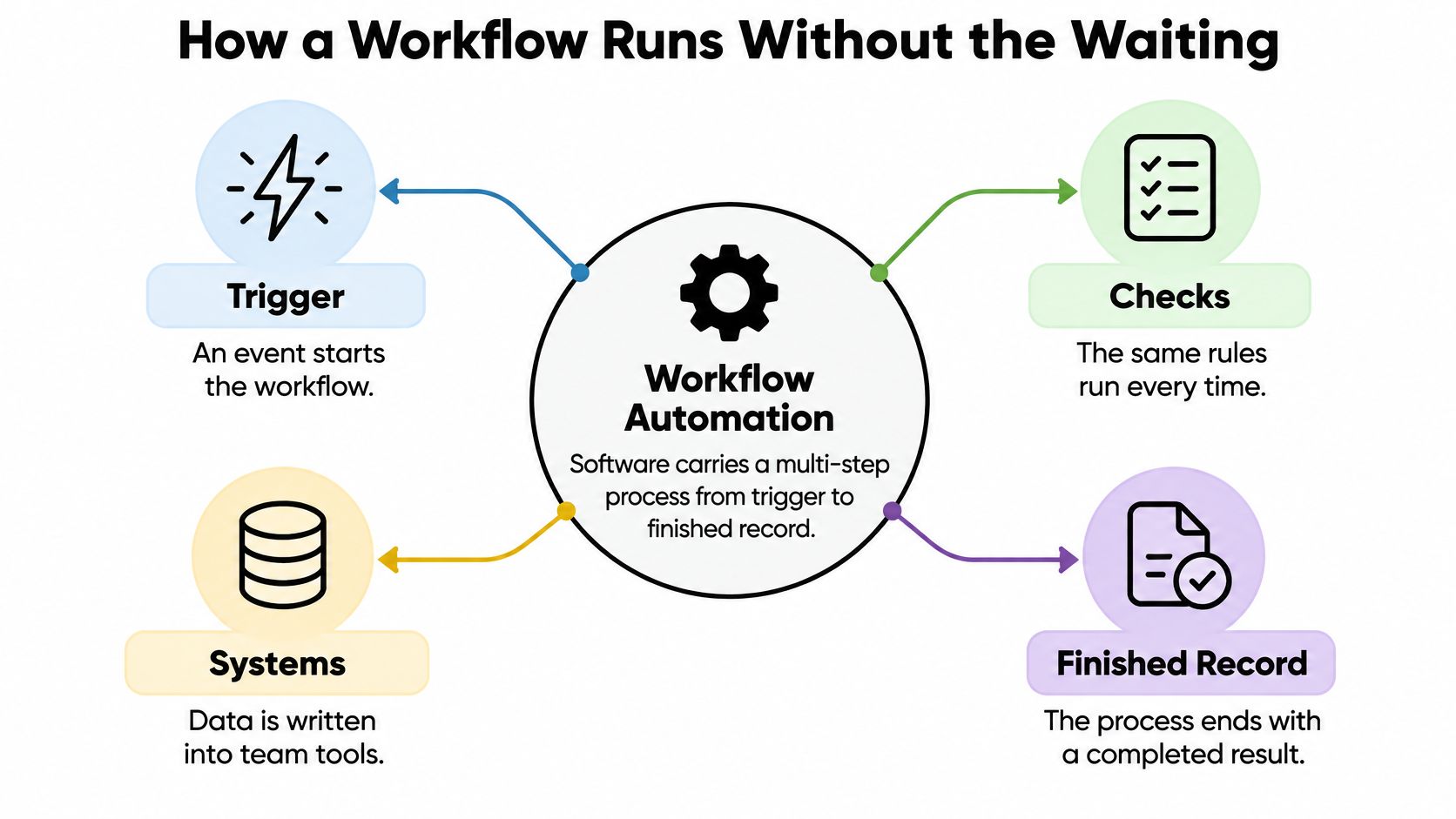
Workflow automation is software that carries a multi-step process from a trigger to a finished record. It reads an input, applies the same checks every time, writes into the systems your team already uses, and parks anything ambiguous for a named person. The finished record matters. A draft sitting in a chat thread isn't a completed workflow.
Think of a relay race where the baton used to sit in inboxes between runners. Automation isn't a faster runner. It's the track, with marked lanes, a clear handoff point, and a finish line everyone can see. Most delays in office work aren't people working slowly. They're work waiting for someone to notice, forward, re-enter, or approve it.
The diagram below shows that path from trigger to completed record.
Three Levels People Confuse
- Task shortcut: Repeats keystrokes inside one tool, such as formatting an export or renaming files. Useful, but it doesn't move work between people.
- Workflow: Crosses tools and owners. A form feeds the CRM, the CRM triggers an email, finance gets the record, and an approver sees only the cases that need judgment.
- Agent: Chooses the next step inside a written playbook, does multi-step work across connected tools, and reports back in the conversation where the team asked for it.
Calling a macro a workflow leads to disappointment. The macro saves minutes for one person. The workflow removes waiting between several people, which is where cycle time reduction comes from.
One Support Ticket, Start to Finish
Say a customer asks where an order is. The message arrives and triggers the workflow. Software matches the customer, pulls order status, checks the shipping record, and drafts a reply in your brand voice. A straightforward status answer can go out under the rules you've approved.
A refund above your set amount doesn't go out. It waits for approval, with the order, the reason, and an audit note attached. The person approving doesn't hunt through three systems. They decide.
That design beats another dashboard nobody opens. The work arrives where the team already works, in Slack, Teams, email, or the support tool itself, with no new tab to babysit.
What stays human is clear. People set policy, make promises to customers, and handle cases the rules can't classify. Use this test before anything runs unattended: if a step has no owner when it fails, it isn't ready.
The Hours and Cost a Single Process Returns
Time returned is the easiest benefit to overstate, so separate what employees see from what leaders count. Employees tally the visible personal tasks: the copy-paste, the status checks, the resends. Leaders tally a wider ledger that includes handoffs, duplicated data entry, approval delays, and recurring coordination across teams. Both views are honest. The leadership view catches the waiting that never lands on any one person's task list, and that waiting is where most recoverable hours sit.
A Controlled Process You Can Check
A controlled empirical study of robotic process automation found that processing 100 scheduling requests fell from approximately 1,000 minutes manually to 135 minutes with automation, a 7.5x throughput improvement.
The mechanism is plain. Software performs the same data-entry, validation, and routing steps without switching context or waiting for someone to become available. People don't lose most of their time typing. They lose it restarting, checking, and waiting.
Cost held up after the build. After including implementation, consulting, and licensing costs, the five-year cost was still 3.1x lower than the manual approach in that study. That's process-specific, but it's the right shape for a business case because it doesn't pretend implementation is free.
Time and cost released by automating routine work
| Scenario | Manual or baseline | With automation | What it means |
|---|---|---|---|
| 100 scheduling requests | About 1,000 minutes | 135 minutes | 7.5x throughput on a routine queue |
| Five-year processing cost | Manual labor baseline | 3.1x lower after build, consulting, and licenses | Savings survive implementation cost |
One study on one process can't price your operation. It can, however, give you the shape of a defensible claim: measure a bounded queue, count the full cost, and report the ratio.
Run Your Own ROI Math
Collect five inputs before you estimate anything: cycle time per transaction, monthly volume, loaded labor cost, exception rate, and rework cost. Loaded cost means salary plus taxes, benefits, tools, and management overhead, not the hourly wage alone. Without exception rate, you'll assume every case takes the clean path. It won't.
- Annual hours returned: Multiply hours saved per transaction by annual volume, then multiply by loaded hourly cost.
- Avoided rework: Add the cost of corrections, refunds, resends, and downstream cleanup you expect to prevent.
- Full cost: Subtract build, license, training, monitoring, and governance cost.
- ROI: Divide that net result by the full cost from step three.
Speed without validation multiplies bad data. Build the exception queue and audit log into the first version, not the apology tour.
Prioritize workflows with high transaction volume, stable rules, and structured inputs, such as invoice handling, candidate screening, order updates, and reconciliation. Two cautions before you bank the number. First, a broken process automated is a broken process running faster, so fix the steps before you speed them up. Second, hours returned are inventory, not profit. Assign them in advance to sales conversations, analysis, service recovery, and exceptions. If you don't name the destination, the hours dissolve into a slightly quieter inbox that fills again by Friday.
When Faster Work Makes the Team Weaker
A person can get faster while the team gets worse. That's the finding operators skip. The image below captures the version teams recognize, where tools multiply but coordination doesn't improve.

A 2025 Microsoft Research review reports that surveyed enterprise users attributed 40 to 60 minutes of daily time savings to AI use, yet early evidence is stronger for individual productivity than for team-level performance. The same review warns automation can reduce worker autonomy, recognition, and social connection, factors associated with engagement, wellbeing, and meaningful work.
Ask one question after launch: did the workflow remove friction, or did it raise the quota and fragment the handoffs? If each person produces more drafts but reviewers drown, you haven't improved the system. You've moved the bottleneck and called it progress.
Measure What Hours Saved Misses
- Cycle time: Does the whole case finish sooner, or only the first step?
- Error rate and rework: Are downstream teams correcting less, or just receiving mistakes sooner?
- Customer outcome: Did resolution, renewal, or satisfaction move with the speed?
- Handoff quality: Does the next person get context, or a bare output they must investigate?
- Workload after launch: Did saved time become higher-value work, or just more volume?
- Decision ownership: Can the team name who approved, overrode, or stopped the workflow?
The ILO's 2025 analysis adds useful restraint. Most exposed jobs are more likely to be transformed than eliminated, and augmentation depends on workers receiving the skills and infrastructure to adapt. Training isn't a launch garnish. It's part of whether the benefit exists.
The discussion below is worth watching with those measures in mind, especially where individual output and team coordination pull apart.

Use a human-in-the-loop pattern for anything consequential. Software drafts, matches, and routes. A person approves money, policy, and anything the rules flag. Assign saved time in the same week to a higher-value queue, or the gain disappears into more of the same tasks.
If the team can't point to who owns an exception, the workflow is faster and worse.
Benefits Inside Sales Support and Operations
The pattern repeats across functions, but the human stop and the KPI trap change. Get either one wrong and the department looks busy while the number that matters stays flat. A 2026 benchmark comparing manual spreadsheet processing with automated workflow execution across five datasets of 300 to 3,000 transactions reported execution-time reductions of 88.6% to 95.5% and error reductions of 93.3% to 95.5%.
That result comes from replacing manual rows, formulas, and transfer steps with repeatable programmatic operations. It doesn't remove judgment. It removes the copy-and-paste errors, inconsistent formulas, stale extracts, and delayed reporting that make judgment late.
Workflow to automate first by function
| Function | Workflow | Software does | Person still | KPI |
|---|---|---|---|---|
| Sales | Prospect research and outreach | Pulls account context and drafts the note | Approves claims and pricing | Meetings booked per rep |
| Support | Tier-1 replies | Matches the customer and drafts the answer | Approves refunds and policy exceptions | First response and reopen rate |
| Operations | Reconciliation | Matches records and flags rejects | Clears exceptions and signs the total | Close time and error rate |
| Marketing | KPI reporting | Joins store, ads, and finance data | Interprets the variance | Hours to a trusted number |
| Recruiting | Screen and schedule | Scores against the rubric and books slots | Makes the hiring decision | Days to a qualified slate |
The Human Stop in Each Function
In sales, software pulls account context and drafts outreach, but a rep approves pricing and any claim before it goes out. Institutional Capital Partners, a private equity client, saved 220 hours per month with a research-automation agent that surfaces deal flow, drafts memos, and tracks portfolio companies, replacing two analysts. If you want comparable patterns before choosing your own, explore AI-powered prospecting case studies and compare the human approval point, not just the hours claimed.
In support, tier-1 status and how-to replies can go out at once. Refunds and policy exceptions wait for a person, because a fast wrong refund is still wrong.
In operations, publish totals only after they tie to the source system. Preserve immutable source records, validate schema and type at ingestion, and show run IDs, timestamps, rejected-record counts, and exception reasons. A person clears exceptions and signs the total.
The KPI Trap in Each Function
Sales teams count emails sent because it's easy. Track meetings booked per rep instead. Support teams celebrate first-response time while customers reopen the same issue, so pair speed with reopen rate.
Marketing's trap is a fast dashboard nobody trusts. Measure hours from period end to a trusted number, and let a person interpret the variance. Recruiting's trap is faster screens that narrow the slate in ways nobody intended, so measure days to a qualified slate and audit who the rubric rejects.
Don't automate five functions to prove ambition. Copy one row, the function where volume and delay already hurt, and make that KPI move.
Operations leaders should be strictest here. If operators can't distinguish a genuine business anomaly from an automation defect, they won't trust the output, and they'll rebuild the spreadsheet in secret.
A Roadmap That Starts With Three Workflows
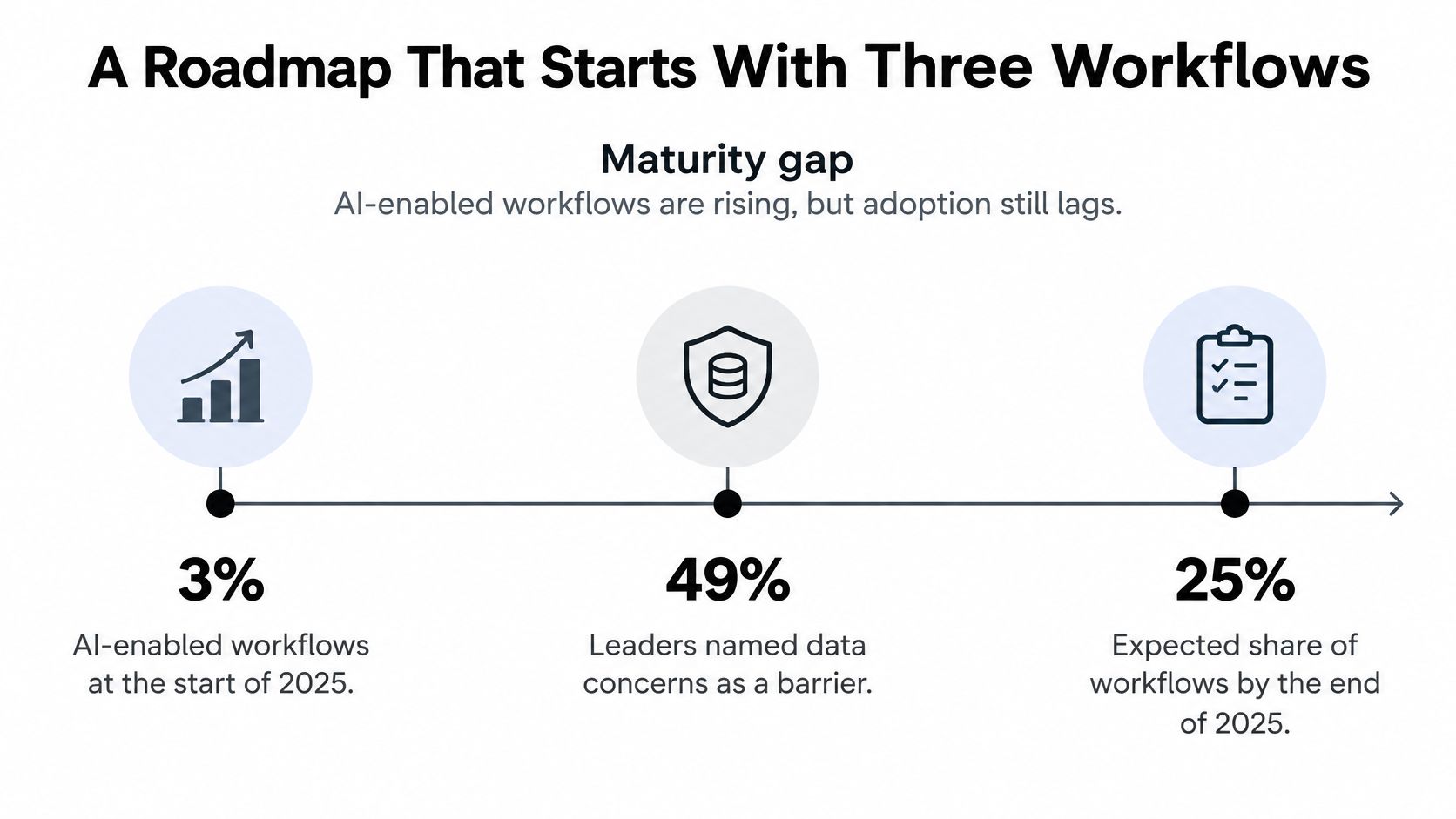
AI adoption plans are running ahead of the organizations meant to absorb them. IBM's 2025 global executive research found organizations expected AI-enabled workflows to rise from 3% of workflows to 25% by the end of 2025, while leaders flagged data concerns at 49%, trust issues at 46%, and skills shortages at 42% as major barriers.
The timeline below puts that maturity gap in one view.
The constraint sits inside the org chart rather than the technology. Automation research consistently points to selected tasks within existing roles as the realistic target, which means roles get redesigned rather than erased. That distinction drives the whole roadmap: the savings only become real when the freed hours get reassigned to work the team was already neglecting.
Five Filters Before You Build
A serious audit surfaces more candidates than any budget covers. Screen each one against five conditions:
- High transaction volume: Enough repetitions for small savings to compound.
- Stable rules: The team can write down what correct looks like.
- Structured inputs: Forms, records, and fields arrive in a predictable shape.
- Costly delay: Waiting hurts revenue, cash, customers, or compliance.
- One named owner: A person accepts exceptions, changes, and results.
Automating a broken process locks bad decisions in at higher volume. Fix the path first, then let the workflow run it.
The Rollout Sequence
- Sit with the people who do the work. In our discovery process, we audit existing workflows with the client's team and identify the 3 to 5 highest-ROI AI opportunities, ending with a prioritized roadmap. The top three become the build order.
- Baseline the current state. Record cycle time, exception frequency, labor cost, and downstream rework before anyone builds.
- Fix the path on paper. Decide who approves money and sensitive steps, what data the workflow may touch, and what happens when it fails.
- Ship one workflow inside existing tools. We build AI workflows live with the people who do the work, using the client's playbooks and past outputs, then train the owner to run it.
- Refine against real usage. After go-live, we refine workflows against real usage data, expand coverage, and compound gains across departments only when the first KPI holds.
That sequence is the practical core of an AI transformation roadmap. Labor savings alone are the wrong ROI if governance, training, permissions, fallback procedures, and rework sit outside the cost. Scalability depends on those conditions, and saved hours need an assigned destination. Reinvested into a redesigned role, they compound; left unassigned, individual speed keeps outpacing team performance. Once one workflow's KPI holds, copy its playbook and owner model to the next process rather than widening scope at once.
Run One Live Workflow This Month
Name one workflow that already has volume, a stable rule, and an owner who feels the delay. That's your only candidate for the first month. Not the most impressive demo, not the process your vendor prefers, and not five departments at once.
Set the baseline before any build starts. Then build that one workflow live with the person who does the job, on tools the company already pays for, and keep it running. In our build-one-live step, we build one real workflow with the task owner in 30 minutes on the client's tools, and the client keeps it.
We follow consultation, implementation, then transformation. We train your leaders and teams, then build AI workflows with them on their real work. You keep the workflows, the know-how, and the people who can run them. We've also automated our own entire sales cycle with a 10-step sales automation, which we use as our proof of concept.
Operators who want more output without a matching rise in headcount should start with that single workflow. If the baseline KPI doesn't move within 60 days, stop and redesign the process before adding a second workflow.
Cyndra trains your leaders and teams, then builds live AI workflows with them on their real work inside the tools they already use, so your first workflow automation win is owned by your team, not rented from a vendor. Start with one high-volume process, measure it against the KPI you chose, and visit Cyndra to build it this month.