 CYNDRA
The popular advice about AI in customer support is to automate more conversations and celebrate the tickets that never reach an agent. That's the wrong starting point. A customer who leaves a chatbot and contacts you again hasn't been successfully deflected, and an agent who spends saved minutes correcting drafts hasn't gained useful capacity.
Design for resolution, not avoidance. Decide who owns the customer, how that ownership transfers, and which work the AI is allowed to complete. A lower automation rate can be the better operating choice when it prevents repeat contacts and removes supervision work.
Table of Contents
- What AI in Customer Support Actually Does
- Which Support Model Should Own the Reply
- Where the Productivity Gains Actually Land
- Security and Compliance Before Go Live
- KPIs That Show Real Resolution
- What a Real After-Sales Deployment Changed
- Start the Hybrid Rollout on Three Workflows
What AI in Customer Support Actually Does
Buying a chatbot isn't the same as changing your support operation. Say a customer asks why an order hasn't arrived. Software might answer with a shipping-policy article, help an agent investigate the shipment, or check the order and initiate an approved recovery procedure. Those are different jobs with different permissions.
AI in customer support means software that interprets an incoming issue, retrieves relevant business context, and either recommends a response or completes a tightly bounded action. The useful distinction isn't how naturally it writes. It's what the software can access, decide, and change.
Separate the offers behind the label
A deflection chatbot answers a defined set of questions and aims to finish the conversation without involving an agent. For the missing order, it might explain where to find tracking information. That can help with a straightforward question, but it doesn't establish whether this particular shipment needs intervention.
A copilot works beside a human agent. It can retrieve the order record, suggest troubleshooting steps, and draft wording based on the shipping policy. The person checks the recommendation and sends the message.
An AI employee follows a written procedure across connected tools and reports what it did. It might verify the order, check shipment status, and propose a refund within a documented limit. The copilot is a strong colleague whispering the next line; the AI employee is a new hire with a job description and no permission to leave it.
Practical rule: Buy the level of responsibility your procedure can support, not the most autonomous demonstration.
Define the job before the interface
For the missing-order workflow, write down what counts as sufficient evidence. A carrier status, a delivery address, and a customer's statement may disagree. The procedure should say which discrepancies require investigation rather than letting the software improvise a policy.
Keep these responsibilities separate:
- Answering: Explain an approved policy using the relevant account context.
- Recommending: Suggest a remedy for a person to review.
- Acting: Change a record or initiate an approved transaction.
A system that's suitable for answering shipping questions isn't automatically suitable for owning refunds, complaints, or regulated advice. Model fit starts with that boundary. Productivity, controls, and measurement only become meaningful once the job is clear.
Which Support Model Should Own the Reply
Four ways to run AI in customer support
| Model | Who sends the reply | Best fit | Main failure | KPI that catches it |
|---|---|---|---|---|
| Copilot beside the agent | Human, using AI suggestions | Novices, policy-heavy chats, onboarding | Experts slowed or pulled down by weak suggestions | Issues resolved per hour by tenure |
| Bounded AI with human handoff | AI on known intents, human on exceptions | High-volume tier-1 with written policy | Customer trapped and forced to repeat the issue | Resolution after transfer and repeat contacts |
| Fully autonomous agent | AI for the whole conversation | Narrow, low-risk, fully documented intents | Wrong answer with no recovery path | Containment plus downstream retrial rate |
| Human team, no AI | Human only | Regulated, high-value or thin-data cases | Cost and uneven quality at peak volume | Handle time and quality-audit score |
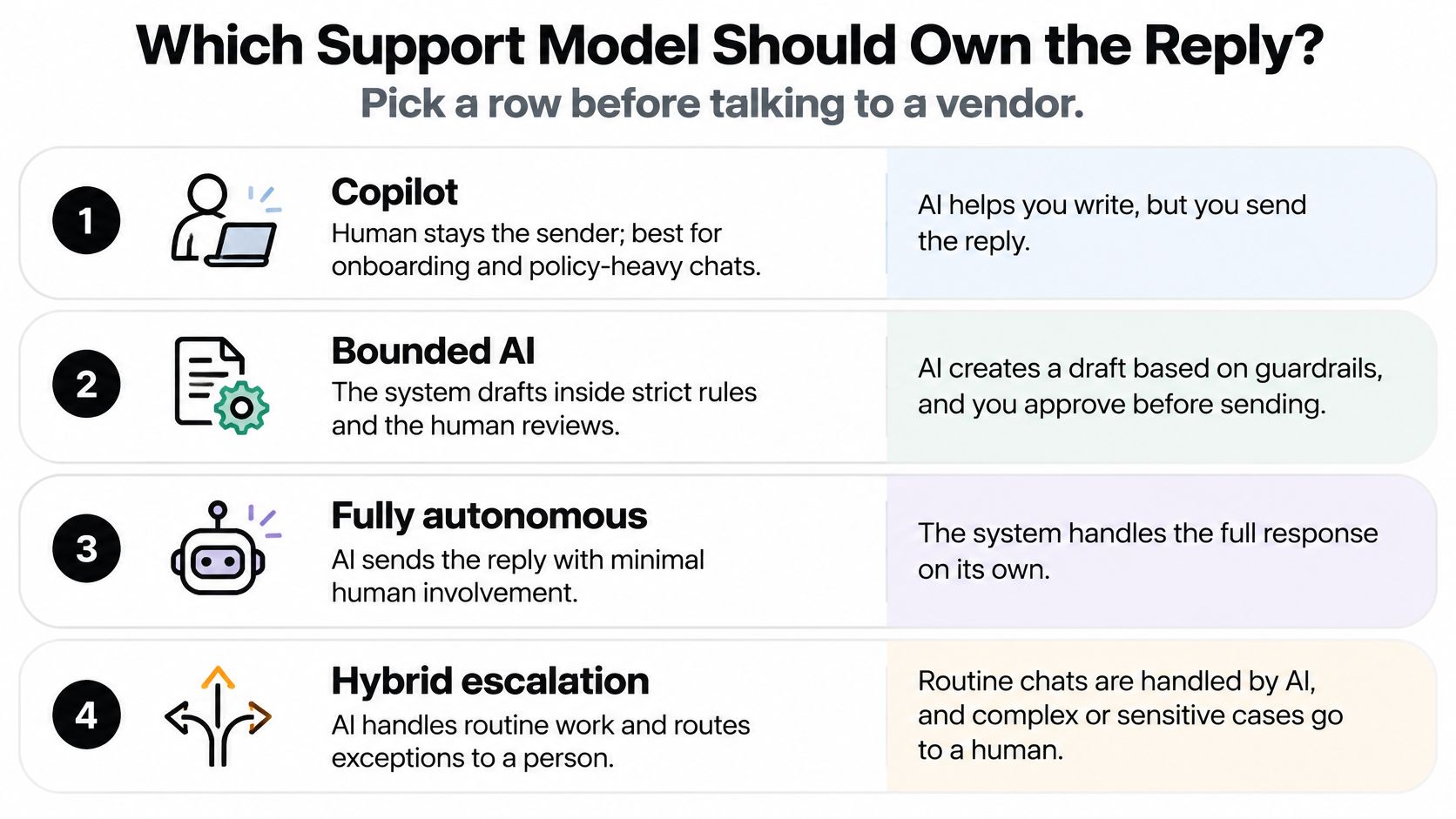
Pick a row before talking to a vendor. The distinction between an AI agent and a chatbot matters most when it changes who can send a reply or execute an action, not when it changes the product's label.
Match authority to the work
Copilot is the clearest starting point when employees need help navigating policy. A new agent handling a subscription complaint can inspect the suggested answer before accepting responsibility for it. Don't require agents to use every suggestion. Review is meaningful only when they can reject the draft.
Bounded AI with human handoff fits documented routine requests, such as explaining an order status or checking eligibility against a clear returns policy. The AI owns the exchange only while the request remains within its approved scope. An exception transfers responsibility, not merely the conversation window.
Full autonomy should mean autonomy within a narrow workflow, not freedom across the entire support queue. Favor requests where the approved answer is well documented and an error is inexpensive to reverse. Retrieving a public setup guide is a different risk from changing a delivery address after dispatch.
Human-only service remains a valid design choice. Keep judgment-heavy disputes, sensitive advice, and cases with incomplete documentation with people. You can improve those queues through clearer procedures and better access to records without delegating the customer interaction.
Use the visual comparison to discuss levels of automation, then make the written ownership rules decisive.
Make leaving the AI easy
In Clutch's consumer research on AI customer support, 47% of respondents were frustrated at having to repeat their issue during escalation, and 13% lost the conversation context entirely. Those are handoff failures, not reasons to write a friendlier chatbot greeting.
Write escalation triggers as testable rules:
- Uncertain evidence: Missing records, conflicting policies, or insufficient confidence route the case to review.
- Financial authority: Refunds or credits above the written limit require a person's decision.
- Sensitive language: Legal threats, safety concerns, and suspected fraud enter designated human queues.
- Unresolved history: A repeat contact about the same problem prompts investigation rather than another automated answer.
- Customer preference: Any request for a person starts the transfer without another persuasion loop.
Provide a one-step transfer option. Attach the transcript, customer intent, verified account context, attempted actions, and unresolved question. Distinguish facts retrieved from systems from assumptions generated by the AI.
Show the customer who now owns the case. If nobody is available immediately, give them the receiving team and a clear next step instead of implying that an agent has already joined. The receiving agent should confirm their understanding, not ask the customer to start again.
Preserve human ownership behind the scenes
Assign a service leader to approve the AI's scope and a queue owner to accept exceptions. Retaining people to define, supervise, and revise AI's role is a more durable operating choice than treating the system as an unattended replacement.
Test handoffs with awkward scenarios, not just clean demonstrations. Try a missing order followed by a refund request, an unavailable receiving queue, and a customer who switches channels. Confirm that the case remains open until someone accepts it.
A lower automation rate is better when it reduces repeat contacts, churn risk, and chargebacks. Don't optimize customers out of the queue before you've solved their problem.
Where the Productivity Gains Actually Land
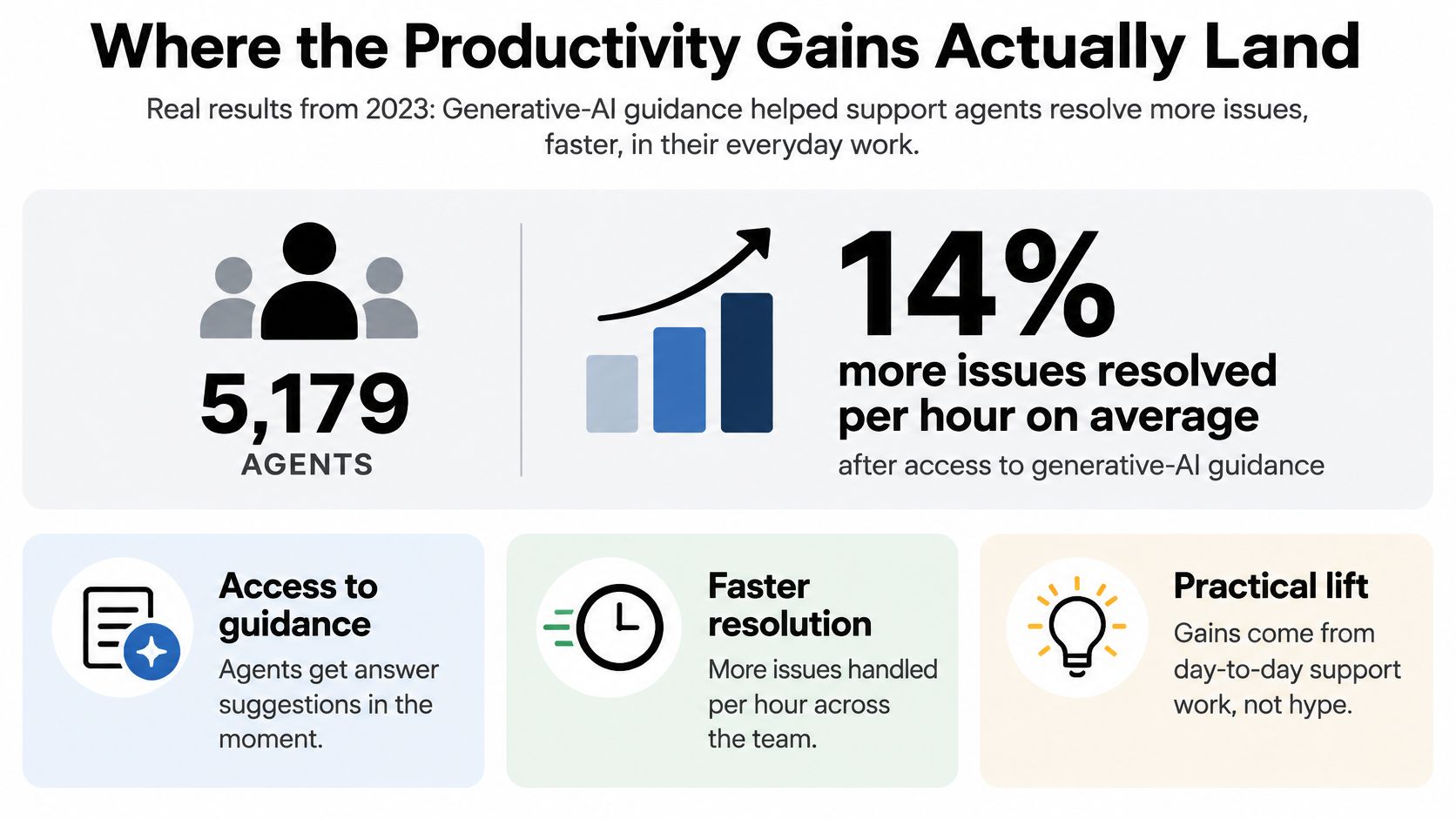
A 2023 National Bureau of Economic Research field study covering 5,179 support agents found that access to generative-AI guidance increased issues resolved per hour by approximately 14% on average, with about 34–35% gains for novice and lower-skilled agents, while experienced and highly skilled agents saw little to no improvement and small negative effects in some analyses.
That split matters more than the headline average. The study examined real customer-support work, but its result isn't a universal forecast for every queue. Your mix of experience, documentation, and customer issues will determine where assistance is useful.
Productivity lift by agent cohort
| Agent cohort | Change in issues resolved per hour |
|---|---|
| All agents, average | About +14% |
| Novice and lower-skilled agents | About +34% to +35% |
| Experienced and highly skilled agents | Little to no gain; small negative in some analyses |
The visual highlights the overall result, but deployment decisions should use the cohort differences.
Treat assistance as embedded coaching
A new employee may understand the policy but struggle to apply it during a live interaction. They need to identify the relevant exception, ask the right diagnostic question, and explain the next step without making an unsupported promise.
A useful assistant puts those choices in front of the agent at the moment they're needed. It can supply language and troubleshooting patterns that the agent hasn't yet learned to use consistently. That's knowledge transfer during work, rather than another document the employee must remember to search.
Say a new agent is handling a cancellation request involving a pending shipment. A generic draft might promise immediate cancellation. A grounded suggestion should first identify the fulfillment status and explain the applicable procedure. The value lies in helping the employee choose the correct branch, not merely producing polished text.
The business value is more consistent output from the existing team, especially employees who haven't yet built deep operational experience.
This is useful during onboarding, demand peaks, and policy changes. It's not evidence that you can remove the people who maintain the knowledge, investigate exceptions, and decide when the recommendation is wrong.
Give specialists a different experience
An experienced agent may recognize an exception before the assistant has assembled a plausible answer. Requiring that person to inspect repetitive or weaker suggestions introduces another task. Accepting the suggestion without scrutiny can be worse.
Let specialists collapse suggestions, request help selectively, and override recommendations without being penalized for low acceptance. A high draft-acceptance rate isn't proof of good judgment. It can also mean people are complying with the interface.
Use different review questions for different employees:
- For new agents: Did the suggestion identify the right policy and help the employee understand the decision?
- For specialists: Did it contribute information they needed, or interrupt a sound approach?
- For team leaders: Did the tool reduce coaching gaps without creating an unmanageable review queue?
Keep comparisons fair. Match similar intents, channels, and case difficulty rather than comparing a novice's routine contacts with a specialist's dispute queue. Record when a policy or workflow changes so you don't attribute every movement to the AI.
Finally, don't equate shorter replies or fewer messages with useful productivity. A well-handled exchange may require clarification and confirmation. Measure the completed issue and the employee's total work, not just the amount of text produced.
A company-wide tickets-per-hour average can hide both a strong onboarding benefit and a specialist quality problem. Keep both visible, and adjust deployment rather than forcing everyone into the same assistance mode.
Security and Compliance Before Go Live
Production approval should depend on demonstrable controls, not the fluency of a demo. Ask the security reviewer to show how each control works in the connected helpdesk, customer database, and action tools. A policy document alone doesn't establish that the integration enforces it.
What customer data can the AI retrieve and retain?
Limit retrieval to the case being handled. Customer messages, order history, and identity fields shouldn't automatically become a permanent training dataset. Separate temporary context retrieval from any permission to retain or reuse content.
Require the engagement paperwork to identify the data processing agreement, retention window, deletion procedure, and sub-processors. Ask how deletion works across conversation storage, diagnostic logs, and backups. The reviewer should distinguish what can be removed immediately from what follows a documented retention process.
We include a DPA and security review support in Cyndra's Enterprise engagements, alongside specific limits and controls. That paperwork should support a concrete review of the actual workflow, not substitute for one.
Which identity can change a customer record?
Give the AI its own account and start read-only. Don't run it under a support manager's credentials. A separate identity lets administrators scope permissions, attribute actions, and revoke access without disabling a person's account.
Add write actions procedure by procedure. Keep refunds, credits, address changes, and access provisioning behind human approval until audit results meet a predefined acceptance standard. Verify limits in the action layer, not only in instructions that tell the model to behave.
Use an AI agent governance framework to connect each permission to an owner, an approval process, and a rollback method.
What evidence survives a bad answer?
Block secrets and full payment-card numbers from prompts. Keep an access-controlled audit trail of the relevant context, retrieved sources, generated reply, tool actions, approvals, and model version. Apply retention limits to these logs too, because logging can create another store of sensitive content.
Treat customer messages and retrieved documents as untrusted inputs. A message telling the assistant to ignore policy must not change its permissions. Test attempts to retrieve another customer's records or trigger an unauthorized action.
Keep financial, health, and legal advice queues human-owned until counsel approves the specific intent list. Don't interpret a vendor certification as permission to automate every activity in a regulated business.
Can a leader stop the workflow?
Use a short operational checklist:
- Autonomy authority: Who can enable automated sending or add an action?
- Incident ownership: Who reviews a bad answer and contacts affected customers?
- Rollback control: Can an authorized operator switch the workflow to draft-only without a development release?
- Customer disclosure: Does the approved opening clearly identify the AI and offer access to a human?
- Traceability: Can a reviewer identify which model version answered a particular case?
An agent that can't be scoped, inspected, and revoked isn't ready for customer data.
Test the shutdown path before launch. Trust comes from bounded authority and recoverable mistakes, not confidence in the assistant's wording.
KPIs That Show Real Resolution
Containment shouldn't be the headline measure. The Quarterly Journal of Economics field study found that assistance affected handling speed, simultaneous-chat capacity, and successful resolution differently across agent experience levels. Your scorecard needs to preserve those distinctions.
Support AI scorecard
| KPI | What it measures | How to cut it | False win it prevents |
|---|---|---|---|
| Issues resolved per hour | Output | By tenure and skill | A flat average hiding novice gains and expert losses |
| Handle time | Speed per contact | By intent and assist mode | Time saved in chat but spent fixing drafts |
| Concurrent chats | Capacity | Chat only, by experience band | More load before quality stabilizes |
| Containment rate | Share never reaching a human | In-scope intents only | Deflection followed by another contact |
| Repeat contact or retrial | Whether the issue stayed fixed | By AI, human, and escalated path | Fast chats that fail downstream |
| Transfer completion | Context arrived with the human | By escalation trigger | Customers forced to restate the issue |
| CSAT by path | Experience of each route | AI-only, assisted, escalated | A blended score hiding a bad path |
| After-contact work and overrides | Extra agent effort | By queue | Automation that adds supervision |
| Quality-audit pass rate | Answer accuracy | By intent, including low-confidence cases | Happy-path-only audits |
Read the measures together
For human-handled and assisted work, apply tenure and skill filters across the scorecard wherever meaningful. Output without case mix can mislead; lower handle time without correction work can conceal extra effort. More concurrent chats count as capacity only while accuracy holds.
Pair containment with repeat contact. Require transfer completion to include context delivery, not just successful routing. Split satisfaction by journey, and inspect overrides alongside after-contact work to understand the supervision burden.
Use operational efficiency metrics to connect these results to total work rather than dashboard activity. Review weekly: if repeat contacts or after-contact work rise, narrow the approved intent list even when deflection improves.
What a Real After-Sales Deployment Changed
A randomized field experiment in e-commerce after-sales service tested an assistant that diagnosed order-related problems in real time and generated proposed written solutions. It improved speed and measured service quality, with larger benefits for lower-performing agents, but high performers lost quality when recommendations fell below their expertise; assisted agents also produced more messages and a higher agent-to-customer message ratio.
The human remained central to the workflow.

Translate the case into design decisions
The practical lesson isn't to let a general assistant answer every order complaint. It's to make the recommendation useful enough for an accountable employee to evaluate.
- Ground the recommendation: Retrieve the relevant order facts and approved procedure instead of asking for an unrestricted answer.
- Expose the basis: Show supporting sources and uncertainty. A model-generated confidence label alone isn't evidence of correctness.
- Protect judgment: Send ambiguous or high-value cases to people, and don't punish specialists for rejecting weak recommendations.
For an ROI calculation, count the handling time saved, then subtract review, correction, exception handling, and ongoing maintenance. Confirm that repeat contacts or customer retrials fall before claiming that faster conversations represent durable resolution.
If agents must inspect more alerts without a redesigned queue, include that effort too. Assign priorities and owners so urgent exceptions don't disappear among routine suggestions.
Use the accompanying video as a discussion prompt for your team's workflow review, not as evidence for the experiment's results.

The experiment's boundary is worth preserving: diagnosis plus proposed text, with a human accountable for the outcome.
Start the Hybrid Rollout on Three Workflows
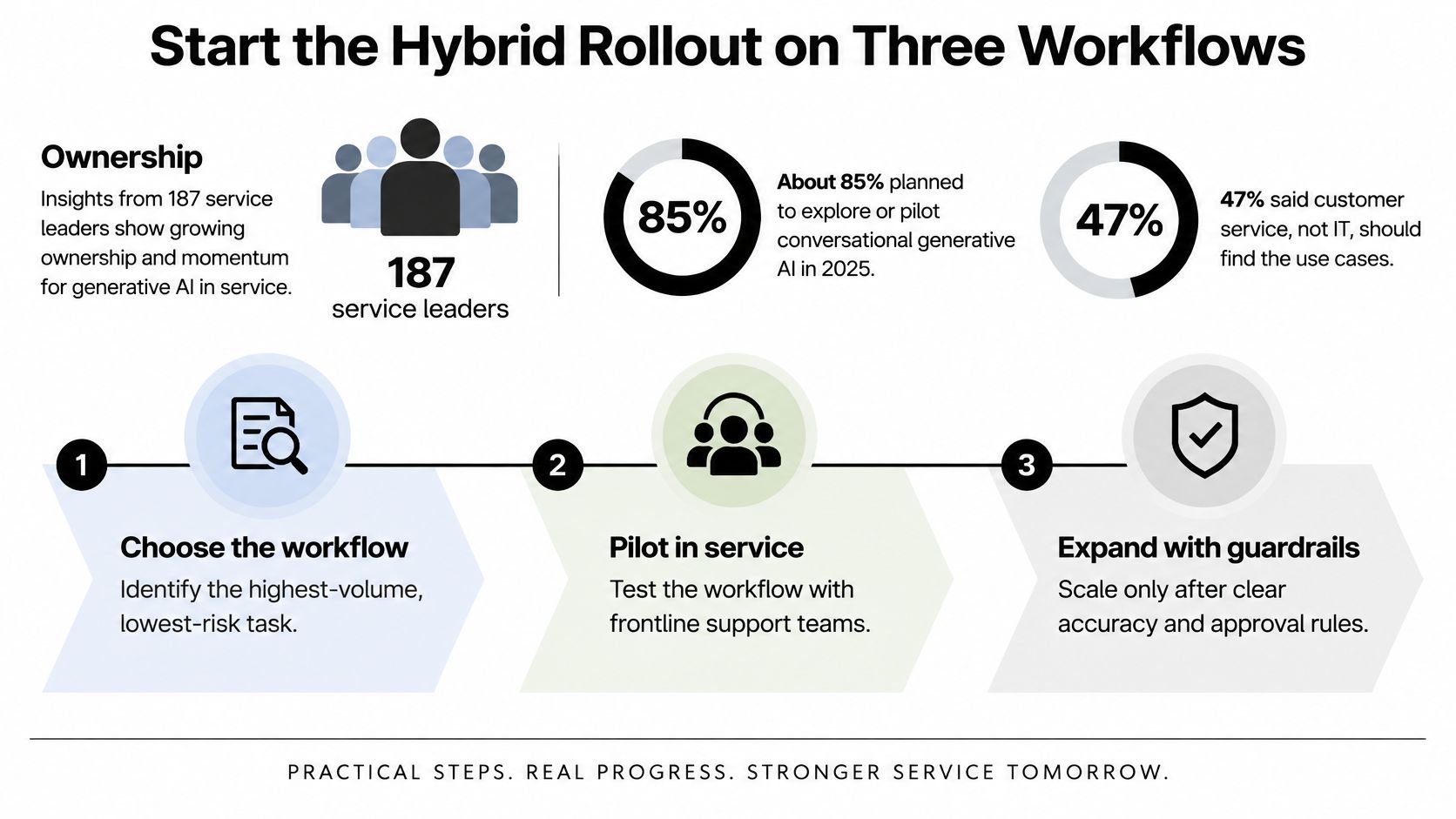
Start with ownership. A Gartner survey of 187 customer-service leaders, conducted in July and August 2024 and reported by Tech Monitor, found that 85% planned to explore or pilot conversational generative AI during 2025, while 47% assigned primary responsibility for identifying AI opportunities to customer service. Those were adoption intentions, not completed deployments.
Use service-led discovery with IT responsible for secure integration. This visual summarizes the progression from selection to controlled expansion.
Turn ownership into a launch sequence
- Inventory contact reasons. Review a representative recent period and identify requests with complete written policies.
- Choose three routine workflows to pilot, such as order-status lookup, return-eligibility guidance, and basic setup troubleshooting. Name a service owner for each.
- Write the procedure. Specify approved sources, decision branches, action limits, and escalation conditions.
- Connect the workflow inside the tools agents already use. Give IT ownership of integration and begin with read-only access.
- Launch draft-only. Test with new agents, sample by experience, and permit automated sending only when downstream outcomes and audits support it.
- Redesign the review queue before expanding. Give exceptions priorities, owners, and enough capacity for correction work.
- Review weekly and expand deliberately. Add an intent only when the current scope is stable; return to draft-only when supervision work increases.
Choose the simplest effective fix
In discovery, we sit with the client's team, audit workflows, and identify the 3 to 5 highest-ROI AI opportunities, ending with a prioritized roadmap. We don't force AI: the right fix may be training, an integration, or a simple script.
Keep humans responsible for what AI is allowed to do. Staff the rollout as a service-improvement program, not a predetermined headcount cut.
Cyndra offers a free 30-minute call to discuss your business and scope an engagement around the workflows your team runs. Visit Cyndra to discuss which support tasks to pilot, where human ownership must remain, and how to measure whether the changes reduce repeat contacts and agent workload.