 CYNDRA
17% of surveyed email marketers identified developing personalized content efficiently as their top personalization challenge, according to Litmus's 2025 survey of nearly 500 marketing professionals. But faster writing isn't the whole job. A useful workflow must also decide what to say when data is missing and when not to send anything.
If you're learning how to make personalized email that gets replies, start with a verified reason to contact someone. Then build the message, fallback language, approval rules, and suppression logic around that reason. Generating more variations won't fix an irrelevant offer or bad timing.
Table of Contents
- What Personalization Really Changes in Your Results
- Choose Your Data Sources and Personalization Level
- How to Draft Each Email With AI Prompts
- How to Test Personalization Against a Control
- When to Hold Back a Personalized Email
- Deploy Safely and Stay Compliant
- Launch Your First Personalized Campaign
What Personalization Really Changes in Your Results
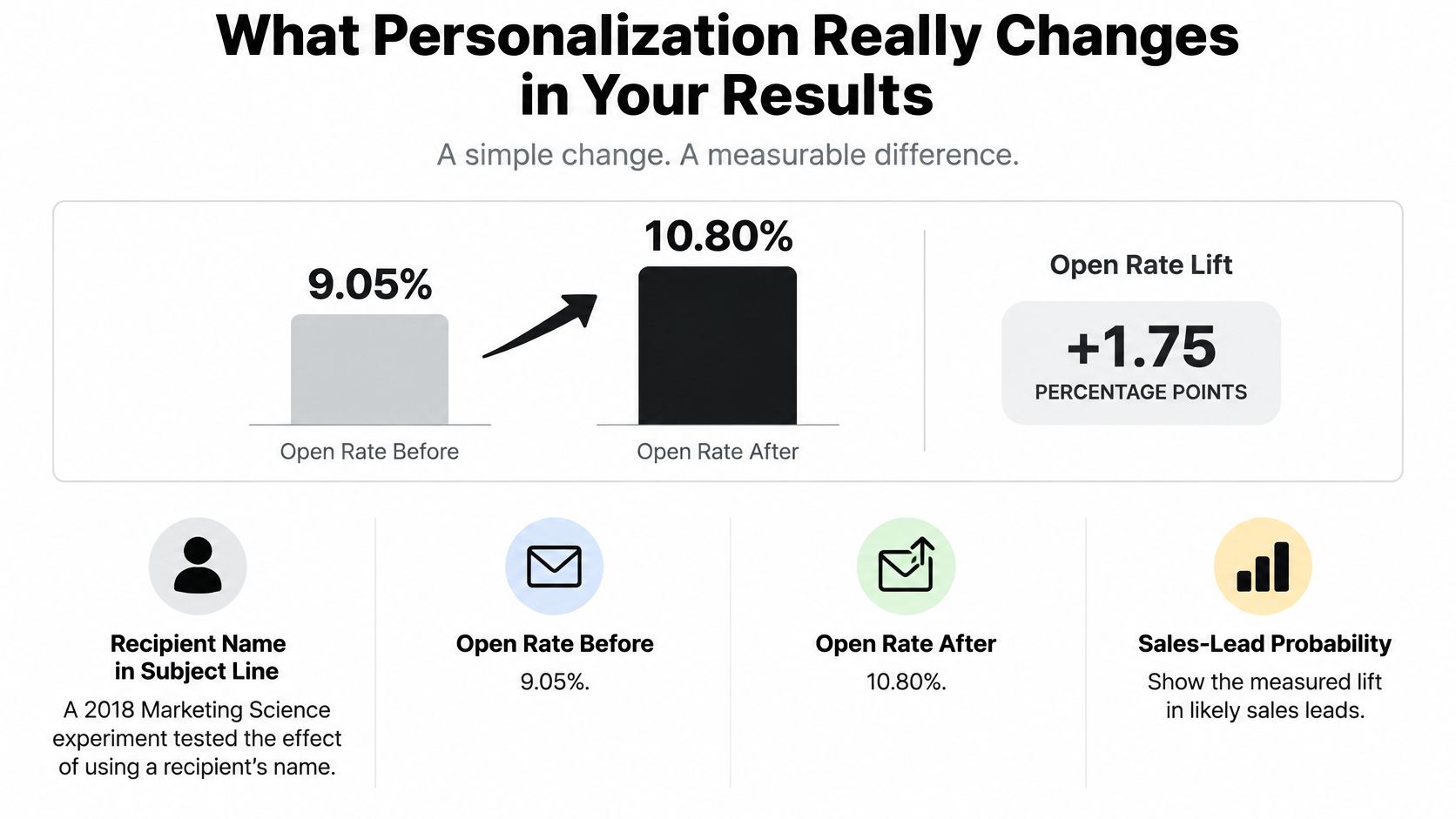
Adding a recipient's name to the subject line increased opens from 9.05% to 10.80% in a 2018 Marketing Science experiment, while sales-lead probability increased 31% and unsubscribes declined 17%. That's a reason to test name personalization, not a promise that your campaign will achieve the same result.
A name token is a cheap starting point because it requires little content variation. The more important question is whether the people who open become qualified replies, customers, or retained subscribers.
Reported Lifts From Personalized Email
The table combines that experiment with Experian's 2014 analysis, which reported 29% higher unique opens, 41% higher unique clicks for personalized promotional mailings, 51% higher unique clicks for personalized triggered messages, and six times higher revenue per email for personalized emails.
| Metric | Baseline | Personalized | Source |
|---|---|---|---|
| Open rate, subject-line test | 9.05% | 10.80% | Marketing Science 2018 |
| Sales-lead rate, subject-line test | 0.39% | 0.51% (+31%) | Marketing Science 2018 |
| Unsubscribe rate, subject-line test | 1.2% | 1.0% (-17%) | Marketing Science 2018 |
| Unique open rate, promotional mailings | Non-personalized | +29% | Experian 2014 |
| Unique click rate, promotional mailings | Non-personalized | +41% | Experian 2014 |
| Unique click rate, triggered messages | Non-personalized | +51% | Experian 2014 |
| Revenue per email | Non-personalized | 6x | Experian 2014 |
These are historical findings from different settings, not interchangeable forecasts. Use them to choose experiments, not to build a revenue projection.
For practical examples of content beyond greetings, SendX's guide to personalizing your email campaigns is a useful companion. Your target should remain more valuable replies or purchases, rather than an email that merely looks individually addressed.
Choose Your Data Sources and Personalization Level
| Level | Data it needs | Example field | Best use |
|---|---|---|---|
| Name and company tokens | Clean contact record | first_name, company |
Greetings and subject lines |
| Segment-based | CRM role, industry, lifecycle stage | job_title, industry |
Different message angle per group |
| Behavioral trigger | Page views, cart or purchase events | last_viewed_product, cart_items |
Timed follow-ups |
| AI-drafted per recipient | Thread history and verified notes | last_thread_summary, verified_notes |
Longer sales sequences with reviewed drafts |
Choose the level your records can support, not the most elaborate option your software offers. A segment-specific message built from trustworthy CRM fields is preferable to an individualized draft assembled from guesses.
Start with subscriber preferences, customer records, and interactions your business can verify. When evaluating enrichment, people search tools from Context can be part of your assessment, but an enriched attribute isn't permission to invent a relationship. Establish matching and validation rules before importing anything into a sending workflow.
Make Missing Data a Deliberate Branch
Normalize names, company names, and titles before drafting. Preserve proper capitalization rather than blindly applying title case, and separate a contact's current role from old employment records. A practical CRM data enrichment workflow should reconcile conflicting values instead of overwriting them.
Distinguish optional missing data from essential missing data. A missing first name can use a neutral greeting; an unverified purchase event should block a purchase-based follow-up.
Fallback rule: Replace the sentence, not just the missing word, when the remaining wording would sound unnatural.
For example, replace a company-dependent introduction with a role-specific sentence if the company field is unavailable. Don't send a sentence that reads like a form with a hole in it.
Before activating your chosen level, require:
- Identity: A stable contact identifier and validated email address.
- Relevance: The segment field or event that justifies the message.
- Provenance: Where each attribute came from and when it was recorded.
- Eligibility: Suppression status and the applicable permission record.
Commercial messaging also needs truthful presentation. The FTC's CAN-SPAM compliance guide requires accurate headers, non-deceptive subject lines, and a clear opt-out mechanism for covered US commercial email.
I would start with a meaningful segment and a verified trigger. Add recipient-level AI drafting only when the extra context changes what you should say.
How to Draft Each Email With AI Prompts
Don't ask an AI tool to research someone freely and write a convincing email in the same step. Separate fact collection from composition so the reviewer can trace each claim.
Use this workflow in your approved drafting tool:
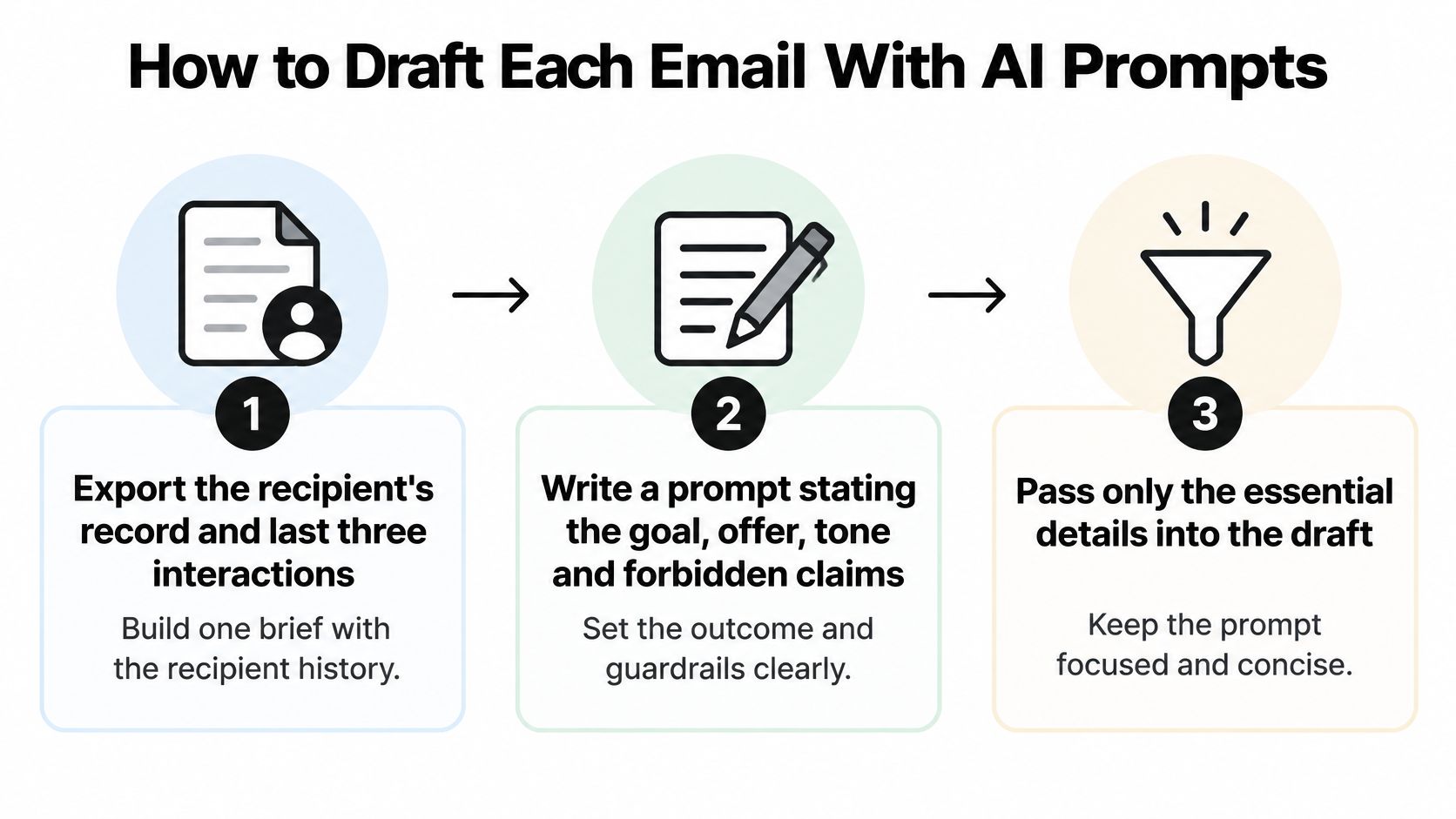
- Assemble the recipient brief. Export the current record and recent relevant interactions from HubSpot, Salesforce, or your email system. Include timestamps and distinguish the contact's own statements from internal sales notes.
- Write the goal, offer, tone, and forbidden claims. Specify whether you want a reply, a meeting, or a purchase, rather than asking for an engaging email.
- Pass only approved fields. Exclude unrelated account details and sensitive notes. Giving a model more information doesn't make that information appropriate to mention.
- Request short, question-led, and trigger-led variants. Keep the offer consistent so you can judge the opening rather than compare unrelated pitches.
- Audit every factual sentence. Delete unsupported claims, invented compliments, and assumptions about budget, urgency, or buying authority.
- Route the selected draft to its reviewer. Hold sensitive segments automatically rather than treating silence as approval.
This visual summarizes the preparation before drafting.
A Prompt You Can Adapt
You are drafting a follow-up for [role] at [company]. Use only the facts in the brief below. Reference the [trigger] once, in one sentence. Do not claim prior contact that is not in the thread. Offer one 20-minute call.
Goal: [desired outcome]
Offer: [approved offer]
Tone: direct, helpful, and restrained
Forbidden claims: invented results, unverified familiarity, assumed urgency
Brief: [approved fields and relevant thread excerpts]
If the trigger is missing or contradictory, return HOLD with the reason instead of drafting.
The role and company define the audience without requiring decorative personal details. The approved-facts instruction limits the evidence the draft may use. The trigger instruction keeps behavioral references focused rather than turning the opening into a browsing-history recital.
The prior-contact restriction prevents invented familiarity. The call instruction gives the recipient a concrete decision, while the hold instruction prevents the model from filling an essential gap.
For greetings, a merge tag such as {{first_name|there}} can produce a natural fallback, if your sending platform supports that syntax. Preview it with populated, empty, and invalid records before relying on it.
Use a genuine event from the record to justify trigger-led drafts. If no event exists, write an honest segment-based message instead.
How to Test Personalization Against a Control
Build a control email and a treatment email that differ only in the personalization you're evaluating. If you change the offer, sender, and timing too, you won't know which change affected the result.
A useful test answers a narrow question: does a verified context sentence generate more qualified replies than the same message without it?
- Define the primary conversion. Choose a qualified reply, booked meeting, or completed purchase. Specify what counts before the campaign starts.
- Select a meaningful audience segment, then randomly allocate eligible recipients between the test arms. Don't compare existing customers in one arm with unfamiliar prospects in the other.
- Hold the sending conditions constant. Keep sender, offer, timing, and call to action aligned.
- Change the personalization strategy alone. For example, add a sentence connecting the offer to a verified stated need.
- Set the analysis window and sample requirement in advance. Use your baseline conversion rate and the smallest improvement worth acting on to plan sample size. Don't stop because early results look encouraging.
Metrics to Read When You Test Personalization
| Metric | What it tells you | Act when |
|---|---|---|
| Open rate | Directional evidence about subject line and sender trust | Treatment beats control clearly, then check downstream results |
| Reply or click rate | Message relevance | Treatment lifts replies without more complaints |
| Conversion rate | Whether the message drives the goal event | Lift holds after the test window |
| Unsubscribe rate | Whether personalization feels intrusive | Treatment rises: stop and review |
| Complaint rate | Trust and deliverability risk | Any rise above your baseline: pause the send |
Classify replies, not just their presence. A request to stop emailing isn't equivalent to a buyer asking about implementation.
Evidence doesn't support assuming a universal benefit: a randomized study indexed by ERIC involving 1,598 university recipients found that personalization and message length didn't affect response or completion rates. That survey setting isn't your sales pipeline, but the null result is a useful warning against treating personalization as automatically effective.
A treatment wins only when it improves the outcome you wanted without creating an unacceptable cost elsewhere.
Review the uncertainty around the difference, not merely which percentage is larger. If the audience is too small for a reliable conclusion, record the result as inconclusive rather than scaling a supposed winner.
When to Hold Back a Personalized Email
Relevant emails can still be excessive. In Optimove's 2025 consumer study, 70% of respondents unsubscribed from at least three brands within three months because of message overload, while 78% preferred fewer, more targeted messages.
Treat recipient fatigue as a sending constraint, not a copywriting problem.

Build a Decision Layer Before Sending
- Contact pressure: Count recent marketing contacts across campaigns, brands, and connected channels. Include pending sends so simultaneous automations don't each assume the recipient is available.
- Global frequency caps: Enforce the cap in a shared eligibility check, not separately inside every sequence. Define which essential service messages sit outside marketing limits.
- Recency suppression: Stop automated prospecting after a meaningful reply and remove purchasers from the relevant acquisition sequence. Hand active conversations to the responsible person.
- Send-versus-wait experiments: Compare immediate delivery with delayed delivery or no additional message. Evaluate unsubscribes, complaints, repeat purchases, and revenue per recipient over an appropriate follow-up period.
Say a prospect has received several automated follow-ups and then replies asking for time to review internally. A new product-page visit shouldn't restart the sequence. Hold the message until the agreed follow-up date, record the reply as the reason, and assign the contact owner to review any conflicting trigger.
Store the decision as send, wait, suppress, or review, with the rule name and supporting event. Don't let a drafting workflow bypass that status just because it produced convincing copy.
Use this companion video alongside your team's review of email workflow decisions.

Accurate personalization doesn't make every contact appropriate. The recipient's situation, your recent sending history, and their stated preferences should determine whether the draft leaves the queue.
Deploy Safely and Stay Compliant
Preview the actual rendered message, not just the template editor. Test representative records in the email clients your audience uses, including mobile layouts and plain-text versions.
Click every destination and complete the unsubscribe journey as a recipient would. Check whether dynamic sections leave orphaned headings, empty buttons, or punctuation when an optional field disappears.
Use a Release Checklist
- Rendering and content: Confirm that approved records produce complete subject lines, greetings, body copy, and signatures.
- Eligibility at send time: Recheck suppression and conversation status immediately before dispatch, not only when the draft enters the queue.
- Auditability: Store the template version, approved draft, attribute provenance, and approval record together.
- Stop rules: Assign an owner who can pause the campaign, and configure automatic holds when bounce or complaint rates exceed your operating baseline.
- Segment reporting: Inspect delivery, bounces, complaints, replies, and conversions separately for each audience group.
For US commercial email, verify the applicable CAN-SPAM obligations before release, including sender identification, truthful presentation, a valid postal address, and functioning opt-out handling. Don't assume compliance with US requirements settles obligations in every recipient's jurisdiction.
Keep Drafting and Sending Permissions Separate
A draft approval should apply to the specific content and recipient the reviewer checked. If the workflow changes either afterward, return it for review rather than reusing an old approval.
When designing sales outreach automation, give the drafting process access to the information it needs without automatically granting dispatch authority. Test retries carefully so a temporary system error doesn't produce duplicate messages.
Start with a controlled release and inspect individual records alongside aggregate reporting. Dynamic content, custom fields, and behavioral branches should each have an owner, a test case, and a documented response when validation fails.
Launch Your First Personalized Campaign
Keep the first trial narrow: a defined segment, a verified trigger, and a treatment you can explain. Use this launch sequence rather than trying to automate the entire customer journey.
- Select the audience and outcome. Count eligible records after suppression, then define the reply or purchase that would justify further investment.
- Build the trigger and verify its required fields. For an email follow-up automation trial, use an event your team can inspect in the record.
- Generate and review the drafts. Compare short, question-led, and trigger-led options against the approved facts. For prospecting copy, MailAdept's Cold Email That Gets Replies provides a focused companion resource.
- Configure control and treatment arms, a fixed sending window, and the analysis criteria.
- Release under supervision. Inspect early delivery and safety signals, but leave the conversion test running for its planned duration.
Bring a Real Task
Choose a follow-up your team still writes manually, not a hypothetical campaign. Bring the audience definition, the triggering event, the fields already available, and an example of the tone you want.
Decide who will review sensitive messages before building. A useful first result is a trustworthy draft-and-hold workflow, not an unattended sending system.
Cyndra offers a free 30-minute live build on a real task your team still does by hand, built with you, and you keep the result. Visit Cyndra with your segment, trigger, and available fields to build a personalized-email workflow that gets only the tools and data it needs, with sensitive steps waiting for a person.